Ubigi esim is great and it has helped me while I was travelling to Asia last month. It has worked very good since I first touched down Changi airport Singapore and during my trips to Indonesia, South Korea, Japan.
customer, 07 Dec 2025
검증됨
검증된 리뷰
이 사용자는 구매자로 확인되었습니다
It' working
It's very simple, it's working
customer, 07 Dec 2025
검증됨
검증된 리뷰
이 사용자는 구매자로 확인되었습니다
Easy to use
Easy to use, good reception In Vietnam and easy to install. No QR code needed
Mt Goat, 07 Dec 2025
검증됨
검증된 리뷰
이 사용자는 구매자로 확인되었습니다
It’s perfectly smooth without a single…
It’s perfectly smooth without a single moment of doubt and errors! It just works! Thank you!
Eric Yap, 07 Dec 2025
검증됨
검증된 리뷰
이 사용자는 구매자로 확인되었습니다
Easy
Easy, cheap and efficient!
customer, 07 Dec 2025
검증됨
검증된 리뷰
이 사용자는 구매자로 확인되었습니다
good prepare
How to prepare before trip, was good explained, so that I could start to use eSim just after arrival.
Maki, 07 Dec 2025
검증됨
검증된 리뷰
이 사용자는 구매자로 확인되었습니다
Got the BestAsia eSim for Japan and South Korea
Got the BestAsia eSim for Japan and South Korea, easy to buy and activated on the day without any hassle. Worked fantastic and notifications before data was exhausted. Will surely recommend, value for money as well.
Imran Shaikh, 07 Dec 2025
검증됨
검증된 리뷰
이 사용자는 구매자로 확인되었습니다
Great e-sim
Everything I needed during my Japan trip, coverage was great.
Milan, 07 Dec 2025
검증됨
검증된 리뷰
이 사용자는 구매자로 확인되었습니다
Easy to use
Easy to use, and it works!
Gustav, 07 Dec 2025
검증됨
검증된 리뷰
이 사용자는 구매자로 확인되었습니다
Its was very good 👍
Its was very good 👍
customer, 07 Dec 2025
검증됨
검증된 리뷰
이 사용자는 구매자로 확인되었습니다
Amazing price and great network…
Amazing price and great network coverage. Well done !!
customer, 07 Dec 2025
검증됨
검증된 리뷰
이 사용자는 구매자로 확인되었습니다
The best
Vert good expérience. Perfect
Ali, 07 Dec 2025
감사합니다
귀하의 메시지가 전송되었습니다. 곧 답변드리겠습니다.
감사합니다
귀하의 뉴스레터 구독을 고려했습니다.
기기가 eSIM을 지원하는지 확인하는 방법
eSIM 호환성 확인
스마트폰 및 셀룰러 태블릿:
(*#06#)을 누르세요. EID 번호가 표시되면, 기기는 eSIM을 지원합니다.
노트북 (Windows 10/11):
오른쪽 하단의 빠른 설정 을 여세요. 셀룰러 설정 이 보이면, 노트북이 eSIM을 지원하는 것입니다.
통신사 잠금 해제 여부 확인
iOS에서:
설정 > 일반 > 정보 > 통신사 잠금(Carrier Lock)으로 이동하세요. "SIM 제한 없음" 이라고 표시되면, 기기가 잠금 해제된 상태입니다.
Android에서:
설정 > 네트워크 및 인터넷 > 모바일 네트워크로 이동하세요. 자동 네트워크 선택을 끄세요. 여러 개의 네트워크가 보이면, 기기는 잠금 해제된 것입니다. 하나만 보이거나 오류가 발생하면, 잠겨 있을 수 있습니다.




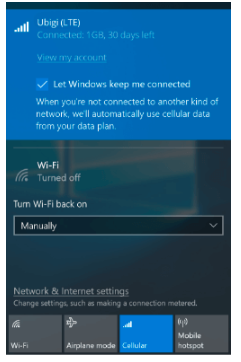
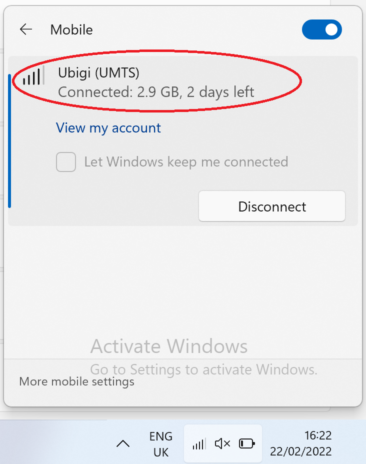



 eSIM 호환성 확인
 통신사 잠금 해제 여부 확인