How to transfer my eSIM profile from an iPhone to an Android device?
To transfer or switch your Ubigi eSIM profile from an iPhone to another Android device :
1 – First, make sure that you remember your login+password. If not, you must check them directly on your Ubigi account under the Settings tab while connected through your Ubigi connectivity on the iPhone on which the eSIM profile is still installed (you can modify your password at that moment if you do not remember it)
3 – Download the Ubigi app on your Android device and connect to your Ubigi account by using your login and password:
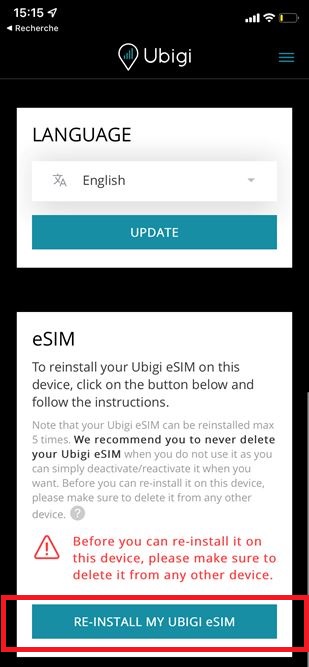
4 – Once connected, go to the Settings tab and in the “eSIM” section, click on the “Re-install my Ubigi eSIM” button:
5 – Then follow the instructions on your screen to complete the installation.
NB: if the “re-install my Ubigi eSIM” button is not displayed, please contact our Customer Service for more help as you may have an old profile that cannot be reinstalled. Our team will send you an updated profile that you can reinstall on your Android device and you will keep your Ubigi account.
IMPORTANT: your Ubigi eSIM profile must be deleted on your iPhone before the re-installation on your Android device, otherwise the re-installation and swap will not work (NB: this action won’t delete your Ubigi account).
Explore Ubigi eSIM data plans for seamless connectivity worldwide!
Install once, stay globally connected for life with a single eSIM, compatible with all eSIM-enabled devices : iOS Phone, iPad OS, Android, and Windows 10 and 11.
Are you a company with teams on the move?
Manage your employees' LTE/5G connectivity on smartphones, tablets, laptops, and hotspots while maintaining complete control over your costs.
Explore Ubigi eSIM data plans for seamless connectivity worldwide!
Install once, stay globally connected for life with a single eSIM, compatible with all eSIM-enabled devices : iOS Phone, iPad OS, Android, and Windows 10 and 11.
Are you a company with teams on the move?
Manage your employees' LTE/5G connectivity on smartphones, tablets, laptops, and hotspots while maintaining complete control over your costs.
Great
Based on 29472 reviews on
Verified
Verified review
This user has been identified as a buyer
Amazing price and great network…
Amazing price and great network coverage. Well done !!
customer, 07 Dec 2025
Verified
Verified review
This user has been identified as a buyer
The best
Vert good expérience. Perfect
Ali, 07 Dec 2025
Verified
Verified review
This user has been identified as a buyer
Works perfectly, using it for a second time in Japan.
Works perfectly, using it for a second time in Japan.
Ta Kz, 07 Dec 2025
Verified
Verified review
This user has been identified as a buyer
The only eSIM I could find for New Caledonia
Works very well
Ilya Isakovich, 07 Dec 2025
Verified
Verified review
This user has been identified as a buyer
Great Service with No Issues
We did not experience any issues while in Japan. Additionally, the cost was very reasonable and easy to obtain.
Shelley, 07 Dec 2025
Verified
Verified review
This user has been identified as a buyer
Super for a travel to Japan
Super for a travel to Japan ! We always had a good connection.
We have activated the e-sim before our arrival and when arriving it was working well.
For a month of travel, I think the 21Go is too much because all hotels had a wifi and we only used the data to use Google Maps
Mme PAL Emeline, 07 Dec 2025
Verified
Verified review
This user has been identified as a buyer
Worked perfectly!
Worked perfectly! Never had an issue with maps, websites, or my park apps for Universal and Disneyland loading or processing reservations. I will definitely use again on my next trip to Japan, and I will absolutely recommend Ubigi to everyone I know who is traveling as well.
Heidi, 07 Dec 2025
Verified
Verified review
This user has been identified as a buyer
Ease of purchase and activation
Ease of purchase and activation
Rafael Talmon, 07 Dec 2025
Verified
Verified review
This user has been identified as a buyer
ease of setting up
Ease of installation and getting connected.
customer, 07 Dec 2025
Verified
Verified review
This user has been identified as a buyer
Would use again
Used Ubigi in Japan and it worked absolutely amazing! It was fairly straightforward to buy and install. I chose the unlimited one and don’t have any complaints at all. No dead spots in Tokyo, Kyoto, and Osaka. Only had a slow connection problem in Nara when it rained heavily (but everyone else’s connection through different Esims, even the local WiFi was the same so can’t really pin that on Ubigi). Was also able to use Tiktok no problem when we were out and about since Ubigi routes locally. Absolutely will use again!
First time customer, 07 Dec 2025
Verified
Verified review
This user has been identified as a buyer
French Polynesia 3 gigs
It’s understandable that French Polynesia doesn’t have the best coverage, nor 5G or 5G+, but there were periods of E and 3G in main towns of several islands.
There needs to be more data options between 3 and 10 gigabytes to make it easier for me.
I will note that even with full bars on LTE or 5G (when you got it) did not mean that the network was as fast as expected. Many website pages still did not load for more than 10 seconds.
If you just need to have data to keep in touch occasionally with friends, mostly SMS or WhatsApp then it’s perfectly fine for that. I’m not even sure I can blame Ubigi as it’s up to the local providers to prioritize their network.
I’d buy it again next time.
customer, 07 Dec 2025
Verified
Verified review
This user has been identified as a buyer
Its cheap were other are expensive so…
Its cheap were other are expensive so its a better deal
YASMIN, 06 Dec 2025
Verified
Verified review
This user has been identified as a buyer
Had trouble getting QR code the…
Had trouble getting QR code the supporting staff was prompt with the reply
AZ hiker, 06 Dec 2025
Verified
Verified review
This user has been identified as a buyer
First time using an eSIM
This was my first time using an eSIM so I was a bit suspicious. The whole process from selecting the correct option to installing and implementing the Ubigi eSim was effortless and everything worked exactly as it should.
customer, 06 Dec 2025
Verified
Verified review
This user has been identified as a buyer
Easy, reliable, but, be aware of fair use
Easy to install. Singnal was 9/10. Labeling the package as unlimited is kind of misleading where, at least, it should have said "unlimited with fair use" or something similar.
Mohamed Alali, 06 Dec 2025
Thank you
Your message has been sent. We’ll get back to you shortly.
Thank you
We have taken into account your subscription to the newsletter
How to check if a device is ready for eSIM?
Check eSIM compatibility
Smartphones & Cellular Tablets:
Dial (*#06#). If an EID number shows, your device supports eSIM!
Laptops (Windows 10/11):
Open your flyout (bottom-right corner). If Cellular settings are visible, your laptop supports eSIM!
Check Carrier Unlock
On iOS:
Go to Settings > General > About, scroll to Carrier Lock. If it says "No SIM restrictions", your device is unlocked!
On Android:
Go to Settings > Network & Internet > Mobile Network, turn off Auto network selection. If you see multiple available networks, your device is unlocked! If only one appears, or you get an error, it may be locked.
You already have an eSIM in your cart.
Each order can only include one eSIM data plan.
If you choose to add a new one, the current plan will be removed. What would you like to do?





 Check eSIM compatibility
 Check Carrier Unlock