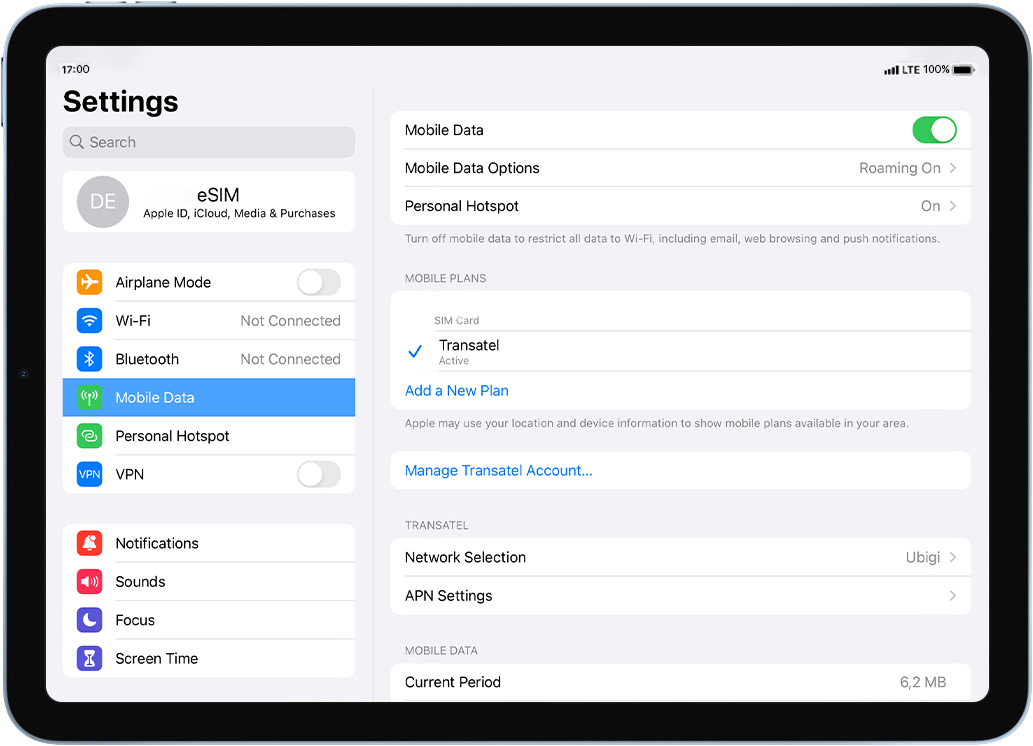
Semak jika profil eSIM anda telah dipasang pada peranti anda.
Semak eSIM aktifkan profil eSIM
Periksa sama ada profil eSIM anda telah diaktifkan pada peranti anda.
Terapkan data ke profil eSIM
Pastikan data telah diterapkan ke profil eSIM Ubigi anda.
Semak APN konfigurasi
Pastikan APN telah ditetapkan dengan betul untuk kebolehhubungan Ubigi anda.
Semak rangkaian paparan
Semak status rangkaian untuk sambungan Ubigi anda.
Semakan akhir!
Semak akaun penciptaan dan Akses Internet.
Pastikan Data Mudah Alih diaktifkan:
Pergi ke: Tetapan > Data mudah alih > aktifkan Data mudah alih di bahagian atas: pastikan butang dihidupkan (dalam warna hijau).
Hebat
Berdasarkan 51397 ulasan sur
Disahkan
Ulasan disahkan
Pengguna ini telah dikenal pasti sebagai pembeli.
Easy to join and consistent coverage…
Easy to join and consistent coverage throughout the trip.
Robert, 11 Nov 2026
Disahkan
Ulasan disahkan
Pengguna ini telah dikenal pasti sebagai pembeli.
My experience was excellent with Ubigi
My experience was excellent with Ubigi. Automatically the eSIM change all the settings in the phone system to connect. Only I need was start for 10 secs airplane mode and off, and wait about 1 minute and I have data internet. I love that I see in the app my data consumption. Very fast and stable.
AM, 11 Nov 2026
Disahkan
Ulasan disahkan
Pengguna ini telah dikenal pasti sebagai pembeli.
Connection everywhere
Easy to buy and install, the plan activates when you land. From there on I didn’t worry about data usage or had connectivity issues.
Everything worked perfectly (only had coverage problems at some instances inside the Shinkansen and up in the mountains/in the middle of the woods).
My only suggestion would be to offer more plans in which more days of unlimited data, without it being 7 or 30 days, is featured.
customer, 11 Nov 2026
Disahkan
Ulasan disahkan
Pengguna ini telah dikenal pasti sebagai pembeli.
Easy to use and very happy!
I installed the app and purchased a data plan two days before my trip. The setup was incredibly easy and took no time at all. Once I arrived at my destination, I simply switched on my Ubigi eSIM in my iPhone settings and was connected to the local mobile network within minutes.
I’ve been able to use my phone as usual for train directions, maps, keeping in touch with family and friends, and playing games, with no issues with speed. I’m very happy with the service and will definitely use Ubigi again on my next trip!
Kaori, 11 Nov 2026
Disahkan
Ulasan disahkan
Pengguna ini telah dikenal pasti sebagai pembeli.
I'd like to give it a 4.5 stars as it…
I'd like to give it a 4.5 stars as it was a great alternative while visiting Japan. There were times when I would lose connection altogether for a couple of minutes but would get restored. That was myainly issue. Would I recommend it to friends and family? 100% I would.
Juan, 11 Nov 2026
Disahkan
Ulasan disahkan
Pengguna ini telah dikenal pasti sebagai pembeli.
Available anywhere
Available anywhere
Frederic, 11 Nov 2026
Disahkan
Ulasan disahkan
Pengguna ini telah dikenal pasti sebagai pembeli.
Easy to install. Worked perfectly
Very easy to purchase, activate and use! No issues with speed or coverage
customer, 11 Nov 2026
Disahkan
Ulasan disahkan
Pengguna ini telah dikenal pasti sebagai pembeli.
Pre-activation of the e-sim is very…
Pre-activation of the e-sim is very convenient to avoid struggling upon arrival at destination.
S., 11 Nov 2026
Disahkan
Ulasan disahkan
Pengguna ini telah dikenal pasti sebagai pembeli.
Awesome
I ordered a e-sim from another brand before arriving in Japan but it ended up not working. I refund it right away and decided to go with Ubigi. E-Sim worked right away and since then no more problems
I recommend it 100% no hesitation
Client, 11 Nov 2026
Disahkan
Ulasan disahkan
Pengguna ini telah dikenal pasti sebagai pembeli.
The Ease of use
The Ease of use
Barb, 11 Nov 2026
Disahkan
Ulasan disahkan
Pengguna ini telah dikenal pasti sebagai pembeli.
Easy to use and cheap
Guy Vandebrouck, 11 Nov 2026
Disahkan
Ulasan disahkan
Pengguna ini telah dikenal pasti sebagai pembeli.
Easy to use and reliable
Barbara Heitger, 11 Nov 2026
Disahkan
Ulasan disahkan
Pengguna ini telah dikenal pasti sebagai pembeli.
Overall
Overall, connections were great. I think price was little expensive and recommended to lower a bit .
SanJoseLandLord, 11 Nov 2026
Disahkan
Ulasan disahkan
Pengguna ini telah dikenal pasti sebagai pembeli.
Loved this e-sim service
Loved this e-sim service! Everything was excellent. Easy to understand. Easy instructions.
Transparent policy. Lots of package usage options and countries to use them in!
Will use again. Thanks.
Rose, 11 Nov 2026
Disahkan
Ulasan disahkan
Pengguna ini telah dikenal pasti sebagai pembeli.
Simple et efficace
Simple et efficace
Kremser, 11 Nov 2026
Terima kasih
Mesej anda telah dihantar. Kami akan kembali kepada anda sebentar lagi.
Terima kasih
Kami telah mengambil kira langganan anda kepada buletin.
Cara menyemak keserasian eSIM
Telefon pintar/tablet:
Dial *#06#. → Jika nombor EID muncul, peranti anda serasi dengan eSIM.
Windows 10 / 11:
Tekan Windows+I. Buka Rangkaian & Internet → Jika anda melihat "Cellular", PC anda serasi eSIM.
Cara menyemak pembukaan kunci pembawa
iPhone / iPad:
Pergi ke Tetapan > Am > Berkenaan. Tatal ke Kunci Pengendali. → Jika anda melihat "Tiada sekatan SIM", peranti anda telah dibuka kuncinya.
Android:
Pergi ke Tetapan > Rangkaian & Internet > Rangkaian mudah alih. Lumpuhkan pemilihan rangkaian automatik. → Jika berbilang rangkaian muncul, peranti anda telah dibuka kuncinya.