Naka-install at aktibo na ang aking Ubigi eSIM profile sa aking Android device, nakikita ang network pero wala akong access sa Internet, ano ang dapat kong gawin?
Mahalaga: Kapag mayroon kang maraming SIM card/eSIM (“plan”) sa iyong telepono, hindi posible na i-activate ang cellular data sa dalawang plan nang sabay. Maaari mo lamang itong i-apply sa isa sa mga ito.
Kailangan mong tiyakin na naka-apply ang Cellular Data sa Ubigi eSIM profile para makapag-access ka sa Internet. Upang gawin ito, pumunta sa:
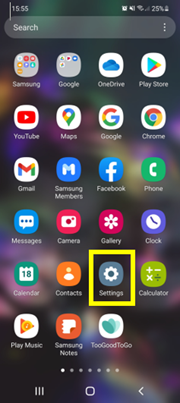
– Pumunta sa Settings:
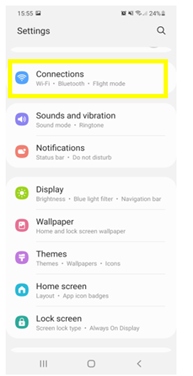
– Pagkatapos, piliin ang Connections:
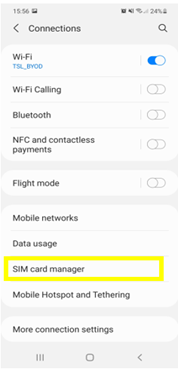
– Pagkatapos, SIM card manager:
– Pumunta sa Mobile data:
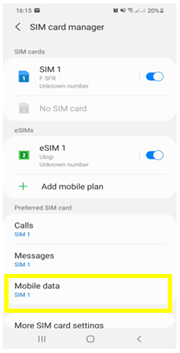
– At i-apply ang mobile data sa eSIM (Ubigi) at i-validate:
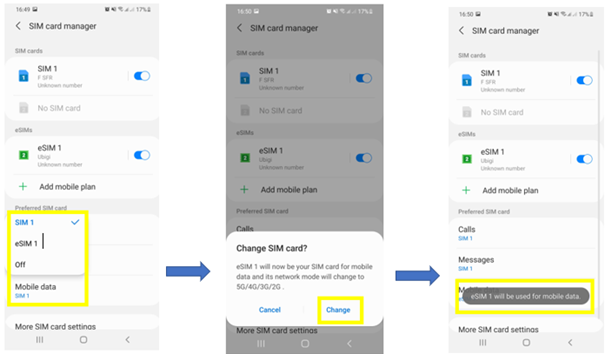
Gagamit na ngayon ang iyong telepono ng mobile data sa pamamagitan ng iyong Ubigi eSIM.

Na-verify na review
Ang user na ito ay kinilala bilang mamimili.
Excellent!!!
Excellent!!!
customer, 13 Nov 2026
Na-verify
Na-verify na review
Ang user na ito ay kinilala bilang mamimili.
It is very difficult to get the…
It is very difficult to get the connection started. The connection did not start automaticly. After asking help at the desk of the competition in worked good for the whole period.
customer, 13 Nov 2026
Na-verify
Na-verify na review
Ang user na ito ay kinilala bilang mamimili.
Reliable e-SIM service
I've used several times the Ubigi e-SIM service while travelling outside Europe : it is efficient and convenient.
Gérard COBUT, 13 Nov 2026
Na-verify
Na-verify na review
Ang user na ito ay kinilala bilang mamimili.
Just like home Just like data from regular USA…
Just like data from regular USA account. Coupled with international 30 day pass I get voice and text via mint and data through Ubigi. Just like I never left home
jim, 13 Nov 2026
Na-verify
Na-verify na review
Ang user na ito ay kinilala bilang mamimili.
**Excellent eSIM Experience! ⭐⭐⭐⭐⭐**
I really love how easy it is to install and activate the Ubigi eSIM. I travelled to Paris, Belgium, and the Netherlands, and I didn't experience any network issues throughout my trip. The connection was reliable, and everything worked smoothly wherever I went.
I'm very satisfied with the service and would definitely recommend Ubigi to anyone travelling abroad. It made staying connected during my vacation so easy and stress-free. I will definitely use Ubigi again on my next trip!
Vincent Biswana, 13 Nov 2026
Na-verify
Na-verify na review
Ang user na ito ay kinilala bilang mamimili.
Excellent connection
Frederick, 13 Nov 2026
Na-verify
Na-verify na review
Ang user na ito ay kinilala bilang mamimili.
I highly recommend Ubigi
I highly recommend Ubigi. Service has been fabulous. I’m online throughout the day and it’s been as good as a powerful wi-fi. And it was easy to sign on to.
Nancy Anthony, 13 Nov 2026
Na-verify
Na-verify na review
Ang user na ito ay kinilala bilang mamimili.
Works with no hussle.
customer, 13 Nov 2026
Na-verify
Na-verify na review
Ang user na ito ay kinilala bilang mamimili.
Great experience
Easy to install and reliable connection
Irina, 13 Nov 2026
Na-verify
Na-verify na review
Ang user na ito ay kinilala bilang mamimili.
Was an easy process
Was an easy process
customer, 13 Nov 2026
Na-verify
Na-verify na review
Ang user na ito ay kinilala bilang mamimili.
Great connection everywhere on Honshu!
Great connection everywhere on Honshu/Japan.
Marjan van der Meer, 13 Nov 2026
Na-verify
Na-verify na review
Ang user na ito ay kinilala bilang mamimili.
Excellent coverage
Excellent coverage. It worked both in the mountains and in the Sahara desert
Ioana Valea, 13 Nov 2026
Na-verify
Na-verify na review
Ang user na ito ay kinilala bilang mamimili.
First Time User
Easy to set up Japanese SIM while still in USA. Everything worked automatically after landing at NRT. Service has been good nearly everywhere. Price is good too. I'll use Ubigi again for sure.
JOHN BUSH, 13 Nov 2026
Na-verify
Na-verify na review
Ang user na ito ay kinilala bilang mamimili.
It was reliable
It was reliable
Robyn M Bush, 13 Nov 2026
Na-verify
Na-verify na review
Ang user na ito ay kinilala bilang mamimili.
Good
Good
Gooood
customer, 13 Nov 2026
Salamat
Naipadala na ang iyong mensahe. Makikipag-ugnayan kami sa iyo sa lalong madaling panahon.
Salamat
Isinasaalang-alang na namin ang iyong pag-subscribe sa newsletter.
Palitan ng bagong plano
Mga smartphone/mga tablet:
I-dial ang *#06#. → Kung lumitaw ang isang EID na numero, eSIM-compatible ang iyong aparato.
Windows 10 / 11:
Pindutin ang Windows+I. Pumunta sa "Network at Internet" → Kung nakikita mo ang "Cellular", eSIM-compatible ang iyong PC.
Paano suriin ang pag-unlock ng carrier
iPhone / iPad:
Pumunta sa Mga Setting > Pangkalahatan > Tungkol sa Mag-scroll sa Carrier Lock. → Kung makikita mo ang Walang mga paghihigpit sa SIM, naka-unlock ang iyong aparato.
Android:
Pumunta sa Mga Setting > Network at Internet > Mobile network. I-disable ang Awtomatikong pagpili ng network. → Kung lumalabas ang maraming network, naka-unlock ang iyong device.

