Paano ko malalaman kung naka-activate ang Ubigi eSIM profile ko sa iPhone/iPad ko?
Upang suriin kung naka-activate ang iyong eSIM profile sa iyong iPhone/iPad:
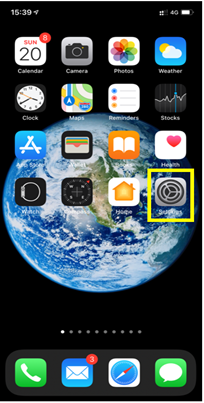
– Pumunta sa Settings:
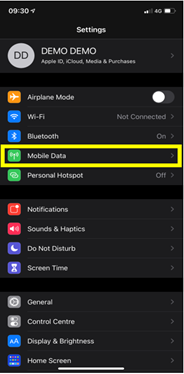
– Pagkatapos, piliin ang Mobile data:
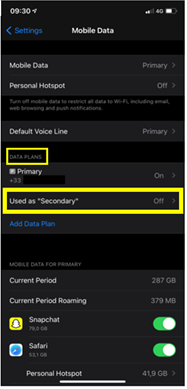
– Pagkatapos, sa ilalim ng DATA PLANS, piliin ang naka-install na profile (lumalabas ito bilang pangalawa):
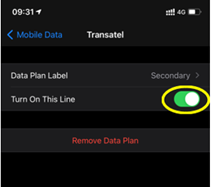
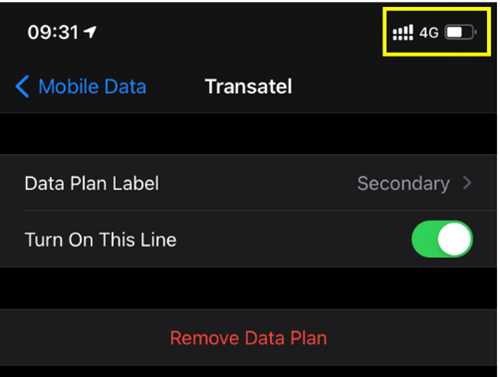
– Sa wakas, i-activate ang profile sa pamamagitan ng pag-press ng button sa kanan:
Sa sandaling ma-activate ang iyong profile, lalabas ang dobleng network signal sa itaas ng iyong screen: Para sa karagdagang impormasyon:
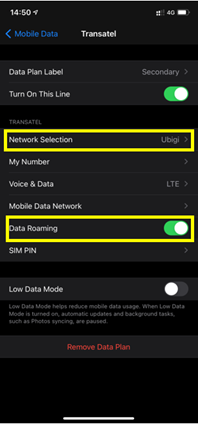
1/ Kapag na-activate mo ang iyong eSIM profile, lalabas ang mga bagong patlang para mapamahalaan mo ang iyong profile: Halimbawa: ang patlang na “Network selection” ay nagpapakita ng pangalan ng network na iyong kinakabit (ang halimbawa sa ibaba ay “Ubigi”):
2/ Kailangang i-activateang opsyonna “Data Roaming” sa iyong Ubigi profile upang matiyak na gumagana ang iyong koneksyon sa data.
Na-verify na review
Ang user na ito ay kinilala bilang mamimili.
Very efficient
Very efficient
Ann, 15 Nov 2026
Na-verify
Na-verify na review
Ang user na ito ay kinilala bilang mamimili.
Good experience
Good. Thank you
customer, 15 Nov 2026
Na-verify
Na-verify na review
Ang user na ito ay kinilala bilang mamimili.
Very easy to install and to activate. No connection issues.
Very easy to install and activate
HappyC, 15 Nov 2026
Na-verify
Na-verify na review
Ang user na ito ay kinilala bilang mamimili.
Super helpful and quick to activate…
Super helpful and quick to activate when in a pinch.
HANNAH PIERCE, 15 Nov 2026
Na-verify
Na-verify na review
Ang user na ito ay kinilala bilang mamimili.
Worked like a charm all over India
Worked like a charm all over India
customer, 15 Nov 2026
Na-verify
Na-verify na review
Ang user na ito ay kinilala bilang mamimili.
I had an excellent experience with…
I had an excellent experience with Ubigi during my trip to Japan. I used the service across multiple cities, including Tokyo, Kyoto, and Osaka, and the connection was consistently fast, stable, and reliable. I didn't experience any interruptions or connectivity issues throughout my trip.
The data package was more than sufficient for my needs, even with frequent use of navigation, social media, and other online services.
Overall, I'm extremely satisfied with Ubigi's performance and ease of use. It made traveling around Japan much more convenient and stress-free. I would definitely choose Ubigi again for my future international trips and highly recommend it to other travelers. Thank you for such a great service!
Metin, 15 Nov 2026
Na-verify
Na-verify na review
Ang user na ito ay kinilala bilang mamimili.
Great Value and Easy to Use
It’s easy to purchase, a breeze to activate and good value. I like the fact they have different plans to suit various durations and data usages.
Andrew, 15 Nov 2026
Na-verify
Na-verify na review
Ang user na ito ay kinilala bilang mamimili.
Provided exactly as promised
Provided exactly as promised. Good reliable connections when traveling in Spain. Activating the proper settings on my device were very helpful as it can be confusing
Edward Dolan, 15 Nov 2026
Na-verify
Na-verify na review
Ang user na ito ay kinilala bilang mamimili.
Fast activate
Fast activate
customer, 15 Nov 2026
Na-verify
Na-verify na review
Ang user na ito ay kinilala bilang mamimili.
Excelent services
Excelent services
customer, 15 Nov 2026
Na-verify
Na-verify na review
Ang user na ito ay kinilala bilang mamimili.
Simple to use, clear instructions and good pricing of data bundles.
Very easy to select a data plan for a specific country on the world. The orderring process is simple, the App is easy to work with. Clear instructions can be found on the website about how to install, and how to select the installed e-sim for use on an iPhone and Android phone.
Joyce, 15 Nov 2026
Na-verify
Na-verify na review
Ang user na ito ay kinilala bilang mamimili.
To date I’ve had excellent connection…
To date I’ve had excellent connection across Morocco.
Geoffrey Hyland, 15 Nov 2026
Na-verify
Na-verify na review
Ang user na ito ay kinilala bilang mamimili.
Works automatically
Works automatically. Make it more clear that at the beginning it has to be connected with a local net in the country of the choice
Helmut Lettau, 15 Nov 2026
Na-verify
Na-verify na review
Ang user na ito ay kinilala bilang mamimili.
Good data speed and availability.
Good data speed and availability.
jajajohn, 15 Nov 2026
Na-verify
Na-verify na review
Ang user na ito ay kinilala bilang mamimili.
The sincronization with movistar net…
The sincronization with movistar net for fist time, was too slow
A Marcel, 15 Nov 2026
Salamat
Naipadala na ang iyong mensahe. Makikipag-ugnayan kami sa iyo sa lalong madaling panahon.
Salamat
Isinasaalang-alang na namin ang iyong pag-subscribe sa newsletter.
Palitan ng bagong plano
Mga smartphone/mga tablet:
I-dial ang *#06#. → Kung lumitaw ang isang EID na numero, eSIM-compatible ang iyong aparato.
Windows 10 / 11:
Pindutin ang Windows+I. Pumunta sa "Network at Internet" → Kung nakikita mo ang "Cellular", eSIM-compatible ang iyong PC.
Paano suriin ang pag-unlock ng carrier
iPhone / iPad:
Pumunta sa Mga Setting > Pangkalahatan > Tungkol sa Mag-scroll sa Carrier Lock. → Kung makikita mo ang Walang mga paghihigpit sa SIM, naka-unlock ang iyong aparato.
Android:
Pumunta sa Mga Setting > Network at Internet > Mobile network. I-disable ang Awtomatikong pagpili ng network. → Kung lumalabas ang maraming network, naka-unlock ang iyong device.





 Palitan ng bagong plano
 Paano suriin ang pag-unlock ng carrier