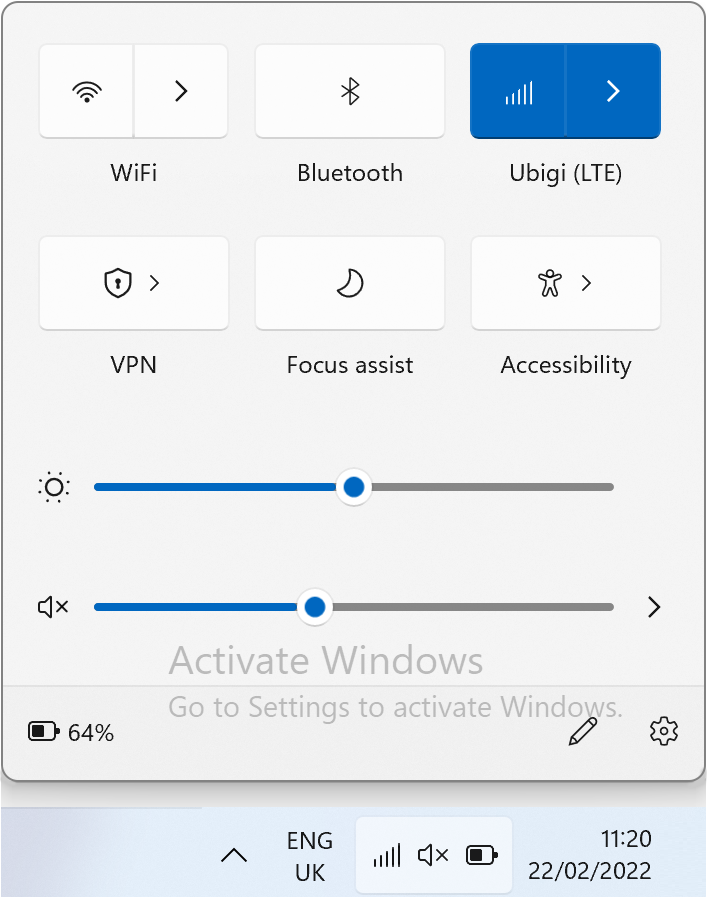
Suriin kung naka-install ang iyong eSIM profile ay naka-install sa iyong device.
Suriin ang eSIM aktibasyon ng profile
Suriin kung naka-aktibo ang iyong eSIM profile ay naka-aktiba sa iyong device.
I-apply ang data sa eSIM profile
Siguraduhing na-apply ang data sa iyong Ubigi eSIM profile.
Suriin ang APN ng pagsasaayos
Siguraduhin na ang APN ay tama ang pag-set para sa ang iyong koneksyon sa Ubigi.
Suriin ang network ipakita
Suriin ang katayuan ng network para sa iyong koneksyon sa Ubigi.
Panghuling pagsusuri!
Suriin ang account likha at Pag-access sa Internet.
Sa network flyout, tiyakin na:
Naka-aktibo ang Cellular (o Mobile). Nakapatay ang Wi-Fi.
Magaling
Batay sa 51819 na mga pagsusuri sur
Na-verify
Na-verify na review
Ang user na ito ay kinilala bilang mamimili.
I was very satisfied.
customer, 15 Nov 2026
Na-verify
Na-verify na review
Ang user na ito ay kinilala bilang mamimili.
Used Ubigi esim for a trip to Japan
Used Ubigi esim for a trip to Japan. Works really well (4g was available everywhere we went). And the instant activation through the app male it really easy to get started. Once we landed in Japan, the ESIm worked straight away.
Morgan, 15 Nov 2026
Na-verify
Na-verify na review
Ang user na ito ay kinilala bilang mamimili.
easy connection
easy connection, reasonable prices, coverage all over the world.
customer, 15 Nov 2026
Na-verify
Na-verify na review
Ang user na ito ay kinilala bilang mamimili.
I would use it again
Works 90% because some places not have enough internet. I can said I would use it again!!!!
Veronica Espinoza, 15 Nov 2026
Na-verify
Na-verify na review
Ang user na ito ay kinilala bilang mamimili.
Forever Fan
I have been using Ubigi since 2023 across multiple international trips, including Japan, New Zealand, South Korea, and now Scandinavia. The coverage has been consistently reliable everywhere I’ve gone, with fast speeds and seamless connections as soon as I land. It’s super easy to top up and manage through the app without needing to reinstall a new eSIM for every country. On top of that, their customer service is excellent—they always address my queries as quickly as possible, even when I needed to request a refund. Definitely my go-to travel SIM!
CJ, 15 Nov 2026
Na-verify
Na-verify na review
Ang user na ito ay kinilala bilang mamimili.
Great coverage around Japan so far and…
Great coverage around Japan so far and very easy to install and start using
Adeel, 15 Nov 2026
Na-verify
Na-verify na review
Ang user na ito ay kinilala bilang mamimili.
Very efficient to use and during my…
Very efficient to use and during my journey to Asia helps me a lot
Hawa, 15 Nov 2026
Na-verify
Na-verify na review
Ang user na ito ay kinilala bilang mamimili.
I use ubigi once or twice a year for a…
I use ubigi once or twice a year for a couple of years now, mostly in Japan.
In general the service works fine but I have some issues every time where it have to go into airplane mode or turn of the sim a few times. This issue stayed the same across a couple of iPhones
I also once contacted the support in 2025 with no response what so ever after my data volume was gone way too fast
Matthias, 15 Nov 2026
Na-verify
Na-verify na review
Ang user na ito ay kinilala bilang mamimili.
Excellent
Very easy to set up the travel e-sim, use it and it’s very good value.
GT, 15 Nov 2026
Na-verify
Na-verify na review
Ang user na ito ay kinilala bilang mamimili.
First time that I bought an E sim for…
First time that I bought an E sim for abroad. Perfect service of Ubigi, easily installed and perfectly accessible abroad for family and friends when there is no wifi! When travelling I will certainly use the Ubigi app again.
Greet, 15 Nov 2026
Na-verify
Na-verify na review
Ang user na ito ay kinilala bilang mamimili.
Connection was established fast
Connection was established fast. Network was working well.
customer, 15 Nov 2026
Na-verify
Na-verify na review
Ang user na ito ay kinilala bilang mamimili.
Excellent eSIM experience in Japan
Excellent eSIM experience in Japan! The signal was consistently strong, even on the subway. The 8-day unlimited data plan kept me connected at all times, allowing me to work securely and stay online without any worries. Highly recommended!
MaroZ, 15 Nov 2026
Na-verify
Na-verify na review
Ang user na ito ay kinilala bilang mamimili.
Easy setup
Easy setup. Fast connection!
Trace, 15 Nov 2026
Na-verify
Na-verify na review
Ang user na ito ay kinilala bilang mamimili.
Simple and keep sending me messages to…
Simple and keep sending me messages to let me know how process working
Dolly Satanapongcustomer, 15 Nov 2026
Na-verify
Na-verify na review
Ang user na ito ay kinilala bilang mamimili.
This would be a 5/5 but customer…
This would be a 5/5 but customer service isn’t the greatest and is slow, luckily figured it out on my own but it works great and I would still 100% recommend if you’re traveling abroad.
Faus, 15 Nov 2026
Salamat
Naipadala na ang iyong mensahe. Makikipag-ugnayan kami sa iyo sa lalong madaling panahon.
Salamat
Isinasaalang-alang na namin ang iyong pag-subscribe sa newsletter.
Palitan ng bagong plano
Mga smartphone/mga tablet:
I-dial ang *#06#. → Kung lumitaw ang isang EID na numero, eSIM-compatible ang iyong aparato.
Windows 10 / 11:
Pindutin ang Windows+I. Pumunta sa "Network at Internet" → Kung nakikita mo ang "Cellular", eSIM-compatible ang iyong PC.
Paano suriin ang pag-unlock ng carrier
iPhone / iPad:
Pumunta sa Mga Setting > Pangkalahatan > Tungkol sa Mag-scroll sa Carrier Lock. → Kung makikita mo ang Walang mga paghihigpit sa SIM, naka-unlock ang iyong aparato.
Android:
Pumunta sa Mga Setting > Network at Internet > Mobile network. I-disable ang Awtomatikong pagpili ng network. → Kung lumalabas ang maraming network, naka-unlock ang iyong device.