Skip to content

Tuklasin kung paano i-install ang iyong Ubigi eSIM sa iyong iPad sa ilang hakbang!

Magsimula sa pag-check kung compatible ang iPad mo sa eSIM.

Tablet illustration

I-dial ang *#06#; kung lumabas ang EID code, sinusuportahan ng iyong device ang eSIM.

Mag-install ng Ubigi eSIM sa iyong iPad gamit ang QR code

Step 1 - eSIM tutorial

Bumili ng data plan

Piliin ang iyong destinasyon at bumili ng data plan mula sa aming katalogo.

Step 2 - eSIM tutorial

I-install ang iyong eSIM

Pindutin at hawakan ang QR code na natanggap sa email o i-scan ito para mai-install ang iyong Ubigi eSIM.
Step 3 - eSIM tutorial

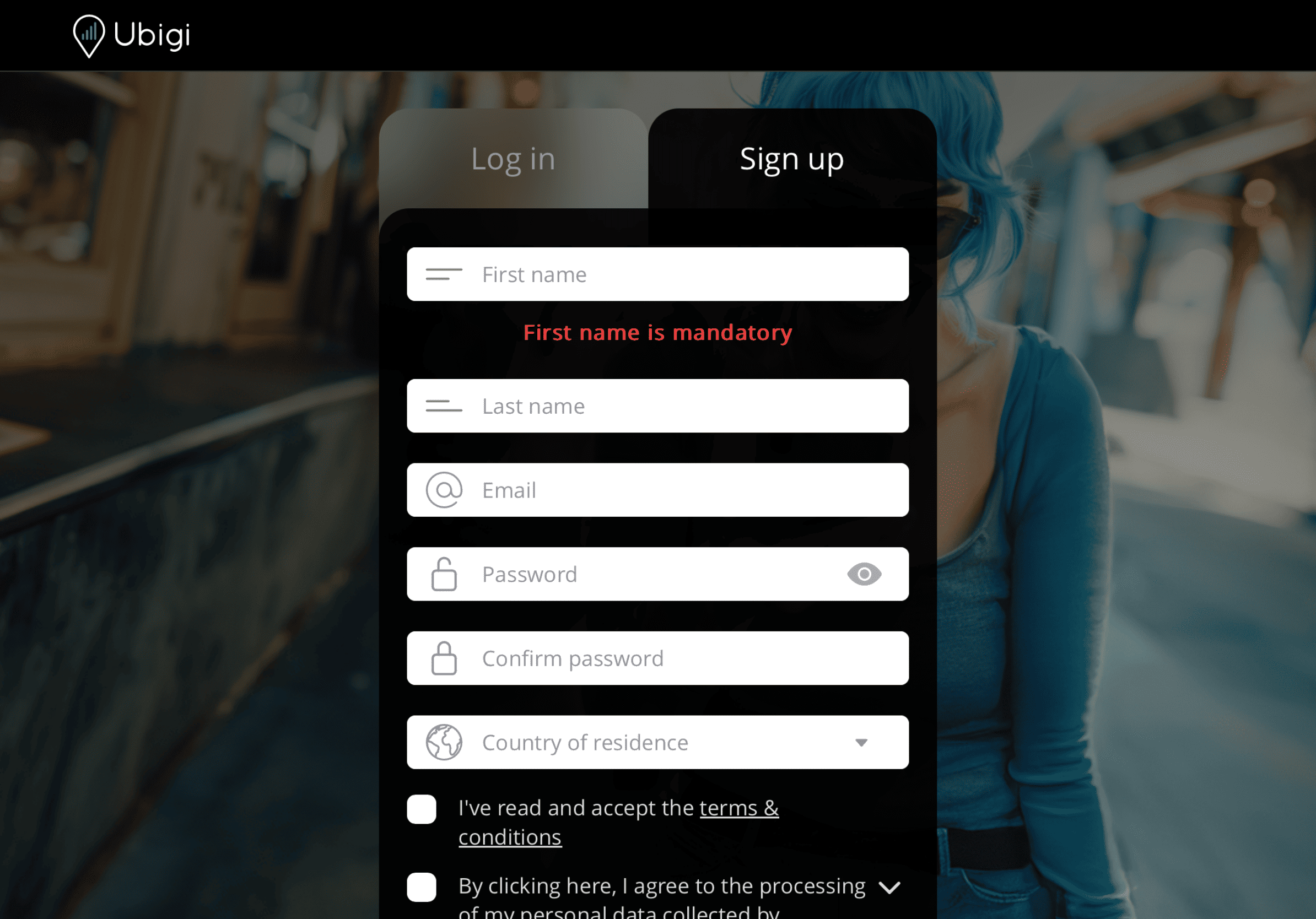
Gumawa ng iyong account

Mag-sign up sa Ubigi sa pamamagitan ng pag-download ng app o pagbisita sa Ubigi.me para masubaybayan ang iyong data nang real time, makatanggap ng mga alert notification, at mag-top up nang madali.

Step 4 - eSIM tutorial

Narito ang ilang pag-setup sa iPad na kailangan mong tandaan na gawin.

Setup Logo 1

Bago umalis

Siguraduhing naka-off na ang Data Roaming ng iyong linya sa bahay bago ka umalis.
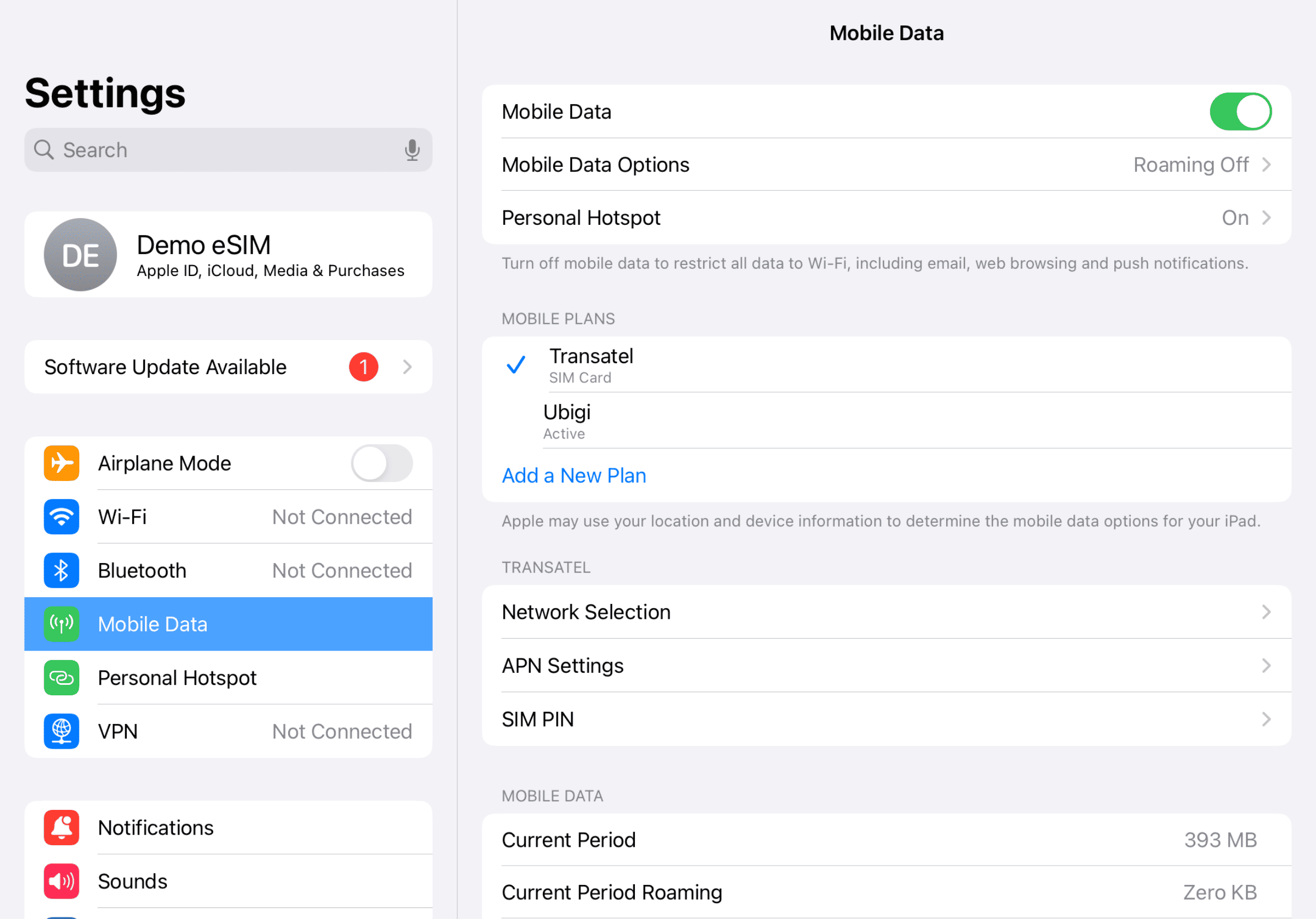
Device setup reminder - before departure
Setup Logo 2

Pagdating

Magsisimula ang iyong paggamit ng data pagdating sa destinasyon. Tiyaking ginagamit mo ang linya ng Ubigi para sa Cellular Data.
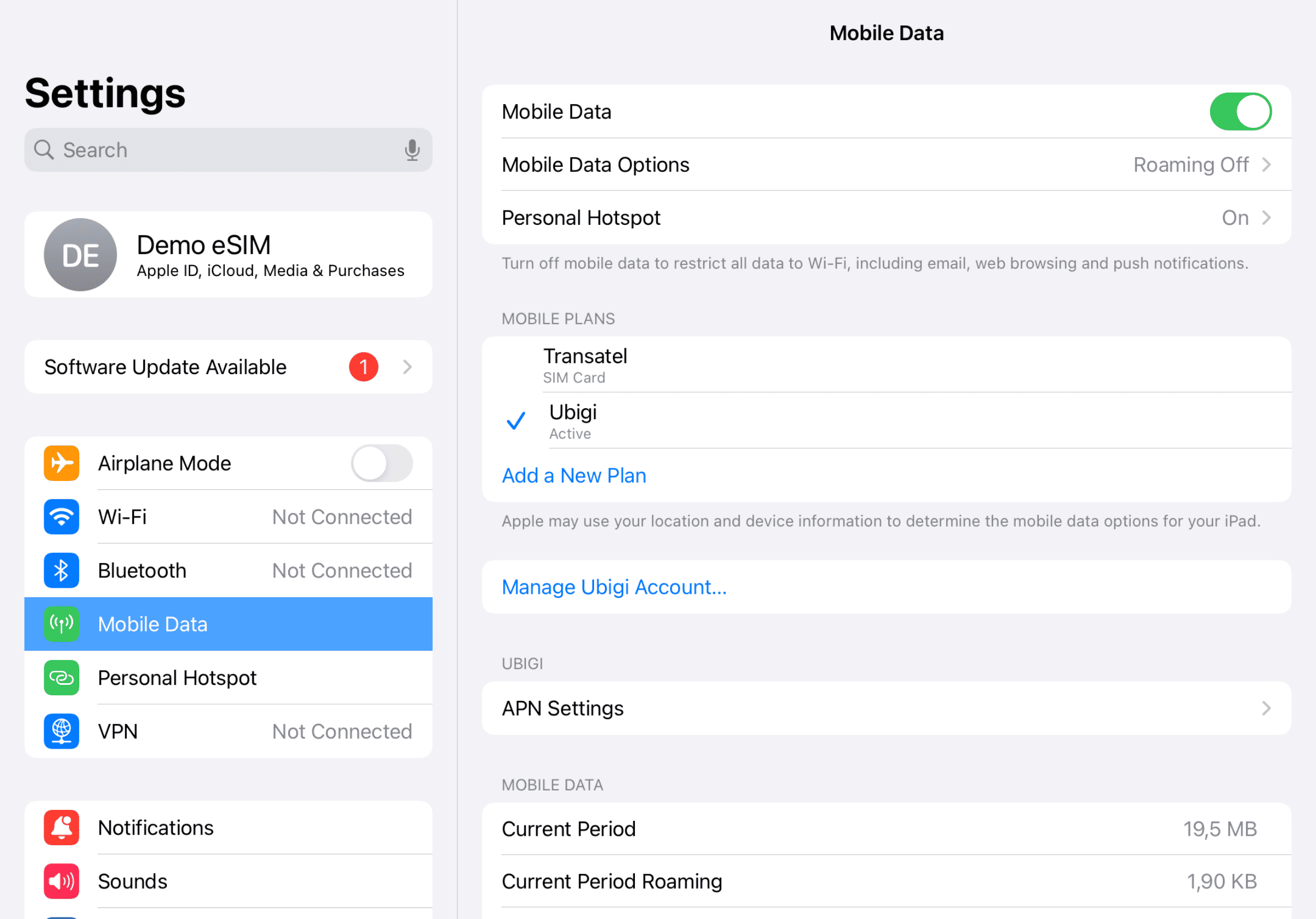
Another step reminder
Mobile device setup reminder - upon arrival
Setup Logo 3

Bumalik na sa bahay

Patayin ang iyong linya ng Ubigi at bumalik sa iyong paunang mga setting.
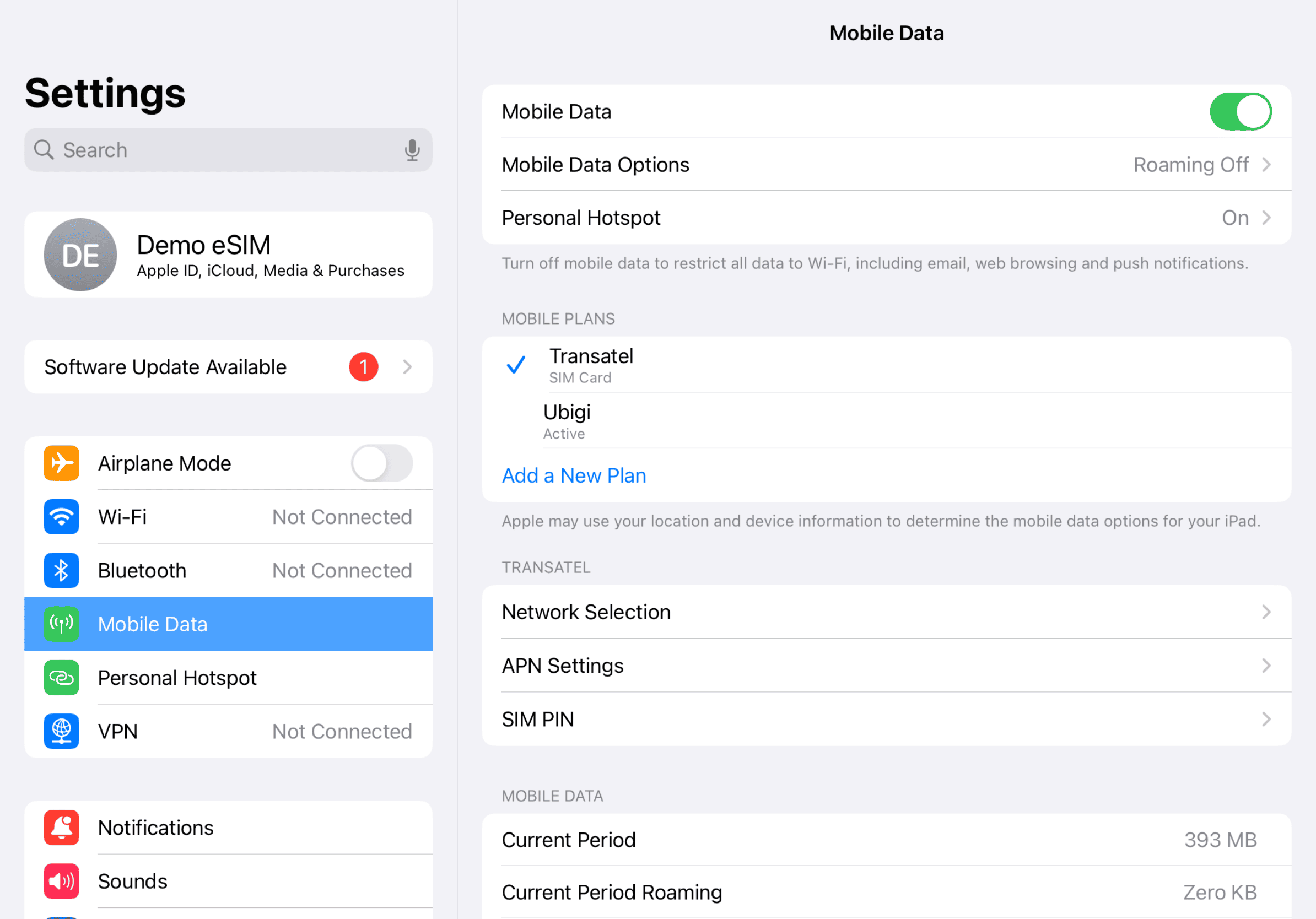
Final step reminder
Mobile device setup reminder - upon arrival

Paano mag-top up ng iyong eSIM sa Ubigi app?

Tingnan ang tutorial:

Magaling Trustpilot stars Trustpilot
Trustpilot stars
Batay sa 48671 na mga pagsusuri sur Trustpilot
5 stars Na-verify
Na-verify na review
Ang user na ito ay kinilala bilang mamimili.
installing and using the Esim was so…
installing and using the Esim was so easy - and I had full connectivity all over Japan.
customer, 15 Oct 2026
5 stars Na-verify
Na-verify na review
Ang user na ito ay kinilala bilang mamimili.
Easy to use
Easy to use Once set up. Had no issues at all.
customer, 15 Oct 2026
5 stars Na-verify
Na-verify na review
Ang user na ito ay kinilala bilang mamimili.
Good
Good service, no problem yo actívate abroad.
customer, 15 Oct 2026
5 stars Na-verify
Na-verify na review
Ang user na ito ay kinilala bilang mamimili.
It worked perfectly.
The purchase, startup and function was simple and seamless.
Leonardo Lopez, 15 Oct 2026
5 stars Na-verify
Na-verify na review
Ang user na ito ay kinilala bilang mamimili.
Flawless execution
Flawless execution
customer, 15 Oct 2026
5 stars Na-verify
Na-verify na review
Ang user na ito ay kinilala bilang mamimili.
Super easy and good value
Super easy and good value. Highly recommended.
Chris, 15 Oct 2026
5 stars Na-verify
Na-verify na review
Ang user na ito ay kinilala bilang mamimili.
It help me a lot
It help me a lot. Tks
customer, 15 Oct 2026
5 stars Na-verify
Na-verify na review
Ang user na ito ay kinilala bilang mamimili.
No comment.
No comment.
customer, 15 Oct 2026
4 stars Na-verify
Na-verify na review
Ang user na ito ay kinilala bilang mamimili.
except disconnected once a while
except disconnected once a while, it is ok.
customer, 15 Oct 2026
5 stars Na-verify
Na-verify na review
Ang user na ito ay kinilala bilang mamimili.
Just been to Japan for three weeks and…
Just been to Japan for three weeks and the data plan worked all over, in really remote places as well as the big cities.
Andrew Welsh, 15 Oct 2026
5 stars Na-verify
Na-verify na review
Ang user na ito ay kinilala bilang mamimili.
Working flawlessly during a trip to…
Working flawlessly during a trip to multiple states in USA
Paul, 15 Oct 2026
5 stars Na-verify
Na-verify na review
Ang user na ito ay kinilala bilang mamimili.
App very simple to use and good signal…
App very simple to use and good signal in Paris
customer, 15 Oct 2026
5 stars Na-verify
Na-verify na review
Ang user na ito ay kinilala bilang mamimili.
Seamless service
Seamless service
Maggie B, 15 Oct 2026
5 stars Na-verify
Na-verify na review
Ang user na ito ay kinilala bilang mamimili.
We traveled from the US to the…
We traveled from the US to the Netherlands and Spain. The eSIM started working as soon as we landed in the Netherlands. The only issue was that the internet was slow or didn’t work at all in popular tourist areas. Other than that, it was easy to install and affordable.
Mikhail B, 15 Oct 2026
4 stars Na-verify
Na-verify na review
Ang user na ito ay kinilala bilang mamimili.
Great for navigating London, but a few things to keep in mind
As someone traveling out of the country for the very first time, Ubigi made it really easy to navigate my way around London. The signal was pretty good and reliable throughout my trip, and the overall user experience was solid. There were just a couple of things I wish I had known beforehand as a first time user. First, my primary phone number wouldn't work on my iPhone unless I was connected to WiFi. Second, the service slowed down after reaching a certain threshold. I would have preferred to purchase a set amount of data instead. Overall, it was a great service that kept me connected when I needed it most!
RUBEN, 15 Oct 2026
cross

Naipadala na ang iyong mensahe.
Makikipag-ugnayan kami sa iyo sa lalong madaling panahon.

cross

Isinasaalang-alang na namin ang iyong pag-subscribe sa newsletter.

cross