Skip to content
← 返回问题
如何重新安装在 iPhone/iPad 上删除的 Ubigi eSIM 配置文件?

另请参阅:
如何在我的 Android 设备上重新安装已删除的 Ubigi eSIM 配置文件?
如何在我的Windows 10 或 Windows 11设备上重新安装已删除的 Ubigi eSIM 配置文件? 如何重新安装我在 Windows 10 或 Windows 11 设备上删除的 Ubigi eSIM 配置文件?

如果您误删了 iPhone/iPad 上的 Ubigi eSIM 配置文件,您可以按照以下步骤轻松重新安装:

– 打开设备上的Ubigi 应用程序 并连接到您的 Ubigi 账户

– 连接后,进入 “设置 “选项卡并点击 “重新安装我的 Ubigi eSIM “按钮:
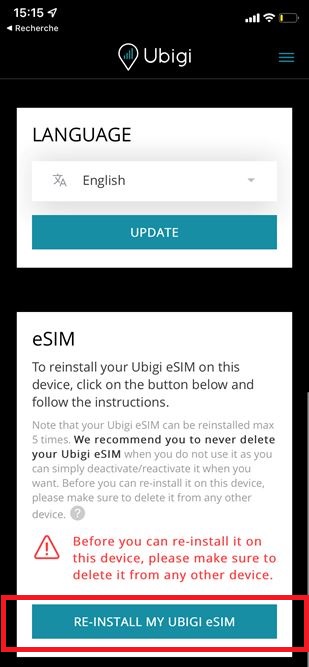
– 然后按照屏幕上的说明完成安装。

注意:删除 Ubigi eSIM 配置文件后,最多只能重新安装 5 次。如果您在重新安装过程中收到错误信息,请参阅以下部分:
使用 Ubigi 账户上的二维码重新安装 Ubigi eSIM 配置文件时收到错误信息,为什么?

在寻找特定的东西吗?

其他常见问题:

如何获取和使用 Ubigi?

如何加入 Ubigi 推荐计划?

如何使用 Ubigi WELCOME10 欢迎优惠代码?

Ubigi 提供 5G 吗?

每次为我的 Ubigi 账户充值 eSIM 数据计划时,我会收到一个二维码吗?

如何在三星 Galaxy S22 系列(包括 S22、S22+ 和 S22 Ultra)上安装 Ubigi eSIM

如何在 iPhone 14 机型上安装 Ubigi eSIM?

如何在 iPhone 12 机型上安装 Ubigi eSIM?

如何在 iPhone 13 机型上安装 Ubigi eSIM?

如何在 Google Pixel 6 或 Google Pixel 7 上安装 eSIM 配置文件?

如何在 iPhone 上打开或关闭 eSIM 配置文件?

如何在 iPhone 上重新激活或停用 eSIM 配置文件?

当我使用 Ubigi 账户上的二维码重新安装 Ubigi eSIM 配置文件时,我收到一条错误信息,为什么?

如何在 Android 上使用激活码手动安装 eSIM 配置文件?

我可以将我的Ubigi连接与其他设备共享数据吗?

如何在 iPhone 11 机型上安装 Ubigi eSIM?

如何在三星 Galaxy S21 5G / S21+ 5G / S21 Ultra 5G 上安装 Ubigi eSIM?

如何在三星 Galaxy S20 / S20+ / S20 Ultra 上安装 Ubigi eSIM?

如何在三星 Galaxy S23 / S23+ / S23 Ultra 上安装 Ubigi eSIM?

如何在 Google Pixel 7a上安装 Ubigi eSIM ?

我的 Ubigi eSIM手机号码是什么?

如何使用 Ubigi?

Ubigi eSIM 数据计划可以拨打电话吗?

如何在 iOs 上使用激活码手动安装 eSIM 卡?

您应该在旅行前购买 Ubigi eSIM 数据计划,还是在抵达后再购买?

Ubigi是什么?

太棒了 Trustpilot stars Trustpilot
Trustpilot stars
基于 Trustpilot 35199条评论
5 stars 已验证
已验证评论
该用户已被识别为买家
Great service
Great service
customer, 19 Apr 2026
5 stars 已验证
已验证评论
该用户已被识别为买家
Com on time pick up quick nice driver police chat to customer r
Pick on time and nice service
Minh, 19 Apr 2026
4 stars 已验证
已验证评论
该用户已被识别为买家
It works smoothly in general.
It works smoothly in general. Sometimes, i lost the wifi because mobile data was off accidentally
Huan, 19 Apr 2026
5 stars 已验证
已验证评论
该用户已被识别为买家
Worked perfect
Worked perfect
customer, 19 Apr 2026
4 stars 已验证
已验证评论
该用户已被识别为买家
Overall experience is superb
Overall experience is superb. I'm missing some flexibility of this service. However, I assume that this may be due to technical limitations.
Piotr Miller, 19 Apr 2026
5 stars 已验证
已验证评论
该用户已被识别为买家
It’s good for text and
Mohamed Meeran, 19 Apr 2026
5 stars 已验证
已验证评论
该用户已被识别为买家
Excellent ESim
It worked perfectly with no problems I recommend it strongly
LA BELLE GROCERY STORE, 19 Apr 2026
5 stars 已验证
已验证评论
该用户已被识别为买家
It is great to be informed everywhere…
It is great to be informed everywhere and at a reasonable cost
customer, 19 Apr 2026
5 stars 已验证
已验证评论
该用户已被识别为买家
Good value for money
Good value for money. Easy enough to set up.
FwebekMiracleCrusade, 19 Apr 2026
4 stars 已验证
已验证评论
该用户已被识别为买家
I had immediate process to the…
I had immediate process to the intenet,but the domestic provider operates very slow internet
Mar, 19 Apr 2026
5 stars 已验证
已验证评论
该用户已被识别为买家
Ubigi was easy to install
Ubigi was easy to install. So far the service has been good.
Melissa S., 19 Apr 2026
5 stars 已验证
已验证评论
该用户已被识别为买家
Cheap, easy to use and reliable
I have been using Ubigi in Asia for just over a year on various trips. I was unsure at first but service has been good, topping up easy and it always connects on arrival with no fuzz. Easy to manage with app and a lot cheaper than roaming. A must in today’s world where paying and taxis are on apps.
Steph, 19 Apr 2026
5 stars 已验证
已验证评论
该用户已被识别为买家
Good service
Good service
WENDY, 19 Apr 2026
5 stars 已验证
已验证评论
该用户已被识别为买家
It has a great connection.
Jaime, 19 Apr 2026
5 stars 已验证
已验证评论
该用户已被识别为买家
I’m using it all over the world
Once you set it up, it becomes your travel companies. So far, it has never let me down.. I only suggest easier notification as you run low on data.
customer, 19 Apr 2026

您的信息已发送。
我们会尽快与您联系。

我们已考虑到您订阅了新闻通讯。

