앱이 없는 경우 웹 브라우저를 사용하여 ubigi .me에서 Ubigi 계정에 액세스할 수도 있습니다.
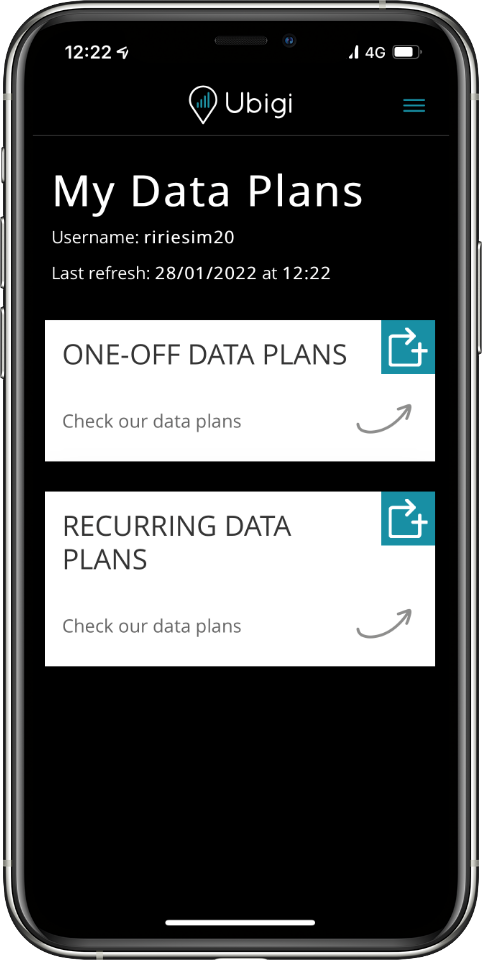
충전으로 이동합니다.
충전 기호
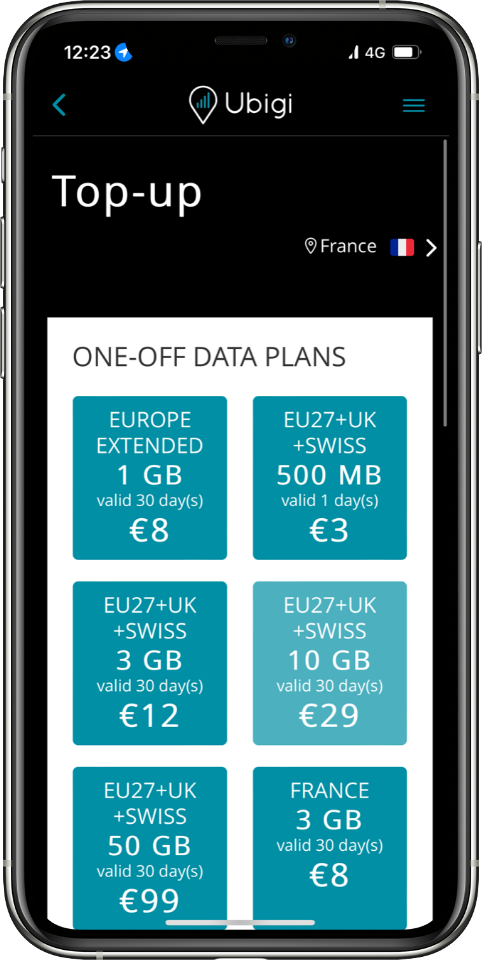
을 탭하여 다양한 일회성 및 정기결제
데이터 요금제를 확인하세요.
데이터 요금제 선택
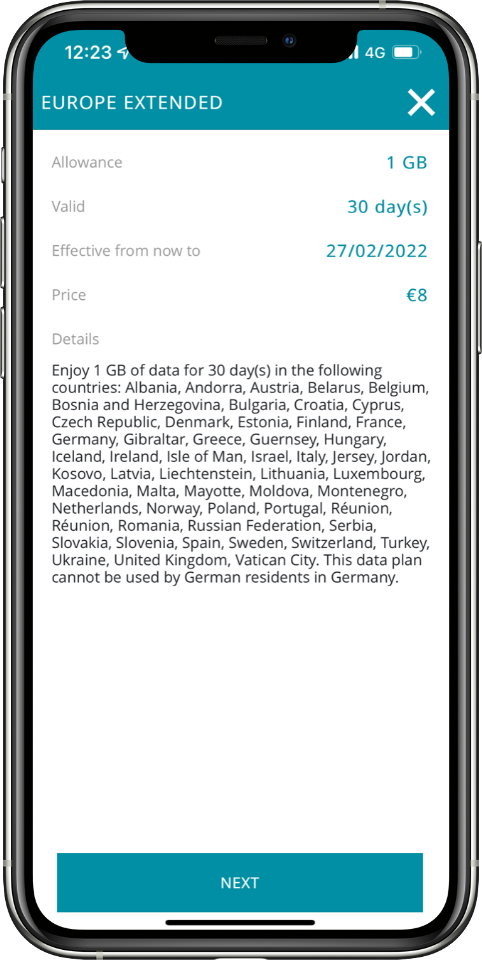
원하는 데이터 요금제를 탭하면 데이터 허용량, 유효 일수, 만료일, 가격 및 적용 대상 지역을 포함한 전체 정보를 확인할 수 있습니다.
참고: 현재 위치 이외의 지역에서 데이터 요금제를 검색하려면 오른쪽 상단에서 위치 설정을 변경하면 됩니다.
결제하기
데이터 요금제를 선택한 후 결제 방법을 선택하고 결제 세부 정보를 입력하여 결제하세요.
요금제가 적용되는 목적지에 도착하면 데이터 요금제가 자동으로 활성화되며, 유효 기간은 그 순간부터 시작됩니다. 구매 후 6개월 이내에 요금제를 활성화하지 않으면 자동으로 만료된다는 점에 유의하세요.
유비기 연결을 즐기세요!
주요 국제 결제 수단을 사용할 수 있습니다:
훌륭해
의 46239개 리뷰를 기준으로
검증됨
검증된 리뷰
이 사용자는 구매자로 확인되었습니다
I have only been using Ubigi for 3 days…
I have only been using Ubigi for 3 days and so far it is excellent. No problems at all. Keeping my fingers crossed it will stay that way for the rest of the stay approximately 10 days.
customerFawzi Pishori, 21 Sep 2026
검증됨
검증된 리뷰
이 사용자는 구매자로 확인되었습니다
The set up seemed clear until I had…
The set up seemed clear until I had trouble. But the help for trouble shooting was good. I am a senior with limited knowledge about eSIMs so I finally figured it out.
customer, 21 Sep 2026
검증됨
검증된 리뷰
이 사용자는 구매자로 확인되었습니다
We had great phone service
We had great phone service, during our trip all over Italy!
Julie Carlton, 21 Sep 2026
검증됨
검증된 리뷰
이 사용자는 구매자로 확인되었습니다
data roaming
To explain how to cancel the data roaming of the sim of your local network provider!
Avi jonathan Evron, 21 Sep 2026
검증됨
검증된 리뷰
이 사용자는 구매자로 확인되었습니다
It works as described
It works as described
Andy Ricketts, 21 Sep 2026
검증됨
검증된 리뷰
이 사용자는 구매자로 확인되었습니다
User friendly and fast
Easy, userfriendly, fast
VladÌmir, 21 Sep 2026
검증됨
검증된 리뷰
이 사용자는 구매자로 확인되었습니다
First-time customer
First-time customer. Been using the Ubigi e-sim in Switzerland and Italy for several days now.
So far it has worked perfectly and we’ve been in some remote locations.
Purchase and installation were extremely easy. Speed is 5G wherever available. Pricing was excellent.
Daniel Wisniak, 21 Sep 2026
검증됨
검증된 리뷰
이 사용자는 구매자로 확인되었습니다
I experienced that the internet was…
I experienced that the internet was alright
customer, 21 Sep 2026
검증됨
검증된 리뷰
이 사용자는 구매자로 확인되었습니다
Simple to use
Simple to use, connection quality was great. My trip went very smooth thanks to ubigi
customer, 21 Sep 2026
검증됨
검증된 리뷰
이 사용자는 구매자로 확인되었습니다
Just perfect !
Just perfect !
Katrien, 21 Sep 2026
검증됨
검증된 리뷰
이 사용자는 구매자로 확인되었습니다
Good service
Good service
Roehl Aguilar, 21 Sep 2026
검증됨
검증된 리뷰
이 사용자는 구매자로 확인되었습니다
fantastic experience using Ubigi eSIM
fantastic experience using Ubigi eSIM, quick and easy access with full coverage of network.
customer, 21 Sep 2026
검증됨
검증된 리뷰
이 사용자는 구매자로 확인되었습니다
Simple
Simple, easy and no issues!
Love it!
customer, 21 Sep 2026
검증됨
검증된 리뷰
이 사용자는 구매자로 확인되었습니다
Reliable and accurate connectivity
Reliable and accurate connectivity
Leila, 21 Sep 2026
검증됨
검증된 리뷰
이 사용자는 구매자로 확인되었습니다
Excellent coverage all the way to…
Excellent coverage all the way to Souya Misaki and Wakkanai.
ST Lim, 21 Sep 2026
감사합니다
귀하의 메시지가 전송되었습니다. 곧 답변드리겠습니다.
감사합니다
귀하의 뉴스레터 구독을 고려했습니다.
eSIM 호환성 확인 방법
스마트폰 / 태블릿:
*#06# 입력. → EID 번호가 나오면 eSIM 지원 기기입니다.
Windows 10 / 11:
Windows+I 를 누르세요. “네트워크 및 인터넷”으로 이동하세요 → 셀룰러 네트워크가 보이면 PC가 eSIM을 지원합니다..
통신사 잠금 해제 여부 확인 방법
iPhone / iPad:
설정 > 일반 > 정보로 이동 통신사 잠금 항목까지 스크롤. → “SIM 제한 없음”이 표시되면 기기는 잠금 해제 상태입니다.
Android:
설정 > 네트워크 및 인터넷 > 모바일 네트워크 자동 네트워크 선택을 끄세요. → 여러 네트워크가 보이면 잠금 해제된 기기입니다.


























 eSIM 호환성 확인 방법
 통신사 잠금 해제 여부 확인 방법