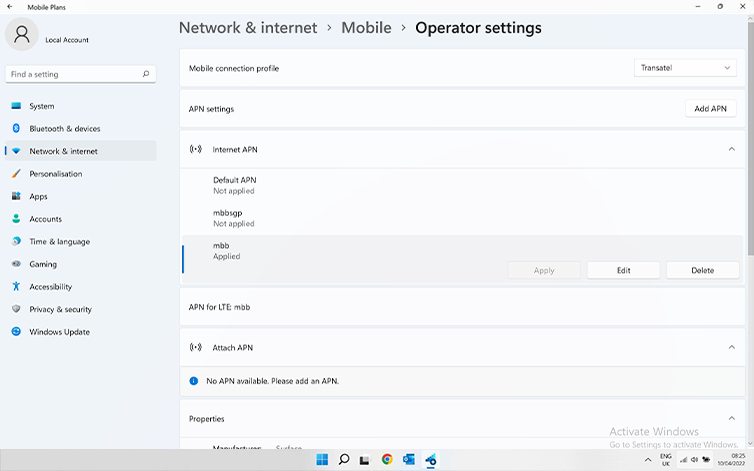
이동합니다: 설정 > 네트워크 및 인터넷 > 모바일로 이동한 다음 이동 통신사 설정으로 이동합니다. “APN 설정” 섹션의 목록에 Ubigi APN “mbb” 가 나타나면 다음 단계로 이동합니다.
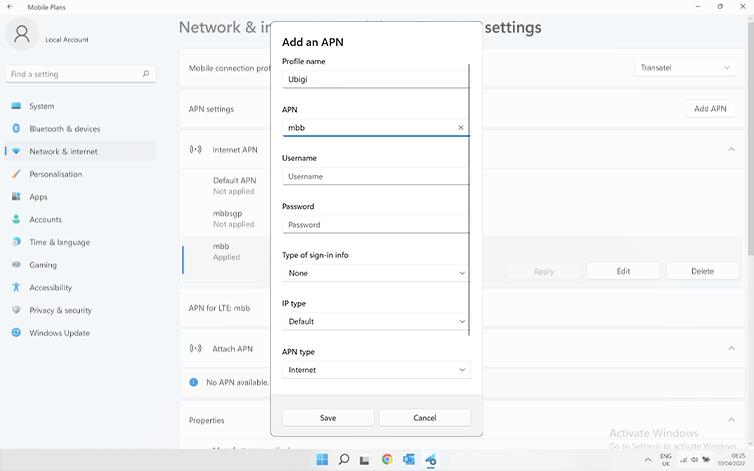
Ubigi APN “mbb” 가 표시되지 않으면 “APN 추가”를 클릭하고 입력합니다:
– 프로필 이름: Ubigi
– APN: mbb
저장을 클릭합니다. 이 새 APN이 “APN 설정” 목록에 나타납니다.
Ubigi APN이 “적용됨”으로 표시되는지 확인합니다. 그렇지 않은 경우 이를 클릭하고 적용을 선택합니다.
훌륭해
의 29935개 리뷰를 기준으로
검증됨
검증된 리뷰
이 사용자는 구매자로 확인되었습니다
Highly recommend the fixed-data plan for Japan
I bought the fixed-data plan for Japan and it worked smoothly from activation to daily use. Apart from one or two brief moments where the connection dropped, everything was reliable. Having 5G available on top of an already competitive price was great value. The app made it easy to manage the plan as well. I’d definitely use Ubigi again on my next trip.
Daniel, 25 Dec 2025
검증됨
검증된 리뷰
이 사용자는 구매자로 확인되었습니다
Made it incredibly easy to use on my…
Made it incredibly easy to use on my phone from the states to Japan. No issues with service. Easy to set up and deactivate from my phone when done using it. Will use it again for future international trips!!!!
Cooper, 25 Dec 2025
검증됨
검증된 리뷰
이 사용자는 구매자로 확인되었습니다
It was easy to switch on
It was easy to switch on. Everything was seamless with no hiccups. Worked perfectly at all times. No complaints at all. That you so much for being such a great and trustworthy company. Hats off!
Herve Cabon, 25 Dec 2025
검증됨
검증된 리뷰
이 사용자는 구매자로 확인되었습니다
Pretty straightforward and worked 95%…
Pretty straightforward and worked 95% of the time whilst we were away. Would use again but the downloading process was a faff.
miss kimberley martin, 25 Dec 2025
검증됨
검증된 리뷰
이 사용자는 구매자로 확인되었습니다
Perfect
Perfect service
customer, 25 Dec 2025
검증됨
검증된 리뷰
이 사용자는 구매자로 확인되었습니다
Great connectivity!
Great connectivity!
customer, 24 Dec 2025
검증됨
검증된 리뷰
이 사용자는 구매자로 확인되었습니다
working very good..
ı was happy touse Ubigi. good connection..
customer Nedim, 24 Dec 2025
검증됨
검증된 리뷰
이 사용자는 구매자로 확인되었습니다
This company gives me great service and…
This company gives me great service and gives you a discount code when you check out
customer, 23 Dec 2025
검증됨
검증된 리뷰
이 사용자는 구매자로 확인되었습니다
Easy to use and friendly!
Easy to use and friendly!
customer, 23 Dec 2025
검증됨
검증된 리뷰
이 사용자는 구매자로 확인되었습니다
Decent SIM provider
The SIM itself provided decent service throughout.
However, the app's User Interface is very buggy, loads too slow, and hard to navigate.
customer, 23 Dec 2025
검증됨
검증된 리뷰
이 사용자는 구매자로 확인되었습니다
eSim Ubigi
Used it in Europe and worked perfectly 👌 👍
MEVIN, 23 Dec 2025
검증됨
검증된 리뷰
이 사용자는 구매자로 확인되었습니다
RELIABLE CONNECTION AND EASY TO USE APP
RELIABLE CONNECTION AND EASY TO USE APP
Jim Durbin, 23 Dec 2025
검증됨
검증된 리뷰
이 사용자는 구매자로 확인되었습니다
Reliable service away from home
Every time I used Ubigi in Europe and in Asia, the service was reliable. I also tried a cheaper company, but I ended up coming back to Ubigi.
Paul, 23 Dec 2025
검증됨
검증된 리뷰
이 사용자는 구매자로 확인되었습니다
Just come back from far east used esim…
Just come back from far east used esim and had great signal everywhere we visited. Easy to install and use. Would 100% recommend
Customer, 23 Dec 2025
검증됨
검증된 리뷰
이 사용자는 구매자로 확인되었습니다
It kept me connected when travelling…
It kept me connected when travelling around the Agadir region of Morocco. There was only 1 short period when the connection dropped for some reason.
Martin C, 22 Dec 2025
감사합니다
귀하의 메시지가 전송되었습니다. 곧 답변드리겠습니다.
감사합니다
귀하의 뉴스레터 구독을 고려했습니다.
eSIM 호환성 확인 방법
스마트폰 / 태블릿:
*#06# 입력. → EID 번호가 나오면 eSIM 지원 기기입니다.
Windows 10 / 11:
Windows+I 를 누르세요. “네트워크 및 인터넷”으로 이동하세요 → 셀룰러 네트워크가 보이면 PC가 eSIM을 지원합니다..
통신사 잠금 해제 여부 확인 방법
iPhone / iPad:
설정 > 일반 > 정보로 이동 통신사 잠금 항목까지 스크롤. → “SIM 제한 없음”이 표시되면 기기는 잠금 해제 상태입니다.
Android:
설정 > 네트워크 및 인터넷 > 모바일 네트워크 자동 네트워크 선택을 끄세요. → 여러 네트워크가 보이면 잠금 해제된 기기입니다.







 eSIM 호환성 확인 방법
 통신사 잠금 해제 여부 확인 방법