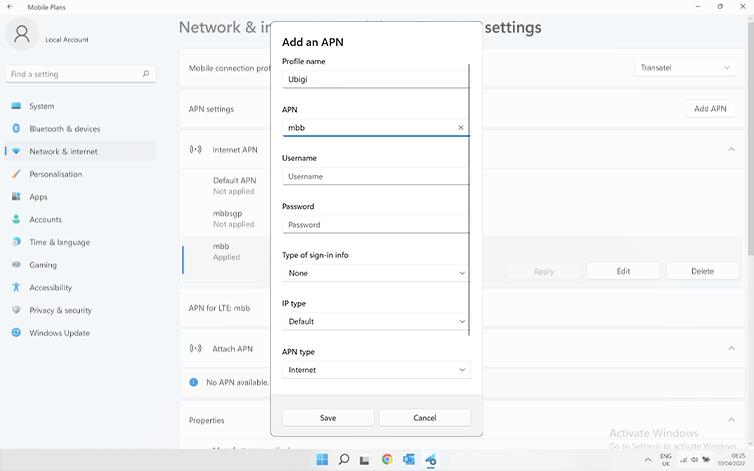
이동합니다: 설정 > 네트워크 및 인터넷 > 모바일로 이동한 다음 이동 통신사 설정으로 이동합니다. “APN 설정” 섹션의 목록에 Ubigi APN “mbb” 가 나타나면 다음 단계로 이동합니다.
Ubigi APN “mbb” 가 표시되지 않으면 “APN 추가”를 클릭하고 입력합니다:
– 프로필 이름: Ubigi
– APN: mbb
저장을 클릭합니다. 이 새 APN이 “APN 설정” 목록에 나타납니다.
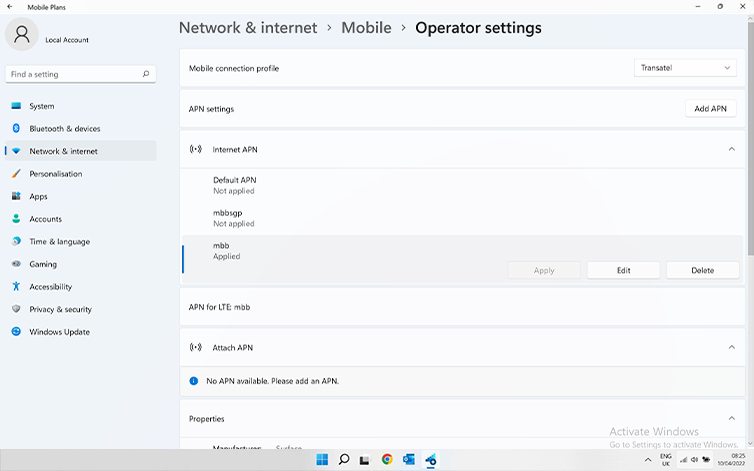
Ubigi APN이 “적용됨”으로 표시되는지 확인합니다. 그렇지 않은 경우 이를 클릭하고 적용을 선택합니다.
훌륭해
의 31430개 리뷰를 기준으로
검증됨
검증된 리뷰
이 사용자는 구매자로 확인되었습니다
So easy to use, an excellent choice
I’m extremely satisfied with the simple steps informing me on how to set up my eSIM. The coverage has been excellent!! I couldn’t as for more.
Michelle, 14 Feb 2026
검증됨
검증된 리뷰
이 사용자는 구매자로 확인되었습니다
Quite useful
Quite useful
customer, 14 Feb 2026
검증됨
검증된 리뷰
이 사용자는 구매자로 확인되었습니다
Very convenient to use everytime I…
Very convenient to use everytime I travel
Irene Dela Cruz, 14 Feb 2026
검증됨
검증된 리뷰
이 사용자는 구매자로 확인되었습니다
Ease to connect.
Ease to connect.
The signal has stabilized.
customer, 14 Feb 2026
검증됨
검증된 리뷰
이 사용자는 구매자로 확인되었습니다
Great coverage and great speed in NYC
Great coverage and great speed in NYC. Recommend.
Diogo Pernes, 14 Feb 2026
검증됨
검증된 리뷰
이 사용자는 구매자로 확인되었습니다
Easy to use
Easy to buy, easy to use, and the network was reliable.
Nicola, 14 Feb 2026
검증됨
검증된 리뷰
이 사용자는 구매자로 확인되었습니다
Easy to use and set up
Easy to use and set up. Service was reliable in a rural area. Reasonably priced.
customer, 14 Feb 2026
검증됨
검증된 리뷰
이 사용자는 구매자로 확인되었습니다
I was not sure what phone Sim
I was not sure what phone Zim. I should use in Costa Rica. And II he used biggie, and it was very easy to get the eSIM, and the registration in Costa Rica was easy too, and we used it a lot. Just for WhatsApp and it worked fine at least in San Jose, and on the West Coast. Now, we're going on the east coast, and we'll see how it works over there.
UDO, 14 Feb 2026
검증됨
검증된 리뷰
이 사용자는 구매자로 확인되었습니다
Great
Great, everything was great
Tom, 14 Feb 2026
검증됨
검증된 리뷰
이 사용자는 구매자로 확인되었습니다
Connectivity from the start
Connectivity from the start. Very reliable. Easy to install and use. Excellent.
Martin, 14 Feb 2026
검증됨
검증된 리뷰
이 사용자는 구매자로 확인되었습니다
Sapporo
Good reception
Christina customer, 14 Feb 2026
검증됨
검증된 리뷰
이 사용자는 구매자로 확인되었습니다
Quick and easy to deal with
customer, 14 Feb 2026
검증됨
검증된 리뷰
이 사용자는 구매자로 확인되었습니다
Excellent
Excellent, fast and easy to book.
customer, 14 Feb 2026
검증됨
검증된 리뷰
이 사용자는 구매자로 확인되었습니다
It would be a five star
It would be a five star. Getting the app was easy. Starting the app when I got to country. Was not good for me. After finding out how to get on the app. It has been smooth sailing.
customer, 13 Feb 2026
검증됨
검증된 리뷰
이 사용자는 구매자로 확인되었습니다
Just as great as being told
Just as great as being told. Will use it again for the coming trips
customer, 13 Feb 2026
감사합니다
귀하의 메시지가 전송되었습니다. 곧 답변드리겠습니다.
감사합니다
귀하의 뉴스레터 구독을 고려했습니다.
eSIM 호환성 확인 방법
스마트폰 / 태블릿:
*#06# 입력. → EID 번호가 나오면 eSIM 지원 기기입니다.
Windows 10 / 11:
Windows+I 를 누르세요. “네트워크 및 인터넷”으로 이동하세요 → 셀룰러 네트워크가 보이면 PC가 eSIM을 지원합니다..
통신사 잠금 해제 여부 확인 방법
iPhone / iPad:
설정 > 일반 > 정보로 이동 통신사 잠금 항목까지 스크롤. → “SIM 제한 없음”이 표시되면 기기는 잠금 해제 상태입니다.
Android:
설정 > 네트워크 및 인터넷 > 모바일 네트워크 자동 네트워크 선택을 끄세요. → 여러 네트워크가 보이면 잠금 해제된 기기입니다.


