Bought the 25 G plan for our 3 week trip to Japan for a very reasonable $28 Canadian dollars, it worked seamlessly, was better than using public wifi, and used only about 10 G total.
customer, 07 Nov 2025
검증됨
검증된 리뷰
이 사용자는 구매자로 확인되었습니다
Easy to use
Easy to use, reliable
A Cross, 07 Nov 2025
검증됨
검증된 리뷰
이 사용자는 구매자로 확인되었습니다
Just get Ubigi!
I purchased airlo on my last trip to Japan and I didn’t have any luck. Ubigi has made my trip so much easier with it 5G! I definitely recommend them!
SDCASOLE, 07 Nov 2025
검증됨
검증된 리뷰
이 사용자는 구매자로 확인되었습니다
User friendly
User friendly
customerKatayoun, 07 Nov 2025
검증됨
검증된 리뷰
이 사용자는 구매자로 확인되었습니다
Great eSIM for short travels.
Setting up the eSIM was easy and the guides were straightforward and simple to follow. The price is also quite afford.
The only gripes I had is that the amount of data you could request wasn't as flexible since there were only a preset list of options.
The speed of the data was fine when using light and simple apps like maps and viewing online web pages. But anything more heavy like social and viewing videos did take some time to load.
customer, 07 Nov 2025
검증됨
검증된 리뷰
이 사용자는 구매자로 확인되었습니다
Easy to set up and great for abroad
Barbara Mason, 07 Nov 2025
검증됨
검증된 리뷰
이 사용자는 구매자로 확인되었습니다
Ubigi eSim is a winner!
Ubigi was a brilliant solution for mobile data in Spain. My service provider was quoting £22+ to use my normal plan for roaming and the Ubigi eSim was £8 for 10gb. More than enough for my needs. It’s simple to buy, install and use and the coverage was spot on. Will definitely use again and have recommended it to other travellers.
Steve Jenner, 07 Nov 2025
검증됨
검증된 리뷰
이 사용자는 구매자로 확인되었습니다
Greece travels
Easy to use. The network was connected in almost all places with very minor drop outs.
Thank you for the reliable service.
customer, 07 Nov 2025
검증됨
검증된 리뷰
이 사용자는 구매자로 확인되었습니다
Used during Tokyo trip
I spent 12 days in Tokyo, using my phone for navigation—on trains and walking around every day—and the Ubigi connection was excellent. It even worked in most subway stations, though I did lose connectivity in a few areas. Overall, a great experience.
customer, 06 Nov 2025
검증됨
검증된 리뷰
이 사용자는 구매자로 확인되었습니다
Nice experience.
Nice experience.
Priscille Nankoua, 06 Nov 2025
검증됨
검증된 리뷰
이 사용자는 구매자로 확인되었습니다
Very easy to get it working
Very easy to get it working, seamless
customer, 06 Nov 2025
검증됨
검증된 리뷰
이 사용자는 구매자로 확인되었습니다
Very Simple and positive Android experience
The android app made things really easy, and streamlined. Bought my E-Sim through it with GPay on my phone and it auto installed everything, all I had to do was switch it to primary and disable data on my home Sim.
I had great service and data. It was a good experience
FN, 06 Nov 2025
검증됨
검증된 리뷰
이 사용자는 구매자로 확인되었습니다
Perfect thank
Perfect thank
Mylen, 06 Nov 2025
검증됨
검증된 리뷰
이 사용자는 구매자로 확인되었습니다
Everything worked like it was supposed…
Everything worked like it was supposed to, and it was easy to use
customerN/A, 06 Nov 2025
검증됨
검증된 리뷰
이 사용자는 구매자로 확인되었습니다
Less a matter to worry about
Travel made easy while still staying connected.
Hui, 06 Nov 2025
감사합니다
귀하의 메시지가 전송되었습니다. 곧 답변드리겠습니다.
감사합니다
귀하의 뉴스레터 구독을 고려했습니다.
기기가 eSIM을 지원하는지 확인하는 방법
eSIM 호환성 확인
스마트폰 및 셀룰러 태블릿:
(*#06#)을 누르세요. EID 번호가 표시되면, 기기는 eSIM을 지원합니다.
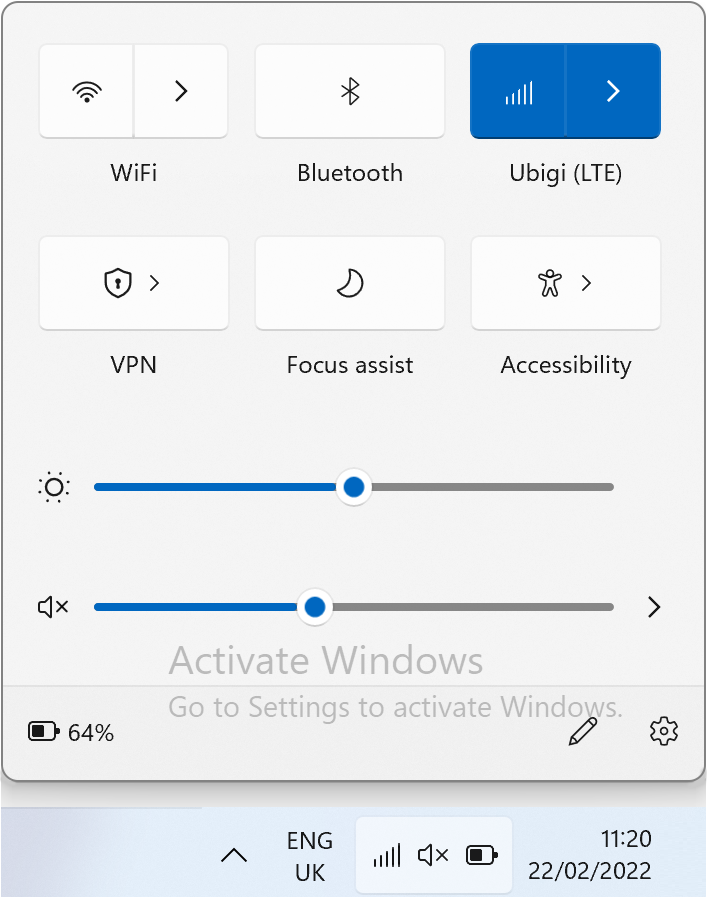
노트북 (Windows 10/11):
오른쪽 하단의 빠른 설정 을 여세요. 셀룰러 설정 이 보이면, 노트북이 eSIM을 지원하는 것입니다.
통신사 잠금 해제 여부 확인
iOS에서:
설정 > 일반 > 정보 > 통신사 잠금(Carrier Lock)으로 이동하세요. "SIM 제한 없음" 이라고 표시되면, 기기가 잠금 해제된 상태입니다.
Android에서:
설정 > 네트워크 및 인터넷 > 모바일 네트워크로 이동하세요. 자동 네트워크 선택을 끄세요. 여러 개의 네트워크가 보이면, 기기는 잠금 해제된 것입니다. 하나만 보이거나 오류가 발생하면, 잠겨 있을 수 있습니다.