Check if your eSIM profile is installed on your device.
Check eSIM profile activation
Check if your eSIM profile is activated on your device.
Apply data to eSIM profile
Ensure data is applied to your Ubigi eSIM profile.
Check APN configuration
Ensure that the APN is correctly set for your Ubigi connectivty.
Check network display
Check the network status for your Ubigi connectivity.
Final checks!
Check account creation and Internet access.
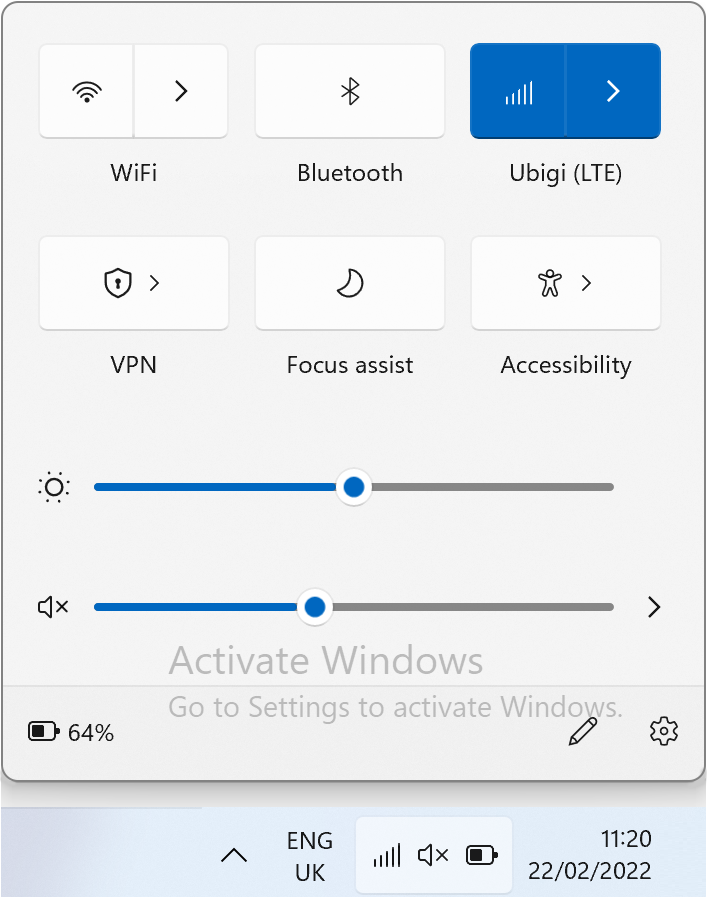
On the network flyout, ensure that:
Cellular (or Mobile) is activated. Wi-Fi is deactivated.
Great
Based on 29676 reviews on
Verified
Verified review
This user has been identified as a buyer
Experience was good in the main lines
Experience was good in the main lines. Internet was ok but sometimes we got few internet outages. But it was not a big deal.
Antoine CHANTHAVONG, 12 Dec 2025
Verified
Verified review
This user has been identified as a buyer
Easy and fast to install
Easy and fast to install, good internet speed at good price
MICHELI MICHELE, 12 Dec 2025
Verified
Verified review
This user has been identified as a buyer
Your Internet connection is very good…
Your Internet connection is very good and fast, the data's last longer even though I'm using maps, but I YouTube, downloads and more others.
customer, 12 Dec 2025
Verified
Verified review
This user has been identified as a buyer
Easy to activate
Easy to activate, affordable, app useful, will use again :)
E. M., 12 Dec 2025
Verified
Verified review
This user has been identified as a buyer
Super easy to install and use!
Emma, 11 Dec 2025
Verified
Verified review
This user has been identified as a buyer
First time
Service activated right when I landed, was able to use Google Maps to travel and use train stations with ease! The data plans prices were reasonable and the service was so good I was able to stream live nba games as well! 10/10
Francis Calata, 11 Dec 2025
Verified
Verified review
This user has been identified as a buyer
Great for travel
Worked great in Seoul, Korea for the 2 weeks I was there!
Jonathan Lee, 11 Dec 2025
Verified
Verified review
This user has been identified as a buyer
Excellent Data Service
Easy to use and excellent data service
Velda, 11 Dec 2025
Verified
Verified review
This user has been identified as a buyer
....
..........
customer, 11 Dec 2025
Verified
Verified review
This user has been identified as a buyer
Worked great everywhere we went
Worked great everywhere we went. Great speed. Install and set up was quick and easy on my iPhone.
Darren P, 11 Dec 2025
Verified
Verified review
This user has been identified as a buyer
I use Ubigi to get signal
I use Ubigi as a spare esim where my original provider cant get signal, Ubigi has found a signal as it uses more that 1 network
LHawk, 11 Dec 2025
Verified
Verified review
This user has been identified as a buyer
Simple: purchase and activation
Very easy to purchase and activate as soon as we landed in Japan. Coverage has been great in Tokyo
customer, 11 Dec 2025
Verified
Verified review
This user has been identified as a buyer
Everything went smoothly
Everything went smoothly. So convenient!
Annie, 11 Dec 2025
Verified
Verified review
This user has been identified as a buyer
It worked
It worked as expected as soon as I landed. While the speeds were a little slow, it wasn't anything that I would actually complain about for the price. I'll definitely use this again as a low-cost eSIM option when travelling outside my home area.
Justin Galbraith, 11 Dec 2025
Verified
Verified review
This user has been identified as a buyer
It was incredible
It was incredible! Thanks, Ubigi. My travel was perfect because of you!
customer, 11 Dec 2025
Thank you
Your message has been sent. We’ll get back to you shortly.
Thank you
We have taken into account your subscription to the newsletter
How to check eSIM compatibility
Smartphones / Tablets:
Dial *#06#. → If an EID number appears, your device is eSIM-compatible.
Windows 10 / 11:
Press Windows+I. Go to “Network & Internet” → If you see "Cellular", your PC is eSIM-compatible.
How to check carrier unlocking
iPhone / iPad:
Go to Settings > General > About. Scroll to Carrier Lock. → If you see “No SIM restrictions”, your device is unlocked.
Android:
Go to Settings > Network & Internet > Mobile network. Disable Automatic network selection. → If multiple networks appear, your device is unlocked.
You already have an eSIM in your cart.
Each order can only include one eSIM data plan.
If you choose to add a new one, the current plan will be removed. What would you like to do?