Paano ko masusuri kung naka-install ang aking Ubigi eSIM profile sa aking iPhone?
Upang suriin kung naka-install ang iyong eSIM profile sa iyong iPhone/iPad, sundin ang mga tagubilin sa ibaba:
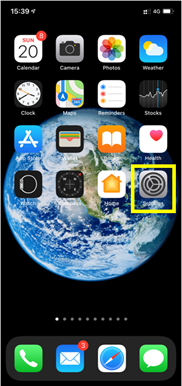
– Pumunta sa Settings:
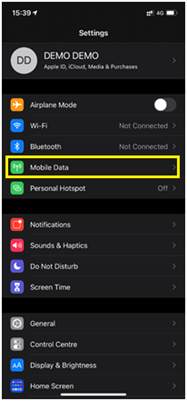
– Pagkatapos, piliin ang Mobile Data:
– Sa wakas, sa ilalim ng DATA PLANS, tingnan kung may mga planong nakalista: Tandaan: kung may pisikal na SIM na nakapasok, ito ang lilitaw bilang Main package/Primary number.
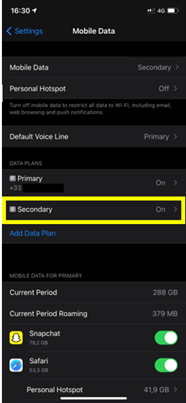
Kung lilitaw ang pangalawang package sa ilalim ng pangunahing package, piliin ito:
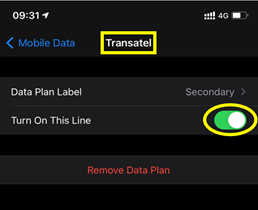
– Makikita mo ang pangalan ng naka-install na eSIM profile: halimbawa sa ibaba, ang naka-install na profile ay Ubigi (ang teknikal na pangalan na ipinapakita: “Transatel”) at ito ay naka-aktibo (berdeng pindutan sa kanan)
Na-verify na review
Ang user na ito ay kinilala bilang mamimili.
This apps is very dependable and…
This apps is very dependable and trustworthy,.You can used to any communication apps . Thanks
customer, 24 Oct 2026
Na-verify
Na-verify na review
Ang user na ito ay kinilala bilang mamimili.
Idiot-proof service and support!
Buying the data plans was super easy. Everything is laid out in a way that is logical and fairly easy to use. Which is really important, but what is even more important is how Ubigi handled the situation(s) when something went 'wrong'.
Because, despite an easy process to buy the data plans, some users (me!!) manage to make a mistake anyway. I meant to buy a travel plan for each of the two devices I had but accidentally bought two travel plans for one device and none for the other. I contacted Support who responded to my query within a few minutes, explained what I should have done, and facilitated a refund for one of the travel plans.
And then, just when you think surely someone cannot make yet another mistake, you have that one user (me, again!!) who panicked when she couldn't top up one of her plans. I contacted Support via the website and got an immediate response explaining how to do the top-up. Problem solved, panic averted!
(It was only after I complimented the very helpful support person on their speedy and efficient service did I realise it was an AI bot. Oh well, I hope the bot appreciated my praise.)
Tertia, 24 Oct 2026
Na-verify
Na-verify na review
Ang user na ito ay kinilala bilang mamimili.
The service was really good
customer, 24 Oct 2026
Na-verify
Na-verify na review
Ang user na ito ay kinilala bilang mamimili.
Simple to use and very reliable
dave, 24 Oct 2026
Na-verify
Na-verify na review
Ang user na ito ay kinilala bilang mamimili.
It just works
It just works! And the pricing is good!
Jeannie Berg, 24 Oct 2026
Na-verify
Na-verify na review
Ang user na ito ay kinilala bilang mamimili.
Good connection across US
Anomiem, 24 Oct 2026
Na-verify
Na-verify na review
Ang user na ito ay kinilala bilang mamimili.
Very good services
Very good services
customer, 24 Oct 2026
Na-verify
Na-verify na review
Ang user na ito ay kinilala bilang mamimili.
Convenience and it just worked.
customer, 24 Oct 2026
Na-verify
Na-verify na review
Ang user na ito ay kinilala bilang mamimili.
Easy to set-up and use.
Kristoffer, 24 Oct 2026
Na-verify
Na-verify na review
Ang user na ito ay kinilala bilang mamimili.
Easy and reliable
It is easy and reliable.
From USA used in Japan, 24 Oct 2026
Na-verify
Na-verify na review
Ang user na ito ay kinilala bilang mamimili.
Because it works
Because it works, where others fail! Japan!
Chrizz, 24 Oct 2026
Na-verify
Na-verify na review
Ang user na ito ay kinilala bilang mamimili.
Easy to use
Easy to use, connected really quickly and was simple and quick to top up.
Happy, 24 Oct 2026
Na-verify
Na-verify na review
Ang user na ito ay kinilala bilang mamimili.
easy to install and use, and worked well
easy to install and use. worked very well in Tokyo, Kanazawa, Kyoto, Hiroshima, Osaka, and Nikko
customer, 24 Oct 2026
Na-verify
Na-verify na review
Ang user na ito ay kinilala bilang mamimili.
Quick response and no throttle during…
Quick response and no throttle during my trip in South Korea and Japan on October 2026.
customer, 24 Oct 2026
Na-verify
Na-verify na review
Ang user na ito ay kinilala bilang mamimili.
Sooo easy
All worked very well, from the easy order till using the eSIM in Great Britain. So I was connected with the world. Thank you Ubigi!
Thomas P, 24 Oct 2026
Salamat
Naipadala na ang iyong mensahe. Makikipag-ugnayan kami sa iyo sa lalong madaling panahon.
Salamat
Isinasaalang-alang na namin ang iyong pag-subscribe sa newsletter.
Palitan ng bagong plano
Mga smartphone/mga tablet:
I-dial ang *#06#. → Kung lumitaw ang isang EID na numero, eSIM-compatible ang iyong aparato.
Windows 10 / 11:
Pindutin ang Windows+I. Pumunta sa "Network at Internet" → Kung nakikita mo ang "Cellular", eSIM-compatible ang iyong PC.
Paano suriin ang pag-unlock ng carrier
iPhone / iPad:
Pumunta sa Mga Setting > Pangkalahatan > Tungkol sa Mag-scroll sa Carrier Lock. → Kung makikita mo ang Walang mga paghihigpit sa SIM, naka-unlock ang iyong aparato.
Android:
Pumunta sa Mga Setting > Network at Internet > Mobile network. I-disable ang Awtomatikong pagpili ng network. → Kung lumalabas ang maraming network, naka-unlock ang iyong device.
Mayroon ka nang eSIM sa iyong cart.
Bawat order ay maaari lamang maglaman ng isang eSIM data plan.
Kasalukuyang plano: EKWADOR • 3 GB • 15 araw • CA$23.00
Kung pipiliin mong magdagdag ng bago, matatanggal ang kasalukuyang plano. Ano ang nais mong gawin?


