Paano ko masusuri kung naka-install ang aking Ubigi eSIM profile sa aking iPhone?
Upang suriin kung naka-install ang iyong eSIM profile sa iyong iPhone/iPad, sundin ang mga tagubilin sa ibaba:
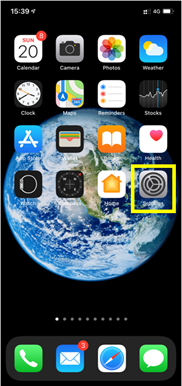
– Pumunta sa Settings:
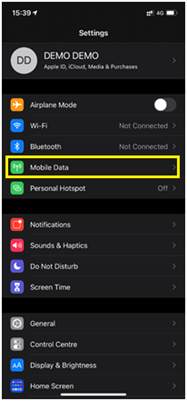
– Pagkatapos, piliin ang Mobile Data:
– Sa wakas, sa ilalim ng DATA PLANS, tingnan kung may mga planong nakalista: Tandaan: kung may pisikal na SIM na nakapasok, ito ang lilitaw bilang Main package/Primary number.
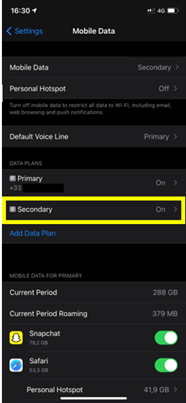
Kung lilitaw ang pangalawang package sa ilalim ng pangunahing package, piliin ito:
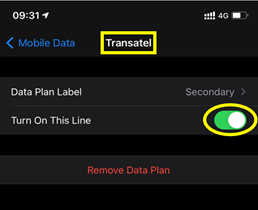
– Makikita mo ang pangalan ng naka-install na eSIM profile: halimbawa sa ibaba, ang naka-install na profile ay Ubigi (ang teknikal na pangalan na ipinapakita: “Transatel”) at ito ay naka-aktibo (berdeng pindutan sa kanan)
Na-verify na review
Ang user na ito ay kinilala bilang mamimili.
Difficult to connect in Istanbul
Difficult to connect in Istanbul. Once connected it worked
ludo, 27 Oct 2026
Na-verify
Na-verify na review
Ang user na ito ay kinilala bilang mamimili.
Connection was pretty much spotless
Connection was pretty much spotless except for the first time I activated in JFK. I had to go connect to the airport wifi to reach my airport pickup but the rest of the way was perfect. Good value compared to other providers too.
customer, 27 Oct 2026
Na-verify
Na-verify na review
Ang user na ito ay kinilala bilang mamimili.
Worked first time
Worked first time
SpaceMovieBuff, 27 Oct 2026
Na-verify
Na-verify na review
Ang user na ito ay kinilala bilang mamimili.
Worked out very well for my first trip…
Worked out very well for my first trip in japan would use it again was a great sim
customer, 27 Oct 2026
Na-verify
Na-verify na review
Ang user na ito ay kinilala bilang mamimili.
Fast Connexion
Fast Connexion, would recommend to anyone
Quentin Leroy, 27 Oct 2026
Na-verify
Na-verify na review
Ang user na ito ay kinilala bilang mamimili.
Easy to use
Easy to use, prices are reasonable and the app is very easy to use.
Laura Hyk, 27 Oct 2026
Na-verify
Na-verify na review
Ang user na ito ay kinilala bilang mamimili.
Data has been great except when we’re…
Data has been great except when we’re in the car trying to listen to music off our phones. The data seems to drop and the music stops multiple times during one song.
customer, 27 Oct 2026
Na-verify
Na-verify na review
Ang user na ito ay kinilala bilang mamimili.
No problems the entire trip
customer, 27 Oct 2026
Na-verify
Na-verify na review
Ang user na ito ay kinilala bilang mamimili.
It just simply worked...
It just simply worked.... great
Tobias Lembach, 27 Oct 2026
Na-verify
Na-verify na review
Ang user na ito ay kinilala bilang mamimili.
Great service.
Great service.
Had great connection no matter where I was in Japan. Will use again
customer, 27 Oct 2026
Na-verify
Na-verify na review
Ang user na ito ay kinilala bilang mamimili.
Easy to use eSim
The eSim was easy to purchase, install and activate. As soon as we landed at Narita airport we had access to the internet. We had no coverage issues during our trip in Tokyo and our purchased data limit allowed us to do all that we needed to do. Would use Ubigi again
Phil L, 27 Oct 2026
Na-verify
Na-verify na review
Ang user na ito ay kinilala bilang mamimili.
Easy setup
Easy setup, great coverage in Japan!
customer, 27 Oct 2026
Na-verify
Na-verify na review
Ang user na ito ay kinilala bilang mamimili.
Great service
Great service! So I’ll use this service for next trips!
customer, 27 Oct 2026
Na-verify
Na-verify na review
Ang user na ito ay kinilala bilang mamimili.
super easy purchase & great coverage
super easy purchase, turned on immediately when i arrived in japan. excellent service throughout trip across the country
K D, 27 Oct 2026
Na-verify
Na-verify na review
Ang user na ito ay kinilala bilang mamimili.
Ease to purchase and install
Christian Brown , 27 Oct 2026
Salamat
Naipadala na ang iyong mensahe. Makikipag-ugnayan kami sa iyo sa lalong madaling panahon.
Salamat
Isinasaalang-alang na namin ang iyong pag-subscribe sa newsletter.
Palitan ng bagong plano
Mga smartphone/mga tablet:
I-dial ang *#06#. → Kung lumitaw ang isang EID na numero, eSIM-compatible ang iyong aparato.
Windows 10 / 11:
Pindutin ang Windows+I. Pumunta sa "Network at Internet" → Kung nakikita mo ang "Cellular", eSIM-compatible ang iyong PC.
Paano suriin ang pag-unlock ng carrier
iPhone / iPad:
Pumunta sa Mga Setting > Pangkalahatan > Tungkol sa Mag-scroll sa Carrier Lock. → Kung makikita mo ang Walang mga paghihigpit sa SIM, naka-unlock ang iyong aparato.
Android:
Pumunta sa Mga Setting > Network at Internet > Mobile network. I-disable ang Awtomatikong pagpili ng network. → Kung lumalabas ang maraming network, naka-unlock ang iyong device.
Mayroon ka nang eSIM sa iyong cart.
Bawat order ay maaari lamang maglaman ng isang eSIM data plan.
Kung pipiliin mong magdagdag ng bago, matatanggal ang kasalukuyang plano. Ano ang nais mong gawin?


