Skip to content
← Back to questions
How can I check if my Ubigi eSIM profile is installed on my iPhone?

To check if your eSIM profile is installed on your iPhone/iPad, follow the instructions below:

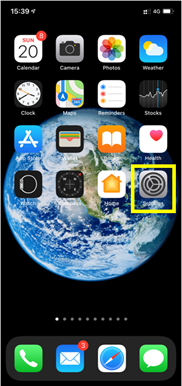
– Go to Settings:

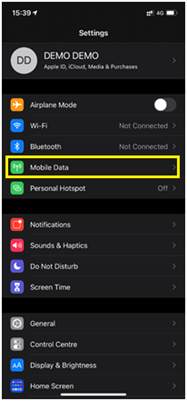
– Then select Mobile Data:

– Finally, under DATA PLANS, check to see if any plans are displayed:
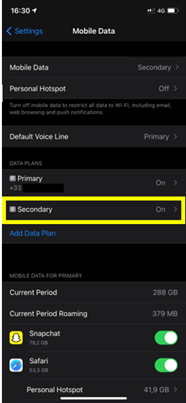
Note: if you have a physical SIM already inserted, then it will appear as the Main package/Primary number.

If a secondary package appears below the main package, select it :
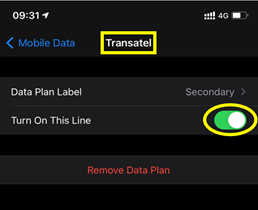
– You will then see the name of the installed eSIM profile: for example below, the installed profile is Ubigi (technical name displayed : ” Transatel “) and it is activated (green button on the right)



Looking for something specific?

Other frequently asked questions:

Will data latency be impacted by the IP location feature?

Why is my Ubigi connection not working?

For which countries is the IP location feature available?

In which countries is the IP location feature supported?

IP location feature: Do I need to install an additional app to benefit from this feature?

What is the difference between a Country of Residence IP address and a Regional IP address?

Is the IP location feature free?

IP location feature: which devices are supported?

Can I make phone calls with Ubigi eSIM data plans?

I am stuck on the "FINAL STEP" page, and the message "Waiting for Ubigi cellular connectivity" has been displayed for several minutes. How can I resolve this?

I restored my data on my (new) iPhone, but my eSIM profile does not work. What to do?

I am about to travel. How do I manage my Ubigi eSIM profile on my device ?

Resolve an issue with Ubigi eSIM profile on Android device

Resolve an issue with Ubigi eSIM profile on iPhone

iMessage does not work with my Ubigi eSIM profile. What to do ?

How do I know if my Ubigi eSIM profile is activated on my iPhone/iPad?

How to get and install a Ubigi eSIM profile on iPhone?

How to get and install a Ubigi eSIM profile on an Android device?

How to get and install a Ubigi eSIM profile on iPad?

How to get and install a new Ubigi eSIM profile on my Windows 10 or Windows 11 laptop or tablet?

How do I activate my Ubigi services with my Windows 10 or Windows 11 device equipped with a Ubigi physical SIM card?

How do I activate my Ubigi services with my Windows 10 or Windows 11 laptop or tablet equipped with a Ubigi eSIM?

How can I buy a data plan from the Ubigi application on iPhone or iPad?

How can I check if my Ubigi eSIM profile is installed on my iPad?

How do I know if my Ubigi eSIM profile is activated and ready to use on my Android device?

My Ubigi eSIM profile is installed and active on my iPhone/iPad but I don't have any network displayed, what can I do?

My eSIM Ubigi profile is installed and active on my iPhone/iPad, the network is displayed but I don't have access to the Internet, what should I do?

Mobile data is applied to the Ubigi eSIM profile on my iPhone/iPad but I can't access the internet, what can I do?

How do I know if my Ubigi profile is installed on my Android device?

My Ubigi eSIM profile is installed and active on my Android device but I don’t have any network displayed, what can I do?

I can not connect with my Ubigi eSIM

My Ubigi eSIM profile is installed and active on my Android device, the network is displayed but I don’t have access to the Internet, what should I do?

Mobile data is applied to the Ubigi eSIM profile on my Android device, but impossible to access the internet, what can I do?

Which mobile devices support Ubigi eSIM?

How do I know if my Ubigi eSIM profile is activated on my Windows 10 or Windows 11 device?

How do I check the APN configuration of my Ubigi eSIM on Windows 10 or Windows 11?

What is a one-off and a recurring Ubigi data plans?

My Ubigi eSIM profile is activated on my Windows 10 or Windows 11 device but I do not have a network, what should I do?

What is the best way to contact Ubigi support?

How to use Ubigi with a dual SIM device?

How to use tethering with a Windows 10 or Windows 11 device to share the Ubigi connectivity?

How to use tethering with an iPhone/iPad to share the Ubigi connectivity?

How to use tethering with an Android device to share the Ubigi connectivity?

I did not use my Ubigi data plan, can I get a refund?

My device does not show "Ubigi" as carrier name, is it normal?

How can I find the ICCID of my Ubigi eSIM?

How to set the APN for Ubigi eSIM?

The Ubigi antenna pictogram is not displayed in Japan, why?

How to reset my password for my Ubigi eSIM account?

How can I create my Ubigi account on iPad?

How can I create my Ubigi account on an Android device?

How can I create my Ubigi account on a Windows 10 or Windows 11 device?

How can I create my Ubigi account on iPhone?

How can I change my Ubigi password?

How can I check the remaining balance of my Ubigi eSIM?

How to delete my Ubigi account?

How can I buy a data plan from the Ubigi application on an Android device?

How can I buy a data plan from the Ubigi application by using a Windows 10 or Windows 11 device?

Do I need Wi-Fi to purchase a Ubigi data plan?

I paid for a Ubigi data plan but it does not appear in my account, what should I do?

I purchased the wrong data plan and did not use it, how can I change it?

How to get an invoice for my Ubigi data plan purchase?

I do not get the “eSIM – Mobile Data in my device” button on my iPad to install my Ubigi profile. Why and what should I do?

How to reinstall the Ubigi eSIM profile I deleted on my Windows 10 or Windows 11 device?

Does my Ubigi eSIM profile have a validity period and will expire one day?

I have a new Windows10 device. How can I reinstall my Ubigi eSIM profile on it?

How can I enable my Ubigi eSIM on my iPhone when I want to use it again?

I lost my device. How can I block my Ubigi eSIM account?

How can I disable my Ubigi eSIM on my iPhone when I travel or when I do not use it?

I have multiple  Ubigi eSIM profiles. Can I manage them all under one Ubigi account?

How can I enable my Ubigi eSIM profile on my iPad when I want to use it again?

How can I disable my Ubigi eSIM profile on my iPad when I travel or when I do not use it?

How can I disable my Ubigi eSIM on my Android device when I travel or when I do not use it?

How can I enable my Ubigi eSIM on my Android device when I want to use it again?

How to delete a Ubigi eSIM profile on iPhone/iPad?

How to delete a Ubigi eSIM profile on an Android device?

How to delete a Ubigi eSIM profile on a Windows 10 or Windows 11 device ?

How can I find PIN, PIN2 or PUK codes for my Ubigi eSIM?

Ubigi connection is not working. Should I disable any active DNS or VPN on my device?

Great Trustpilot stars Trustpilot
Trustpilot stars
Based on 39568 reviews on Trustpilot
4 stars Verified
Verified review
This user has been identified as a buyer
Ease of use
Ease of use. No signal drop throughout Italy.
customer, 15 Jun 2026
5 stars Verified
Verified review
This user has been identified as a buyer
Works everwhere I went and is fast.
customer, 15 Jun 2026
5 stars Verified
Verified review
This user has been identified as a buyer
Super easy to use
Super easy to use, no issues connecting. Overall great price for what I needed.
customer, 15 Jun 2026
5 stars Verified
Verified review
This user has been identified as a buyer
Easy installation!!
Easy installation!!
Martin Daudelin, 15 Jun 2026
5 stars Verified
Verified review
This user has been identified as a buyer
I feel safe when not on the ship thank…
I feel safe when not on the ship thank you
Christine Eddy, 15 Jun 2026
5 stars Verified
Verified review
This user has been identified as a buyer
Easy to activate and quick response…
Easy to activate and Ubigi’s response is very prompt if any issue is experienced.
Raymond, 15 Jun 2026
5 stars Verified
Verified review
This user has been identified as a buyer
Really Good experience
customer, 15 Jun 2026
5 stars Verified
Verified review
This user has been identified as a buyer
Highly recommend
Easy to install. Directions were clear and it worked as soon as I landed. with Perfect reception throughout the trip. Highly recommend!
Real customer, 15 Jun 2026
5 stars Verified
Verified review
This user has been identified as a buyer
The best ESIM
The best ESIM, easy to use and faster internet. I used it for my European’s trip!
Emily, 15 Jun 2026
4 stars Verified
Verified review
This user has been identified as a buyer
Good but Spotty at times
Spotty at times, but overall decent connection. Very slow to upload pics, especially if more than two. Still a much better plan than spending $10/day through Verizon.
Brenda, 15 Jun 2026
5 stars Verified
Verified review
This user has been identified as a buyer
It just works
It just works! The whole family has been using Ubigi for travel for 2 years now and never had a problem. So much better priced and reliable than conventional mobile service providers with all the addition roaming charges etc they add on. Been recommending to all our friends!
Kurt Schell, 15 Jun 2026
5 stars Verified
Verified review
This user has been identified as a buyer
No issues at all
No issues at all. Great price for unlimited data! Grazie
customer, 15 Jun 2026
4 stars Verified
Verified review
This user has been identified as a buyer
Tokyo Trip June 2026
There was this brief moment the entire system was down, it was about 3-4 hours. Thankfully we were already heading home and the directions on google maps were set. Other than that, we had a pleasant use of it!
Vince, 15 Jun 2026
5 stars Verified
Verified review
This user has been identified as a buyer
It was easy to buy and worked when I…
It was easy to buy and worked when I used it.
Rebecca Byrnes, 15 Jun 2026
5 stars Verified
Verified review
This user has been identified as a buyer
Simple easy process for me on a…
Simple easy process for me on a oneplus15. In both Japan and china.
Leon, 15 Jun 2026

Your message has been sent.
We’ll get back to you shortly.

We have taken into account your subscription to the newsletter