Verified review
This user has been identified as a buyer
Easy to buy
Easy to buy. Clear usage remaining
Good signal
customer, 11 Nov 2026
Verified
Verified review
This user has been identified as a buyer
Fast and stable connection
Fast and stable connection
Hedwin, 11 Nov 2026
Verified
Verified review
This user has been identified as a buyer
Seamless and simple to used.
It is seamless and simple to use.
Jodi V., 11 Nov 2026
Verified
Verified review
This user has been identified as a buyer
Absolutely brilliant !!
Absolutely brilliant !!
Chat gtp helped me and guided me through setting it up which was a little tricky for some reason
But soon as I landed in Japan everything worked and the service there was amazing, never any issues.
Again soon as I got back to
New Zealand it switched automatically back over so grateful for a great service thanks
customer, 11 Nov 2026
Verified
Verified review
This user has been identified as a buyer
I got support until my problem was…
I got support until my problem was solved. Great service mate...
customer, 11 Nov 2026
Verified
Verified review
This user has been identified as a buyer
Easy to install and use
Easy to install and use. Excellent coverage throughout Kyushu, Japan. We drove around most of the island and only lost coverage when going through a mountain pass.
Tardo Hammer, 11 Nov 2026
Verified
Verified review
This user has been identified as a buyer
Great Product
It worked quite well, as advertised. I purchased the 30-day, 25MB Europe plan. It automatically activated upon my first stop in Europe. I bought it specifically for the Czeck Republic, Slovakia, and Hungary and I was very happy with the performance. I used less than 6GB during my 14-day trip. The price was reasonable and installation on Samsung Galaxie was straightforward,
Said Abdel-Azim, 11 Nov 2026
Verified
Verified review
This user has been identified as a buyer
Just really easy to use
Just really easy to use
customer, 11 Nov 2026
Verified
Verified review
This user has been identified as a buyer
Excellent value, easy to use and hassle-free.
Purchasing and installing the eSIM was quick and straightforward. As soon as the plane landed in Japan, it automatically connected, so I was online straight away. The dashboard makes it really easy to keep track of data usage, too.
I've used just 1.15GB of my 10GB allowance in the first three days, so it's proving to be excellent value for money. The plan was very competitively priced, too.
I've been really impressed with how simple and hassle-free the whole process has been. I'd definitely recommend Ubigi!
Miss Christine Tucker, 11 Nov 2026
Verified
Verified review
This user has been identified as a buyer
Easy to purchase
Easy to purchase, great pricing, easy to set up, and worked every time I needed it to!
Rachel, 11 Nov 2026
Verified
Verified review
This user has been identified as a buyer
I really like the experience and the…
I really like the experience and the cost
customer, 11 Nov 2026
Verified
Verified review
This user has been identified as a buyer
Easy to buy an e-sim or upgrade
Easy to buy an e-sim or upgrade
customer, 11 Nov 2026
Verified
Verified review
This user has been identified as a buyer
Connectivity was not great in some areas
Connectivity was not great in some areas, but overall it was a good service for a fair price
Roberto, 11 Nov 2026
Verified
Verified review
This user has been identified as a buyer
Works well
Works well! I'm an exchange student in Denmark and don't have a Danish sim. I was able to keep my original phone number and still get data in Denmark for cheap. Would recommend
Tasha, 11 Nov 2026
Thank you
Your message has been sent. We’ll get back to you shortly.
Thank you
We have taken into account your subscription to the newsletter
How to check eSIM compatibility
Smartphones / Tablets:
Dial *#06#. → If an EID number appears, your device is eSIM-compatible.
Windows 10 / 11:
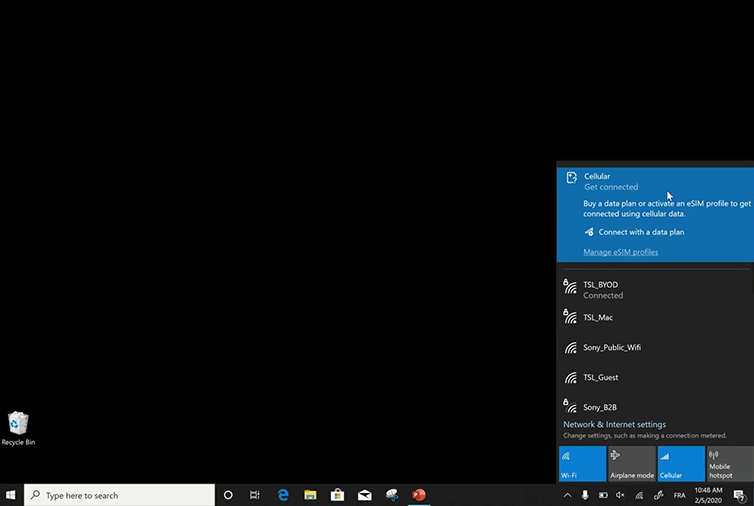
Press Windows+I. Go to “Network & Internet” → If you see "Cellular", your PC is eSIM-compatible.
How to check carrier unlocking
iPhone / iPad:
Go to Settings > General > About. Scroll to Carrier Lock. → If you see “No SIM restrictions”, your device is unlocked.
Android:
Go to Settings > Network & Internet > Mobile network. Disable Automatic network selection. → If multiple networks appear, your device is unlocked.












 How to check eSIM compatibility
 How to check carrier unlocking