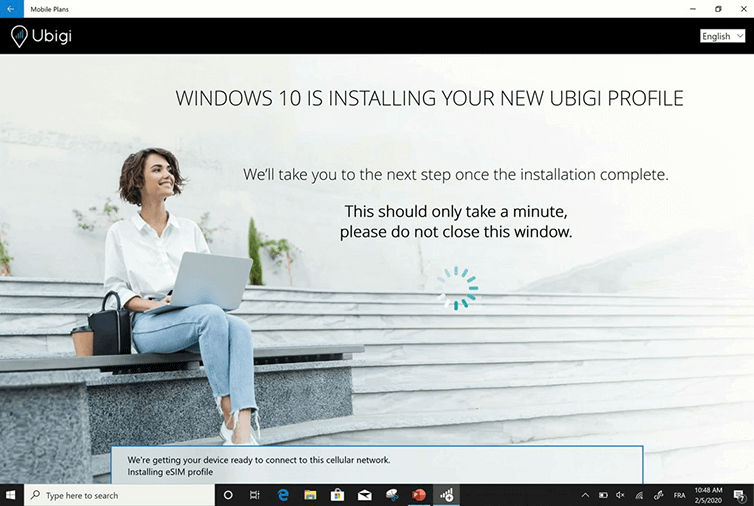
The installation of your profile starts automatically!
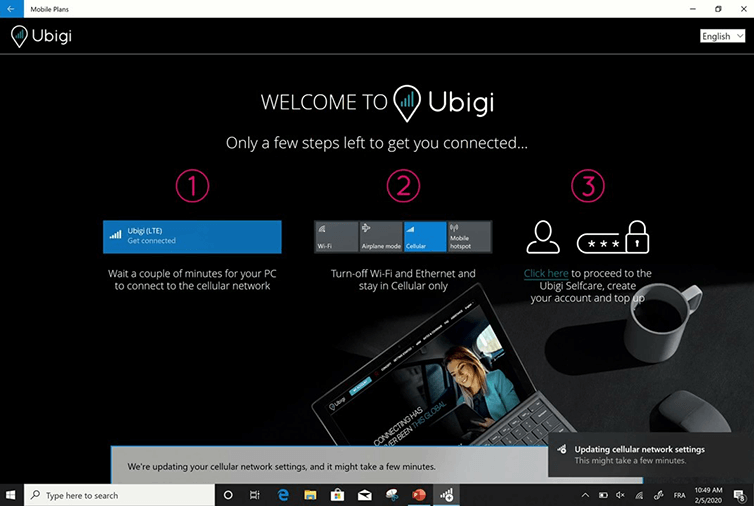
Your Ubigi eSIM profile is now installed!
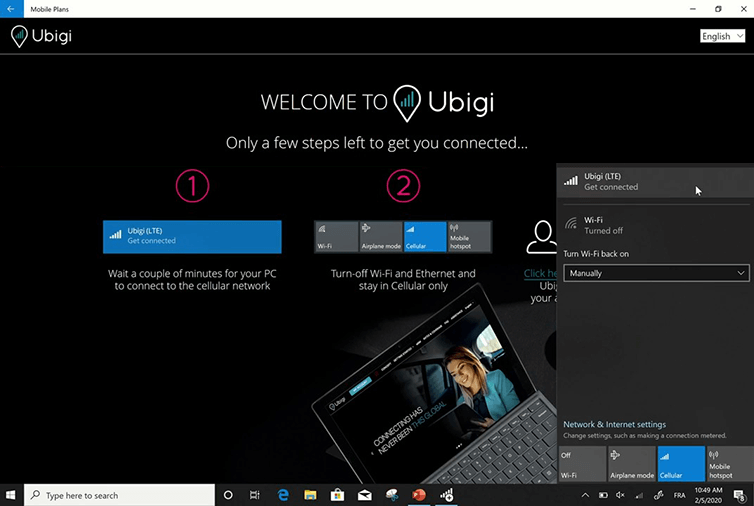
Wait a few seconds until your SIM has attached to the cellular network
Then switch off Wi-Fi and stay in Cellular mode only Click on “Ubigi (LTE) Get Connected”
Great
Based on 44855 reviews on
Verified
Verified review
This user has been identified as a buyer
First time using Unigi
First time using Unigi, very easy to use and working great in the UK. Very cost effective alternative for expensive Canadian phone roaming charges.
Susan, 02 Sep 2026
Verified
Verified review
This user has been identified as a buyer
Good experience travelling in Japan
Immediate access to internet when we landed in Japan. No major issues throughout our stay, but sometimes the connection was less stable, with lower speed.
Georgiana, 02 Sep 2026
Verified
Verified review
This user has been identified as a buyer
Works really well for international…
Works really well for international travel. I haven’t had any issues.
Donte, 02 Sep 2026
Verified
Verified review
This user has been identified as a buyer
Worked well right after landing in…
Worked well right after landing in Tokyo and basically everywhere we went. Nothing not complain about.
customer, 02 Sep 2026
Verified
Verified review
This user has been identified as a buyer
Excellent service
Excellent service! I used the Ubigi eSIM while travelling and always had a reliable connection. It was convenient, easy to use, and gave me peace of mind throughout my trip. I will definitely use Ubigi again for future travels and would happily recommend it to others.
Dalinda, 02 Sep 2026
Verified
Verified review
This user has been identified as a buyer
Reliable practice easy to use
Reliable practice easy to use
customer, 02 Sep 2026
Verified
Verified review
This user has been identified as a buyer
Great apps
Great apps! The only problem is when using the Google map slows the connections or delayed
customer, 02 Sep 2026
Verified
Verified review
This user has been identified as a buyer
EASY TO SET UP
Easy to set up , f
YAZMIN, 02 Sep 2026
Verified
Verified review
This user has been identified as a buyer
all went perfekt
all went perfekt, thanks for this app
Anton , 02 Sep 2026
Verified
Verified review
This user has been identified as a buyer
easy to buy and activate
easy to buy and activate, had a great experience
customer, 02 Sep 2026
Verified
Verified review
This user has been identified as a buyer
Very reasonable price
Very reasonable price. Great customer service. Easy to connect, reliable connection.
Mary, 02 Sep 2026
Verified
Verified review
This user has been identified as a buyer
Easy to set up and great coverage
Easy to set up and great coverage around multiple cities and while driving through mountains in Italy.
Nigel, 02 Sep 2026
Verified
Verified review
This user has been identified as a buyer
Setting up the connection was a breeze
Setting up the connection was a breeze, and I'm impressed with the excellent reception.
customer, 02 Sep 2026
Verified
Verified review
This user has been identified as a buyer
Totally recommend it
There was always coverage and signal strength was great, it was very easy to get it and it worked as it should
Elena, 02 Sep 2026
Verified
Verified review
This user has been identified as a buyer
Easy setup and fast connection
Easy setup and fast connection
customer, 02 Sep 2026
Thank you
Your message has been sent. We’ll get back to you shortly.
Thank you
We have taken into account your subscription to the newsletter
How to check eSIM compatibility
Smartphones / Tablets:
Dial *#06#. → If an EID number appears, your device is eSIM-compatible.
Windows 10 / 11:
Press Windows+I. Go to “Network & Internet” → If you see "Cellular", your PC is eSIM-compatible.
How to check carrier unlocking
iPhone / iPad:
Go to Settings > General > About. Scroll to Carrier Lock. → If you see “No SIM restrictions”, your device is unlocked.
Android:
Go to Settings > Network & Internet > Mobile network. Disable Automatic network selection. → If multiple networks appear, your device is unlocked.
You already have an eSIM in your cart.
Each order can only include one eSIM data plan.
If you choose to add a new one, the current plan will be removed. What would you like to do?










 How to check eSIM compatibility
 How to check carrier unlocking