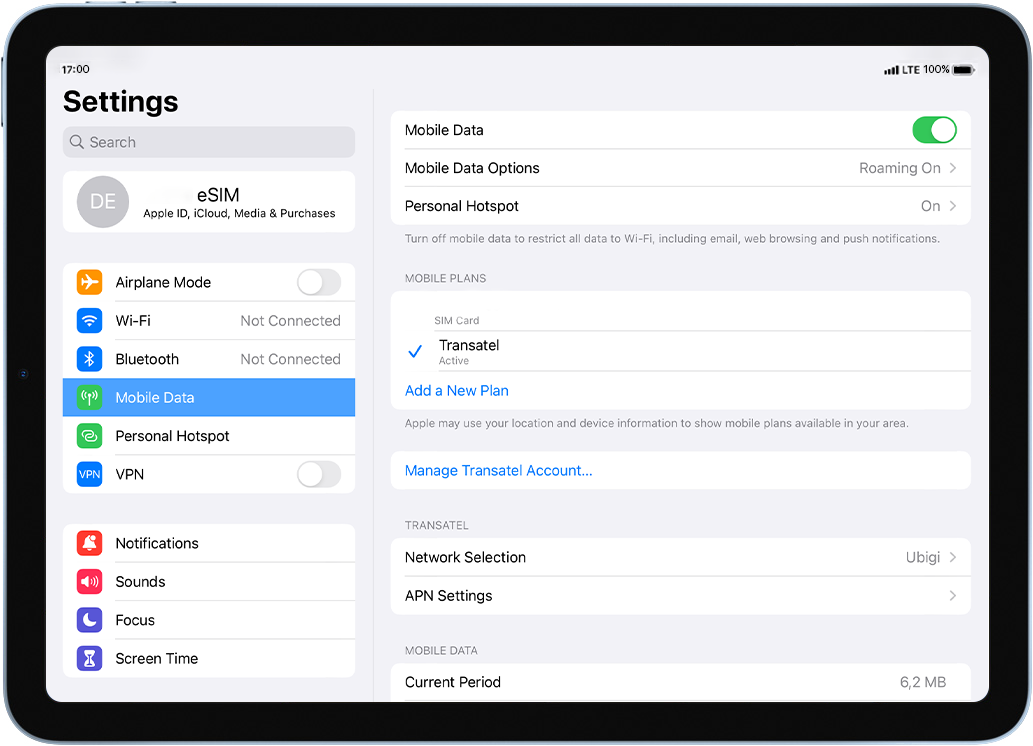
이동합니다: 설정 > 모바일데이터 > 상단의 모바일 데이터 활성화: 버튼이 켜져 있는지 (녹색) 확인합니다.
훌륭해
의 39310개 리뷰를 기준으로
검증됨
검증된 리뷰
이 사용자는 구매자로 확인되었습니다
I took out a World Plan
I took out a World Plan to cover Uzbekistan, Tajikistan, Kyrgyzstan and Kazakhstan. Other than Tajikistan which there was no connection at all, the other three worked well. Just thought you should know. Thanks again.
Shelley, 11 Jun 2026
검증됨
검증된 리뷰
이 사용자는 구매자로 확인되었습니다
My only concern is the process of…
My only concern is the process of ensuring that the settings are set up correctly
customer, 11 Jun 2026
검증됨
검증된 리뷰
이 사용자는 구매자로 확인되었습니다
The service is good and stable.
Dhr. Roman Schkliarov, 11 Jun 2026
검증됨
검증된 리뷰
이 사용자는 구매자로 확인되었습니다
The very best eSIM I have ever used
The very best eSIM I have ever used. Easy to load and pretty much automatic to use. Never faltered during my travels in Egypt . I would definitely recommend this eSIM to everybody . Best value around..
Steven Pownall, 11 Jun 2026
검증됨
검증된 리뷰
이 사용자는 구매자로 확인되었습니다
Super Reliable
Super Reliable
Lina, 11 Jun 2026
검증됨
검증된 리뷰
이 사용자는 구매자로 확인되었습니다
Very good
Used in Japan with 0 problems
Sylvain D., 11 Jun 2026
검증됨
검증된 리뷰
이 사용자는 구매자로 확인되었습니다
Easy to use and really good
Easy to use and really good and is not complicated
Netti, 11 Jun 2026
검증됨
검증된 리뷰
이 사용자는 구매자로 확인되었습니다
Good speed and always available
customer, 11 Jun 2026
검증됨
검증된 리뷰
이 사용자는 구매자로 확인되었습니다
Works well enough
Been able to make calls on data apps just fine
customer, 11 Jun 2026
검증됨
검증된 리뷰
이 사용자는 구매자로 확인되었습니다
I love it so far
I love it so far
DAVID, 11 Jun 2026
검증됨
검증된 리뷰
이 사용자는 구매자로 확인되었습니다
Easy to connect internet in a foreign…
Easy to connect internet in a foreign country
YY, 11 Jun 2026
검증됨
검증된 리뷰
이 사용자는 구매자로 확인되었습니다
Easy to use and good value
Joanna, 11 Jun 2026
검증됨
검증된 리뷰
이 사용자는 구매자로 확인되었습니다
Fast, competent, and friendly customer service
I've used I Ubigi several times on different trips to Japan. When I went to add my eSIM for my most recent trip, it wasn't loading correctly because I deleted it after my last trip and apparently eSIM providers remember your device ID and assume you'll keep the eSIM they assigned you during your first transaction.
Anyway, there was no way for me to activate it on my own, so I had to contact customer service. After I sent the email, I assumed I'd have to wait until at least the next day to hear back from them and then deal with going back and forth for hours until it was resolved, but no! To my surprise, someone (shoutout to Chaouki!) emailed back within minutes and had my connection activated after a few messages. I honestly couldn't believe it. Highly recommended!
Laurel, 11 Jun 2026
검증됨
검증된 리뷰
이 사용자는 구매자로 확인되었습니다
Speed and conection are sometimes big problem
For decent amount of money you get conected. Sometimes its slow.
customer, 11 Jun 2026
검증됨
검증된 리뷰
이 사용자는 구매자로 확인되었습니다
It was easy to connect based on the…
It was easy to connect based on the guidance by ChatGPT.
Takeshi, 11 Jun 2026
감사합니다
귀하의 메시지가 전송되었습니다. 곧 답변드리겠습니다.
감사합니다
귀하의 뉴스레터 구독을 고려했습니다.
eSIM 호환성 확인 방법
스마트폰 / 태블릿:
*#06# 입력. → EID 번호가 나오면 eSIM 지원 기기입니다.
Windows 10 / 11:
Windows+I 를 누르세요. “네트워크 및 인터넷”으로 이동하세요 → 셀룰러 네트워크가 보이면 PC가 eSIM을 지원합니다..
통신사 잠금 해제 여부 확인 방법
iPhone / iPad:
설정 > 일반 > 정보로 이동 통신사 잠금 항목까지 스크롤. → “SIM 제한 없음”이 표시되면 기기는 잠금 해제 상태입니다.
Android:
설정 > 네트워크 및 인터넷 > 모바일 네트워크 자동 네트워크 선택을 끄세요. → 여러 네트워크가 보이면 잠금 해제된 기기입니다.