Suriin kung naka-install ang iyong eSIM profile ay naka-install sa iyong device.
Suriin ang eSIM aktibasyon ng profile
Suriin kung naka-aktibo ang iyong eSIM profile ay naka-aktiba sa iyong device.
I-apply ang data sa eSIM profile
Siguraduhing na-apply ang data sa iyong Ubigi eSIM profile.
Suriin ang APN ng pagsasaayos
Siguraduhin na ang APN ay tama ang pag-set para sa ang iyong koneksyon sa Ubigi.
Suriin ang network ipakita
Suriin ang katayuan ng network para sa iyong koneksyon sa Ubigi.
Panghuling pagsusuri!
Suriin ang account paglikha at Pag-access sa Internet.
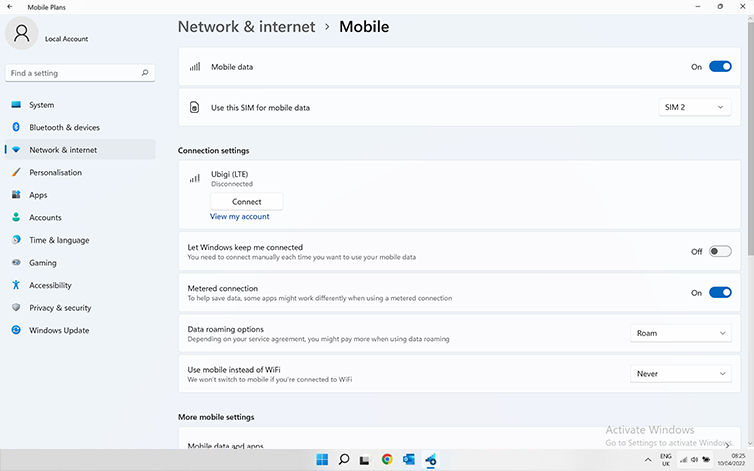
Ngayon ay i-apply ang Mobile data sa iyong Ubigi eSIM profile:
Pumunta sa: Start > Settings > Networks & Internet > Cellular(o Mobile). Sa drop-down menu sa itaas, piliin ang SIM na katugma ng iyong Ubigi eSIM profile. Upang masiguro na tama ang napili, makikita mo ang pangalang Ubigi na nakalista sa ilalim ng Connection settings kasama ang mga bar ng cellular network.
Siguraduhing nakatakda sa Roam ang Data roaming options:
Pumunta sa: Start > Settings > Networks & Internet > Cellular(o Mobile). Sa parehong pahina, sa patlang na Data roaming options, piliin ang Roam sa drop-down menu.
Mahalaga: kung maingat mong sinunod ang mga nakaraang hakbang, ang iyong Ubigi eSIM profile ay ginagamit na ngayon para sa koneksyon ng cellular data (at HINDI ang iyong pisikal na SIM card kung mayroon ka man). Nangangahulugan ito na hindi ka magkakaroon ng karagdagang gastos sa roaming dahil ang mga rate ng Ubigi ang iaaplay habang ginagamit ang konektividad ng cellular ng Ubigi. Sa anumang kaso, laging tiyakin na ang iyong Ubigi eSIM profile ang napili para sa cellular data upang maiwasan ang karagdagang gastos sa roaming habang nasa ibang bansa.
Magaling
Batay sa 49314 na mga pagsusuri sur
Na-verify
Na-verify na review
Ang user na ito ay kinilala bilang mamimili.
Hassle free
Hassle free, works well, clear information
Jörg, 23 Oct 2026
Na-verify
Na-verify na review
Ang user na ito ay kinilala bilang mamimili.
My texts won't go thru
My texts won't go thru
customer, 23 Oct 2026
Na-verify
Na-verify na review
Ang user na ito ay kinilala bilang mamimili.
Moto trip to Morocco
Excellent eSIM! Ubigi worked perfectly throughout my trip, with fast, reliable internet and easy setup. Highly recommended for stress-free travel!
Dennis, 22 Oct 2026
Na-verify
Na-verify na review
Ang user na ito ay kinilala bilang mamimili.
Great service
Great connection and good internet speed. Very happy with the service!
Ellie , 22 Oct 2026
Na-verify
Na-verify na review
Ang user na ito ay kinilala bilang mamimili.
Amazing Service!
This was fantastic! All of my friends on the trip were using their cell providers international networks and had no signal almost the entire time. I had all that signal I could use and it tethered with my computer it was fantastic! I used it in Italy and Germany. Thank you!
Audrey Monson, 22 Oct 2026
Na-verify
Na-verify na review
Ang user na ito ay kinilala bilang mamimili.
Very good experience with ubigi
Very good experience with ubigi
customer, 22 Oct 2026
Na-verify
Na-verify na review
Ang user na ito ay kinilala bilang mamimili.
It worked right away
It worked right away. I hope future uses won’t ba a bummer like some eSim’s.
Tony, 22 Oct 2026
Na-verify
Na-verify na review
Ang user na ito ay kinilala bilang mamimili.
One of the lowest cost providers for eSIM’s, particularly for travel
This is the first time using this company Ubigi.
On previous trips we would always order a pocket Wi-Fi but this year we decided to do what everybody else does and use an eSIM, supposedly it’s a lot more secure than a pocket Wi-Fi and it’s actually less expensive than one as well.
Pre-purchase I had a lot of questions and they were all answered by the Ubigi team through E-Mail. All my questions were always answered and if it wasn’t answered to my satisfaction, I would send another email and they would reply back and further clarify things.
So I purchased one eSIM so far installed it on my phone this was very simple at least with my iPhone 15 if you download the app and use the app to do it. I have not used the eSIM yet because our travels to Japan are upcoming. If there’s any issues beyond a more than positive experience while using the eSIM in Japan, I will be sure and update this review but so far I’m very happy with my interactions and purchase with Ubigi.
Bob, 22 Oct 2026
Na-verify
Na-verify na review
Ang user na ito ay kinilala bilang mamimili.
Ubigi's promise that the service would…
Ubigi's promise that the service would connect immediately upon arrival at my destination came through without any fuss.
customer, 22 Oct 2026
Na-verify
Na-verify na review
Ang user na ito ay kinilala bilang mamimili.
My wife and I had a great experience…
My wife and I had a great experience using Ubigi for our visit to Japan. The eSIM connected seamlessly for the most part with just one little moment of panic when we entered the country. We quickly realized it was operator error and once connected, it worked everywhere perfectly.
GL, 22 Oct 2026
Na-verify
Na-verify na review
Ang user na ito ay kinilala bilang mamimili.
Easy to install and great coverage
Easy to install and great coverage
Rafael Silveira, 22 Oct 2026
Na-verify
Na-verify na review
Ang user na ito ay kinilala bilang mamimili.
This is the easiest esim to use
This is the easiest esim to use! I lost service one day due to a regional outage (unknown at the time) and support was so fast to answer me and help me figure it out.
Lauren, 22 Oct 2026
Na-verify
Na-verify na review
Ang user na ito ay kinilala bilang mamimili.
Perfect service
Perfect service
customer, 22 Oct 2026
Na-verify
Na-verify na review
Ang user na ito ay kinilala bilang mamimili.
Thanks I was very happy by ubigi😊
Thanks I was very happy by ubigi😊
customer, 22 Oct 2026
Na-verify
Na-verify na review
Ang user na ito ay kinilala bilang mamimili.
Easy and affordable
Purchasing was easy, installation was just as easy. Reliable connections while traveling in Japan. Good experience.
Stephen Bramwell, 22 Oct 2026
Salamat
Naipadala na ang iyong mensahe. Makikipag-ugnayan kami sa iyo sa lalong madaling panahon.
Salamat
Isinasaalang-alang na namin ang iyong pag-subscribe sa newsletter.
Palitan ng bagong plano
Mga smartphone/mga tablet:
I-dial ang *#06#. → Kung lumitaw ang isang EID na numero, eSIM-compatible ang iyong aparato.
Windows 10 / 11:
Pindutin ang Windows+I. Pumunta sa "Network at Internet" → Kung nakikita mo ang "Cellular", eSIM-compatible ang iyong PC.
Paano suriin ang pag-unlock ng carrier
iPhone / iPad:
Pumunta sa Mga Setting > Pangkalahatan > Tungkol sa Mag-scroll sa Carrier Lock. → Kung makikita mo ang Walang mga paghihigpit sa SIM, naka-unlock ang iyong aparato.
Android:
Pumunta sa Mga Setting > Network at Internet > Mobile network. I-disable ang Awtomatikong pagpili ng network. → Kung lumalabas ang maraming network, naka-unlock ang iyong device.
Mayroon ka nang eSIM sa iyong cart.
Bawat order ay maaari lamang maglaman ng isang eSIM data plan.
Kung pipiliin mong magdagdag ng bago, matatanggal ang kasalukuyang plano. Ano ang nais mong gawin?








 Palitan ng bagong plano
  Paano suriin ang pag-unlock ng carrier