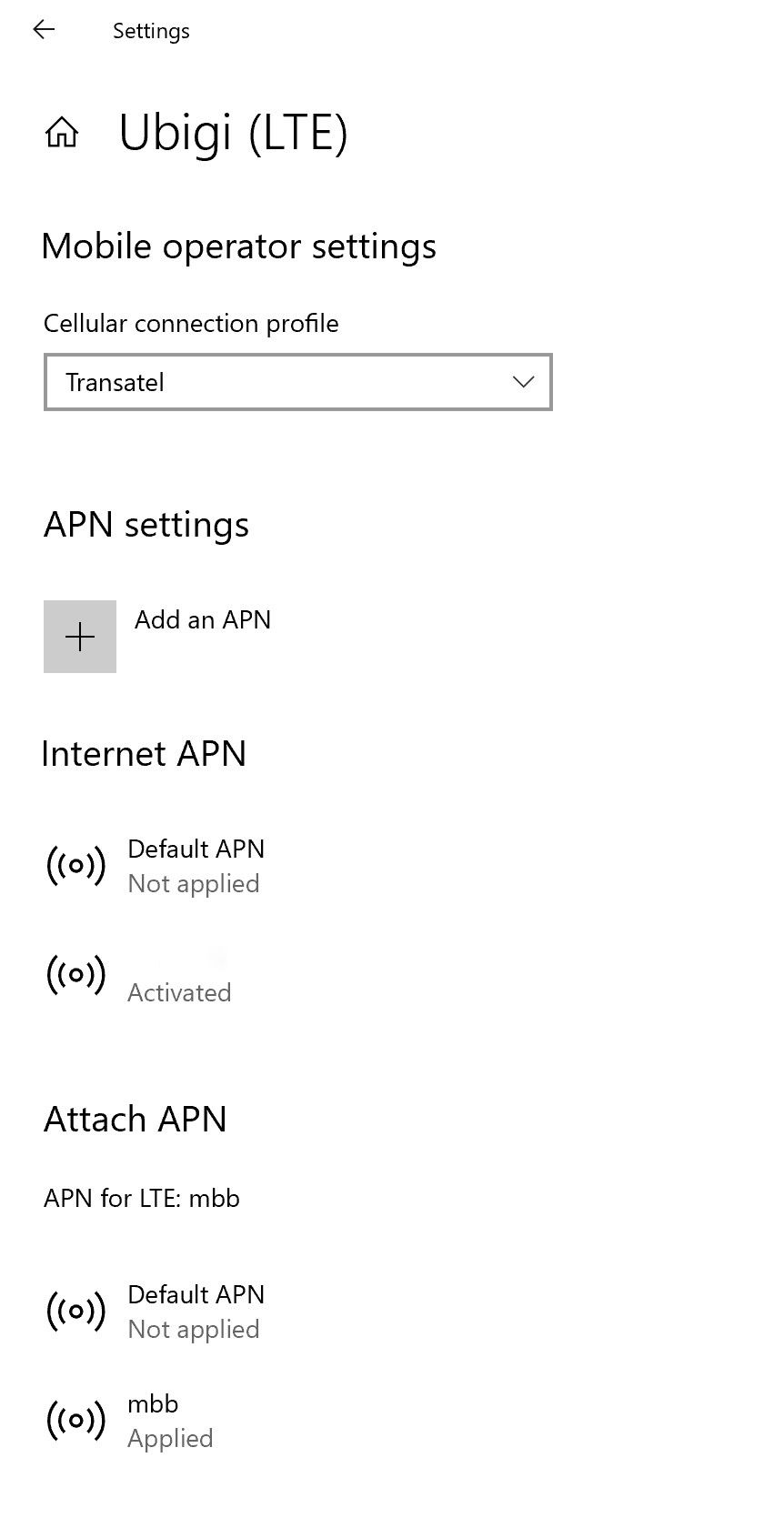
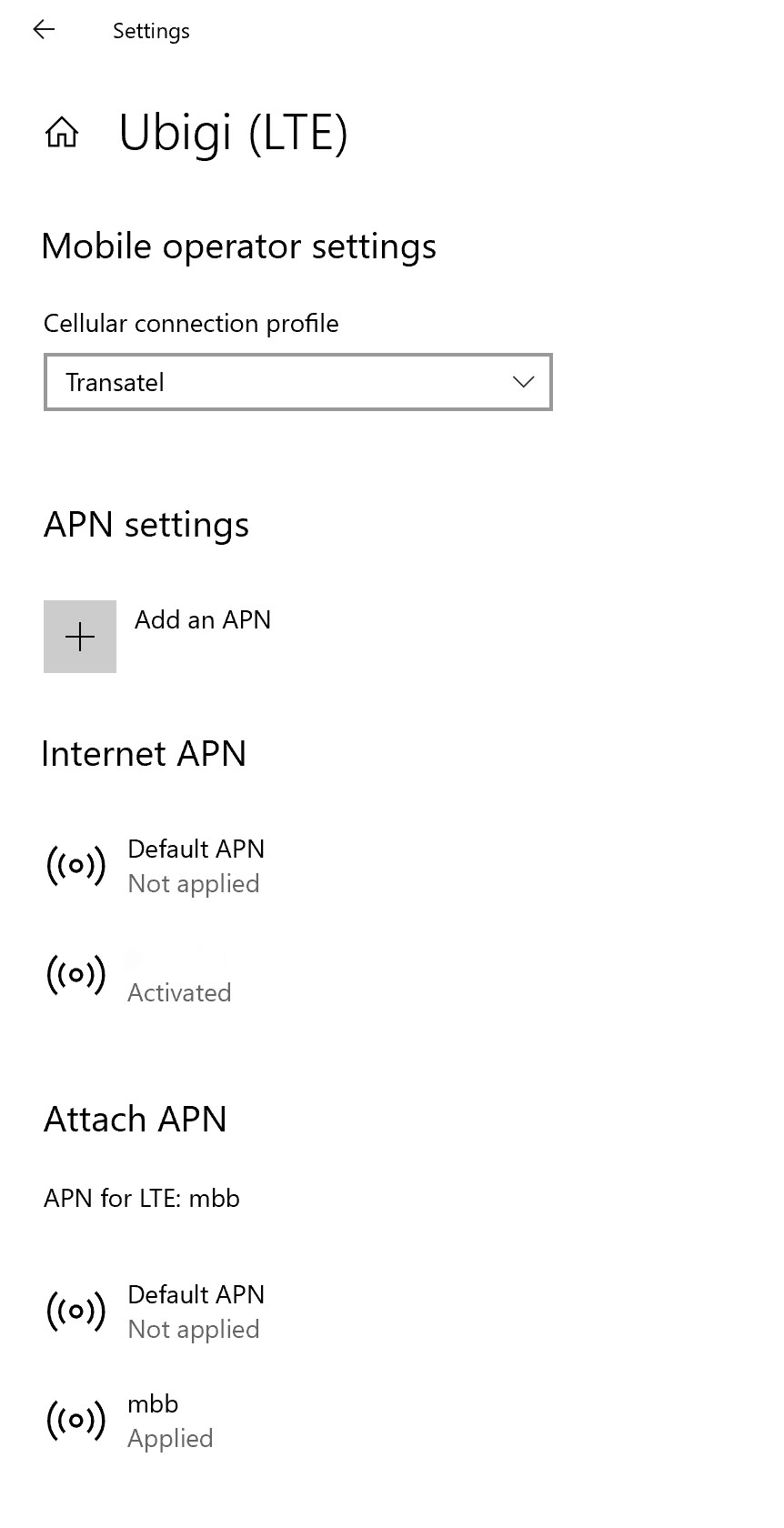
이동합니다: 설정 > 네트워크 및 인터넷 > 모바일로 이동한 다음 이동통신사 설정으로 이동합니다. 인터넷 APN 또는 APN 연결 목록에 APN mbb가 나타나면 5단계로 바로 이동합니다.
Ubigi APN이 나타나지 않으면 다음 단계로 이동합니다.
Ubigi APN이 나타나지 않으면 “APN 추가”를 클릭하고 입력합니다:
– 프로필 이름: Ubigi – APN: mbb
“이 프로필 적용” 확인란을 선택하고 저장을 클릭합니다.
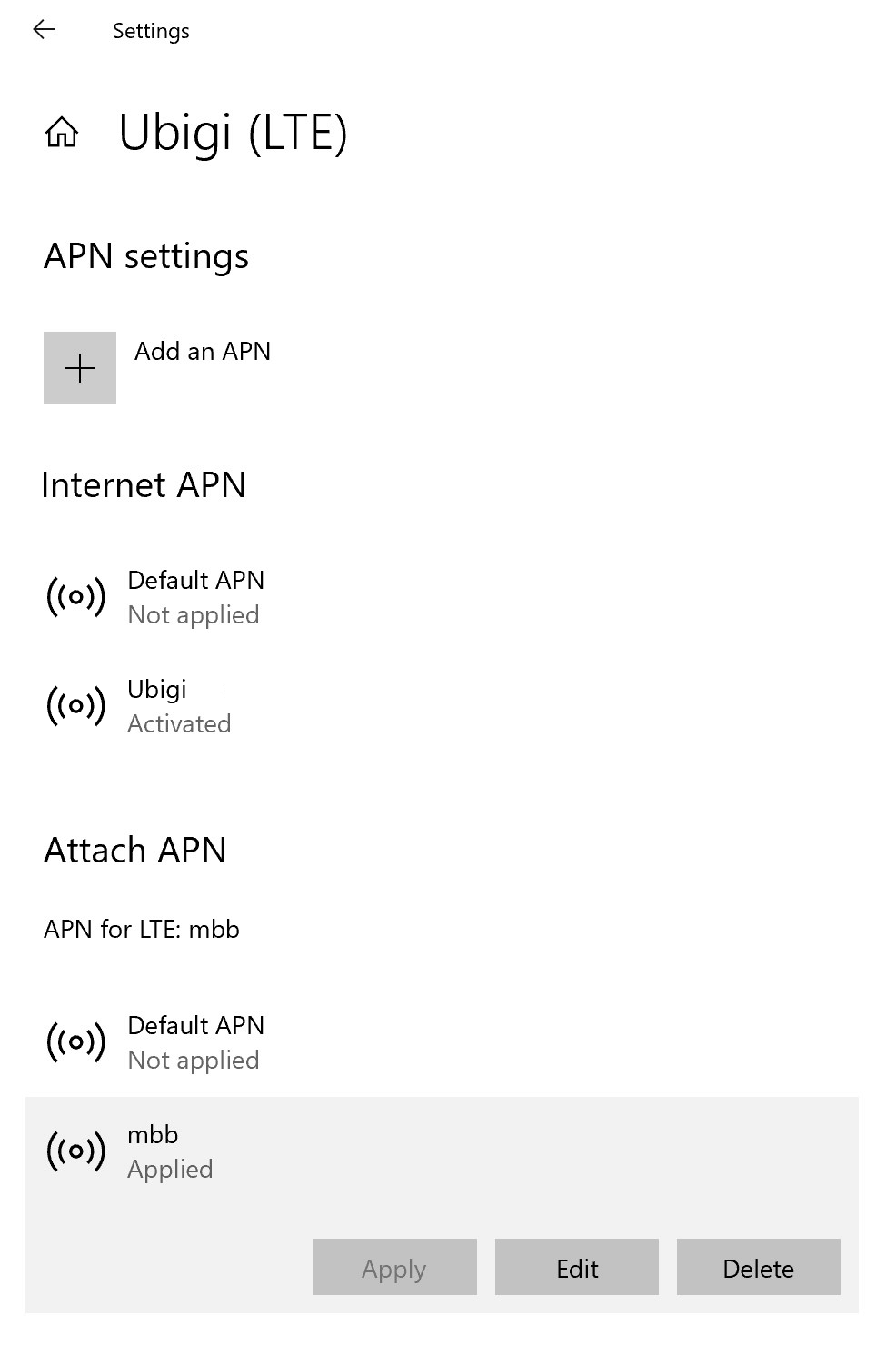
이제 Ubigi APN이 “적용됨”으로 표시되는지 확인합니다.
그렇지 않은 경우 클릭하여 더 많은 옵션을 표시하고 적용 버튼을 클릭합니다.
훌륭해
의 35975개 리뷰를 기준으로
검증됨
검증된 리뷰
이 사용자는 구매자로 확인되었습니다
Fast speed and coverage are incredible.
Fast speed and coverage are incredible.
customer, 29 Apr 2026
검증됨
검증된 리뷰
이 사용자는 구매자로 확인되었습니다
The connection was amazing the whole…
The connection was amazing the whole trip in Switzerland across multiple cities, and the price was so reasonable!
Sophia Grande, 29 Apr 2026
검증됨
검증된 리뷰
이 사용자는 구매자로 확인되었습니다
great connectivity
great connectivity, seamless transition in roaming, strong signal, no disruption
Sanjay Varman, 29 Apr 2026
검증됨
검증된 리뷰
이 사용자는 구매자로 확인되었습니다
It worked quite well
It worked quite well despite being in a difficult country.
I will use them again.
Customer, 29 Apr 2026
검증됨
검증된 리뷰
이 사용자는 구매자로 확인되었습니다
eSIM in Italy
I travelled to Italy recently and used the Esim with unlimited data, installation fairly straightforward. I had a bit of an issue but that was more the user error on my part.
The coverage and speed that I received was very good, no issues, I will I will definitely use Ubigi in future.
Vic Tatur, 29 Apr 2026
검증됨
검증된 리뷰
이 사용자는 구매자로 확인되었습니다
Travel
Never hade sim before and first time user found it useful
Leesa Guelfi, 29 Apr 2026
검증됨
검증된 리뷰
이 사용자는 구매자로 확인되었습니다
Worked perfectly
Worked perfectly, when I arrived I activated and connected, no stress…which is good when travelling 😊
Phil, 29 Apr 2026
검증됨
검증된 리뷰
이 사용자는 구매자로 확인되었습니다
THE BEST eSIM
THE BEST eSIM
INDIRAAMILA, 29 Apr 2026
검증됨
검증된 리뷰
이 사용자는 구매자로 확인되었습니다
Very good service
Very good service
customer, 29 Apr 2026
검증됨
검증된 리뷰
이 사용자는 구매자로 확인되었습니다
A conexão é muito boa
A conexão é muito boa.
Me ajudou muito nas viagens
customer, 29 Apr 2026
검증됨
검증된 리뷰
이 사용자는 구매자로 확인되었습니다
Reliable
Reliable. Clear. No drop calls
APJacoba, 29 Apr 2026
검증됨
검증된 리뷰
이 사용자는 구매자로 확인되었습니다
Outstanding service
I'm using Ubigi during our trip around Europe. It has been perfect. Coverage has been faultless.
Would highly recommend
Denise, 29 Apr 2026
검증됨
검증된 리뷰
이 사용자는 구매자로 확인되었습니다
Good connexion.
Good connexion.
Yetou Thiam, 29 Apr 2026
검증됨
검증된 리뷰
이 사용자는 구매자로 확인되었습니다
Good value and worked reliably
Good value and worked reliably (and much more reliably than my friend’s cell phone plan). The process for setting it up wasn’t difficult, but I was still hesitant if I was doing it correctly so I wish there was an even more detailed/clear guide. Ubigi worked well in Tokyo, Kyoto, Osaka, and even Shimoda Japan. I used 3.77 GB out of 10 on a 10 day trip, and that included downloading three Netflix shows before my return flight in April 2026. I used the e-sim primarily for navigation, translation, and texting friends and family back home.
customer, 29 Apr 2026
검증됨
검증된 리뷰
이 사용자는 구매자로 확인되었습니다
Perfect connectivity
Perfect connectivity, easy to use and efficient. There were no complications!
Mandy, 29 Apr 2026
감사합니다
귀하의 메시지가 전송되었습니다. 곧 답변드리겠습니다.
감사합니다
귀하의 뉴스레터 구독을 고려했습니다.
eSIM 호환성 확인 방법
스마트폰 / 태블릿:
*#06# 입력. → EID 번호가 나오면 eSIM 지원 기기입니다.
Windows 10 / 11:
Windows+I 를 누르세요. “네트워크 및 인터넷”으로 이동하세요 → 셀룰러 네트워크가 보이면 PC가 eSIM을 지원합니다..
통신사 잠금 해제 여부 확인 방법
iPhone / iPad:
설정 > 일반 > 정보로 이동 통신사 잠금 항목까지 스크롤. → “SIM 제한 없음”이 표시되면 기기는 잠금 해제 상태입니다.
Android:
설정 > 네트워크 및 인터넷 > 모바일 네트워크 자동 네트워크 선택을 끄세요. → 여러 네트워크가 보이면 잠금 해제된 기기입니다.








 eSIM 호환성 확인 방법
 통신사 잠금 해제 여부 확인 방법