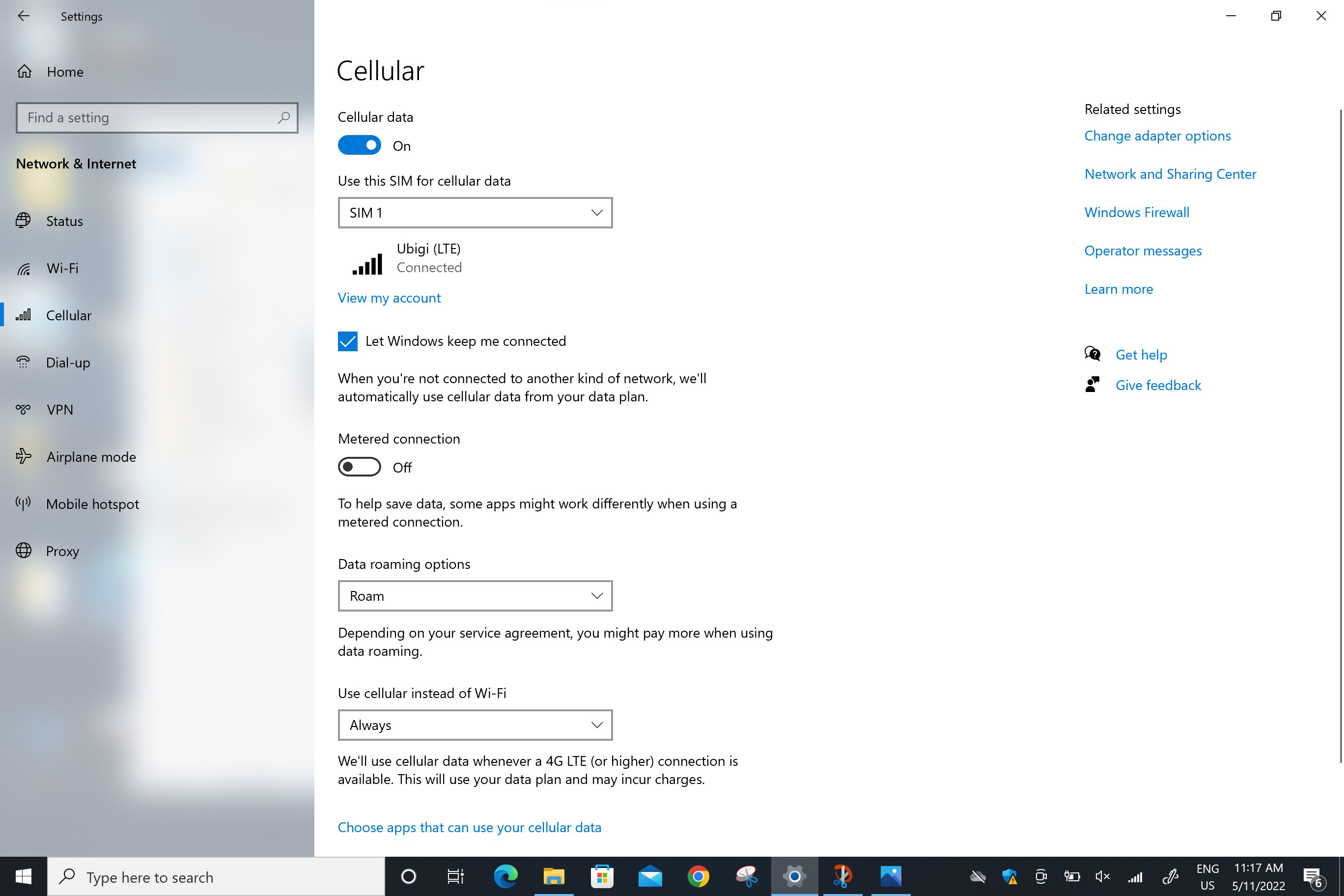
다음으로 이동합니다: 시작 > 설정 > 네트워크 및 인터넷 > 셀룰러로 이동합니다. “데이터 로밍 옵션” 필드에서 로밍을 선택합니다.
경고: 이전 단계를 주의 깊게 따랐다면, 이제 셀룰러 데이터 연결에 물리적 SIM 카드나 다른 eSIM 프로필이 아닌 Ubigi eSIM 프로필이 사용됩니다 (실제 SIM 카드가 있는 경우). 즉, Ubigi 셀룰러 연결을 사용하는 동안에는 Ubigi 요금이 적용되므로 추가 로밍 비용이 발생하지 않습니다. 어떤 경우든 해외에서 추가 로밍 비용을 피하려면 항상 셀룰러 데이터에 대해 Ubigi eSIM 프로필이 선택되어 있는지 확인하세요.
.screen 이미지 { 너비:58rem; 높이:자동; }
훌륭해
의 49267개 리뷰를 기준으로
검증됨
검증된 리뷰
이 사용자는 구매자로 확인되었습니다
After an initial hiccup connecting all…
After an initial hiccup connecting all went very well. Great coverage in Japan
Kathleen Cummins, 22 Oct 2026
검증됨
검증된 리뷰
이 사용자는 구매자로 확인되었습니다
I do not seem to be able to make phone…
I do not seem to be able to make phone calls. Perhaps it is because I am on an island in Japan.
Sue H, 22 Oct 2026
검증됨
검증된 리뷰
이 사용자는 구매자로 확인되었습니다
Great service and easy to use app!
Great service and easy to use app!
customer, 22 Oct 2026
검증됨
검증된 리뷰
이 사용자는 구매자로 확인되었습니다
Went to Tokyo Disney and Disney sea
Went to Tokyo Disney and Disney sea. I wanted the most reliable connection for getting those dpa passes! Ubigi came through big time. Thank you! The connection made my Disney dreams come true!
customer, 22 Oct 2026
검증됨
검증된 리뷰
이 사용자는 구매자로 확인되었습니다
efficiency
efficiency, direct connexion, visibility of consumption
customer, 22 Oct 2026
검증됨
검증된 리뷰
이 사용자는 구매자로 확인되었습니다
Ease of accessing everything
Ease of accessing everything
CM, 22 Oct 2026
검증됨
검증된 리뷰
이 사용자는 구매자로 확인되었습니다
Easy to use
Easy to use, good coverage and fast download speed
Sean Lynch, 22 Oct 2026
검증됨
검증된 리뷰
이 사용자는 구매자로 확인되었습니다
Great connection
Great connection. Even in subway and train stations
S. COLE, 22 Oct 2026
검증됨
검증된 리뷰
이 사용자는 구매자로 확인되었습니다
Easy to connect. Go Ubigi
Easy to connect
So far no.problem
Aruna, 22 Oct 2026
검증됨
검증된 리뷰
이 사용자는 구매자로 확인되었습니다
ALWAYS CONNECTED
ALWAYS CONNECTED
JACOBA, 22 Oct 2026
검증됨
검증된 리뷰
이 사용자는 구매자로 확인되었습니다
Quick and easy
Quick and easy
David Tadd, 22 Oct 2026
검증됨
검증된 리뷰
이 사용자는 구매자로 확인되었습니다
Ubigi E-sim - easy to use
My wife and me traveled to Europe to atleast 5 different countries. We moved to Ubigi from the earlier e-sim provider we used.
Ubigi coverage is excellent and the cost is reasonable. You can track your usage through the Ubigi App and top up is just a click.
Highly recommend
Col Dr Narayan, 22 Oct 2026
검증됨
검증된 리뷰
이 사용자는 구매자로 확인되었습니다
Seamless and great coverage
Seamless and great coverage, whether in the big cities or hills areas. Highly recommend this eSIM
Glen, 22 Oct 2026
검증됨
검증된 리뷰
이 사용자는 구매자로 확인되었습니다
The process was fairly simple
The process was fairly simple. Easy installation and very dependable!
customer Dan, 22 Oct 2026
검증됨
검증된 리뷰
이 사용자는 구매자로 확인되었습니다
No hidden costs
No hidden costs, easy set up and top-up, great local and international connectivity
Federica Bando, 22 Oct 2026
감사합니다
귀하의 메시지가 전송되었습니다. 곧 답변드리겠습니다.
감사합니다
귀하의 뉴스레터 구독을 고려했습니다.
eSIM 호환성 확인 방법
스마트폰 / 태블릿:
*#06# 입력. → EID 번호가 나오면 eSIM 지원 기기입니다.
Windows 10 / 11:
Windows+I 를 누르세요. “네트워크 및 인터넷”으로 이동하세요 → 셀룰러 네트워크가 보이면 PC가 eSIM을 지원합니다..
통신사 잠금 해제 여부 확인 방법
iPhone / iPad:
설정 > 일반 > 정보로 이동 통신사 잠금 항목까지 스크롤. → “SIM 제한 없음”이 표시되면 기기는 잠금 해제 상태입니다.
Android:
설정 > 네트워크 및 인터넷 > 모바일 네트워크 자동 네트워크 선택을 끄세요. → 여러 네트워크가 보이면 잠금 해제된 기기입니다.






 eSIM 호환성 확인 방법
 통신사 잠금 해제 여부 확인 방법