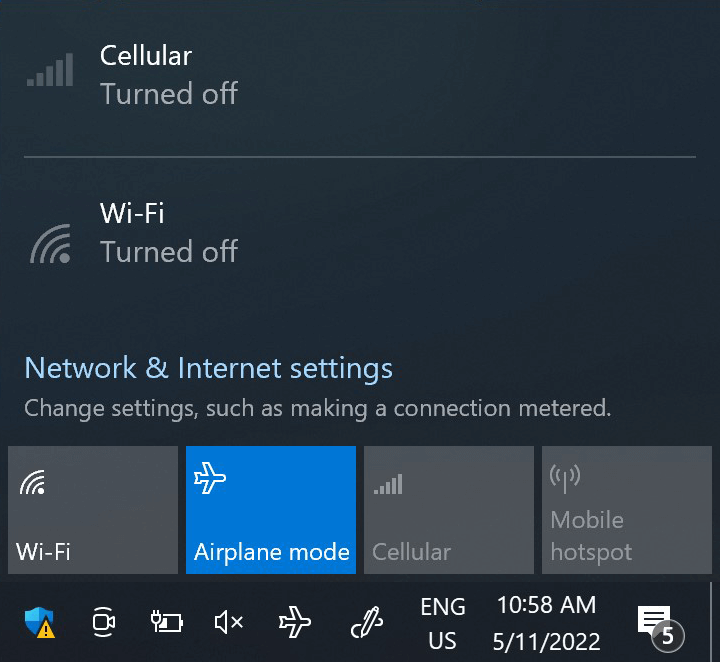
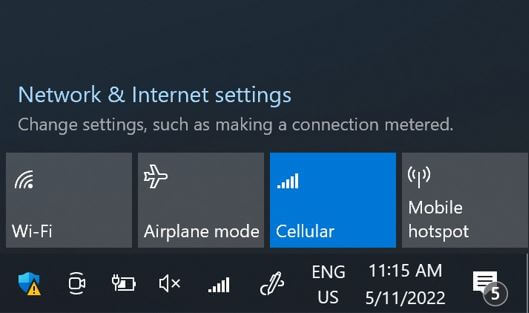
이 단계에서 ‘비행 모드’를 5초 동안 켰다가 끕니다. 이 작업을 수행하면 디바이스에서 네트워크 연결이 새로 고쳐집니다.
네트워크에 연결되면 하단에 네트워크 아이콘이 표시됩니다.
네트워크 아이콘이 없는 경우 다음 단계에 따라 네트워크를 수동으로 선택하세요. 네트워크가 표시되면 다음 단계로 이동합니다.
참고: 수동 선택 후에도 여전히 네트워크 막대가 표시되지 않거나 )가 표시되는 경우, 고객 지원팀에 문의하여 추가 도움을 요청하고 eSIM 프로필의 ICCID를 알려주세요.
훌륭해
의 29525개 리뷰를 기준으로
검증됨
검증된 리뷰
이 사용자는 구매자로 확인되었습니다
5 stars!
Ubigi has made it easy for me and my partner to stay connected online at such an affordable price when we travelled to Hong Kong. I definitely recommend!
Traveller, 08 Dec 2025
검증됨
검증된 리뷰
이 사용자는 구매자로 확인되었습니다
Had trouble with the initial…
Had trouble with the initial activation, all of the anticipated functionality was not there.
Ended up deleting and restarting which generated some issues as well. Even though I thought I had requested phone functionality, unable to make international or calls within US.
However access linked to data usage was good.
ES, 08 Dec 2025
검증됨
검증된 리뷰
이 사용자는 구매자로 확인되었습니다
First time user
First time user. Wasn’t sure how it would work exactly as I had actually layer 3 different country dat plans for trips happening over a couple of months. Well first one worked perfectly, no issues, no worries. I’m sure next two be just fine too.
Overall very impressive!!
Nicky Fox, 08 Dec 2025
검증됨
검증된 리뷰
이 사용자는 구매자로 확인되었습니다
Easy to use
Easy to use - and works well in Asia
Wendy, 08 Dec 2025
검증됨
검증된 리뷰
이 사용자는 구매자로 확인되었습니다
It works.!!
I’m very happy
Eva, 08 Dec 2025
검증됨
검증된 리뷰
이 사용자는 구매자로 확인되었습니다
Perfect
Easy to instal once you have an app. Godd internet
Dragana Stikic, 08 Dec 2025
검증됨
검증된 리뷰
이 사용자는 구매자로 확인되었습니다
Very easy to use and so practical.
Very easy to use, good instructions and clear pricing.
Phil, 08 Dec 2025
검증됨
검증된 리뷰
이 사용자는 구매자로 확인되었습니다
Easy to purchase and set up
Easy to purchase and set up. Hassle free connection on arrival to Japan.
Tina - Aust, 08 Dec 2025
검증됨
검증된 리뷰
이 사용자는 구매자로 확인되었습니다
Very good
Very good, reliable
customer, 08 Dec 2025
검증됨
검증된 리뷰
이 사용자는 구매자로 확인되었습니다
All aspects from downloading to use…
All aspects from downloading to use were easy
customer, 08 Dec 2025
검증됨
검증된 리뷰
이 사용자는 구매자로 확인되었습니다
Ubigi worked flawlessly
Ubigi worked flawlessly. I purchased the eSIM I needed for a great price, activated it in a minute and it began working quickly. I had purchased an Airalo eSIM for Spain and it was refusing to connect to the network on both of our phones, and after 2 hours of trying everything and waiting 1 hour for customer service they didn’t even help. I’ll be using Ubigi from now on, works how it’s supposed to.
Benji, 08 Dec 2025
검증됨
검증된 리뷰
이 사용자는 구매자로 확인되었습니다
Really good internet for a good price!
customer, 08 Dec 2025
검증됨
검증된 리뷰
이 사용자는 구매자로 확인되었습니다
We were always connected with fast…
We were always connected with fast internet.
I will have no hesitation to use this company in the future.
Doudou, 08 Dec 2025
검증됨
검증된 리뷰
이 사용자는 구매자로 확인되었습니다
Great E-Sim experience
Great e-SIM experience during my whole Europe trip with a fast Internet connection.
Ranmuni De Zoysa, 08 Dec 2025
검증됨
검증된 리뷰
이 사용자는 구매자로 확인되었습니다
Works perfectly in Japan
Works perfectly in Japan, so easy tu use !
customer, 08 Dec 2025
감사합니다
귀하의 메시지가 전송되었습니다. 곧 답변드리겠습니다.
감사합니다
귀하의 뉴스레터 구독을 고려했습니다.
기기가 eSIM을 지원하는지 확인하는 방법
eSIM 호환성 확인
스마트폰 및 셀룰러 태블릿:
(*#06#)을 누르세요. EID 번호가 표시되면, 기기는 eSIM을 지원합니다.
노트북 (Windows 10/11):
오른쪽 하단의 빠른 설정 을 여세요. 셀룰러 설정 이 보이면, 노트북이 eSIM을 지원하는 것입니다.
통신사 잠금 해제 여부 확인
iOS에서:
설정 > 일반 > 정보 > 통신사 잠금(Carrier Lock)으로 이동하세요. "SIM 제한 없음" 이라고 표시되면, 기기가 잠금 해제된 상태입니다.
Android에서:
설정 > 네트워크 및 인터넷 > 모바일 네트워크로 이동하세요. 자동 네트워크 선택을 끄세요. 여러 개의 네트워크가 보이면, 기기는 잠금 해제된 것입니다. 하나만 보이거나 오류가 발생하면, 잠겨 있을 수 있습니다.