Check if your eSIM profile is installed on your device.
Check eSIM profile activation
Check if your eSIM profile is activated on your device.
Apply data to eSIM profile
Ensure data is applied to your Ubigi eSIM profile.
Check APN configuration
Ensure that the APN is correctly set for your Ubigi connectivty.
Check network display
Check the network status for your Ubigi connectivity.
Final checks!
Check account creation and Internet access.
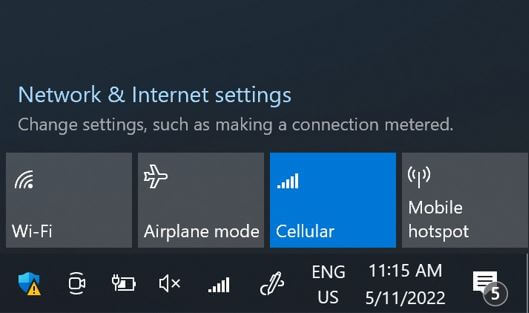
On the network flyout, ensure that:
Cellular (or Mobile) is activated. Wi-Fi is deactivated.
Great
Based on 32330 reviews on
Verified
Verified review
This user has been identified as a buyer
Easy connection
I purchased another e-SIM provider, but ended up not being able to use it, not sure why, and that provider was helpful and ended up providing me with a refund. Then, I searched for which e-SIM provider is better to use in Japan, Ubigi pop-up, which I purchased. The connection was easy. I was worried that I couldn't get it connected because usually, I have my husband do that for me. However, surprisingly, it was very easy to connect. Good thing that it was connected just fine, so I won't feel lost without an internet connection, which I might not be able to connect with my family back home. Just a small piece of feedback is that sometimes I would lose the connections, but it will get back on again after a few minutes.
Selvia Tju, 05 Mar 2026
Verified
Verified review
This user has been identified as a buyer
It just works
It just works
Hüseyin Sarıkaya, 05 Mar 2026
Verified
Verified review
This user has been identified as a buyer
Got the 10gb for a 2 week visit to…
Got the 10gb for a 2 week visit to Vietnam. Worked really well everywhere including Pu Long . Started automatically when I landdd at the airport. Very simple and easy. Would highly recommend.
Debbie, 05 Mar 2026
Verified
Verified review
This user has been identified as a buyer
Easy to set up and connectivity was…
Easy to set up and connectivity was top-notch!
Jay Gatchalian, 05 Mar 2026
Verified
Verified review
This user has been identified as a buyer
Works without one problem
Works without one problem, simple as that
Jan H Austnes, 05 Mar 2026
Verified
Verified review
This user has been identified as a buyer
Installation was a breeze, but still a few minor issues
Installation was a breeze the first time! Top-up less so, it took a while to install the refill.
It was not easy to find how much data I had used. There was no warning the first time that I had run out, yet there was a notice just before the refill ran out. Odd....
Alex H, 05 Mar 2026
Verified
Verified review
This user has been identified as a buyer
I just used this in Japan and it was…
I just used this in Japan and it was very reliable. I really didn’t have connection issues while in country and it was affordable. Highly recommend. Thanks Ubigi!
Kira, 05 Mar 2026
Verified
Verified review
This user has been identified as a buyer
I contracted Holafly for Japan and with…
I contracted Holafly for Japan and with 2 eSIM in 2 phones it did not work despite support trying to help. So I contracted Ubigi on the fly and it worked perfectly straight away, I also did live streaming without trouble. Completely recommandable.
Eric, 05 Mar 2026
Verified
Verified review
This user has been identified as a buyer
A wonderful purchasing experience
1.Quick connection, good signal and fast speed.
2.Easy to set up and use.
3.Excellent after-sales service. I ran into a little hitch when activating the esim, so I contacted the after-sales service. I'm pleased that it solved within minutes. Awesome!
Poran, 05 Mar 2026
Verified
Verified review
This user has been identified as a buyer
Very good thank you
Very good thank you
customer, 05 Mar 2026
Verified
Verified review
This user has been identified as a buyer
Easy to use at the same time the…
Easy to use at the same time the connection was absolutely perfect!
customer, 05 Mar 2026
Verified
Verified review
This user has been identified as a buyer
Smooth
Smooth. Reception available without issues.
customer, 05 Mar 2026
Verified
Verified review
This user has been identified as a buyer
Works as expected
Works as expected. No issues.
Ian, 05 Mar 2026
Verified
Verified review
This user has been identified as a buyer
Great connection and price
customer, 05 Mar 2026
Verified
Verified review
This user has been identified as a buyer
Hassle free
Good price, simple installation and ease of use
Yasat, 05 Mar 2026
Thank you
Your message has been sent. We’ll get back to you shortly.
Thank you
We have taken into account your subscription to the newsletter
How to check eSIM compatibility
Smartphones / Tablets:
Dial *#06#. → If an EID number appears, your device is eSIM-compatible.
Windows 10 / 11:
Press Windows+I. Go to “Network & Internet” → If you see "Cellular", your PC is eSIM-compatible.
How to check carrier unlocking
iPhone / iPad:
Go to Settings > General > About. Scroll to Carrier Lock. → If you see “No SIM restrictions”, your device is unlocked.
Android:
Go to Settings > Network & Internet > Mobile network. Disable Automatic network selection. → If multiple networks appear, your device is unlocked.
You already have an eSIM in your cart.
Each order can only include one eSIM data plan.
If you choose to add a new one, the current plan will be removed. What would you like to do?