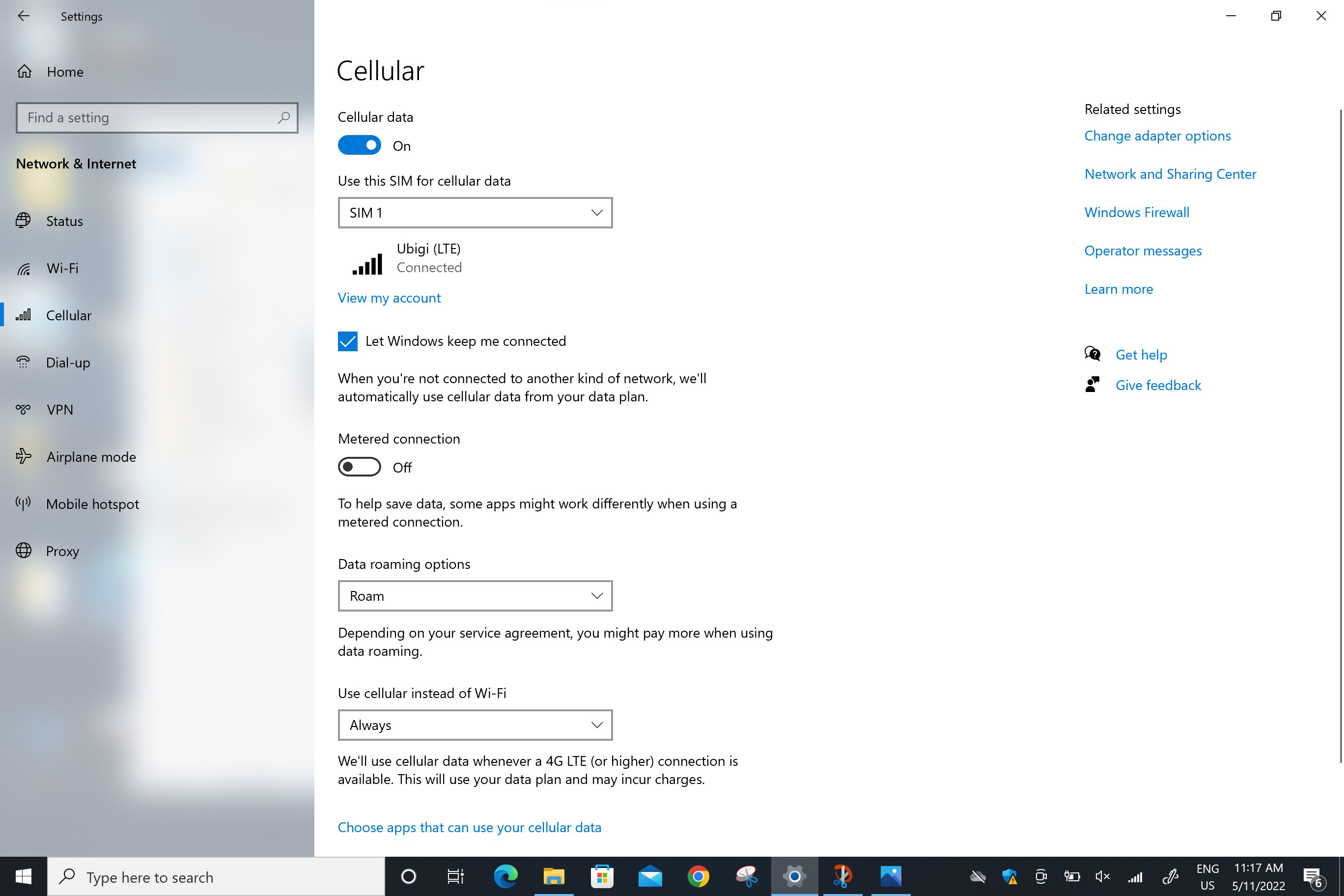
다음으로 이동합니다: 시작 > 설정 > 네트워크 및 인터넷 > 셀룰러로 이동합니다. “데이터 로밍 옵션” 필드에서 로밍을 선택합니다.
경고: 이전 단계를 주의 깊게 따랐다면, 이제 셀룰러 데이터 연결에 물리적 SIM 카드나 다른 eSIM 프로필이 아닌 Ubigi eSIM 프로필이 사용됩니다 (실제 SIM 카드가 있는 경우). 즉, Ubigi 셀룰러 연결을 사용하는 동안에는 Ubigi 요금이 적용되므로 추가 로밍 비용이 발생하지 않습니다. 어떤 경우든 해외에서 추가 로밍 비용을 피하려면 항상 셀룰러 데이터에 대해 Ubigi eSIM 프로필이 선택되어 있는지 확인하세요.
.screen 이미지 { 너비:58rem; 높이:자동; }
훌륭해
의 32707개 리뷰를 기준으로
검증됨
검증된 리뷰
이 사용자는 구매자로 확인되었습니다
It worked
It worked, can’t say much more than that.
John Davidson, 13 Mar 2026
검증됨
검증된 리뷰
이 사용자는 구매자로 확인되었습니다
Expected better connectivity
For me, installation and activation worked fine and I was able to use the internet upon arrival in the destination country. However, speed and connectivity was nit always that good.
customer, 13 Mar 2026
검증됨
검증된 리뷰
이 사용자는 구매자로 확인되었습니다
Easy to use
Easy to use, we had internet the whole trip with no issue! I totally recommend using Ubigi for holidays in Japan.
Gwen, 13 Mar 2026
검증됨
검증된 리뷰
이 사용자는 구매자로 확인되었습니다
Traveled to Japan
Traveled to Japan, sim worked immediately and very well for the whole trip. No problems at all, and easy to setup before traveling.
customer, 13 Mar 2026
검증됨
검증된 리뷰
이 사용자는 구매자로 확인되었습니다
Service top
Service top
Luan Nguyen, 13 Mar 2026
검증됨
검증된 리뷰
이 사용자는 구매자로 확인되었습니다
This was so easy to use and convenient
This was so easy to use and convenient! Used it all over Japan without any issues. I think this has just made traveling so much easier
customer, 13 Mar 2026
검증됨
검증된 리뷰
이 사용자는 구매자로 확인되었습니다
Everything went well
Everything went well, immediately connected when landing in Manila. Good signal, even in the mountains.
customer, 13 Mar 2026
검증됨
검증된 리뷰
이 사용자는 구매자로 확인되었습니다
Straight up rel
Straight up reliable, fast and connected quickly to network. Price was decent too
customer, 13 Mar 2026
검증됨
검증된 리뷰
이 사용자는 구매자로 확인되었습니다
Very good service
Had great service everywhere I went, I highly recommended using this type of cell services!
customer, 13 Mar 2026
검증됨
검증된 리뷰
이 사용자는 구매자로 확인되었습니다
Glad that I was able to use service…
Glad that I was able to use service whenever needed.
customer, 13 Mar 2026
검증됨
검증된 리뷰
이 사용자는 구매자로 확인되었습니다
Amazing coverage within Japan
customer, 13 Mar 2026
검증됨
검증된 리뷰
이 사용자는 구매자로 확인되었습니다
I usually use my mobile off-line
I usually use my mobile off-line. the experience I had this time in Spain was great. I could use translator anywhere, communicate with family any time.
Yasu, 13 Mar 2026
검증됨
검증된 리뷰
이 사용자는 구매자로 확인되었습니다
This service was excellent from…
This service was excellent from beginning to end. I would definitely recommend them and will use them again in the future.
Paul Ashton, 13 Mar 2026
검증됨
검증된 리뷰
이 사용자는 구매자로 확인되었습니다
Very good
Very good, but in Tohoku sometimes it did not work.
customer, 13 Mar 2026
검증됨
검증된 리뷰
이 사용자는 구매자로 확인되었습니다
It just works
It just works, it's nice to be able to import the SIM from the application, no need to scan a QR code from a second phone.
Daniel, 13 Mar 2026
감사합니다
귀하의 메시지가 전송되었습니다. 곧 답변드리겠습니다.
감사합니다
귀하의 뉴스레터 구독을 고려했습니다.
eSIM 호환성 확인 방법
스마트폰 / 태블릿:
*#06# 입력. → EID 번호가 나오면 eSIM 지원 기기입니다.
Windows 10 / 11:
Windows+I 를 누르세요. “네트워크 및 인터넷”으로 이동하세요 → 셀룰러 네트워크가 보이면 PC가 eSIM을 지원합니다..
통신사 잠금 해제 여부 확인 방법
iPhone / iPad:
설정 > 일반 > 정보로 이동 통신사 잠금 항목까지 스크롤. → “SIM 제한 없음”이 표시되면 기기는 잠금 해제 상태입니다.
Android:
설정 > 네트워크 및 인터넷 > 모바일 네트워크 자동 네트워크 선택을 끄세요. → 여러 네트워크가 보이면 잠금 해제된 기기입니다.