Skip to content
← 返回问题
我的 eSIM Ubigi 配置文件已在 iPhone/iPad 上安装并激活,网络已显示,但无法上网,怎么办?

重要: 如果您的 iPhone/iPad 上有多个 SIM 卡/eSIM(”计划”),则无法同时激活两个计划的蜂窝数据。您只能将蜂窝数据应用于其中一个计划。

您需要确认蜂窝数据已应用于 Ubigi eSIM 配置文件,才能访问互联网。为此,请访问:

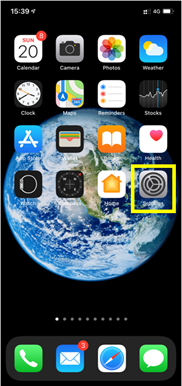
– 设置:


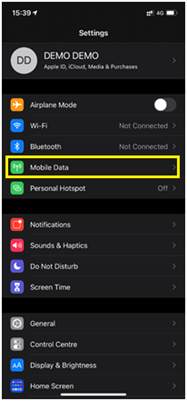
– 然后选择移动数据:


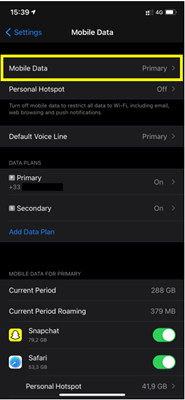
– 然后再次选择移动数据:


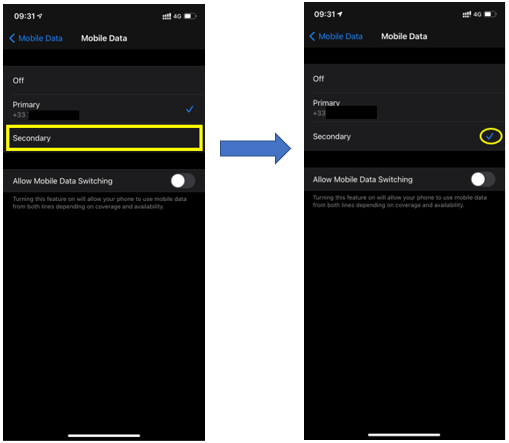
– 最后输入蜂窝数据并选择 “二级”:


您的 iPhone/iPad 现在将使用 Ubigi eSIM 配置文件中的蜂窝数据连接,您将可以用它访问互联网。

在寻找特定的东西吗?

其他常见问题:

我恢复了(新)iPhone 上的数据,但我的 eSIM 配置文件无法使用。怎么办?

我即将旅行。如何管理我设备上的 Ubigi eSIM 卡?

解决安卓设备上的 Ubigi eSIM 配置文件问题

解决 iPhone 上的 Ubigi eSIM 配置文件问题

iMessage 无法与我的 Ubigi eSIM 配置文件一起使用。怎么办?

如何知道我的 Ubigi eSIM 配置文件是否已在 iPhone/iPad 上激活?

如何在 iPhone 上获取并安装 Ubigi eSIM 配置文件?

如何在安卓设备上获取并安装Ubigi eSIM个人档案?

如何通过 iPhone 或 iPad 上的 Ubigi 应用程序购买数据计划?

如何检查我的 iPhone 上是否安装了 Ubigi eSIM 配置文件?

我的 iPhone/iPad 上已安装并激活 Ubigi eSIM 配置文件,但没有显示任何网络,我该怎么办?

我如何知道我的 Ubigi eSIM 配置文件是否已安装在我的安卓设备上?

我的安卓设备上已安装并激活 Ubigi eSIM 配置文件,网络已显示,但无法上网,我该怎么办?

移动数据已应用到我的 Android 设备上的 Ubigi eSIM 配置文件,但无法访问互联网,我该怎么办?

我可以用 Ubigi eSIM 数据计划打电话吗?

如何找到我的 Ubigi eSIM 的 ICCID(序列号)?

如何重置我的 Ubigi eSIM 账户密码?

如何查看 Ubigi eSIM 的余额?

如何删除我的 Ubigi 账户?

我购买了错误的数据计划,但没有使用,如何更改?

如何获得购买 Ubigi 数据计划的发票?

我有一部新的安卓设备。如何将我的 Ubigi eSIM 配置文件重新安装到新设备上?

当我想重新使用 iPhone 上的 Ubigi eSIM 个人档案时,我该如何启用?

当我旅行或不使用 iPhone 时,如何禁用我的 Ubigi eSIM 配置文件?

当我想在安卓设备上重新使用我的 Ubigi eSIM 配置文件时,我该如何启用它?

如何删除 iPhone/iPad 上的 Ubigi eSIM 配置文件?

Ubigi 连接失效。我是否应该禁用设备上的 DNS 或 VPN?

太棒了 Trustpilot stars Trustpilot
Trustpilot stars
基于 Trustpilot 30845条评论
5 stars 已验证
已验证评论
该用户已被识别为买家
Best Internet coverage and speed in NZ
Nice coverage through out NZ. Seamless function
customer, 28 Jan 2026
5 stars 已验证
已验证评论
该用户已被识别为买家
Awesome service I will definitely use…
Awesome service I will definitely use it again
customer, 28 Jan 2026
5 stars 已验证
已验证评论
该用户已被识别为买家
Easy to use
Easy to use. Good network all the time
m&m, 28 Jan 2026
4 stars 已验证
已验证评论
该用户已被识别为买家
Easy and fast.
Easy and fast.
LeVoyageur, 28 Jan 2026
5 stars 已验证
已验证评论
该用户已被识别为买家
Works great
Works great, no issues with connectivity
MK, 28 Jan 2026
5 stars 已验证
已验证评论
该用户已被识别为买家
IT's perfect no problem
IT's perfect no problem Good connection
customer, 28 Jan 2026
5 stars 已验证
已验证评论
该用户已被识别为买家
It worked fine
It worked fine. I recommend it.
Gaetano Petrina, 28 Jan 2026
5 stars 已验证
已验证评论
该用户已被识别为买家
Excellent reception and speed
Reception from Yokohama to Tokyo (which is where I used it) was consistent and fast.
Carl T., 28 Jan 2026
5 stars 已验证
已验证评论
该用户已被识别为买家
Very straight forward easy to use
Very straight forward easy to use. The software configures the esim you only need to okay to switch over to the esim through the app
Liam Greene, 28 Jan 2026
5 stars 已验证
已验证评论
该用户已被识别为买家
Absolutely delighted with being able to…
Absolutely delighted with being able to keep in touch with Friends and Relatives abroad and good coverage too .
Steven Muir, 28 Jan 2026
5 stars 已验证
已验证评论
该用户已被识别为买家
This worked well -- smooth interaction…
This worked well -- smooth interaction and set up. No dramas!
customer, 28 Jan 2026
5 stars 已验证
已验证评论
该用户已被识别为买家
Easy connection fast internet
Eric Oupoh, 28 Jan 2026
5 stars 已验证
已验证评论
该用户已被识别为买家
It was Everything good very good 👍🏻
It was Everything good very good 👍🏻 No problem with that Application. Thx Hat alles sehr gut geklappt bin sehr zufrieden 😀 Vielen Dank
Luz, 28 Jan 2026
4 stars 已验证
已验证评论
该用户已被识别为买家
Worked as described except for inviting others.
Worked as described. I tried inviting another traveller to use it but was unable to do so through the app. Even after asking for information from Ubigi help desk,they told me the option should appear automatically in my account. It doesn’t and they have not helped beyond that. They could have provided me with the code to share with others I could invite.
RPcustomer, 28 Jan 2026
4 stars 已验证
已验证评论
该用户已被识别为买家
The Line better than others
Good to use. Better than others.
Vivian, 28 Jan 2026

您的信息已发送。
我们会尽快与您联系。

我们已考虑到您订阅了新闻通讯。