Skip to content
← 返回问题
当我旅行或不使用 iPhone 时,如何禁用我的 Ubigi eSIM 配置文件?

要暂时禁用您的 Ubigi eSIM:

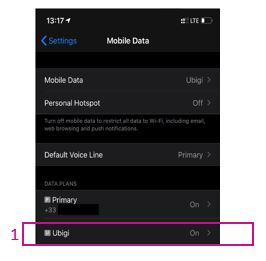
1 – 进入 “设置” > “移动数据” > 选择 Ubigi eSIM 配置文件(如果您尚未重新命名配置文件,则选择 “辅助”):


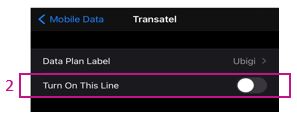
2 – 禁用 “打开此线路 “前面的按钮以禁用配置文件(按钮将显示为灰色)

您的 eSIM 配置文件现已禁用。

您也可以在下面的视频中找到相关说明。

我们建议您 旅行或不使用Ubigi eSIM 卡时千万不要将其删除,因为您只需按上述方法停用/重新激活即可,直到您再次需要时为止。

有关如何管理 eSIM 配置文件的更多信息,请访问我们的支持页面。

在寻找特定的东西吗?

其他常见问题:

我恢复了(新)iPhone 上的数据,但我的 eSIM 配置文件无法使用。怎么办?

我即将旅行。如何管理我设备上的 Ubigi eSIM 卡?

解决安卓设备上的 Ubigi eSIM 配置文件问题

解决 iPhone 上的 Ubigi eSIM 配置文件问题

iMessage 无法与我的 Ubigi eSIM 配置文件一起使用。怎么办?

如何知道我的 Ubigi eSIM 配置文件是否已在 iPhone/iPad 上激活?

如何在 iPhone 上获取并安装 Ubigi eSIM 配置文件?

如何在安卓设备上获取并安装Ubigi eSIM个人档案?

如何通过 iPhone 或 iPad 上的 Ubigi 应用程序购买数据计划?

如何检查我的 iPhone 上是否安装了 Ubigi eSIM 配置文件?

我的 iPhone/iPad 上已安装并激活 Ubigi eSIM 配置文件,但没有显示任何网络,我该怎么办?

我的 eSIM Ubigi 配置文件已在 iPhone/iPad 上安装并激活,网络已显示,但无法上网,怎么办?

我如何知道我的 Ubigi eSIM 配置文件是否已安装在我的安卓设备上?

我的安卓设备上已安装并激活 Ubigi eSIM 配置文件,网络已显示,但无法上网,我该怎么办?

移动数据已应用到我的 Android 设备上的 Ubigi eSIM 配置文件,但无法访问互联网,我该怎么办?

我可以用 Ubigi eSIM 数据计划打电话吗?

如何找到我的 Ubigi eSIM 的 ICCID(序列号)?

如何重置我的 Ubigi eSIM 账户密码?

如何查看 Ubigi eSIM 的余额?

如何删除我的 Ubigi 账户?

我购买了错误的数据计划,但没有使用,如何更改?

如何获得购买 Ubigi 数据计划的发票?

我有一部新的安卓设备。如何将我的 Ubigi eSIM 配置文件重新安装到新设备上?

当我想重新使用 iPhone 上的 Ubigi eSIM 个人档案时,我该如何启用?

当我想在安卓设备上重新使用我的 Ubigi eSIM 配置文件时,我该如何启用它?

如何删除 iPhone/iPad 上的 Ubigi eSIM 配置文件?

Ubigi 连接失效。我是否应该禁用设备上的 DNS 或 VPN?

太棒了 Trustpilot stars Trustpilot
Trustpilot stars
基于 Trustpilot 37447条评论
5 stars 已验证
已验证评论
该用户已被识别为买家
It was good hotel
It was good hotel
customer, 20 May 2026
4 stars 已验证
已验证评论
该用户已被识别为买家
It worked well and easy to use
customer, 20 May 2026
5 stars 已验证
已验证评论
该用户已被识别为买家
It s vers good
No problème in asia
client lambda, 20 May 2026
5 stars 已验证
已验证评论
该用户已被识别为买家
Great use Ubigi for all my overseas…
Great use Ubigi for all my overseas travel
Michelle Wilson, 20 May 2026
5 stars 已验证
已验证评论
该用户已被识别为买家
Smooth transition to the network
customer, 20 May 2026
5 stars 已验证
已验证评论
该用户已被识别为买家
So far an excellent service and fast…
So far an excellent service and fast connection. I would recommend Ubigi to friends and others.
Guven Aydin, 20 May 2026
5 stars 已验证
已验证评论
该用户已被识别为买家
Net work is coming full & it’s ok to…
Net work is coming full & it’s ok to get Ubigi it’s excellent result.
customer, 20 May 2026
5 stars 已验证
已验证评论
该用户已被识别为买家
Very stable
Very stable! Good Connection
David Barth, 20 May 2026
5 stars 已验证
已验证评论
该用户已被识别为买家
Quick and Easy
It was very easy to install and quick to activate. It was super simple to add additional data.
Asha Hooda, 20 May 2026
5 stars 已验证
已验证评论
该用户已被识别为买家
Easy As
Quick and easy to use even for a senior like me. Connections etc is no problem
KezKelly, 20 May 2026
5 stars 已验证
已验证评论
该用户已被识别为买家
Reliable, easy and affordable eSim in China
I needed a reliable and easy way to get connected all time in China and Ubigi eSim is just perfect. Also absolutely affordable.
Philippe de Oviedo Consulting, 20 May 2026
5 stars 已验证
已验证评论
该用户已被识别为买家
Easy to use
Easy to use, consistent service
Your customer, 20 May 2026
5 stars 已验证
已验证评论
该用户已被识别为买家
Easy installation and working well
David Christensen, 20 May 2026
5 stars 已验证
已验证评论
该用户已被识别为买家
Good coverage
Easy, cheap and good coverage in north Wales..
William, 20 May 2026
5 stars 已验证
已验证评论
该用户已被识别为买家
Worked in Japan and the Philippines…
Worked in Japan and the Philippines great!
Dennis, 20 May 2026

您的信息已发送。
我们会尽快与您联系。

我们已考虑到您订阅了新闻通讯。