


Summary
- 1) Key Takeaways
- 2) Why Mobile Data Usage Increases When You Travel
- 3) Essential Tips to Save Mobile Data While Traveling
- 4) Download Content Before You Go (Big Data Saver)
- 5) Control App & System Data Usage
- 6) Optimize Social Media & Messaging Apps
- 7) Monitor and Manage Your Data in Real Time
- 8) Travel Smarter with an eSIM from Ubigi
- 9) Conclusion
- 10) Frequently Asked Questions
Key Takeaways
- If you are wondering “How to Save Mobile Data While Traveling“, this article is for you!
- If you simply mind your app settings and habits, you can sidestep the majority of gratuitous mobile data consumption on the road.
- Disabling background app refresh and allowing app updates only on Wi-Fi helps reduce silent data usage.
- Pre-downloading maps and entertainment on Wi-Fi saves you mobile data when you’re traveling.
- Utilizing mobile-friendly sites and allowing low data modes on messaging and social apps can make your data stretch farther even in slower connection speeds.
- When you disable auto-play for videos and sync cloud services only on Wi-Fi, it stops them from being data drainers.
- Keep an eye on your data with an app like Ubigi and save secured Wi-Fi for the heavy bits of data so you remain within the limits and avoid extra charges.

To save mobile data while on the road, you can disable background app usage, switch apps to offline mode, and utilize Wi-Fi for large downloads. Many travelers swear by these steps to save mobile data on the road.
Streaming and maps tend to be the data guzzlers, so pre-planning can make a big impact. In the following, you’ll find additional tips and actual steps to help you consume less data on your travels.
Why Mobile Data Usage Increases When You Travel
Traveling often comes with unexpected data consumption. Your phone isn’t just for checking emails or social media, it constantly communicates with apps, updates, and cloud services in the background. Apps like maps, weather, and social media can use more data abroad because of roaming settings or increased background activity.
Even simple actions, like opening an app or receiving notifications, can consume data if the content is heavy, like videos or high-resolution images. Public Wi-Fi may be unreliable, pushing your phone to rely on mobile data without you noticing. Understanding these hidden data drains is the first step to staying in control.
Essential Tips to Save Mobile Data While Traveling

Saving mobile data doesn’t require drastic measures. With a few adjustments, you can significantly reduce unnecessary usage.
Turn Off Background App Refresh
Many apps refresh automatically, downloading data even when you’re not actively using them. Turning off this feature ensures apps only use data when you open them, preventing unnoticed data loss.
Use Mobile Versions of Websites
Mobile versions of websites are optimized for smaller screens and often use less data than desktop versions. Browsing mobile sites instead of full desktop pages is a quick, easy way to save data while keeping browsing fast.
Download Google Maps for Offline Use
Navigation apps can be major data consumers. Downloading offline maps before your trip allows you to navigate without using mobile data, which is especially useful in areas with limited connectivity.
Download Content Before You Go (Big Data Saver)

Streaming videos, music, or podcasts on the go can quickly eat up your data allowance. Preparing content in advance is one of the most effective ways to reduce mobile usage.
Services like Netflix, YouTube, Spotify, and podcast apps allow offline downloads. Taking advantage of Wi-Fi to store your favorite shows, music playlists, and episodes means you can enjoy entertainment anywhere without worrying about data consumption.
Offline content also ensures smooth playback in areas with slow or no mobile connectivity, perfect for flights, trains, or long bus rides.
Control App & System Data Usage
Controlling app and system data usage is perhaps the single best way to avoid eye-popping charges while on the road. Some apps operate in the background and consume data even when you’re inactive or stealthily disconnect to refresh. Awareness and control of your data usage can go a long way.
You can monitor your data consumption by navigating to “Mobile data usage” within your phone’s settings. Resetting these stats regularly often provides you a good snapshot of your daily or weekly habits.
Limit App Updates to Wi-Fi Only
Automatic updates can use hundreds of megabytes without warning. Restricting updates to Wi-Fi ensures your data plan is used only when necessary.
Turn Off Cloud Backups & Photo Sync on Cellular
Cloud services like Google Photos or iCloud automatically sync files over mobile data unless restricted. Turning off cellular backup keeps large photos and videos from draining your data allowance unexpectedly.
Optimize Social Media & Messaging Apps

Social media and messaging apps are among the biggest data consumers on your phone when you’re on the road. They linger in the background, play unsolicited videos, and send or receive giant files. To stay in data-friendly territory, you’ll have to tweak some settings and monitor your behavior a bit.
Disable Auto-Play on Social Media
Platforms like Instagram, TikTok, Facebook, and X autoplay videos by default. Disabling auto-play reduces unnecessary video downloads and gives you more control over data usage.
This easy modification prevents your feed from downloading videos you don’t want to watch, thereby reducing the useless consumption of data.
Watching video after video quickly, even just a few minutes, can consume more than 200 MB, especially if the videos are in HD.
Use Low-Data Modes on Messaging Apps
Apps such as WhatsApp, Telegram, and Instagram offer low-data modes that compress images and limit automatic downloads. Using these modes ensures you can stay connected without overusing your mobile plan.
Monitor and Manage Your Data in Real Time
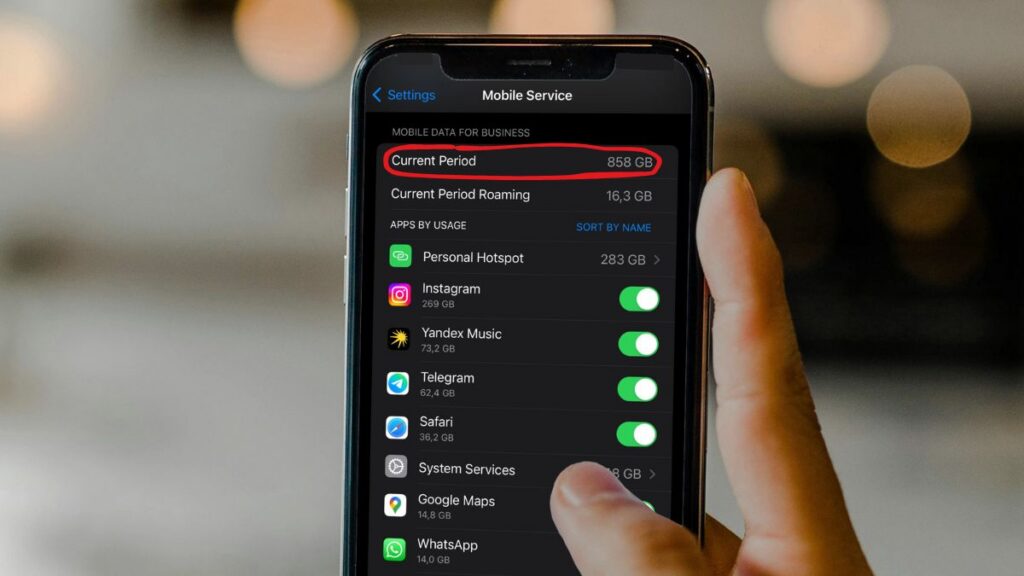
Keeping an eye on your data usage is essential when traveling. A small daily check can prevent surprises at the end of the month.
Track Your Data Usage Regularly
Most smartphones allow you to monitor data consumption by app. Checking this regularly helps you understand which apps use the most data and adjust settings accordingly.
Just a few minutes before your trip, check your settings and limit data use for apps that aren’t critical. This habit halts waste and maintains low costs. Knowing your data usage puts you at ease. There are no more surprise bills and no more sudden slowdowns.
By understanding your usage, you can achieve more savings and enjoy more peace of mind with your phone, wherever you are.
Use Wi-Fi for Data-Heavy Tasks
Always use Wi-Fi to tackle hefty tasks such as video calls, large file sending, or update downloads. All Wi-Fi is not safe. Use only the ones that require a password. Steer clear of open or public networks when you have to transmit confidential data.
By using Wi-Fi first and your mobile data second, you use less data, save on costs, and keep your info secure. It’s an easy step that spares you hassle and expense every month.
Travel Smarter with an eSIM from Ubigi

An eSIM is a modern solution for travelers who want reliable connectivity without worrying about excessive charges. Unlike traditional SIM cards, eSIMs let you switch networks digitally and choose data plans tailored to your destination.
With an eSIM, you can manage your data usage more efficiently and avoid roaming surprises. Services like Ubigi eSIM provide flexible plans, fast mobile data, and seamless coverage in multiple countries. It is perfect for travelers looking for convenience and control. Through the app you can monitor and control your data usage and top up your data plan, even without wifi!
Light users who mostly check emails and messages may need 1–3 GB per week, while heavy users who stream videos, make video calls, or use maps extensively may need 5–10 GB or more. So take your data plan accordingly.
Conclusion
Travel introduces new sights, new sounds and new opportunities to share your world. Quick tips prevent data from going to burn quick! Pre-store your maps, playlists and shows before you go.
Disable auto app updates and reduce background tasks. Leave those social apps on ‘low data mode’! Monitor your usage regularly. These habits keep your mobile bill low and your trip smooth.
A lot of travelers rely on offline maps to get around new cities. Others send photos on Wi-Fi only, so they can share more stress-free. Keep your next trip fun and easy on your wallet with these simple tweaks.
Get going and watch your data go further. Give a try to some of these tips on “How to Save Mobile Data While Traveling” and see your savings grow!

Frequently Asked Questions
How much data do I need for travel?
The amount of data you need depends on your travel habits. Light users who mostly check emails and messages may need 1–3 GB per week, while heavy users who stream videos, make video calls, or use maps extensively may need 5–10 GB or more. Using offline maps, pre-downloading content, and connecting to Wi-Fi whenever possible can significantly reduce your data consumption.
Why does my mobile data usage increase when I travel?
When you’re traveling, your phone tends to burn through much more mobile data to power maps, translation, navigation, photo uploads and more. Automatic app updates and background syncing can add to data usage, especially in uncharted territory.
How can I save mobile data before my trip?
Go ahead and save offline maps, music, videos, and travel guides before you even leave. This allows you to use content offline and skips big mobile data downloads while traveling.
What apps use the most mobile data when traveling?
Navigation apps, social media, video streaming and cloud backups tend to be the biggest data hogs. These apps often refresh and upload large files such as photos or videos.
How can I control background data usage?
Open your phone’s settings and limit background data for non-important apps. Disable automatic updates and backups while you’re on mobile data.
Do messaging apps use a lot of data?
Text messages consume very little data. Uploading pictures, videos, or voice notes can significantly increase consumption. Take advantage of Wi-Fi whenever possible for sharing media.
Can social media apps be optimized to use less data?
Yes, turn on data saver modes in each app’s settings. Free your browser from auto-playing videos and high-resolution images when not on Wi-Fi.
How do I monitor my data usage in real time?
Check your device’s native data tracker or a reliable third-party option. Establish alerts or limits on data to prevent overages and surprise fees.
Is Wi-Fi always safe abroad?
Public Wi-Fi networks, such as those in airports, hotels, or cafes, are often less secure than your home network. To stay safe, avoid accessing sensitive accounts or making payments on public Wi-Fi. Using a VPN or mobile data (like an eSIM plan from Ubigi) for critical tasks adds an extra layer of security when traveling.
Can I track my data usage while traveling?
Yes! Most smartphones have built-in data tracking tools that show how much data each app uses. You can also use your mobile carrier’s app or an eSIM provider’s dashboard to monitor usage in real time. Regular tracking helps prevent overages and keeps you in control of your plan.








 How to check eSIM compatibility
 How to check carrier unlocking