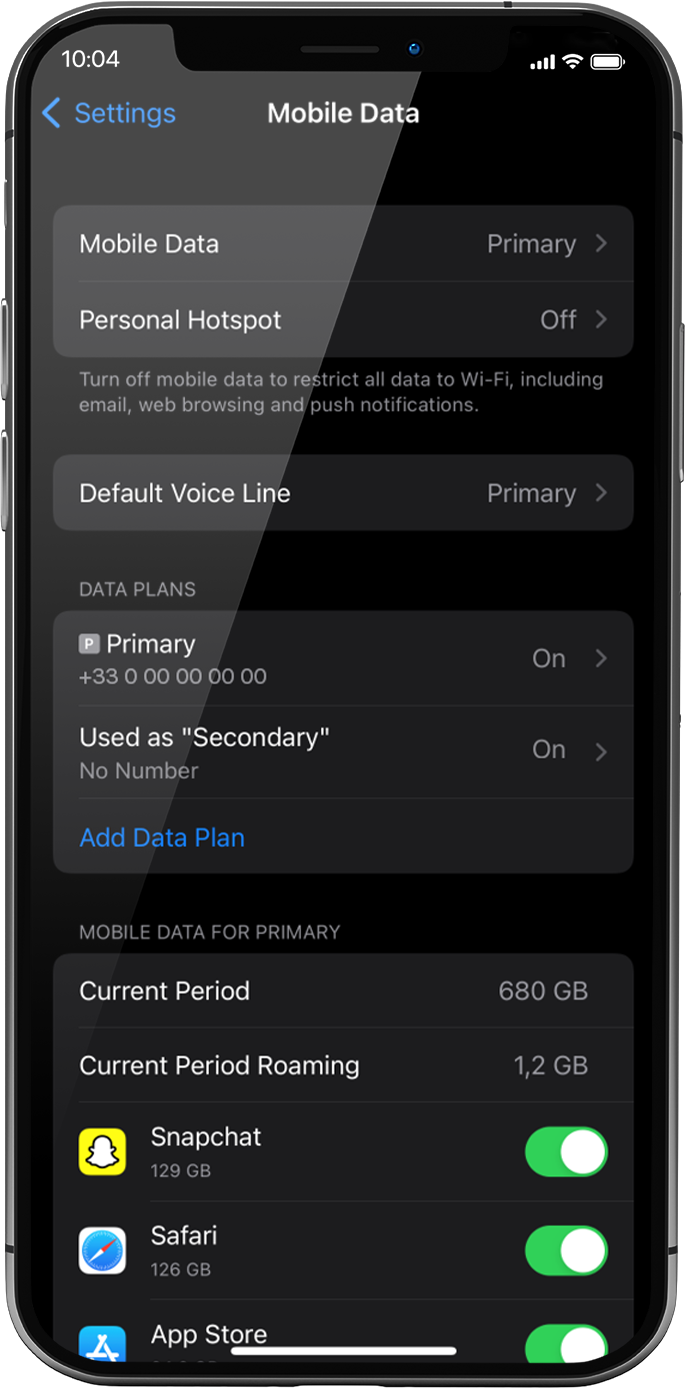
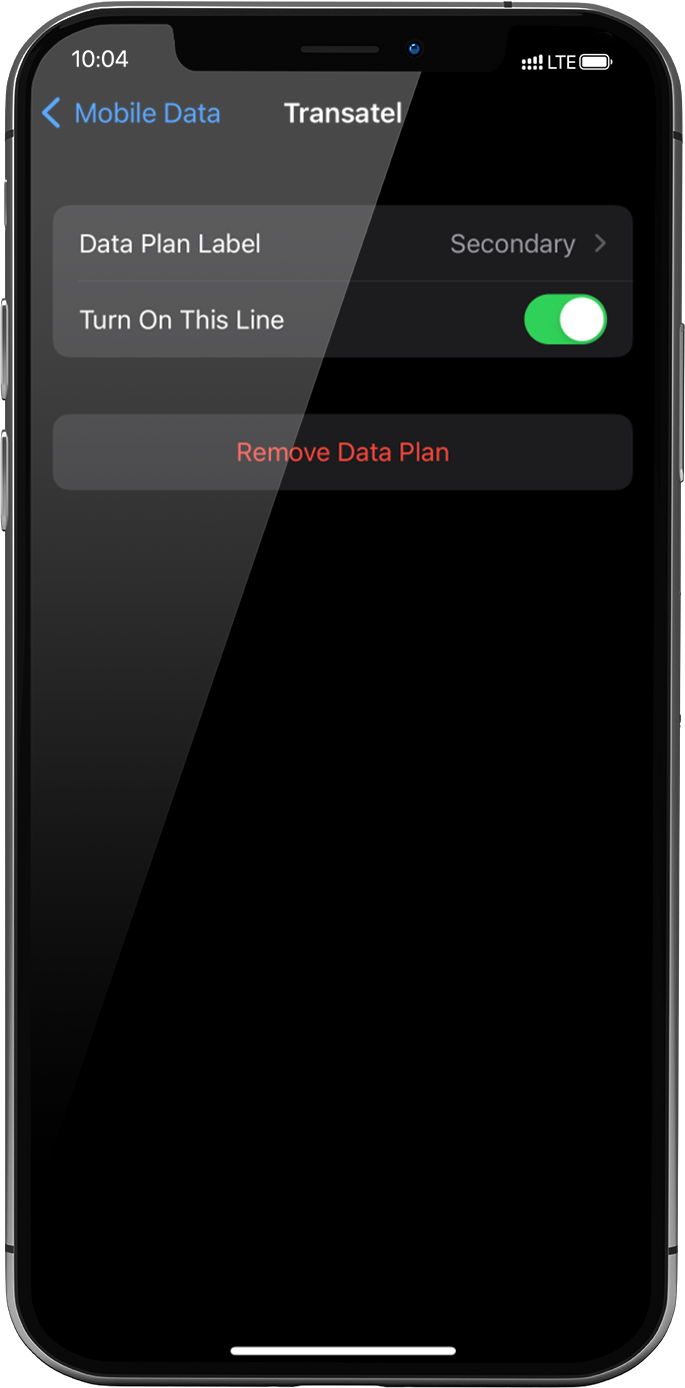
설정 > 모바일 데이터 > 데이터 요금제 아래에서 설치된 eSIM 프로필 (또는 ‘보조’ 또는 이름을 변경한 이름)을 선택합니다 .
오른쪽의 이 회선 켜기 버튼을 눌러 프로필을 활성화합니다.
프로필이 활성화되면 화면 상단에 이중 네트워크 신호가 나타납니다.
참고: 이중 네트워크는 장치에 음성 및 SMS용 물리적 SIM 카드/eSIM 프로필이 설치된 경우에만 표시됩니다. 실제 SIM 카드가 설치되어 있지 않으면 계단식 막대 네트워크만 표시됩니다.
훌륭해
의 38737개 리뷰를 기준으로
검증됨
검증된 리뷰
이 사용자는 구매자로 확인되었습니다
Easy to activate
Easy to activate and pretty much fuss-free.
The internet speed and connectivity is good most of the time.
Cat, 04 Jun 2026
검증됨
검증된 리뷰
이 사용자는 구매자로 확인되었습니다
Simple to use
Simple to use, good pricing, flexible.
customer, 04 Jun 2026
검증됨
검증된 리뷰
이 사용자는 구매자로 확인되었습니다
Fast and reliable internet connection…
Fast and reliable internet connection everywhere
Mehmoona, 04 Jun 2026
검증됨
검증된 리뷰
이 사용자는 구매자로 확인되었습니다
Exactly what i expected.
customer, 04 Jun 2026
검증됨
검증된 리뷰
이 사용자는 구매자로 확인되었습니다
Convenient
Convenient, strong connection, and reasonable prices for data.
customer, 04 Jun 2026
검증됨
검증된 리뷰
이 사용자는 구매자로 확인되었습니다
My go to eSIM provider
I love using Ubigi. This is always by go to eSIM provider. It’s so easy to activate and prices are usually fair. Having travelled and used ubigi around US, Asia and Europe, my coverage was usually very good.
Kiki, 04 Jun 2026
검증됨
검증된 리뷰
이 사용자는 구매자로 확인되었습니다
Very simple and effective process to…
Very simple and effective process to loca and activate the eSim. After struggling time and time again with the competitor's process to download, load and activeate I was ready to give up on eSims for travel. But the Ubigi eSIM converted me back.
Gary, 04 Jun 2026
검증됨
검증된 리뷰
이 사용자는 구매자로 확인되었습니다
Constant connectivity was great
Constant connectivity was great. Not super easy to set up initially but I’m an older user (72) and not particularly techy. So maybe easier instructions? Otherwise it was fabulous being connected everywhere!!!
Cathy Reece, 04 Jun 2026
검증됨
검증된 리뷰
이 사용자는 구매자로 확인되었습니다
Best when traveling to Japan
customer, 04 Jun 2026
검증됨
검증된 리뷰
이 사용자는 구매자로 확인되었습니다
It worked
It worked, rarely any drop off outside of tunnels and certain buildings
Eoghan Sinnott, 04 Jun 2026
검증됨
검증된 리뷰
이 사용자는 구매자로 확인되었습니다
Monitoring, ein Following the Volume which is used. Now my Connection isto but I don’t know why and if I have reached the alliwed Volume.
My Connection ist top Without Any, Warning Before
customer, 04 Jun 2026
검증됨
검증된 리뷰
이 사용자는 구매자로 확인되었습니다
Ease of use
Easy! Easy! Easy! No problems or lack of service thus far.
Liz, 04 Jun 2026
검증됨
검증된 리뷰
이 사용자는 구매자로 확인되었습니다
Worked the way they said it would
Worked the way they said it would, even in almost every subway.
customer, 04 Jun 2026
검증됨
검증된 리뷰
이 사용자는 구매자로 확인되었습니다
World CupSo easy to use and speed is great
So easy to use and speed is great
customer, 04 Jun 2026
검증됨
검증된 리뷰
이 사용자는 구매자로 확인되었습니다
It just kicked in automatically once I…
It just kicked in automatically once I entered the country.
Brenda, 04 Jun 2026
감사합니다
귀하의 메시지가 전송되었습니다. 곧 답변드리겠습니다.
감사합니다
귀하의 뉴스레터 구독을 고려했습니다.
eSIM 호환성 확인 방법
스마트폰 / 태블릿:
*#06# 입력. → EID 번호가 나오면 eSIM 지원 기기입니다.
Windows 10 / 11:
Windows+I 를 누르세요. “네트워크 및 인터넷”으로 이동하세요 → 셀룰러 네트워크가 보이면 PC가 eSIM을 지원합니다..
통신사 잠금 해제 여부 확인 방법
iPhone / iPad:
설정 > 일반 > 정보로 이동 통신사 잠금 항목까지 스크롤. → “SIM 제한 없음”이 표시되면 기기는 잠금 해제 상태입니다.
Android:
설정 > 네트워크 및 인터넷 > 모바일 네트워크 자동 네트워크 선택을 끄세요. → 여러 네트워크가 보이면 잠금 해제된 기기입니다.