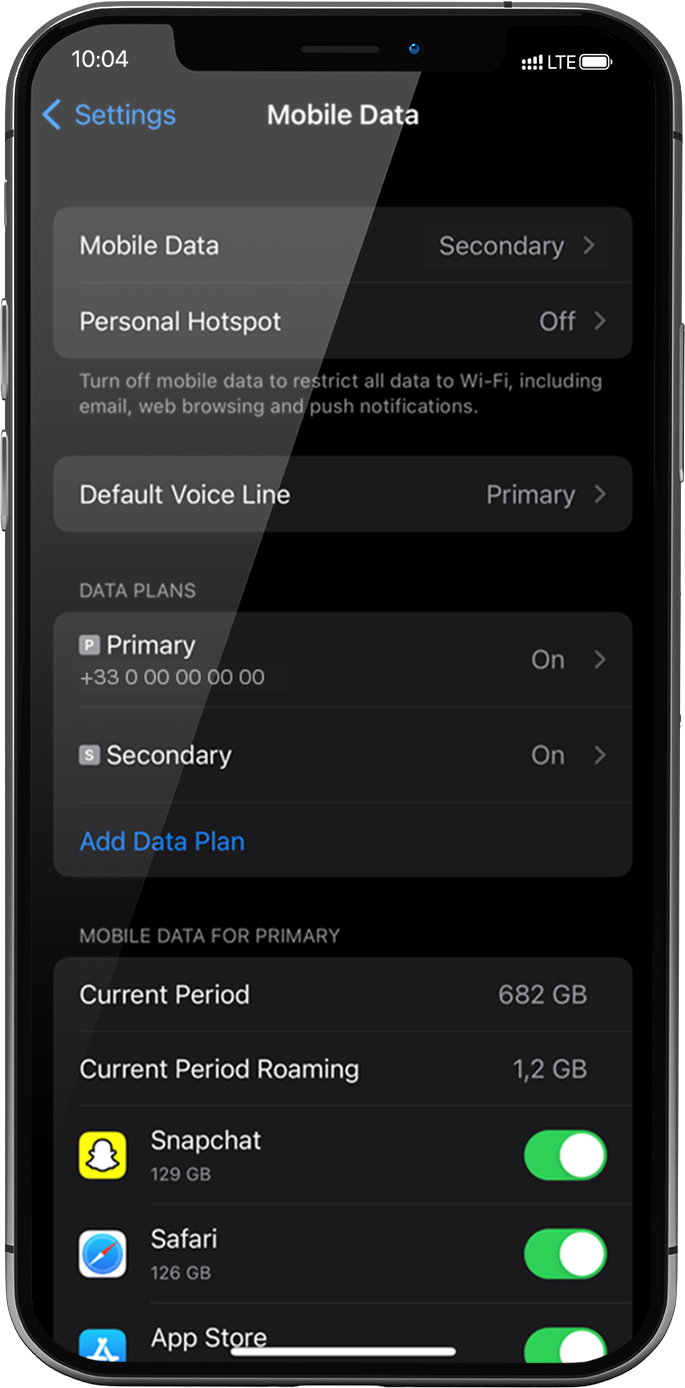
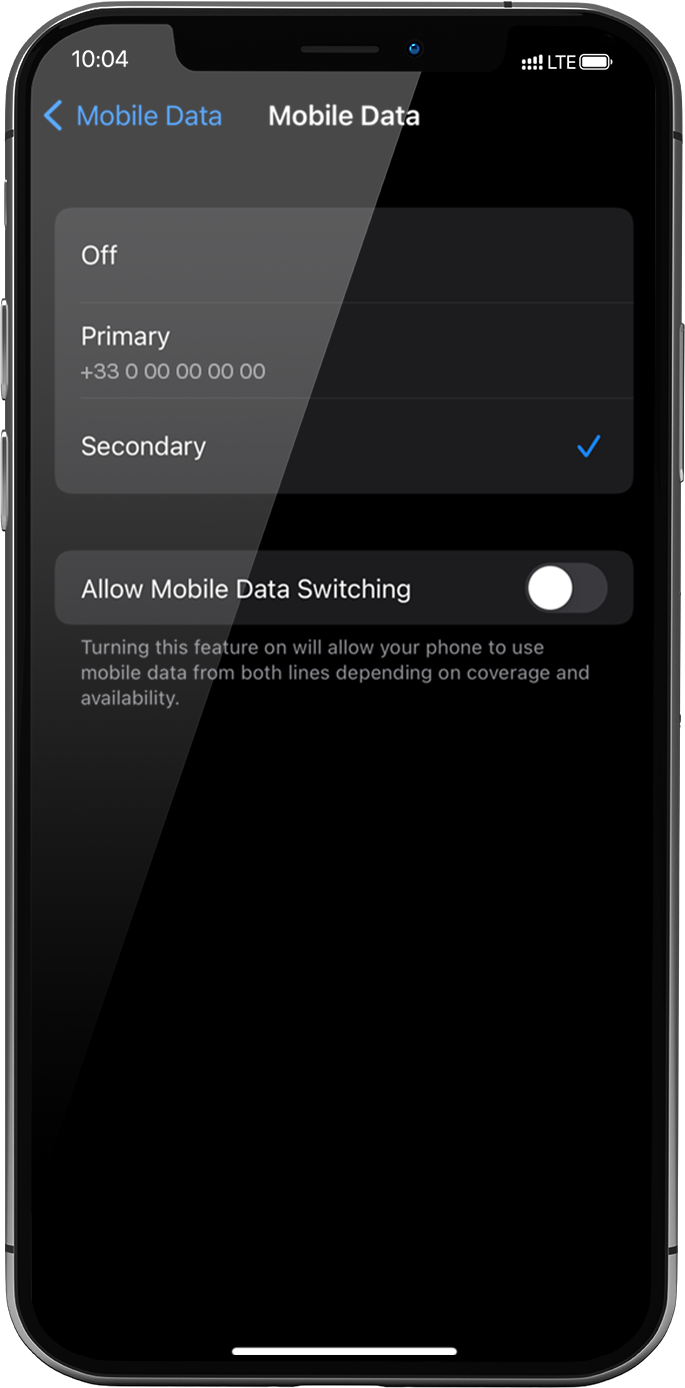
이렇게 하려면 설정 > 모바일 데이터 > 모바일 데이터로 다시 이동하여 보조를 선택합니다. 보조를 선택하면 앞에 체크 표시가 나타납니다.
중요: iPhone에 여러 개의 SIM 카드/eSIM 프로필이 있는 경우, 두 개의 데이터 요금제에서 동시에 셀룰러 데이터를 활성화할 수 없습니다. 한 번에 하나에만 적용할 수 있습니다.
훌륭해
의 29676개 리뷰를 기준으로
검증됨
검증된 리뷰
이 사용자는 구매자로 확인되었습니다
Easy and fast to install
Easy and fast to install, good internet speed at good price
MICHELI MICHELE, 12 Dec 2025
검증됨
검증된 리뷰
이 사용자는 구매자로 확인되었습니다
Your Internet connection is very good…
Your Internet connection is very good and fast, the data's last longer even though I'm using maps, but I YouTube, downloads and more others.
customer, 12 Dec 2025
검증됨
검증된 리뷰
이 사용자는 구매자로 확인되었습니다
Easy to activate
Easy to activate, affordable, app useful, will use again :)
E. M., 12 Dec 2025
검증됨
검증된 리뷰
이 사용자는 구매자로 확인되었습니다
Super easy to install and use!
Emma, 11 Dec 2025
검증됨
검증된 리뷰
이 사용자는 구매자로 확인되었습니다
First time
Service activated right when I landed, was able to use Google Maps to travel and use train stations with ease! The data plans prices were reasonable and the service was so good I was able to stream live nba games as well! 10/10
Francis Calata, 11 Dec 2025
검증됨
검증된 리뷰
이 사용자는 구매자로 확인되었습니다
Great for travel
Worked great in Seoul, Korea for the 2 weeks I was there!
Jonathan Lee, 11 Dec 2025
검증됨
검증된 리뷰
이 사용자는 구매자로 확인되었습니다
Excellent Data Service
Easy to use and excellent data service
Velda, 11 Dec 2025
검증됨
검증된 리뷰
이 사용자는 구매자로 확인되었습니다
....
..........
customer, 11 Dec 2025
검증됨
검증된 리뷰
이 사용자는 구매자로 확인되었습니다
Worked great everywhere we went
Worked great everywhere we went. Great speed. Install and set up was quick and easy on my iPhone.
Darren P, 11 Dec 2025
검증됨
검증된 리뷰
이 사용자는 구매자로 확인되었습니다
I use Ubigi to get signal
I use Ubigi as a spare esim where my original provider cant get signal, Ubigi has found a signal as it uses more that 1 network
LHawk, 11 Dec 2025
검증됨
검증된 리뷰
이 사용자는 구매자로 확인되었습니다
Simple: purchase and activation
Very easy to purchase and activate as soon as we landed in Japan. Coverage has been great in Tokyo
customer, 11 Dec 2025
검증됨
검증된 리뷰
이 사용자는 구매자로 확인되었습니다
Everything went smoothly
Everything went smoothly. So convenient!
Annie, 11 Dec 2025
검증됨
검증된 리뷰
이 사용자는 구매자로 확인되었습니다
It worked
It worked as expected as soon as I landed. While the speeds were a little slow, it wasn't anything that I would actually complain about for the price. I'll definitely use this again as a low-cost eSIM option when travelling outside my home area.
Justin Galbraith, 11 Dec 2025
검증됨
검증된 리뷰
이 사용자는 구매자로 확인되었습니다
It was incredible
It was incredible! Thanks, Ubigi. My travel was perfect because of you!
customer, 11 Dec 2025
검증됨
검증된 리뷰
이 사용자는 구매자로 확인되었습니다
Feel secure with Ubigi
Ubigi makes me feel secure in using the internet in public places
Mary Miller, 11 Dec 2025
감사합니다
귀하의 메시지가 전송되었습니다. 곧 답변드리겠습니다.
감사합니다
귀하의 뉴스레터 구독을 고려했습니다.
eSIM 호환성 확인 방법
스마트폰 / 태블릿:
*#06# 입력. → EID 번호가 나오면 eSIM 지원 기기입니다.
Windows 10 / 11:
Windows+I 를 누르세요. “네트워크 및 인터넷”으로 이동하세요 → 셀룰러 네트워크가 보이면 PC가 eSIM을 지원합니다..
통신사 잠금 해제 여부 확인 방법
iPhone / iPad:
설정 > 일반 > 정보로 이동 통신사 잠금 항목까지 스크롤. → “SIM 제한 없음”이 표시되면 기기는 잠금 해제 상태입니다.
Android:
설정 > 네트워크 및 인터넷 > 모바일 네트워크 자동 네트워크 선택을 끄세요. → 여러 네트워크가 보이면 잠금 해제된 기기입니다.