Check if your eSIM profile is installed on your device.
Check eSIM profile activation
Check if your eSIM profile is activated on your device.
Apply data to eSIM profile
Ensure data is applied to your Ubigi eSIM profile.
Check APN configuration
Ensure that the APN is correctly set for your Ubigi connectivty.
Check network display
Check the network status for your Ubigi connectivity.
Final checks!
Check account creation and Internet access.
Check if your eSIM profile is activated on your iPhone.
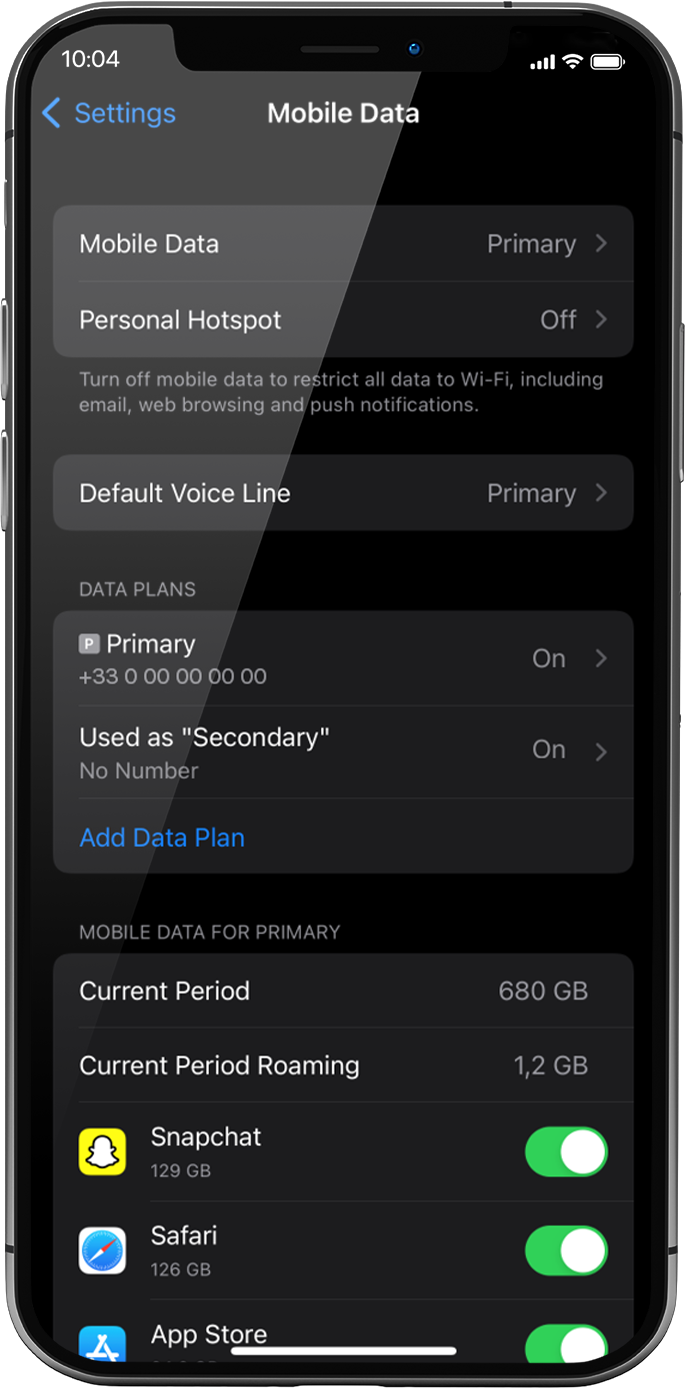
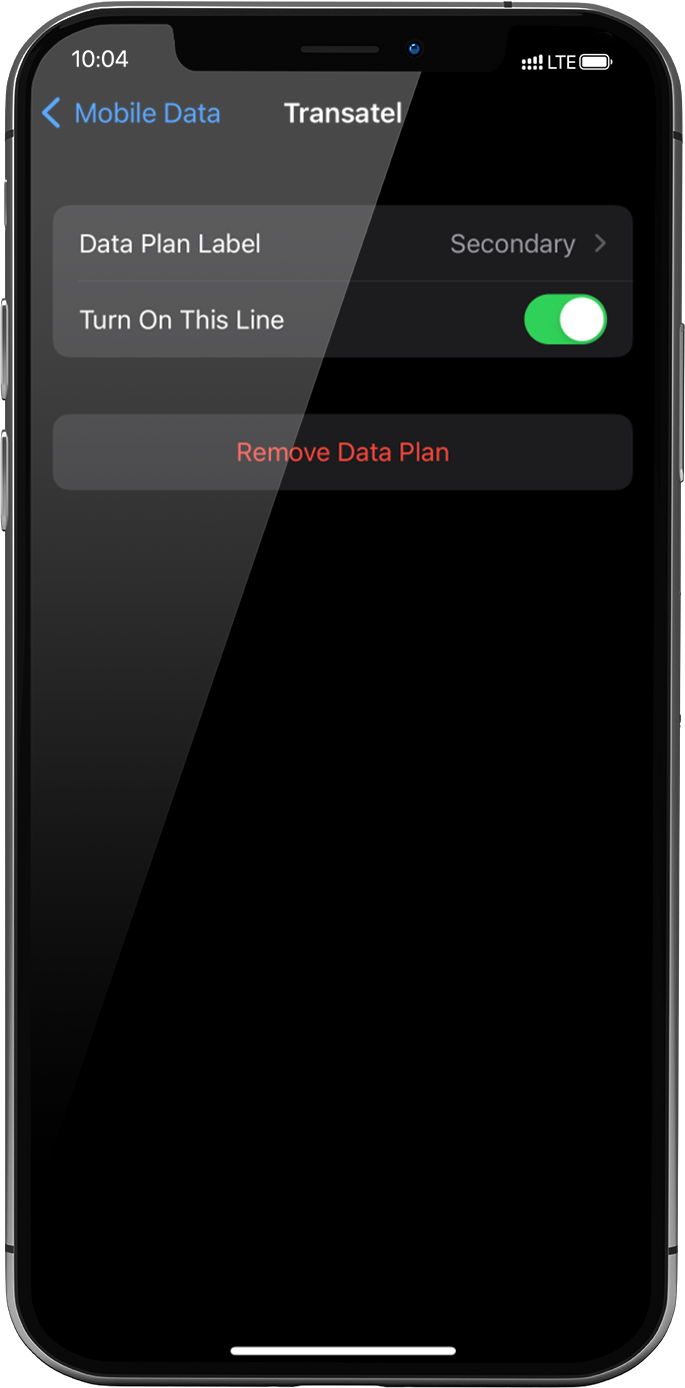
Go to: settings > mobile data > under data plans, select the installed eSIM profile (or “secondary” or the name you renamed it)
Activate the profile by pressing the button Turn On This Line on the right.
As soon as your profile is activated, a double network signal will appear at the top of your screen.
NB: the double network only appears if you have also a physical SIM card/eSIM profile for voice & SMS installed on your device. If there is no physical SIM card installed, only the stepped bars network will be displayed.
Great
Based on 50783 reviews on
Verified
Verified review
This user has been identified as a buyer
It Just Works
My experience was great because Ubigi just works. I downloaded it on my iPhone, and it automatically worked when we landed in Japan.
customer, 05 Nov 2026
Verified
Verified review
This user has been identified as a buyer
the easy way to buy and connect
the easy way to buy and connect
Omar F, 05 Nov 2026
Verified
Verified review
This user has been identified as a buyer
Nothing to say
Nothing to say, all perfect...
Santi, 05 Nov 2026
Verified
Verified review
This user has been identified as a buyer
⭐⭐⭐⭐ Excellent Travel SIM
⭐⭐⭐⭐ Excellent Travel SIM – Highly Recommended!
Ubigi has been brilliant throughout my travels. The connection works reliably in different countries, including Pakistan. Easy to set up, good coverage and reliable internet wherever you go.
Very impressed with the service. Definitely recommend Ubigi to anyone travelling internationally! Five stars! ⭐⭐⭐⭐⭐
Mr.Kapacee, 05 Nov 2026
Verified
Verified review
This user has been identified as a buyer
Great for travel
Easy to download and navigate for hookup, I’ve had uninterrupted service since joining. Will be recommending to family that will travel to visit me.
Owen, 05 Nov 2026
Verified
Verified review
This user has been identified as a buyer
Some places encountered signal problem
Some places encountered signal problem, but overall performance is good. Acceptable
Michael, 05 Nov 2026
Verified
Verified review
This user has been identified as a buyer
Powerful metwork all over Japan. Useful and intuitive app. Donwload easy.
Powerful metwork all over Joan. Radu to donwload and follow using data thru app.
Santi Andreu, 05 Nov 2026
Verified
Verified review
This user has been identified as a buyer
Simply the best
Simply the best. Working where others have no access
TAVARES, 05 Nov 2026
Verified
Verified review
This user has been identified as a buyer
Good price
Good price, easy to install, worked great.
customer, 05 Nov 2026
Verified
Verified review
This user has been identified as a buyer
Easy
Easy, fast, working very well
Jari, 05 Nov 2026
Verified
Verified review
This user has been identified as a buyer
No problems anywhere around Japan
No problems anywhere around Japan. Would recommend to anyone.
mauledbro_gtr, 05 Nov 2026
Verified
Verified review
This user has been identified as a buyer
Super connectivity.
Super connectivity.
Gerard Franklin, 05 Nov 2026
Verified
Verified review
This user has been identified as a buyer
Just great!
Easy to buy, flexible rates, successful connection, just great
LITO, 05 Nov 2026
Verified
Verified review
This user has been identified as a buyer
I have never phased any connection…
I have never phased any connection issues. Up to so far all is good and no complaints
customer, 05 Nov 2026
Verified
Verified review
This user has been identified as a buyer
I had an excellExcellent eSIM Service with Reliable Connectivityent experience with…
I had an excellent experience with Ubigi eSIM during my trip to the United States. Everything worked perfectly, and I had no issues at all. The connection to the T-Mobile network was stable and reliable wherever I went. I was very satisfied with the service and would definitely use Ubigi again.
Jun Kumada, 05 Nov 2026
Thank you
Your message has been sent. We’ll get back to you shortly.
Thank you
We have taken into account your subscription to the newsletter
How to check eSIM compatibility
Smartphones / Tablets:
Dial *#06#. → If an EID number appears, your device is eSIM-compatible.
Windows 10 / 11:
Press Windows+I. Go to “Network & Internet” → If you see "Cellular", your PC is eSIM-compatible.
How to check carrier unlocking
iPhone / iPad:
Go to Settings > General > About. Scroll to Carrier Lock. → If you see “No SIM restrictions”, your device is unlocked.
Android:
Go to Settings > Network & Internet > Mobile network. Disable Automatic network selection. → If multiple networks appear, your device is unlocked.









 How to check eSIM compatibility
 How to check carrier unlocking