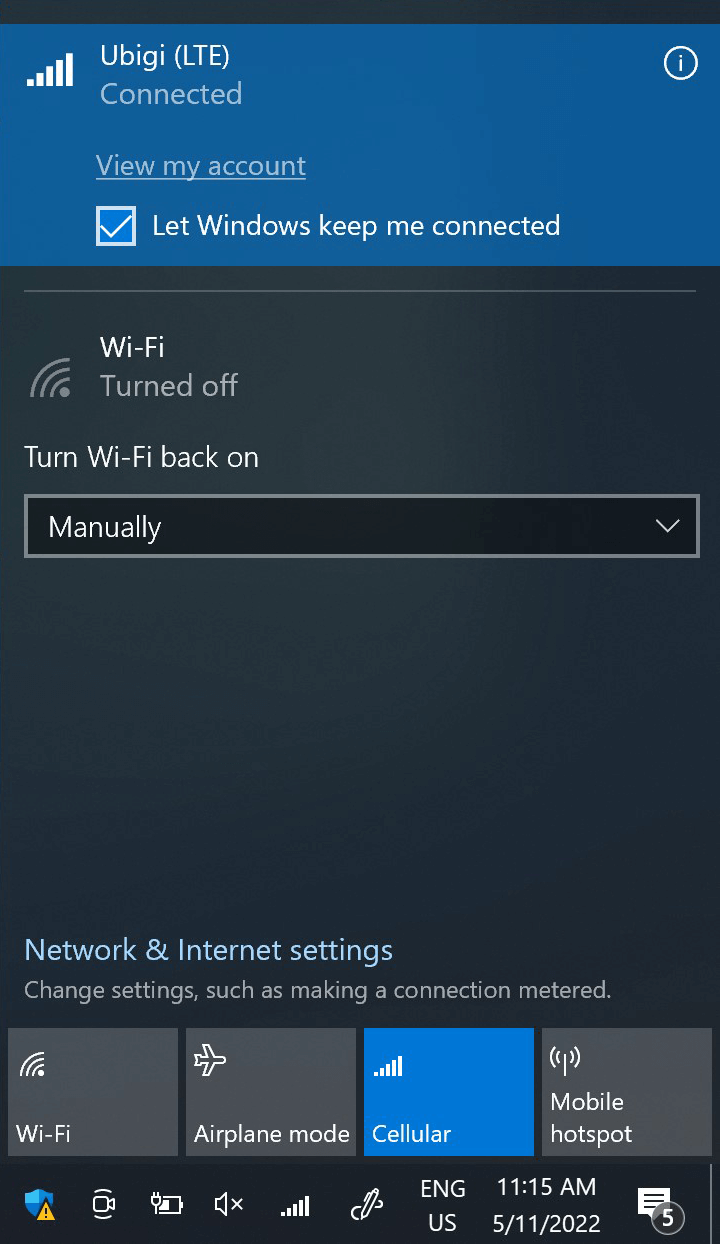
이 단계에서 네트워크 플라이아웃을 열고 “내 계정 보기”를 클릭하여 Ubigi 연결을 테스트합니다. 또는 브라우저를 열고 ubigi .me로 이동합니다.
이미 Ubigi 계정이 있는 경우 자동으로 연결됩니다.
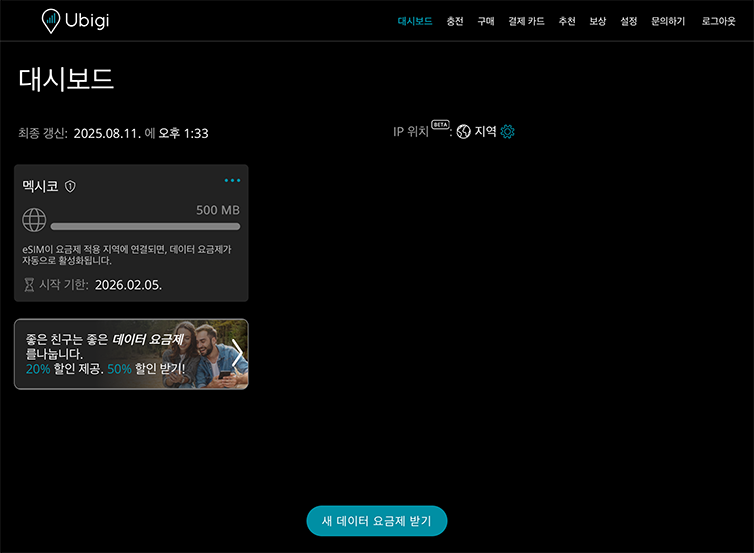
아직 Ubigi 계정이 없는 경우 계정 생성 페이지가 표시됩니다:
입력란을 채우고 계정 만들기를 클릭합니다. 계정이 생성되면 계정에 연결됩니다.
이제 더 많은 [목적지] 국가에서 Ubigi 연결을 즐길 수 있습니다!
참고: 이전 단계를 모두 주의 깊게 따랐는데도 계정 또는 계정 생성 페이지에 액세스할 수 없는 경우 고객 지원팀에 문의하여 추가 도움을 받으세요.
훌륭해
의 33007개 리뷰를 기준으로
검증됨
검증된 리뷰
이 사용자는 구매자로 확인되었습니다
Asia Sim worked
Asia Sim worked
customer, 19 Mar 2026
검증됨
검증된 리뷰
이 사용자는 구매자로 확인되었습니다
It workred perfectly at a good price
It workred perfectly at a good price
customer, 19 Mar 2026
검증됨
검증된 리뷰
이 사용자는 구매자로 확인되었습니다
Great time
Great time! Learned a lot about Sumo. Very knowledgeable.
Nicholas Martin, 19 Mar 2026
검증됨
검증된 리뷰
이 사용자는 구매자로 확인되었습니다
Easy to purchase and activate
Easy to purchase and activate, and to check your data usage
customer, 19 Mar 2026
검증됨
검증된 리뷰
이 사용자는 구매자로 확인되었습니다
Super easy to purchase the right…
Super easy to purchase the right package for a trip to Morocco. The eSIM was straight forward to load and it hasn’t let
Me down. The coverage and speeds have been excellent.
Martin, 19 Mar 2026
검증됨
검증된 리뷰
이 사용자는 구매자로 확인되었습니다
most of the time i can receive good…
most of the time i can receive good signal. even when my partners (use other eSIM brand) can't receive any signal. some times the signal can't reach 5G, it will show 'LTE'. but it's not big problem to me. and also the signal in the Narita International Airport is very bad.
customer, 19 Mar 2026
검증됨
검증된 리뷰
이 사용자는 구매자로 확인되었습니다
User friendly
User friendly, works well!
customer, 19 Mar 2026
검증됨
검증된 리뷰
이 사용자는 구매자로 확인되었습니다
Fast and reliable online service works…
Fast and reliable online service works almost everywhere in granada
nene yashiro, 19 Mar 2026
검증됨
검증된 리뷰
이 사용자는 구매자로 확인되었습니다
Quickly Internet Connection,
Quickly Internet Connection,
customer, 19 Mar 2026
검증됨
검증된 리뷰
이 사용자는 구매자로 확인되었습니다
Easy to install
Easy to install, a bit on the expensive site. 3 GB for 14 days enough for messaging, ride share app.
Ballrus, 19 Mar 2026
검증됨
검증된 리뷰
이 사용자는 구매자로 확인되었습니다
Excellent internet connection
Excellent internet connection. Easy installation. Highly recommended!
customer Michael König, 19 Mar 2026
검증됨
검증된 리뷰
이 사용자는 구매자로 확인되었습니다
Quick and easy
Quick and easy
Dan , 19 Mar 2026
검증됨
검증된 리뷰
이 사용자는 구매자로 확인되었습니다
Seamless
One word. Seamless.
Traveled with a customer and his eSIM had many problems. UI/set up was easy, but inconsistent service, poor coverage and while “on the go” no service. My service was solid post getting on the plane and before landing in Heathrow. I look forward to using Ubigi again in my other business trips. Keep up the great service!
MDP, 19 Mar 2026
검증됨
검증된 리뷰
이 사용자는 구매자로 확인되었습니다
Positive experience
I had a very positive experience with Ubigi. I found the exact service I wanted--15 days of unlimited 5G service in Japan--and I ordered it from.the company website. It started right up as soon as my plane touched down in Japan, and I've had consistenly excellent service while I've been there.
Mike, 19 Mar 2026
검증됨
검증된 리뷰
이 사용자는 구매자로 확인되었습니다
Simple to set up and use
Simple to set up and use, worked great in so many different countries and lots of great options with multi country packages available.
Bao, 19 Mar 2026
감사합니다
귀하의 메시지가 전송되었습니다. 곧 답변드리겠습니다.
감사합니다
귀하의 뉴스레터 구독을 고려했습니다.
eSIM 호환성 확인 방법
스마트폰 / 태블릿:
*#06# 입력. → EID 번호가 나오면 eSIM 지원 기기입니다.
Windows 10 / 11:
Windows+I 를 누르세요. “네트워크 및 인터넷”으로 이동하세요 → 셀룰러 네트워크가 보이면 PC가 eSIM을 지원합니다..
통신사 잠금 해제 여부 확인 방법
iPhone / iPad:
설정 > 일반 > 정보로 이동 통신사 잠금 항목까지 스크롤. → “SIM 제한 없음”이 표시되면 기기는 잠금 해제 상태입니다.
Android:
설정 > 네트워크 및 인터넷 > 모바일 네트워크 자동 네트워크 선택을 끄세요. → 여러 네트워크가 보이면 잠금 해제된 기기입니다.








 eSIM 호환성 확인 방법
 통신사 잠금 해제 여부 확인 방법