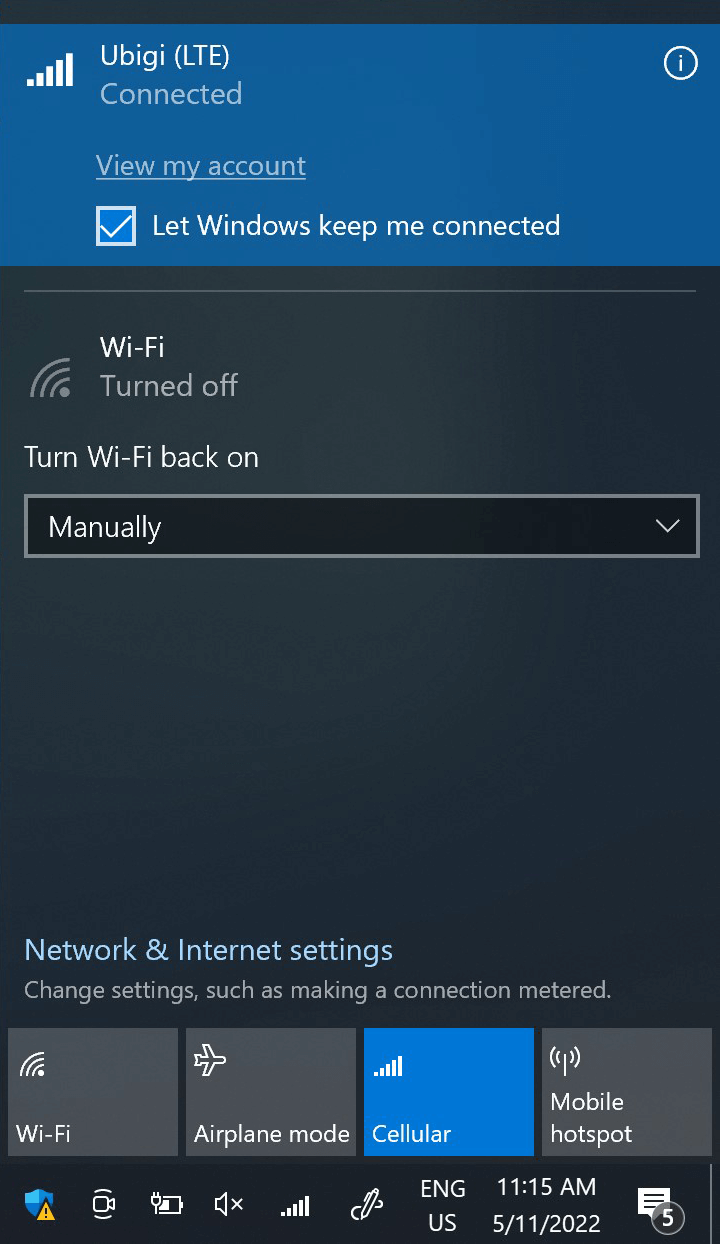
이 단계에서 네트워크 플라이아웃을 열고 “내 계정 보기”를 클릭하여 Ubigi 연결을 테스트합니다. 또는 브라우저를 열고 ubigi .me로 이동합니다.
이미 Ubigi 계정이 있는 경우 자동으로 연결됩니다.
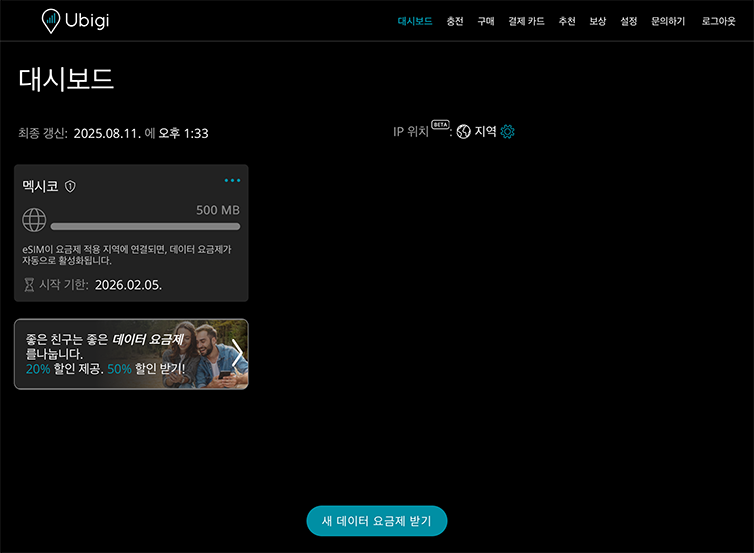
아직 Ubigi 계정이 없는 경우 계정 생성 페이지가 표시됩니다:
입력란을 채우고 계정 만들기를 클릭합니다. 계정이 생성되면 계정에 연결됩니다.
이제 더 많은 [목적지] 국가에서 Ubigi 연결을 즐길 수 있습니다!
참고: 이전 단계를 모두 주의 깊게 따랐는데도 계정 또는 계정 생성 페이지에 액세스할 수 없는 경우 고객 지원팀에 문의하여 추가 도움을 받으세요.
훌륭해
의 44939개 리뷰를 기준으로
검증됨
검증된 리뷰
이 사용자는 구매자로 확인되었습니다
Really good connection
Really good connection
customer, 03 Sep 2026
검증됨
검증된 리뷰
이 사용자는 구매자로 확인되었습니다
Setup took a bit of time for esim
Setup took a bit of time for esim
customer, 03 Sep 2026
검증됨
검증된 리뷰
이 사용자는 구매자로 확인되었습니다
Ubigi customer for life
Ubigi customer for life. Easy to use and very reliable.
Frankie M, 03 Sep 2026
검증됨
검증된 리뷰
이 사용자는 구매자로 확인되었습니다
Seemless
Network connection made very easy.I had a seemless experience
Titilola Olukanni, 03 Sep 2026
검증됨
검증된 리뷰
이 사용자는 구매자로 확인되었습니다
UBIGI worked great in Japan
My daughter researched this and it was rated highest and we agree!! We had no problems whatsoever! I set it up to turn on as soon as I landed in Japan & it did so. I had strong reception even in some mountainous more remote areas! Thank you Ubigi! I have been spreading the word and recommending your app!
Sharon Turner, 03 Sep 2026
검증됨
검증된 리뷰
이 사용자는 구매자로 확인되었습니다
Full coverage with good speed
Full coverage with good speed between Montréal, Québec and Tadoussac. Even at sea.
Great bandwidth for streaming.
Fred, 03 Sep 2026
검증됨
검증된 리뷰
이 사용자는 구매자로 확인되었습니다
Greatest ever
Greatest ever
Thomas N., 03 Sep 2026
검증됨
검증된 리뷰
이 사용자는 구매자로 확인되었습니다
Working normally
Working normally. No lag or no connection issues.
customer, 03 Sep 2026
검증됨
검증된 리뷰
이 사용자는 구매자로 확인되었습니다
Very easy to set up
Very easy to set up. Works great!
Customer, 03 Sep 2026
검증됨
검증된 리뷰
이 사용자는 구매자로 확인되었습니다
The signal strength was very good in…
The signal strength was very good in Japan. Thank you for service
customer, 03 Sep 2026
검증됨
검증된 리뷰
이 사용자는 구매자로 확인되었습니다
Works great
Works great! Only app UI could be more modern.
customer, 03 Sep 2026
검증됨
검증된 리뷰
이 사용자는 구매자로 확인되었습니다
Happy
Connected on landing. No issues across borders. All good.
customer, 03 Sep 2026
검증됨
검증된 리뷰
이 사용자는 구매자로 확인되었습니다
Easy to install, very good connection
Easy to install, I gort very good connection anywhere in the country (better than at home)!
Elle, 03 Sep 2026
검증됨
검증된 리뷰
이 사용자는 구매자로 확인되었습니다
Japan - connectivity is excellent.
Being in a foreign country can be daunting if you don't enjoy being cut off from family and friends. Ubigi supplied a data only eSim to me and it worked ever so well.
On a 1 week stay in Japan I used a little over 1GB to check maps, train times, local attractions, the weather, etc. Nothing data heavy. It worked everytime. There was no drop in service the entire time I needed it.
When I go back I'll be using Ubigi again.
customer, 03 Sep 2026
검증됨
검증된 리뷰
이 사용자는 구매자로 확인되었습니다
10/10 Service while in Japan
10/10 Service while in Japan. All across Japan I had dependable service.
Lewis Kafka, 03 Sep 2026
감사합니다
귀하의 메시지가 전송되었습니다. 곧 답변드리겠습니다.
감사합니다
귀하의 뉴스레터 구독을 고려했습니다.
eSIM 호환성 확인 방법
스마트폰 / 태블릿:
*#06# 입력. → EID 번호가 나오면 eSIM 지원 기기입니다.
Windows 10 / 11:
Windows+I 를 누르세요. “네트워크 및 인터넷”으로 이동하세요 → 셀룰러 네트워크가 보이면 PC가 eSIM을 지원합니다..
통신사 잠금 해제 여부 확인 방법
iPhone / iPad:
설정 > 일반 > 정보로 이동 통신사 잠금 항목까지 스크롤. → “SIM 제한 없음”이 표시되면 기기는 잠금 해제 상태입니다.
Android:
설정 > 네트워크 및 인터넷 > 모바일 네트워크 자동 네트워크 선택을 끄세요. → 여러 네트워크가 보이면 잠금 해제된 기기입니다.








 eSIM 호환성 확인 방법
 통신사 잠금 해제 여부 확인 방법