Check if your eSIM profile is installed on your device.
Check eSIM profile activation
Check if your eSIM profile is activated on your device.
Apply data to eSIM profile
Ensure data is applied to your Ubigi eSIM profile.
Check APN configuration
Ensure that the APN is correctly set for your Ubigi connectivty.
Check network display
Check the network status for your Ubigi connectivity.
Final checks!
Check account creation and Internet access.
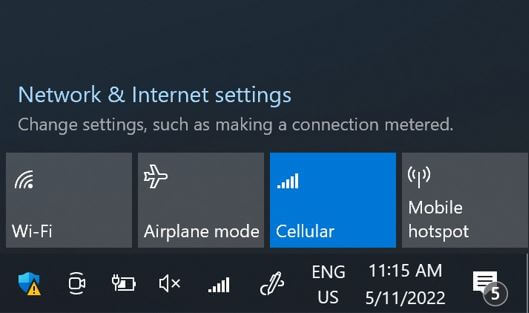
On the network flyout, ensure that:
Cellular (or Mobile) is activated. Wi-Fi is deactivated.
Great
Based on 44897 reviews on
Verified
Verified review
This user has been identified as a buyer
Zero stress in China
customer, 03 Sep 2026
Verified
Verified review
This user has been identified as a buyer
Great eSIM
Easy to buy, connect and use. Great value for money. Good coverage pretty much everywhere I went. No issues whatsoever.
Lexie Conrad, 03 Sep 2026
Verified
Verified review
This user has been identified as a buyer
Great connection all throughout our…
Great connection all throughout our stay in Japan. We went to different cities and I can’t remember a time when my internet connection got weak or disconnected.
Alvin Lamucho, 03 Sep 2026
Verified
Verified review
This user has been identified as a buyer
Small glitch to start -Works great now
Works great - now. Have used this before with no issues. This, upon arrival at destination, the e-sim slot was empty, despite having been purchased and activated before we left home. After about 1/2 hour of bot chat - I was connected with a real person who got us up and running. Took about 45 minutes overall (and finding free wi-fi to chat with)
Will use it again for future trips.
SL, 03 Sep 2026
Verified
Verified review
This user has been identified as a buyer
I was in Japan for 12 days and stayed…
I was in Japan for 12 days and stayed in Tokyo, Mount Fuji area and Kyoto and didn’t have any signal issues. My internet was fine and the amount of data I bought (25gb) was more than enough for that amount of days. Overall really happy with this eSIM.
Carolina, 03 Sep 2026
Verified
Verified review
This user has been identified as a buyer
Excellent service
Excellent service, very stable even in locations with poor signal. Didn’t have the opportunity to test the speed but the connection was good enough that I did not think about speed. The setup was really easy. The differentiating factor was having several plans with different duration and capacity. Pretty useful when you are on a budget.
Antonio, 03 Sep 2026
Verified
Verified review
This user has been identified as a buyer
Travel to Korea
I'm in Korea and have been getting all my data. Thanks.
clee, 02 Sep 2026
Verified
Verified review
This user has been identified as a buyer
Dependable necessii
Reliable service everywhere
A Trejo, 02 Sep 2026
Verified
Verified review
This user has been identified as a buyer
I knew about this fantastic e-sim from…
I knew about this fantastic e-sim from myparisroutin on istagram. I an a flight attendant and I had some bad experience from others esim.
Ubigi is really great. I bought USA zone and it works really great.
Luisa
Luisa Luetti, 02 Sep 2026
Verified
Verified review
This user has been identified as a buyer
It was easy to download the esim and…
It was easy to download the esim and simple to use.
Manon Payette, 02 Sep 2026
Verified
Verified review
This user has been identified as a buyer
It was nice and it’s work very well
A.B, 02 Sep 2026
Verified
Verified review
This user has been identified as a buyer
Easy and user friendly
Installing the app and setting this up was really easy. Best thing, it worked throughout Europe.
Shelanna, 02 Sep 2026
Verified
Verified review
This user has been identified as a buyer
The best e-sim ever !
Martins, 02 Sep 2026
Verified
Verified review
This user has been identified as a buyer
Smooth and effective solution
Samuel, 02 Sep 2026
Verified
Verified review
This user has been identified as a buyer
Best eSim so far
Best eSim so far
Nikola, 02 Sep 2026
Thank you
Your message has been sent. We’ll get back to you shortly.
Thank you
We have taken into account your subscription to the newsletter
How to check eSIM compatibility
Smartphones / Tablets:
Dial *#06#. → If an EID number appears, your device is eSIM-compatible.
Windows 10 / 11:
Press Windows+I. Go to “Network & Internet” → If you see "Cellular", your PC is eSIM-compatible.
How to check carrier unlocking
iPhone / iPad:
Go to Settings > General > About. Scroll to Carrier Lock. → If you see “No SIM restrictions”, your device is unlocked.
Android:
Go to Settings > Network & Internet > Mobile network. Disable Automatic network selection. → If multiple networks appear, your device is unlocked.
You already have an eSIM in your cart.
Each order can only include one eSIM data plan.
If you choose to add a new one, the current plan will be removed. What would you like to do?