Suriin kung naka-install ang iyong eSIM profile ay naka-install sa iyong device.
Suriin ang eSIM aktibasyon ng profile
Suriin kung aktibo ang iyong eSIM profile ay naka-aktiba sa iyong device.
I-apply ang data sa eSIM profile
Siguraduhing na-apply ang data sa iyong Ubigi eSIM profile.
Suriin ang APN ng pagsasaayos
Siguraduhin na ang APN ay tama ang pag-set para sa ang iyong koneksyon sa Ubigi.
Suriin ang network ipakita
Suriin ang katayuan ng network para sa iyong koneksyon sa Ubigi.
Panghuling pagsusuri!
Suriin ang account paglikha at Pag-access sa Internet.
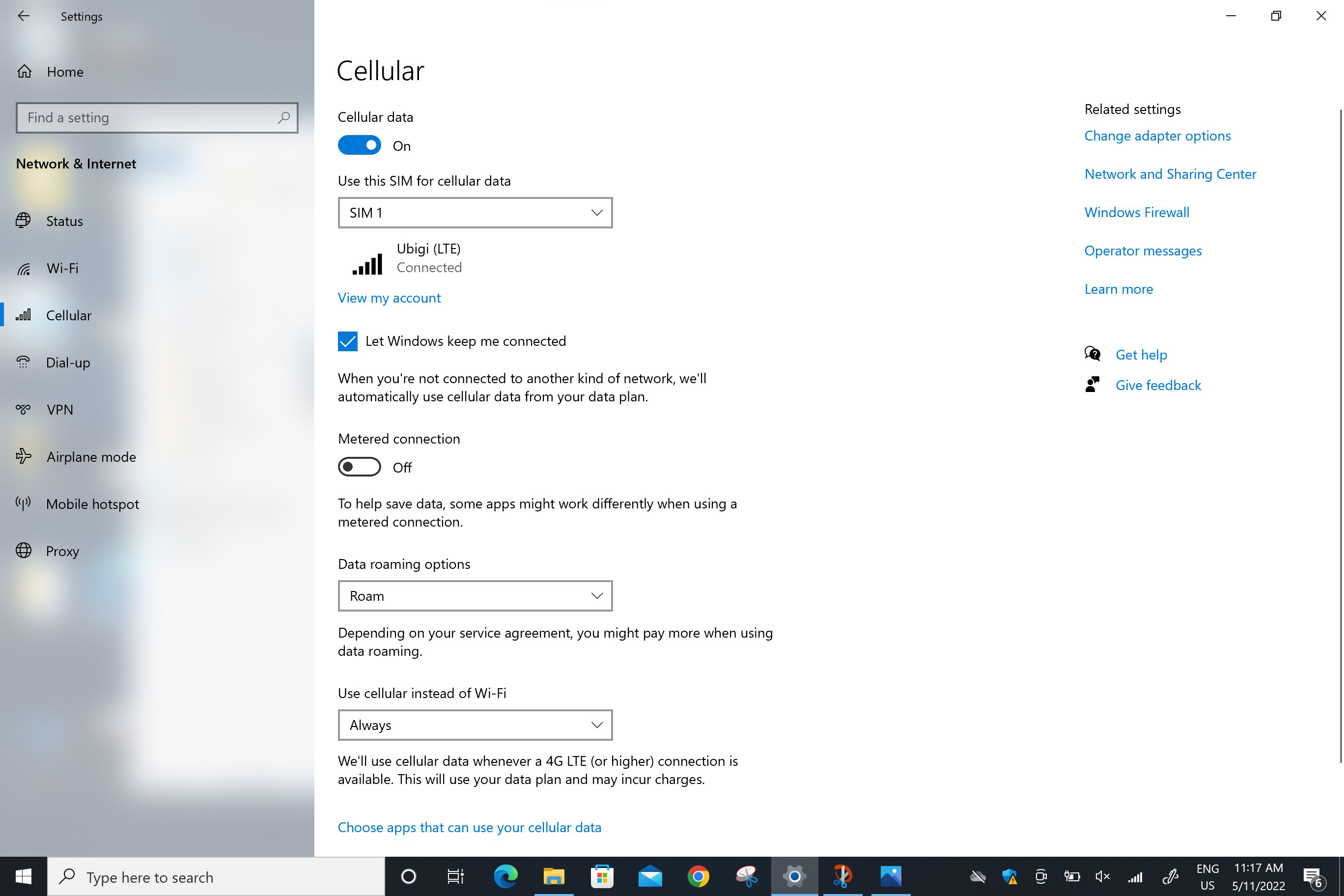
Siguraduhing nakatakda ang Roam sa patlang naMga opsyon sa roaming ng datos:
Pumunta sa: Start > Settings > Networks & Internet > Cellular. Sa patlang na “Data roaming options”, piliin ang Roam.
BABALA: kung maingat mong sinunod ang mga nakaraang hakbang, ang iyong Ubigi eSIM profile ay ginagamit na ngayon para sa koneksyon ng cellular data (at HINDI ang iyong pisikal na SIM card kung mayroon ka man, o anumang ibang eSIM profile). Nangangahulugan ito na hindi ka magkakaroon ng karagdagang gastos sa roaming dahil ang mga rate ng Ubigi ang iaaplay habang ginagamit ang koneksyon ng cellular ng Ubigi. Sa anumang kaso, laging tiyaking naka-select ang iyong Ubigi eSIM profile para sa cellular data upang maiwasan ang karagdagang gastos sa roaming habang nasa ibang bansa.

Magaling
Batay sa 48619 na mga pagsusuri sur
Na-verify
Na-verify na review
Ang user na ito ay kinilala bilang mamimili.
Great service for a good price
I found it very easy to install and start using my Ubigi e-sim card during my first trip to Japan. Connection was overall quite good. The only aspect that needs improvement is how to check how much data I had left on the plan I had purchased.
Esther Gaitán Fuertes, 15 Oct 2026
Na-verify
Na-verify na review
Ang user na ito ay kinilala bilang mamimili.
Have it set up prior to travel
Had it set up prior to travel. Easy to use. They have instructional videos that had great information.
customer, 15 Oct 2026
Na-verify
Na-verify na review
Ang user na ito ay kinilala bilang mamimili.
Very easy and fast internet
customer, 15 Oct 2026
Na-verify
Na-verify na review
Ang user na ito ay kinilala bilang mamimili.
Ubigi made traveling in Japan with confidence a breeze
This service made traveling to Japan and moving around each prefecture and region easy. Even in more rural areas the service was stable and reliable. The only time I ever lost service was in long tunnels while taking the train. For me that kind of reliability and a reasonable price point and easy set up and top-up without need for a wireless connection really is a game change and puts your mind at ease while traveling in a new place where perhaps you may not speak the language at all.
Omar, 15 Oct 2026
Na-verify
Na-verify na review
Ang user na ito ay kinilala bilang mamimili.
easy and strong signal aera coverage.
customer, 15 Oct 2026
Na-verify
Na-verify na review
Ang user na ito ay kinilala bilang mamimili.
No glitches from start to end of our…
No glitches from start to end of our trip in Japan. WiFi connection was spotty during the bus ride in the mountains along the Sea of Japan coastline. Otherwise the WiFi connection was good and dependable.
Dean Doi, 15 Oct 2026
Na-verify
Na-verify na review
Ang user na ito ay kinilala bilang mamimili.
Ubigi always makes my travel easier
Ubigi always makes my travel easier. Never failed me once and is always there to top up if I need to. 😊
customer, 15 Oct 2026
Na-verify
Na-verify na review
Ang user na ito ay kinilala bilang mamimili.
Works perfect
I have Ubigi nog for twee weeks. Its perfectly and its was easy to connect on mine Phone.
customer, 15 Oct 2026
Na-verify
Na-verify na review
Ang user na ito ay kinilala bilang mamimili.
I am now in Cabo San Lucas Mexico and…
I am now in Cabo San Lucas Mexico and reception was faultless .
Michal Andrews, 15 Oct 2026
Na-verify
Na-verify na review
Ang user na ito ay kinilala bilang mamimili.
Easy to set up
Easy to set up, and good connection
Amy, 15 Oct 2026
Na-verify
Na-verify na review
Ang user na ito ay kinilala bilang mamimili.
Great !!
Great !!
Simple to set up
Never failed us, even in mountain range
My daughter hot spotted too
Overall great and will recommend
Samantha Coggin, 14 Oct 2026
Na-verify
Na-verify na review
Ang user na ito ay kinilala bilang mamimili.
At first
At first, there were a few challenges with the setup since it was my first time using it. Now I see that it is easy, and I am truly grateful for the experience, as I was able to use video calls—something very important for deaf people. The signal was sometimes weaker in certain places, especially where there was a lot of frequency interference or other networks, but otherwise, my experience was excellent; I used email, various apps, SMS, and navigation.
Petra, 14 Oct 2026
Na-verify
Na-verify na review
Ang user na ito ay kinilala bilang mamimili.
Good eSIM, Uneven Coverage
Overall, I had a good experience using the eSIM in Italy. However, there were several areas where the signal was either very weak or completely unavailable, particularly in the Dolomites and in some areas on the outskirts of Bologna.
On the positive side, the interface is user-friendly, and the app makes it easy to monitor data usage, which is very helpful.
Overall, a good service, but network coverage could be improved in certain areas.
Ori, 14 Oct 2026
Na-verify
Na-verify na review
Ang user na ito ay kinilala bilang mamimili.
Easy automatic connection as soon as…
Easy automatic connection as soon as you arrive in the country.
Bill UK, 14 Oct 2026
Na-verify
Na-verify na review
Ang user na ito ay kinilala bilang mamimili.
The connection was easy to set up and…
The connection was easy to set up and very stable! Excellent!
customer, 14 Oct 2026
Salamat
Naipadala na ang iyong mensahe. Makikipag-ugnayan kami sa iyo sa lalong madaling panahon.
Salamat
Isinasaalang-alang na namin ang iyong pag-subscribe sa newsletter.
Palitan ng bagong plano
Mga smartphone/mga tablet:
I-dial ang *#06#. → Kung lumitaw ang isang EID na numero, eSIM-compatible ang iyong aparato.
Windows 10 / 11:
Pindutin ang Windows+I. Pumunta sa "Network at Internet" → Kung nakikita mo ang "Cellular", eSIM-compatible ang iyong PC.
Paano suriin ang pag-unlock ng carrier
iPhone / iPad:
Pumunta sa Mga Setting > Pangkalahatan > Tungkol sa Mag-scroll sa Carrier Lock. → Kung makikita mo ang Walang mga paghihigpit sa SIM, naka-unlock ang iyong aparato.
Android:
Pumunta sa Mga Setting > Network at Internet > Mobile network. I-disable ang Awtomatikong pagpili ng network. → Kung lumalabas ang maraming network, naka-unlock ang iyong device.
Mayroon ka nang eSIM sa iyong cart.
Bawat order ay maaari lamang maglaman ng isang eSIM data plan.
Kung pipiliin mong magdagdag ng bago, matatanggal ang kasalukuyang plano. Ano ang nais mong gawin?
