Skip to content
← 返回问题
移动数据已应用到我的 Android 设备上的 Ubigi eSIM 配置文件,但无法访问互联网,我该怎么办?

您需要检查接入点名称 (APN) 的配置,以解决安卓设备上的这一问题。要做到这一点:

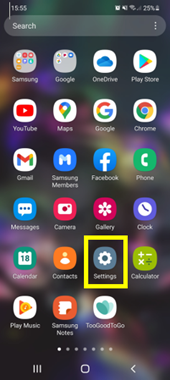
– 进入 “设置”:
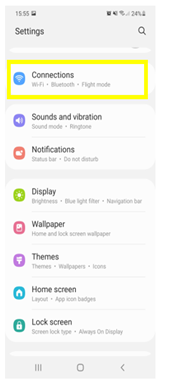
– 选择 “连接”:
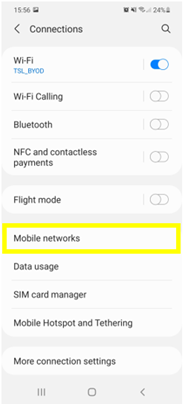
– 选择 “移动网络”:
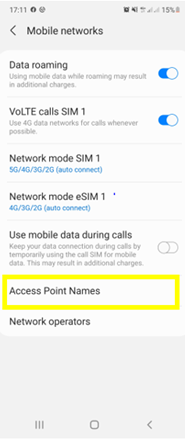
– 然后选择 “接入点名称”:
– 在屏幕底部选择 Ubigi eSIM:
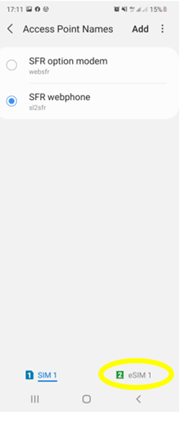
– 如果出现 “APNmobiledata “,请确保选择了它:
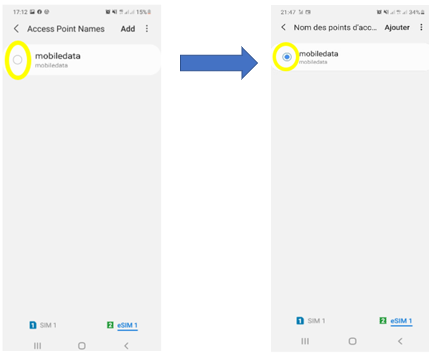
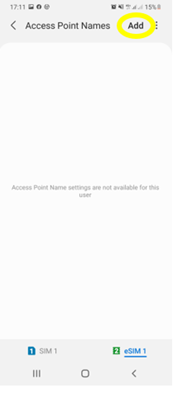
– 如果没有出现 “接入点名称”,请按 “添加 “或 “+”键创建一个:
– 点击 “名称 “可以编辑该字段:
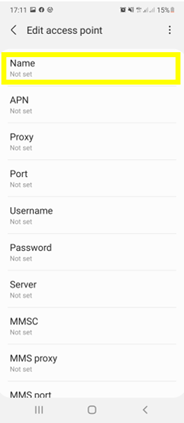
– 键入Ubigi 并按 “确定”:
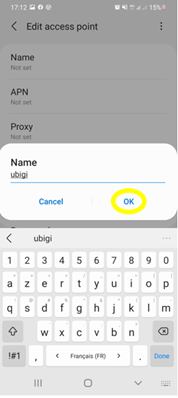
– 点击 APN 字段并键入mobiledata 并按 “确定”:
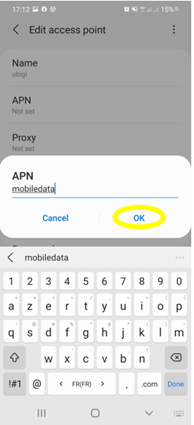
– 点击屏幕上方的 3 个小圆点符号保存 APN:
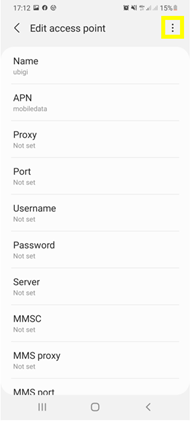
– 最后点击 “保存”:
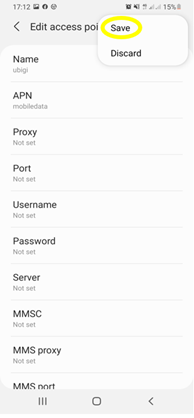
– 确保 APN 已被选中:
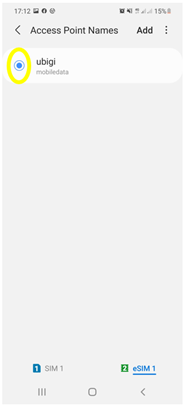
现在您可以使用 Ubigi eSIM 配置文件的连接功能连接互联网。


在寻找特定的东西吗?

其他常见问题:

我恢复了(新)iPhone 上的数据,但我的 eSIM 配置文件无法使用。怎么办?

我即将旅行。如何管理我设备上的 Ubigi eSIM 卡?

解决安卓设备上的 Ubigi eSIM 配置文件问题

解决 iPhone 上的 Ubigi eSIM 配置文件问题

iMessage 无法与我的 Ubigi eSIM 配置文件一起使用。怎么办?

如何知道我的 Ubigi eSIM 配置文件是否已在 iPhone/iPad 上激活?

如何在 iPhone 上获取并安装 Ubigi eSIM 配置文件?

如何在安卓设备上获取并安装Ubigi eSIM个人档案?

如何通过 iPhone 或 iPad 上的 Ubigi 应用程序购买数据计划?

如何检查我的 iPhone 上是否安装了 Ubigi eSIM 配置文件?

我的 iPhone/iPad 上已安装并激活 Ubigi eSIM 配置文件,但没有显示任何网络,我该怎么办?

我的 eSIM Ubigi 配置文件已在 iPhone/iPad 上安装并激活,网络已显示,但无法上网,怎么办?

我如何知道我的 Ubigi eSIM 配置文件是否已安装在我的安卓设备上?

我的安卓设备上已安装并激活 Ubigi eSIM 配置文件,网络已显示,但无法上网,我该怎么办?

我可以用 Ubigi eSIM 数据计划打电话吗?

如何找到我的 Ubigi eSIM 的 ICCID(序列号)?

如何重置我的 Ubigi eSIM 账户密码?

如何查看 Ubigi eSIM 的余额?

如何删除我的 Ubigi 账户?

我购买了错误的数据计划,但没有使用,如何更改?

如何获得购买 Ubigi 数据计划的发票?

我有一部新的安卓设备。如何将我的 Ubigi eSIM 配置文件重新安装到新设备上?

当我想重新使用 iPhone 上的 Ubigi eSIM 个人档案时,我该如何启用?

当我旅行或不使用 iPhone 时,如何禁用我的 Ubigi eSIM 配置文件?

当我想在安卓设备上重新使用我的 Ubigi eSIM 配置文件时,我该如何启用它?

如何删除 iPhone/iPad 上的 Ubigi eSIM 配置文件?

Ubigi 连接失效。我是否应该禁用设备上的 DNS 或 VPN?

太棒了 Trustpilot stars Trustpilot
Trustpilot stars
基于 Trustpilot 30956条评论
5 stars 已验证
已验证评论
该用户已被识别为买家
eSim with coverage when others in the group had none.
Ease of finding the right eSim for me, clear pricing, installation a breeze, and I have had an excellent service, everywhere.
Soyer, 01 Feb 2026
5 stars 已验证
已验证评论
该用户已被识别为买家
Easy to apply and set up.
Easy to apply and set up. Great coverage
customer, 01 Feb 2026
4 stars 已验证
已验证评论
该用户已被识别为买家
Highly Recommended Ubigi Unlimited Plan for Japan: minor setup quirks and occasional network drops.
We used two Pixel 10 Pro XL phones and a Pixel 7 for our 15-day trip. Crucially, the plan doesn't start until you connect to the network you're traveling to, as per terms. One Pixel 10 Pro set up seamlessly in Australia with the app. The second had a setup issue in Japan, requiring uninstall and reinstall, then worked perfectly. Occasional, 30-second network drops were noted across Japan but easily resolved with airplane mode. Overall, highly recommend.
Michael Porter, 01 Feb 2026
5 stars 已验证
已验证评论
该用户已被识别为买家
I lke Ubigi my family used this for a…
I lke Ubigi my family used this for a year and they highly recommend
Ed Calope, 01 Feb 2026
5 stars 已验证
已验证评论
该用户已被识别为买家
So easy to install and then it is ready…
So easy to install and then it is ready to go when you arrive at your destination.
customer, 01 Feb 2026
5 stars 已验证
已验证评论
该用户已被识别为买家
Full area covered
Full area covered
Dr Asif Khuhrocustomer, 01 Feb 2026
4 stars 已验证
已验证评论
该用户已被识别为买家
It was great
It was great, but for shorter days I would recommend more data.
Kathleen Faro, 01 Feb 2026
5 stars 已验证
已验证评论
该用户已被识别为买家
That’s great experience
That’s great experience. I use this e-sim very smoothly in NYC even on underground! I’ve never lose a way because of its network. Thanks! I’m going to pick it up another time.
customer, 01 Feb 2026
5 stars 已验证
已验证评论
该用户已被识别为买家
very easy to acquire
customer, 01 Feb 2026
5 stars 已验证
已验证评论
该用户已被识别为买家
Good service
Using the service for few years now, never had any trouble.
customer, 31 Jan 2026
5 stars 已验证
已验证评论
该用户已被识别为买家
Very efficient
Very easy to set up and kept informed of need to up date
marlene, 31 Jan 2026
5 stars 已验证
已验证评论
该用户已被识别为买家
Easy to use
Easy to use. Until now, just good experience.
Markus Auer, 31 Jan 2026
5 stars 已验证
已验证评论
该用户已被识别为买家
It works perfectly
It works perfectly
customer, 31 Jan 2026
4 stars 已验证
已验证评论
该用户已被识别为买家
GOOD
A bit tricky to setup at first but went well throughout our holidays. Will be using again when needed.
customer, 31 Jan 2026

您的信息已发送。
我们会尽快与您联系。

我们已考虑到您订阅了新闻通讯。
