Skip to content
← 질문으로 돌아가기
모바일 데이터가 내 Android 디바이스의 Ubigi eSIM 프로필에 적용되었지만 인터넷에 액세스할 수 없는 경우 어떻게 해야 하나요?

Android 기기에서 이 문제를 해결하려면 APN(액세스 포인트 이름)의 구성을 확인해야 합니다. 이렇게 하려면:

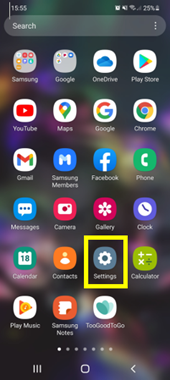
– 설정으로 이동:
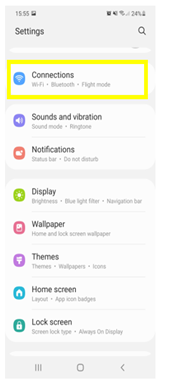
– 연결 선택:
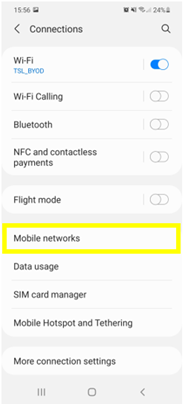
– 모바일 네트워크 선택:
– 액세스 포인트 이름 선택:
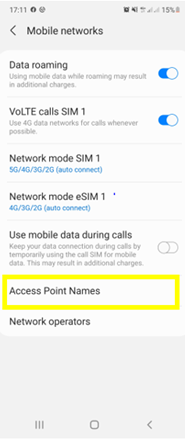
– 화면 하단에서 Ubigi eSIM 선택:
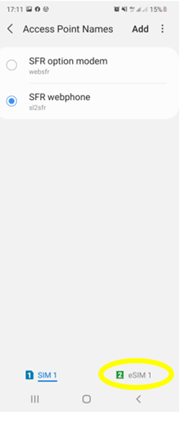
– APN 모바일 데이터가 표시되면 선택되어 있는지 확인:
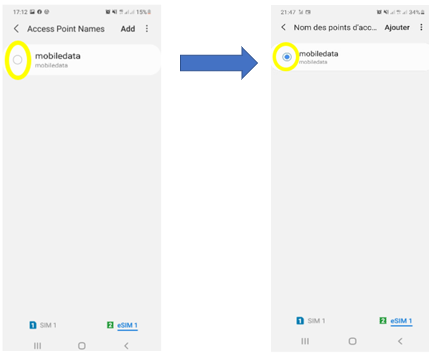
– 액세스 포인트 이름이 표시되지 않으면 ‘추가’ 또는 ‘+’를 눌러 생성:
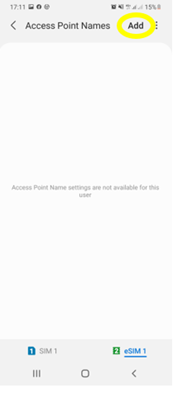
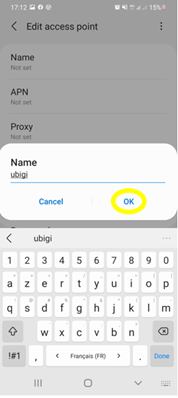
– 이름을 클릭하면 이 필드를 편집할 수 있습니다:
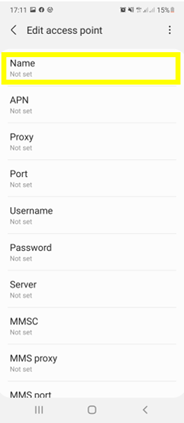
Ubigi를 입력하고 확인을 누릅니다:

– APN 필드를 클릭하고 모바일데이터를 입력하고 확인을 누릅니다:
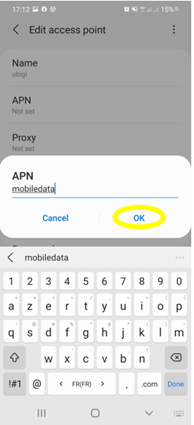
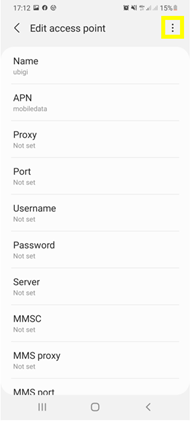
– 화면 상단의 작은 점 3개 기호를 클릭하여 APN을 저장합니다:
– 마지막으로 저장을 클릭합니다:
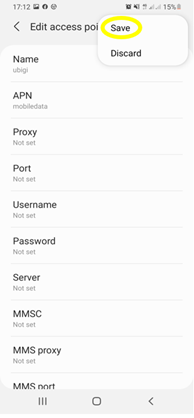
– APN이 선택되었는지 확인합니다:
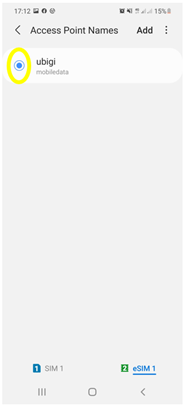
이제 Ubigi eSIM 프로필의 연결을 사용하여 인터넷에 연결할 수 있습니다.


특정한 것을 찾으시나요?

기타 자주 묻는 질문:

(새) iPhone에서 데이터를 복원했지만 eSIM 프로필이 작동하지 않습니다. 어떻게 해야 하나요?

곧 여행을 떠납니다. 내 기기에서 Ubigi eSIM 프로필을 어떻게 관리하나요?

Android 기기에서 Ubigi eSIM 프로필 관련 문제 해결하기

iPhone에서 Ubigi eSIM 프로필 관련 문제 해결하기

iMessage가 내 Ubigi eSIM 프로필에서 작동하지 않습니다. 어떻게 해야 하나요?

아이폰/아이패드에서 유비기 eSIM 프로필이 활성화되었는지 어떻게 알 수 있나요?

iPhone에서 Ubigi eSIM 프로필을 얻고 설치하는 방법은 무엇인가요?

Android 기기에서 Ubigi eSIM 프로필을 받고 설치하는 방법은 무엇인가요?

Ubigi 물리적 SIM 카드가 장착된 Windows 10 또는 Windows 11 디바이스에서 Ubigi 서비스를 활성화하려면 어떻게 해야 하나요?

iPhone 또는 iPad의 Ubigi 애플리케이션에서 데이터 요금제를 구매하려면 어떻게 해야 하나요?

iPhone에 Ubigi eSIM 프로필이 설치되어 있는지 어떻게 확인하나요?

Ubigi eSIM 프로필이 iPhone/iPad에 설치되어 활성화되어 있는데 네트워크가 표시되지 않는데 어떻게 해야 하나요?

iPhone/iPad에 eSIM Ubigi 프로필이 설치되어 활성화되어 있고 네트워크가 표시되지만 인터넷에 액세스할 수 없는 경우 어떻게 해야 하나요?

내 Ubigi eSIM 프로필이 Android 디바이스에 설치되어 있는지 어떻게 알 수 있나요?

Ubigi eSIM 프로필이 Android 디바이스에 설치되어 활성화되었지만 네트워크가 표시되지 않는데 어떻게 해야 하나요?

내 Ubigi eSIM 프로필이 Android 디바이스에 설치되어 활성화되어 있고 네트워크가 표시되지만 인터넷에 액세스할 수 없는 경우 어떻게 해야 하나요?

Ubigi eSIM 데이터 요금제로 전화를 걸 수 있나요?

Windows 10 또는 Windows 11 장치에서 Ubigi eSIM 프로필이 활성화되었지만 네트워크가 없는 경우 어떻게 해야 하나요?

유비기 eSIM의 ICCID(일련 번호)는 어떻게 찾을 수 있나요?

Ubigi eSIM 계정의 비밀번호를 어떻게 재설정하나요?

유비기 eSIM의 잔액은 어떻게 확인할 수 있나요?

Ubigi 계정을 삭제하는 방법은 무엇인가요?

데이터 요금제를 잘못 구매했는데 사용하지 않았는데 어떻게 변경할 수 있나요?

Ubigi 데이터 요금제 구매 영수증은 어떻게 받나요?

새 Android 디바이스가 있습니다. Ubigi eSIM 프로필을 다시 설치하려면 어떻게 해야 하나요?

다시 사용하고 싶을 때 iPhone에서 Ubigi eSIM 프로필을 활성화하려면 어떻게 해야 하나요?

여행 중이거나 사용하지 않을 때 iPhone에서 Ubigi eSIM 프로필을 비활성화하려면 어떻게 해야 하나요?

다시 사용하고 싶을 때 내 Android 기기에서 Ubigi eSIM 프로필을 활성화하려면 어떻게 해야 하나요?

아이폰/아이패드에서 유비기 eSIM 프로필을 삭제하는 방법은 무엇인가요?

Ubigi 연결이 작동하지 않습니다. 기기에서 활성 DNS 또는 VPN을 비활성화해야 하나요?

훌륭해 Trustpilot stars Trustpilot
Trustpilot stars
Trustpilot 31181개 리뷰를 기준으로
5 stars 검증됨
검증된 리뷰
이 사용자는 구매자로 확인되었습니다
I have used Ubigi twice in Japan
I have used Ubigi twice in Japan and it was an easy process both times. I lost service once on a tall remote mountain where another tour buddy on a different service still had signal, but overall I am very happy with the Ubigi eSIM
Nathan, 08 Feb 2026
5 stars 검증됨
검증된 리뷰
이 사용자는 구매자로 확인되었습니다
Easy to purchase and install
Easy to purchase and install, worked great from day 1 the whole time. Overall good experience would use Ubigi again when traveling in Costa Rica
customer, 08 Feb 2026
5 stars 검증됨
검증된 리뷰
이 사용자는 구매자로 확인되었습니다
Easy Peasy!
Easy to use and no issues using it while being in a different country! Will be definitely using this again in the future! 10/10 no notes!
customer, 08 Feb 2026
5 stars 검증됨
검증된 리뷰
이 사용자는 구매자로 확인되었습니다
The installation process was very…
The installation process was very straightforward, connectivity seems to be be really good in Tokyo and in Hakuba.
Andrei, 08 Feb 2026
4 stars 검증됨
검증된 리뷰
이 사용자는 구매자로 확인되었습니다
Worked well in Japan and South Korea…
Worked well in Japan and South Korea rarely had 5G but the 4G was fast and reliable
consumer, 08 Feb 2026
4 stars 검증됨
검증된 리뷰
이 사용자는 구매자로 확인되었습니다
Good prices
Good prices. App works very well. Seemed to take awhile (maybe 30 minutes) to become active, but after that worked great.
Consumer, 08 Feb 2026
5 stars 검증됨
검증된 리뷰
이 사용자는 구매자로 확인되었습니다
Nice and comfortable
Frank B, 07 Feb 2026
5 stars 검증됨
검증된 리뷰
이 사용자는 구매자로 확인되었습니다
Great access to internet.
customer, 07 Feb 2026
5 stars 검증됨
검증된 리뷰
이 사용자는 구매자로 확인되었습니다
Worked flawlessly!
Worked flawlessly!
JohnnyV in California, 07 Feb 2026
5 stars 검증됨
검증된 리뷰
이 사용자는 구매자로 확인되었습니다
Uncomplicated
Uncomplicated
Costumer, 07 Feb 2026
5 stars 검증됨
검증된 리뷰
이 사용자는 구매자로 확인되었습니다
Easy to install on the iPhone
Easy to install on the iPhone. It worked very well in Morocco
customer, 07 Feb 2026
4 stars 검증됨
검증된 리뷰
이 사용자는 구매자로 확인되었습니다
Nice experience!
My experience with Ubigi eSIM was very good, all super clear, well explained, easy to perform and worked perfect.
María, 07 Feb 2026
5 stars 검증됨
검증된 리뷰
이 사용자는 구매자로 확인되었습니다
Very nice thank you for sharing this…
Very nice thank you for sharing this with us
Shogofa Rahmani, 07 Feb 2026
5 stars 검증됨
검증된 리뷰
이 사용자는 구매자로 확인되었습니다
It was as easy as advertised
It was as easy as advertised, i installed it before i left USA. Arrived in Korea, turned it on, BAM, 5G LTE all day.. Arrived in Vietnam, same thing, it worked right away and was LTE speeds. I noticed Tmobile (with the International plan) was mostly 5g, not LTE.
Joe, 07 Feb 2026
5 stars 검증됨
검증된 리뷰
이 사용자는 구매자로 확인되었습니다
I recommend Ubigi
It was easy installing the app and purchasing the plan. I did it a few days before my flight and it worked as soon as I landed in Japan. No problems at all throughout my stay in Japan. Data connection was fast, too.
Florence What, 07 Feb 2026

귀하의 메시지가 전송되었습니다.
곧 답변드리겠습니다.

귀하의 뉴스레터 구독을 고려했습니다.