중요: 이전 단계를 주의 깊게 따랐다면 모바일 데이터는 Ubigi eSIM 프로필에 적용되어야 합니다(실제 SIM 카드가 있는 경우 실제 SIM 카드가 아닌). 즉, Ubigi 셀룰러 연결을 사용하는 동안에는 Ubigi 요금만 적용되므로 추가 로밍 비용이 발생하지 않습니다. 어떤 경우든 해외에서 추가 로밍 비용을 피하려면 항상 모바일 데이터가 Ubigi eSIM 프로필에 적용되어 있는지 확인하세요.
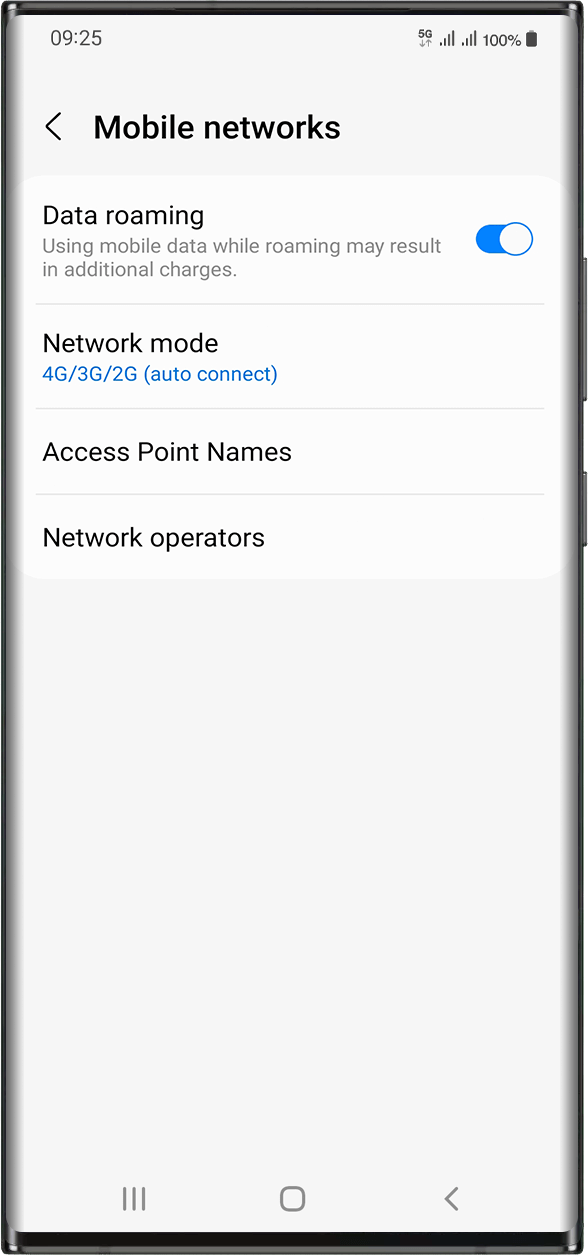
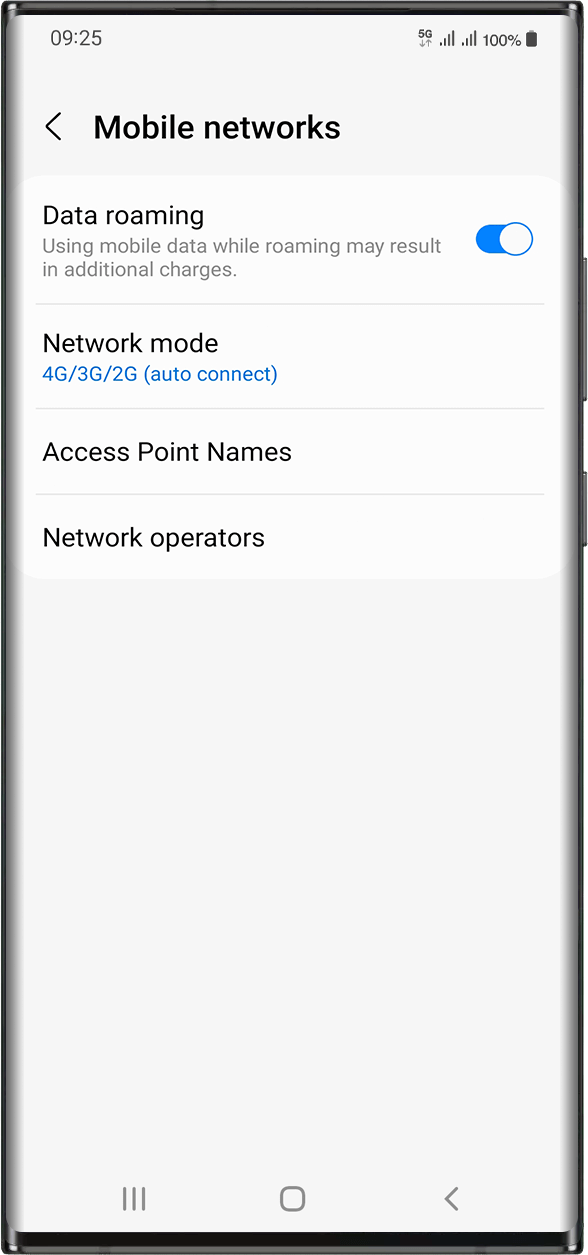
Ubigi eSIM 프로필에 모바일 데이터를 적용했는지 확인했다면 다음 단계로 이동하세요: 설정 > 연결 > 모바일 네트워크 > 데이터 로밍 활성화로 이동합니다.
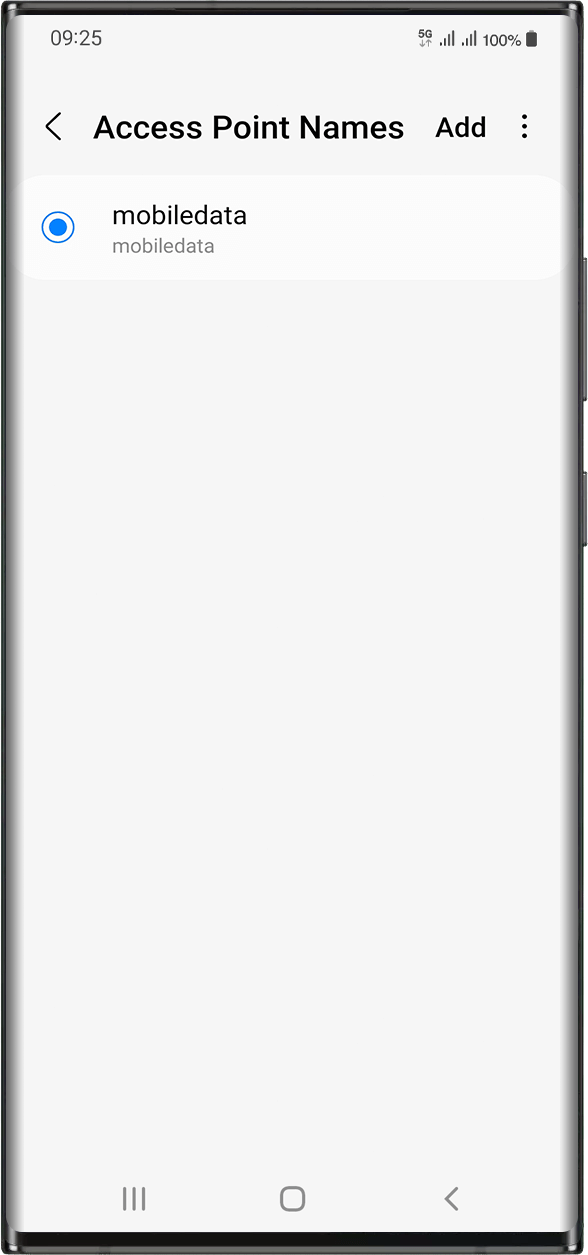
같은 화면에서 액세스 포인트 이름을 선택하여 APN (액세스 포인트 이름) 이 설정되어 있는지 확인하세요:
일반적으로 APN은 자동으로 설정됩니다: 목록에 mobiledata 또는 mbb가 표시됩니다. 이 경우 다음 단계로 넘어갈 수 있습니다.
모바일데이터 또는 mbb APN이 표시되지 않는 경우 다음 지침에 따라 APN을 올바르게 설정하세요. APN을 생성하고 선택했으면 다음 단계로 이동할 수 있습니다.
훌륭해
의 33725개 리뷰를 기준으로
검증됨
검증된 리뷰
이 사용자는 구매자로 확인되었습니다
Fast and easy.
Fast and easy.
customer, 04 Apr 2026
검증됨
검증된 리뷰
이 사용자는 구매자로 확인되었습니다
Very good
It works very well and it’s easy to buy
customer x, 04 Apr 2026
검증됨
검증된 리뷰
이 사용자는 구매자로 확인되었습니다
Is a great experience using Ubigi..very…
Is a great experience using Ubigi..very reliable and works great abroad..no hassle..
customer, 04 Apr 2026
검증됨
검증된 리뷰
이 사용자는 구매자로 확인되었습니다
Very reliable!!
Very reliable!!
customer, 04 Apr 2026
검증됨
검증된 리뷰
이 사용자는 구매자로 확인되었습니다
Data is totally unlimited
Data is totally unlimited
Roque Rodito, 04 Apr 2026
검증됨
검증된 리뷰
이 사용자는 구매자로 확인되었습니다
It is amazing
It is amazing
customer, 04 Apr 2026
검증됨
검증된 리뷰
이 사용자는 구매자로 확인되었습니다
Turn on Data Roaming
Took me a minute to figure out why it wasnt working once i was in Japan. You need to turn data roaming on once the esim is on and your sim is off.
ASHLEY G, 04 Apr 2026
검증됨
검증된 리뷰
이 사용자는 구매자로 확인되었습니다
It’s fine when it’s working but…
It’s fine when it’s working but frequently doesn’t work
John Greaves, 04 Apr 2026
검증됨
검증된 리뷰
이 사용자는 구매자로 확인되었습니다
No hassles
No hassles. Has an app to add data as needed with many options. Coverage was great and the data speed was excellent. Thank you.
James Martin, 04 Apr 2026
검증됨
검증된 리뷰
이 사용자는 구매자로 확인되었습니다
Worked perfectly
Worked perfectly, great overview, easy handling…
Angie, 04 Apr 2026
검증됨
검증된 리뷰
이 사용자는 구매자로 확인되었습니다
Reliable and Convenient Service for Travel and Everyday Use
I discovered this service last year and have been using it ever since. The signal quality has been consistently good, and l've recommended it to many of my friends.
One of the things I appreciate most is the convenience it offers when traveling. You can register before your flight and start using it immediately upon arrival at your destination, which makes the whole experience seamless.
Recently, I've also been using it within my own country. I no longer need to purchase another number, and I can easily choose the amount of data (GB) that suits my needs.
Overall, it's very convenient and flexible.
Highly recommended!
Lee F., 04 Apr 2026
검증됨
검증된 리뷰
이 사용자는 구매자로 확인되었습니다
Verry good excellence I recommend nice
Verry good excellence I recommend nice
Daniela Sardinha, 04 Apr 2026
검증됨
검증된 리뷰
이 사용자는 구매자로 확인되었습니다
Reliable
Reliable , quick log in and wide coverage all of the country
Belle, 04 Apr 2026
검증됨
검증된 리뷰
이 사용자는 구매자로 확인되었습니다
I needed a local IP tourist sim in the…
I needed a local IP tourist sim in the US and Canada, Ubigi works great!
porkchop, 04 Apr 2026
검증됨
검증된 리뷰
이 사용자는 구매자로 확인되었습니다
Absolute necessity while in Japan
Absolute necessity while in Japan. Super easy to buy, install and use on my iPhone. Good value.
Ferris Wills, 04 Apr 2026
감사합니다
귀하의 메시지가 전송되었습니다. 곧 답변드리겠습니다.
감사합니다
귀하의 뉴스레터 구독을 고려했습니다.
eSIM 호환성 확인 방법
스마트폰 / 태블릿:
*#06# 입력. → EID 번호가 나오면 eSIM 지원 기기입니다.
Windows 10 / 11:
Windows+I 를 누르세요. “네트워크 및 인터넷”으로 이동하세요 → 셀룰러 네트워크가 보이면 PC가 eSIM을 지원합니다..
통신사 잠금 해제 여부 확인 방법
iPhone / iPad:
설정 > 일반 > 정보로 이동 통신사 잠금 항목까지 스크롤. → “SIM 제한 없음”이 표시되면 기기는 잠금 해제 상태입니다.
Android:
설정 > 네트워크 및 인터넷 > 모바일 네트워크 자동 네트워크 선택을 끄세요. → 여러 네트워크가 보이면 잠금 해제된 기기입니다.









 eSIM 호환성 확인 방법
 통신사 잠금 해제 여부 확인 방법