Check if your eSIM profile is installed on your device.
Check eSIM profile activation
Check if your eSIM profile is activated on your device.
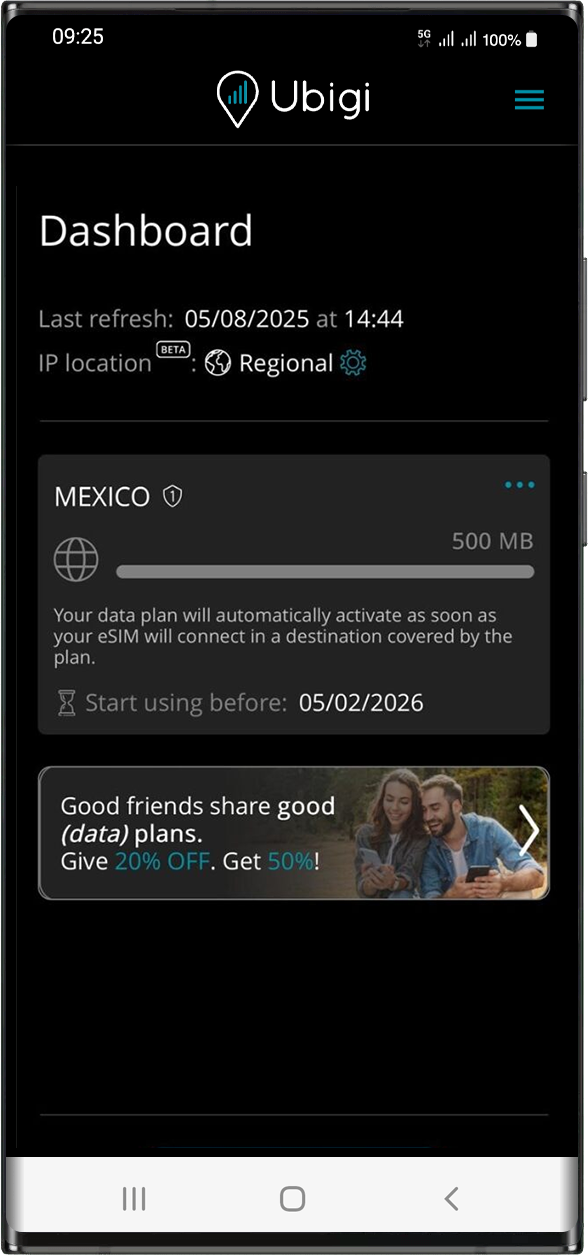
Apply data to eSIM profile
Ensure data is applied to your Ubigi eSIM profile.
Check APN configuration
Ensure that the APN is correctly set for your Ubigi connectivty.
Check network display
Check the network status for your Ubigi connectivity.
Final checks!
Check account creation and Internet access.
At this step, test your Ubigi connectivity by opening the Ubigi app to check if the Ubigi cellular connection works:
If you already have a Ubigi account: you will be connected automatically to your account.
In case you do not have a Ubigi account yet, you will get the account creation page:
Fill in the fields and click on Create account.
Your account is now created and you will be automatically connected to it.
NB: In case you have followed all previous steps carefully and still cannot access your account or the account creation page, we invite you to contact our Customer Support for further help.
Great
Based on 43172 reviews on
Verified
Verified review
This user has been identified as a buyer
Easy to use, great signal, fast data
Setup instructions and explanations were clear and the data signal was great! Underground train stations in Japan had a lag that cannot be helped. I accidentally had a vpn turned on while on WiFi that interrupted Ubuntu functionality but we figured it out quickly. Thank you for this service!
customerrr, 09 Aug 2026
Verified
Verified review
This user has been identified as a buyer
Easy to use
The whole process, from purchasing a plan to installing to switching Sims, was so easy and straight forward
customer, 09 Aug 2026
Verified
Verified review
This user has been identified as a buyer
Always reliable!
Always reliable!
customer, 09 Aug 2026
Verified
Verified review
This user has been identified as a buyer
I cannot extend the days after the due…
I cannot extend the days after the due day
customer, 09 Aug 2026
Verified
Verified review
This user has been identified as a buyer
Excellent!
Very easy and quick to use, fair pricing. Very good
Sebastian Pankonin, 09 Aug 2026
Verified
Verified review
This user has been identified as a buyer
Good service
I’ve been using Ubigi for some time now in Bangkok, Thailand and it’s been good! Sometimes the connection is unsteady in crowded or far away places but it’s been good! Would recommend.
customer, 09 Aug 2026
Verified
Verified review
This user has been identified as a buyer
Awesome connectivity established in each country!
The connectivity established in each country we visited (France, Spain) was seamless and I was able to text, email and use all my phone apps without any problem.
jblaisekim, 09 Aug 2026
Verified
Verified review
This user has been identified as a buyer
The important thing was that I always…
The important thing was that I always had a signal even at the metro in Tokyo. I didn't measure the speed but for the maps and some messages it was more than enough. So for my needs it was great
Nikos P, 09 Aug 2026
Verified
Verified review
This user has been identified as a buyer
Worked very well!
Worked very well!
ANABEL RODRIGUEZ Gomez, 09 Aug 2026
Verified
Verified review
This user has been identified as a buyer
Great but a bit expensive.
Great but a bit expensive.. if it’s a bit cheaper should be amazing
Mahmoud El Gabry, 09 Aug 2026
Verified
Verified review
This user has been identified as a buyer
Top and easy
Top and easy
customer, 09 Aug 2026
Verified
Verified review
This user has been identified as a buyer
Reliable service throughout Tokyo.
Reliable service throughout Tokyo.
Paolo, 09 Aug 2026
Verified
Verified review
This user has been identified as a buyer
Easy to install
Easy to install, and realy good internet speed
Nikola Filipovic, 09 Aug 2026
Verified
Verified review
This user has been identified as a buyer
When there were connection
When there were connection, it work great. There was a few spots in Edinburgh I did not have a good connections. Other than that work fine.
customer, 09 Aug 2026
Verified
Verified review
This user has been identified as a buyer
The service was just great!
The service was just great!
Bashar, 09 Aug 2026
Thank you
Your message has been sent. We’ll get back to you shortly.
Thank you
We have taken into account your subscription to the newsletter
How to check eSIM compatibility
Smartphones / Tablets:
Dial *#06#. → If an EID number appears, your device is eSIM-compatible.
Windows 10 / 11:
Press Windows+I. Go to “Network & Internet” → If you see "Cellular", your PC is eSIM-compatible.
How to check carrier unlocking
iPhone / iPad:
Go to Settings > General > About. Scroll to Carrier Lock. → If you see “No SIM restrictions”, your device is unlocked.
Android:
Go to Settings > Network & Internet > Mobile network. Disable Automatic network selection. → If multiple networks appear, your device is unlocked.
You already have an eSIM in your cart.
Each order can only include one eSIM data plan.
If you choose to add a new one, the current plan will be removed. What would you like to do?









 How to check eSIM compatibility
 How to check carrier unlocking