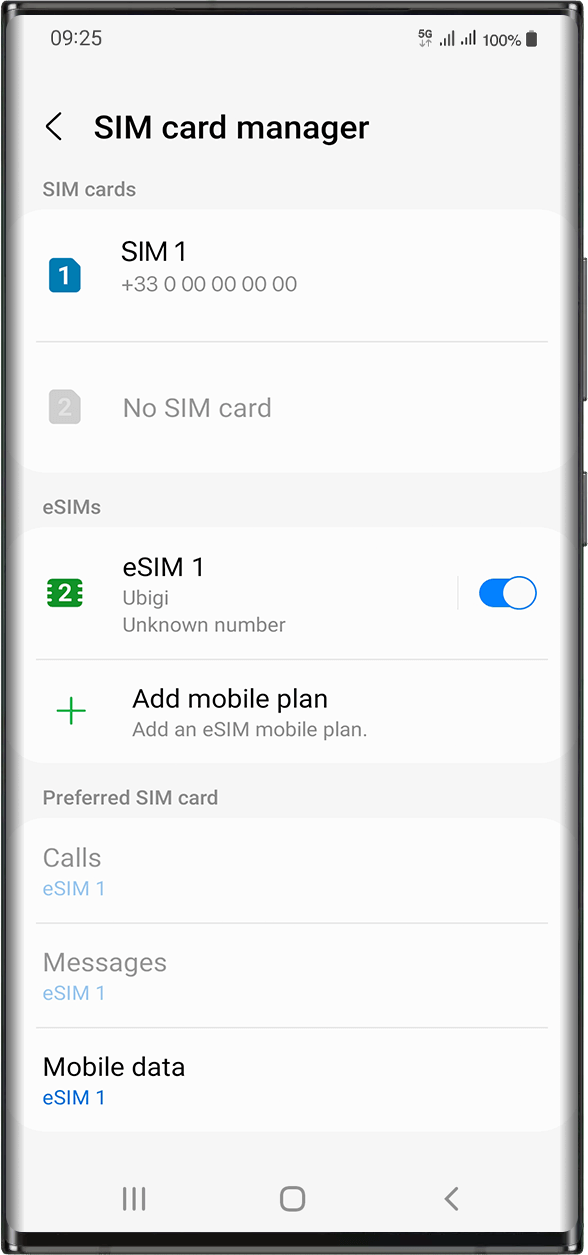
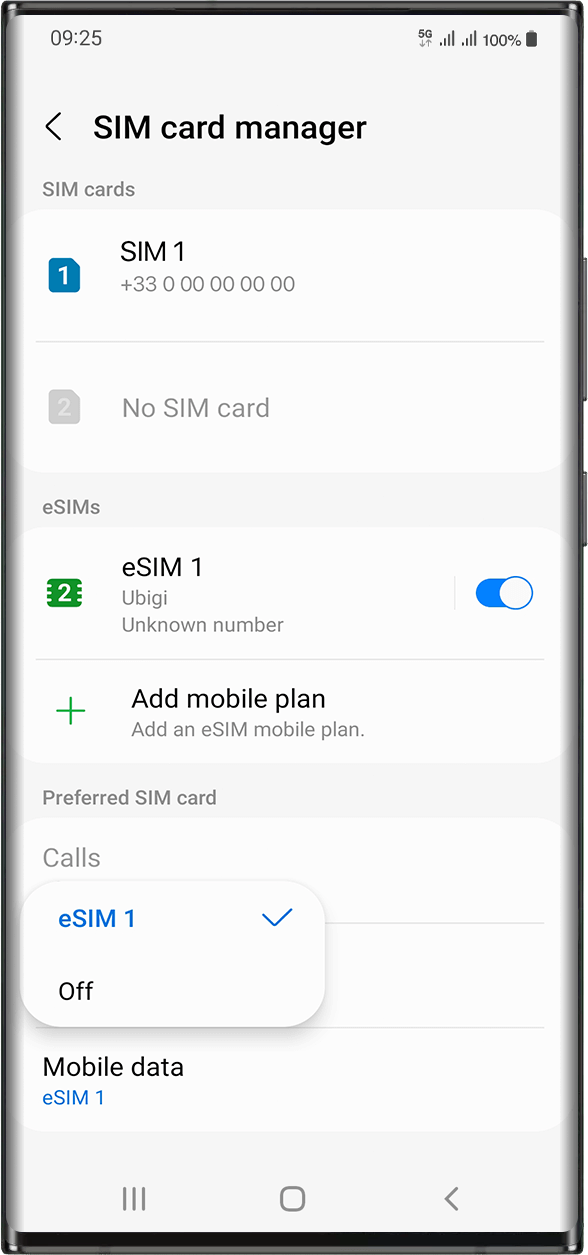
인터넷에 액세스할 수 있도록 모바일 데이터를 Ubigi eSIM 프로필에 적용해야 합니다.
그러려면 다음으로 이동하세요: 설정 > 연결 > SIM 카드 관리자로 이동합니다. “선호하는 SIM 카드”에서 모바일 데이터를 탭하고 데이터를 적용하려는 eSIM 프로필을 선택합니다. 선택하면 체크 표시가 그 앞에 나타납니다.
중요: 장치에 여러 개의 SIM 카드/eSIM (“요금제” )이 있는 경우, 두 개의 데이터 요금제에서 동시에 셀룰러 데이터를 활성화할 수 없습니다. 한 번에 하나만 적용할 수 있습니다.
훌륭해
의 47998개 리뷰를 기준으로
검증됨
검증된 리뷰
이 사용자는 구매자로 확인되었습니다
Five booms
Five booms! BOOM BOOM BOOM BOOM BOOM
Matias, 08 Oct 2026
검증됨
검증된 리뷰
이 사용자는 구매자로 확인되었습니다
I bought it for my 15 days vacation in…
I bought it for my 15 days vacation in Italy and it work perfect.
Guillermo Halley, 08 Oct 2026
검증됨
검증된 리뷰
이 사용자는 구매자로 확인되었습니다
Worked flawlessly
Worked flawlessly, after installing in advance of the actual need. The protected authentification before using the Android application is cumbersome. The app is essential to check usage. An interactive settings assistant for the mobile device is not available, but would be useful for optimizing connectivity, battery and data usage. For purchasing, there is no setting for the preferred currency, but there is a setting for location. For Canadian customers, the price in CAD far exceeds the price in USD. To get the better price in USD, set the location to United States.
Pierre Labrèche, 08 Oct 2026
검증됨
검증된 리뷰
이 사용자는 구매자로 확인되었습니다
Ubigi esim HK
Took the esim to HK. Good network reach used for easy re-routing and payments. Thanks for the amazing experience!
Sadhvi Pugaonkar, 08 Oct 2026
검증됨
검증된 리뷰
이 사용자는 구매자로 확인되었습니다
Easy to set up and use
Easy to set up and use, reliable data use.
customer, 08 Oct 2026
검증됨
검증된 리뷰
이 사용자는 구매자로 확인되었습니다
Ubigi e-sim for our holidays have been…
Ubigi e-sim for our holidays have been the best and most convenient way to stay in touch around the world without a massive bill at the end of it , off the plane and you are connected straight away brilliant
Neall, 08 Oct 2026
검증됨
검증된 리뷰
이 사용자는 구매자로 확인되었습니다
Very good experience
Chilobe, 08 Oct 2026
검증됨
검증된 리뷰
이 사용자는 구매자로 확인되었습니다
Automatically connected!!
Automatically connected!!! U don’t need to do much and works perfectly
Hope, 08 Oct 2026
검증됨
검증된 리뷰
이 사용자는 구매자로 확인되었습니다
When I needed support getting my phone…
When I needed support getting my phone connected to their eSim, they helped right away!
JL, 08 Oct 2026
검증됨
검증된 리뷰
이 사용자는 구매자로 확인되었습니다
The connectivity coupled with other SIM…
The connectivity coupled with other SIM is a challenge as it interferes with the local network which is not the case with other service providers. Though it’s good in a standalone basis and I would recommend others to use the sim
Saad, 08 Oct 2026
검증됨
검증된 리뷰
이 사용자는 구매자로 확인되었습니다
Does not work while driving on hills…
Does not work while driving on hills like hachimantai and mount zao. Remote area connectivity needs major improvement, was not even properly working at Yamadera farms.
Overall satisfactory experience. Cheers
customer, 08 Oct 2026
검증됨
검증된 리뷰
이 사용자는 구매자로 확인되었습니다
When we landed
When we landed, the connection was not automatic. It was actually kind of hard to get connected, but once connected to service was good.
customer, 08 Oct 2026
검증됨
검증된 리뷰
이 사용자는 구매자로 확인되었습니다
Whilst waiting to get off the aeroplane…
Whilst waiting to get off the aeroplane in the Philippines, I switched my phone to the esim and it just worked very impressed and very easy to do
Ron, 08 Oct 2026
검증됨
검증된 리뷰
이 사용자는 구매자로 확인되었습니다
Great experience .,
Great experience .,. Thank you
customer, 08 Oct 2026
검증됨
검증된 리뷰
이 사용자는 구매자로 확인되었습니다
Love Ubigi
Love Ubigi. Brilliant service. I have travelled to many countries with them. And they were super helpful when my teenager was away and we couldn’t get her up and running
Suzie Rawle, 08 Oct 2026
감사합니다
귀하의 메시지가 전송되었습니다. 곧 답변드리겠습니다.
감사합니다
귀하의 뉴스레터 구독을 고려했습니다.
eSIM 호환성 확인 방법
스마트폰 / 태블릿:
*#06# 입력. → EID 번호가 나오면 eSIM 지원 기기입니다.
Windows 10 / 11:
Windows+I 를 누르세요. “네트워크 및 인터넷”으로 이동하세요 → 셀룰러 네트워크가 보이면 PC가 eSIM을 지원합니다..
통신사 잠금 해제 여부 확인 방법
iPhone / iPad:
설정 > 일반 > 정보로 이동 통신사 잠금 항목까지 스크롤. → “SIM 제한 없음”이 표시되면 기기는 잠금 해제 상태입니다.
Android:
설정 > 네트워크 및 인터넷 > 모바일 네트워크 자동 네트워크 선택을 끄세요. → 여러 네트워크가 보이면 잠금 해제된 기기입니다.