
Check if your eSIM profile is installed on your device.
Check eSIM profile activation
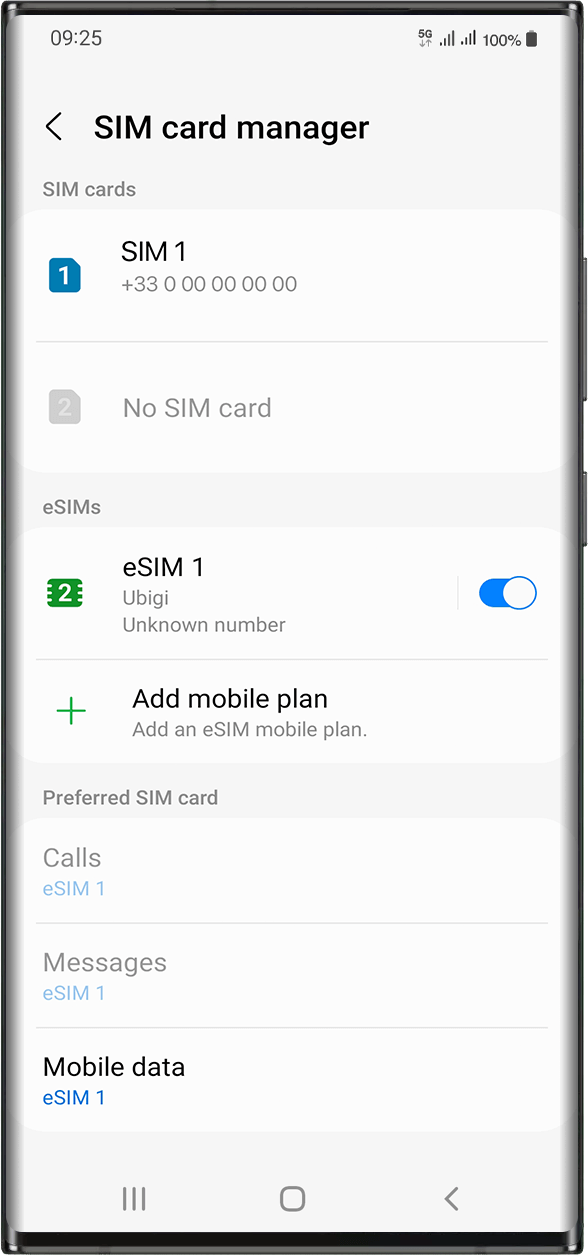
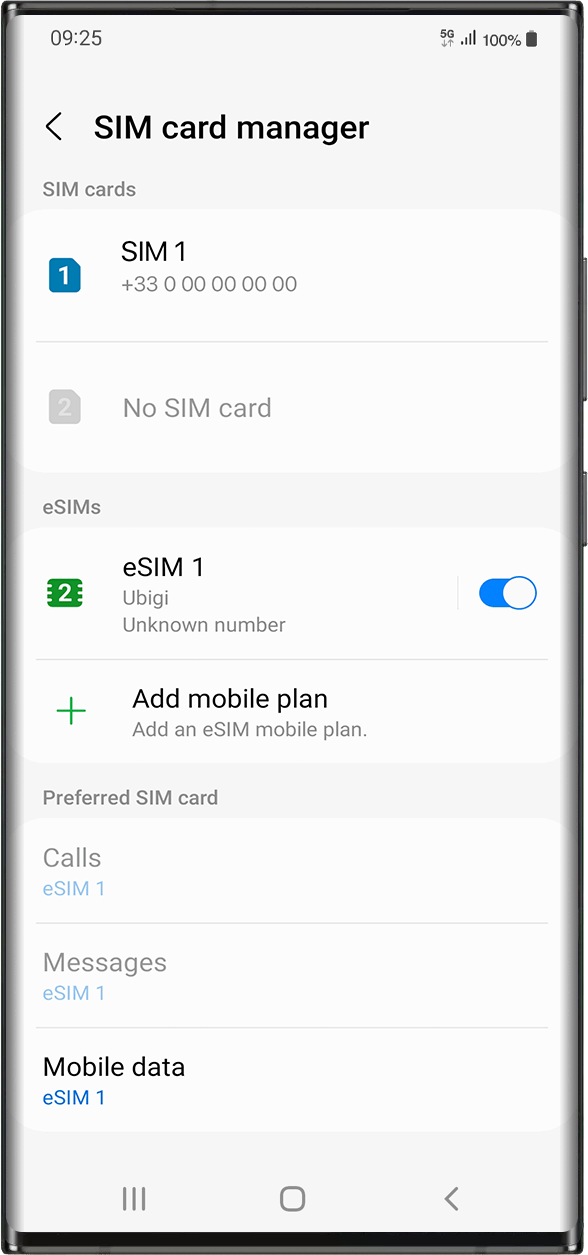
Check if your eSIM profile is activated on your device.
Apply data to eSIM profile
Ensure data is applied to your Ubigi eSIM profile.
Check APN configuration
Ensure that the APN is correctly set for your Ubigi connectivty.
Check network display
Check the network status for your Ubigi connectivity.
Final checks!
Check account creation and Internet access.
Then, you need now to check if your eSIM profile is activated on your device.
Go to: Settings > Connections > under eSIMs, select the installed eSIM profile (it will appear as “eSIM1, eSIM2,…” or under the name you renamed it).
Activate the profile by pressing the button on the right to turn it on(it will turn blue).
As soon as your profile is activated, a double network signal will appear at the top of your screen.
NB: the double network only appears if you also have a physical SIM card installed on your device.
Great
Based on 32728 reviews on
Verified
Verified review
This user has been identified as a buyer
Smooth
Smooth
it was relatevly easy to start up, which was the important thing. We were just a few days in Japan and wanted to have internet connection while skiing, and ubigi could provide that.
Niclas, 14 Mar 2026
Verified
Verified review
This user has been identified as a buyer
everything was working fine
customer, 14 Mar 2026
Verified
Verified review
This user has been identified as a buyer
Super Easy Set-up
Super easy to setup and easy to use. eSIM card started working as soon as we were in Vietnam. I would highly recommend.
Theresa S., 14 Mar 2026
Verified
Verified review
This user has been identified as a buyer
The App was very easy and user-friendly.
John Fensham, 14 Mar 2026
Verified
Verified review
This user has been identified as a buyer
Easy to use
Easy to use, affordable, and worked well while in Japan.
B.A., 14 Mar 2026
Verified
Verified review
This user has been identified as a buyer
Easy and smooth to use.
customer, 14 Mar 2026
Verified
Verified review
This user has been identified as a buyer
Very good coverage and speed
NF, 14 Mar 2026
Verified
Verified review
This user has been identified as a buyer
Good quo
Ery good. Easy to connect
customer, 14 Mar 2026
Verified
Verified review
This user has been identified as a buyer
Easy to use and great rates
Easy to use and great rates, highly recommend!
Craig, 14 Mar 2026
Verified
Verified review
This user has been identified as a buyer
Easy to use even for technologically challenged
This was the very first time with SIM/eSIM. Ubigi made it easy for technologically challenged to access data in Japan. Not only connecting to internet on the go so easy but also very reasonable price. No more looking for McDonald's or Starbucks. And most of the time I am on 5G in Tokyo. I used to depends on paper maps but now I follow GPS directions.
Jess, 14 Mar 2026
Verified
Verified review
This user has been identified as a buyer
Makes it so easy
What a boon to be able to get data etc anywhere in the world without worrying about anything, if you have bought a cover-all package.
Linda Farrington, 14 Mar 2026
Verified
Verified review
This user has been identified as a buyer
I had an absolutely flawless experience…
I had an absolutely flawless experience using Ubigi eSIM during my solo trip to Japan. Setup was incredibly easy. I installed it before I even left home, and the moment I landed, I had data. No hunting for SIM cards, no airport kiosks, no stress.
The connection was fast, reliable, and consistent everywhere I went… from Tokyo to Kyoto and even while navigating train stations and side streets. Google Maps, translations, train schedules, messaging… everything worked seamlessly. It made traveling feel smooth and grounded instead of chaotic.
I also appreciated how transparent the data usage tracking was in the app. No surprises, no hidden fees, just straightforward service that worked exactly as promised.
Honestly, having dependable data the entire time gave me so much peace of mind. Ubigi made staying connected effortless, and I would absolutely use it again for international travel.
Highly recommend.
TC Snyder, 14 Mar 2026
Verified
Verified review
This user has been identified as a buyer
Only this in Japan
Good price, easy to use, after landing and active work immediately, perfect quality dirung calls.
Used with samsung mobile.
Melinda, 14 Mar 2026
Verified
Verified review
This user has been identified as a buyer
It was mostly great
It was mostly great, occasionally some hassles connecting but nothing major
Kate Bin, 14 Mar 2026
Verified
Verified review
This user has been identified as a buyer
Very competitive e-SIM!
It was indeed very easy to use Ubigi e-SIM comparing with other e-SIMs. Besides, cost of Ubigi e-SIM is very competitive than others.
customer, 14 Mar 2026
Thank you
Your message has been sent. We’ll get back to you shortly.
Thank you
We have taken into account your subscription to the newsletter
How to check eSIM compatibility
Smartphones / Tablets:
Dial *#06#. → If an EID number appears, your device is eSIM-compatible.
Windows 10 / 11:
Press Windows+I. Go to “Network & Internet” → If you see "Cellular", your PC is eSIM-compatible.
How to check carrier unlocking
iPhone / iPad:
Go to Settings > General > About. Scroll to Carrier Lock. → If you see “No SIM restrictions”, your device is unlocked.
Android:
Go to Settings > Network & Internet > Mobile network. Disable Automatic network selection. → If multiple networks appear, your device is unlocked.
You already have an eSIM in your cart.
Each order can only include one eSIM data plan.
If you choose to add a new one, the current plan will be removed. What would you like to do?