It was really easy to use and it worked perfectly fine throughout Our whole trip in Japan!
customer, 03 Oct 2026
검증됨
검증된 리뷰
이 사용자는 구매자로 확인되었습니다
Great internet connection
Great internet connection
So good I haven’t bothered to connect to my hotel wi-fi
Paul Baines, 03 Oct 2026
검증됨
검증된 리뷰
이 사용자는 구매자로 확인되었습니다
Easy to purchase an esim
Easy to purchase an esim, clear and good pricing and never had problems with reception
customer, 03 Oct 2026
검증됨
검증된 리뷰
이 사용자는 구매자로 확인되었습니다
Works perfect when landed
Works perfect when landed, I just wish there was a way to actually test it before going to a destination country for a complete piece of mind
customer, 03 Oct 2026
검증됨
검증된 리뷰
이 사용자는 구매자로 확인되었습니다
Easy to set up and seamless operation
Easy to set up and seamless operation
ALAN, 03 Oct 2026
검증됨
검증된 리뷰
이 사용자는 구매자로 확인되었습니다
The internet was fast and reliable.
The internet was fast and reliable.
Doreen, 03 Oct 2026
검증됨
검증된 리뷰
이 사용자는 구매자로 확인되었습니다
It’s good
It’s good, a little slow, but it works
customer, 03 Oct 2026
검증됨
검증된 리뷰
이 사용자는 구매자로 확인되었습니다
Easy to use and worked well
Easy to use and worked well
customer, 03 Oct 2026
검증됨
검증된 리뷰
이 사용자는 구매자로 확인되었습니다
I have used Ubigi in both Portugal and…
I have used Ubigi in both Portugal and Japan. It has exceeded my expectations each time I’ve used it. It was easy to setup, very economical and the speed and efficiency was top notch.
William, 03 Oct 2026
검증됨
검증된 리뷰
이 사용자는 구매자로 확인되었습니다
Best one for Marokko
Best one for Marokko
customer, 03 Oct 2026
검증됨
검증된 리뷰
이 사용자는 구매자로 확인되었습니다
The application is very intuitive and…
The application is very intuitive and easy to use.
Charlie Campagna, 03 Oct 2026
검증됨
검증된 리뷰
이 사용자는 구매자로 확인되었습니다
Good service
Good service
customer, 03 Oct 2026
검증됨
검증된 리뷰
이 사용자는 구매자로 확인되었습니다
Very easy to setup
Very easy to setup, activate and use
Mahesh Subbu, 03 Oct 2026
검증됨
검증된 리뷰
이 사용자는 구매자로 확인되었습니다
Asia Plan
At first, I could not activate my plan and requested help from customer support. I received a reply the following day to resolve my problem. I am currently using the plan in Japan and look forward to its effectiveness to other Asian countries.
Leig Fong CHIN, 03 Oct 2026
검증됨
검증된 리뷰
이 사용자는 구매자로 확인되었습니다
The experience with Ubigi was a little…
The experience with Ubigi was a little rough before we were able to get internet connection. We had to wait until Oct. 2 before we could resolve the problem. Once we got internet connection the Ubigi service was excellent.
customerJung Chin, 03 Oct 2026
감사합니다
귀하의 메시지가 전송되었습니다. 곧 답변드리겠습니다.
감사합니다
귀하의 뉴스레터 구독을 고려했습니다.
eSIM 호환성 확인 방법
스마트폰 / 태블릿:
*#06# 입력. → EID 번호가 나오면 eSIM 지원 기기입니다.
Windows 10 / 11:
Windows+I 를 누르세요. “네트워크 및 인터넷”으로 이동하세요 → 셀룰러 네트워크가 보이면 PC가 eSIM을 지원합니다..
통신사 잠금 해제 여부 확인 방법
iPhone / iPad:
설정 > 일반 > 정보로 이동 통신사 잠금 항목까지 스크롤. → “SIM 제한 없음”이 표시되면 기기는 잠금 해제 상태입니다.
Android:
설정 > 네트워크 및 인터넷 > 모바일 네트워크 자동 네트워크 선택을 끄세요. → 여러 네트워크가 보이면 잠금 해제된 기기입니다.


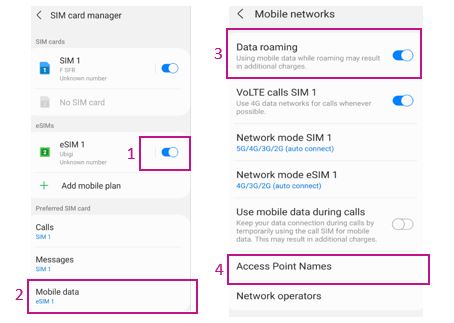



 eSIM 호환성 확인 방법
 통신사 잠금 해제 여부 확인 방법