새 Android 디바이스가 있습니다. Ubigi eSIM 프로필을 다시 설치하려면 어떻게 해야 하나요?
새 기기 또는 다른 Android 기기로 Ubigi eSIM 프로필을 이전하거나 전환하려면:
1 – 먼저 로그인+비밀번호를 기억하고 있는지 확인하세요. 기억나지 않는 경우, eSIM 프로필이 아직 설치되어 있는 첫 번째 Android 기기에서 Ubigi 연결을 통해 연결된 상태에서 설정 탭의 Ubigi 계정에서 직접 확인해야 합니다(비밀번호가 기억나지 않는 경우 그 순간에 수정할 수 있습니다)
3 – 새/기타 Android 기기의 Play스토어에서 Ubigi 앱을 다운로드하고 로그인 및 비밀번호를 사용하여 Ubigi 계정에 연결합니다
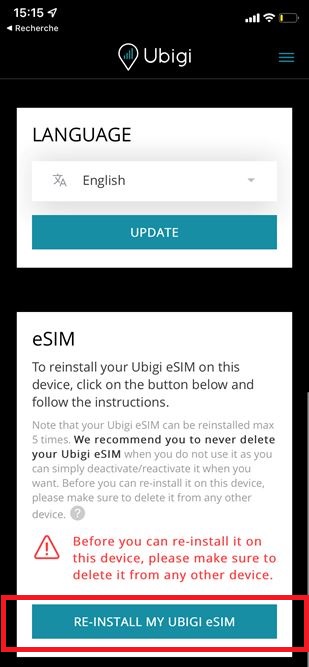
4 – 연결되면 설정 탭으로 이동하여 “eSIM” 섹션에서 “내 Ubigi eSIM 재설치” 버튼을 클릭합니다:
5 – 화면의 지시에 따라 설치를 완료합니다.
참고: “내 Ubigi eSIM 다시 설치” 버튼이 표시되지 않으면 재설치할 수 없는 이전 프로필이 있을 수 있으므로 고객 서비스에 문의하여 도움을 받으시기 바랍니다. 저희 팀이 새 기기에 다시 설치하여 Ubigi 계정을 유지할 수 있는 업데이트된 프로필을 보내드릴 것입니다.
중요: 다른 기기에 다시 설치하기 전에 첫 번째 기기에서 Ubigi eSIM 프로필을 삭제해야 하며, 그렇지 않으면 재설치 및 교체가 작동하지 않습니다(참고: 이 작업은 Ubigi 계정을 삭제하지 않습니다).
첫 번째 디바이스가 더 이상 없는 경우(고장, 분실 등)에 이 삭제가 불가능한 경우 고객 서비스에 문의하여 도움을 받으시기 바랍니다.
I used this Ubigi eSIM while I was traveling to Nigeria. I was connected with local 5G network immediately asI landed in the airport and it was an amazing experience.
I used this Ubigi eSIM while
customer, 12 Sep 2026
검증됨
검증된 리뷰
이 사용자는 구매자로 확인되었습니다
Love it
Love it. $29 vs $1000 for AT&T for a month in Europe. Really. A little confusing at first, but blame it on me a technology.
Al, 12 Sep 2026
검증됨
검증된 리뷰
이 사용자는 구매자로 확인되었습니다
Easy connection
Easy connection, good price. Hot spotting drops in and out but may just be device. So far, no regrets and plan to use again next time.
Bron, 12 Sep 2026
검증됨
검증된 리뷰
이 사용자는 구매자로 확인되었습니다
Best eSIM experience across multiple…
Best eSIM experience across multiple countries. No issues ever. And best rates and plans.
Shaswat Mishra, 12 Sep 2026
검증됨
검증된 리뷰
이 사용자는 구매자로 확인되었습니다
Amazing
Amazing. I’m in Japan 🇯🇵 and can’t fault the coverage.
customer, 12 Sep 2026
검증됨
검증된 리뷰
이 사용자는 구매자로 확인되었습니다
Worked as expected
Worked as expected
Alex Lytvyn, 12 Sep 2026
검증됨
검증된 리뷰
이 사용자는 구매자로 확인되었습니다
Works great!
Very reliable and has worked great during our travels through multiple countries in Europe-- Denmark, Germany, France, Austria, and Italy. Great price too!
Julie, 12 Sep 2026
검증됨
검증된 리뷰
이 사용자는 구매자로 확인되었습니다
No trouble having the connection on…
No trouble having the connection on time. Had connection everywhere.
customer, 12 Sep 2026
검증됨
검증된 리뷰
이 사용자는 구매자로 확인되었습니다
Excellent and easy to use
Excellent and easy to use
Paola De Cicco, 12 Sep 2026
검증됨
검증된 리뷰
이 사용자는 구매자로 확인되었습니다
Great deal for what you need
Easy to use and I've had network everywhere in Portugal. No issues with connectivity or finsihing service at all. It has done the job for us on a month long trip around the coast.
Jason, 12 Sep 2026
검증됨
검증된 리뷰
이 사용자는 구매자로 확인되었습니다
Awesome service
Awesome service and great coverage. Simple to activate.
Andre Craven Pierce, 12 Sep 2026
검증됨
검증된 리뷰
이 사용자는 구매자로 확인되었습니다
Connection is not stable sometimes but…
Connection is not stable sometimes but other than that, it's good
customer in Thailand, 12 Sep 2026
검증됨
검증된 리뷰
이 사용자는 구매자로 확인되었습니다
Good experience overall.
The data was good and pricing seemed fair especially for the unlimited plan. However initial setup upon arriving was a bit buggy. Where I had to restart my phone an additional time and also connect to wifi just to login to activate my eSim.
The dashboard doesn't seem to be accurate nor does it update in real-time (in my experience). But for unlimited plans this isn't an issue. Something to remember if you're using a metered plan.
Customer, 12 Sep 2026
감사합니다
귀하의 메시지가 전송되었습니다. 곧 답변드리겠습니다.
감사합니다
귀하의 뉴스레터 구독을 고려했습니다.
eSIM 호환성 확인 방법
스마트폰 / 태블릿:
*#06# 입력. → EID 번호가 나오면 eSIM 지원 기기입니다.
Windows 10 / 11:
Windows+I 를 누르세요. “네트워크 및 인터넷”으로 이동하세요 → 셀룰러 네트워크가 보이면 PC가 eSIM을 지원합니다..
통신사 잠금 해제 여부 확인 방법
iPhone / iPad:
설정 > 일반 > 정보로 이동 통신사 잠금 항목까지 스크롤. → “SIM 제한 없음”이 표시되면 기기는 잠금 해제 상태입니다.
Android:
설정 > 네트워크 및 인터넷 > 모바일 네트워크 자동 네트워크 선택을 끄세요. → 여러 네트워크가 보이면 잠금 해제된 기기입니다.





 eSIM 호환성 확인 방법
 통신사 잠금 해제 여부 확인 방법