Skip to content
← 질문으로 돌아가기
Windows 10 또는 Windows 11 장치에서 Ubigi eSIM 프로필이 활성화되었지만 네트워크가 없는 경우 어떻게 해야 하나요?

Ubigi eSIM 프로필에 네트워크가 없는 경우 아래 지침에 따라 기기에서 네트워크를 수동으로 선택하세요:

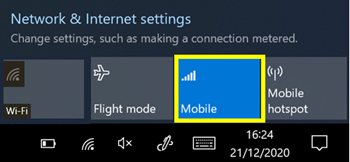
– 먼저 플라이아웃의 “네트워크 및 인터넷 설정”에서 모바일 네트워크 옵션이 활성화되어 있는지 확인하고 WiFi 옵션을 비활성화하세요:

Windows 10:


Windows 11:
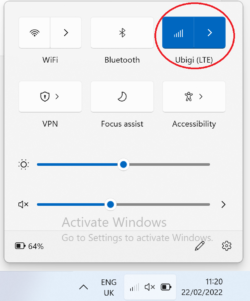

이미 활성화된 경우 몇 초 동안 비활성화한 다음 다시 활성화하세요.

– 그 다음, 설정으로 이동하세요. 그런 다음 Windows 버튼을 탭하여 메인 메뉴를 표시하고 설정으로 이동합니다.
– ‘네트워크 및 인터넷’ 선택:
– ‘셀룰러’ 또는 ‘모바일’ 선택:

Windows 10의경우(참고: 이 페이지 하단의 Windows 11 지침):
– ‘고급 옵션’ 선택:
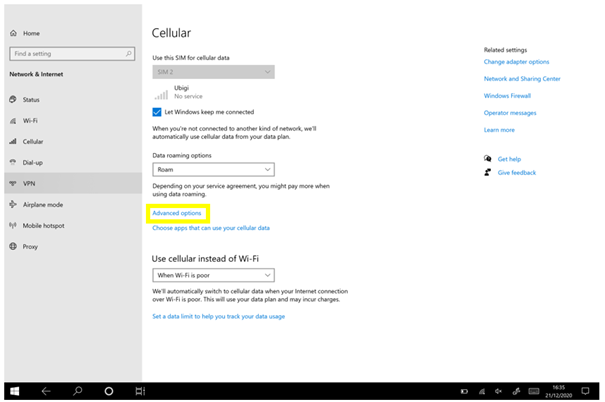

– 그 후, 화면을 아래로 스크롤하여 ‘네트워크 검색’을 선택합니다:
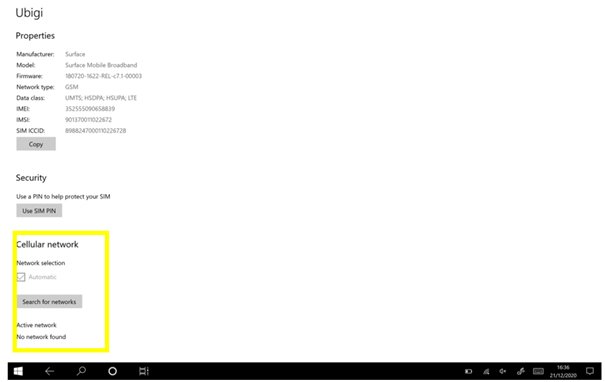

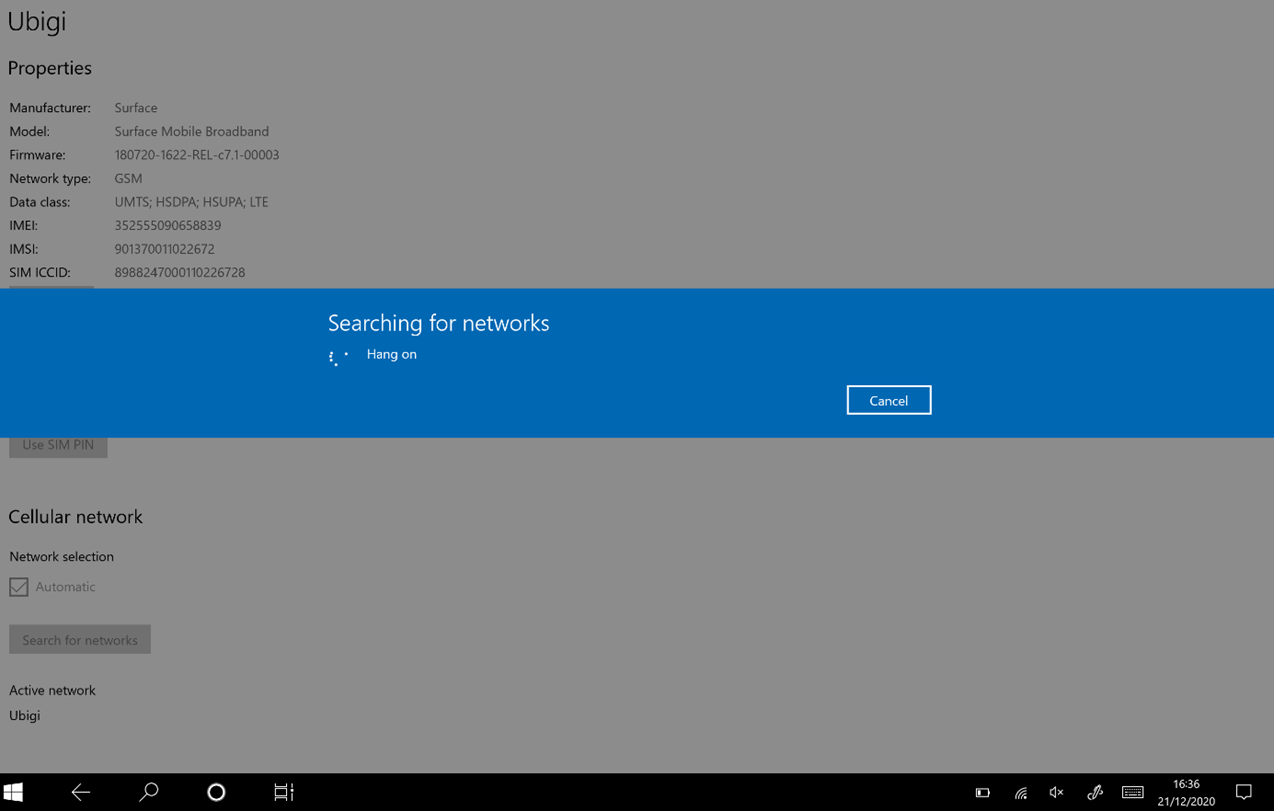
– 네트워크 검색이 진행 중으로 표시됩니다:

– Ubigi 네트워크가 나타나면 선택합니다:
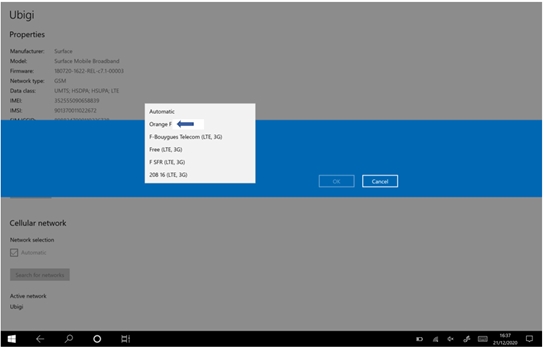
참고: Ubigi가 표시되거나 현재 거주 중인 국가의 통신사 이름이 표시됩니다 – 올바른 네트워크를 선택하려면 국가별 통신사 목록을 확인하시기 바랍니다.

– 마지막으로 확인을 눌러 선택한 네트워크를 확인합니다:
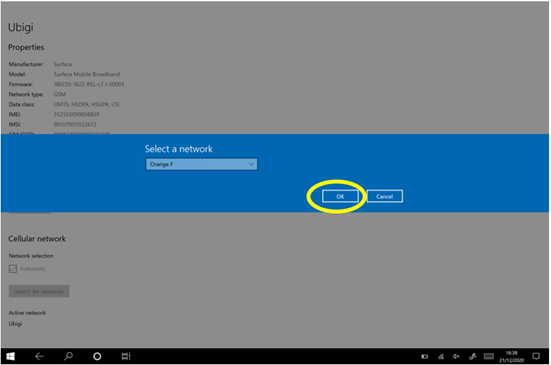

몇 초 후 네트워크가 표시되고 장치에서 Ubigi 연결을 사용할 수 있습니다.

[참고: 장치에서 VPN을 사용 중인 경우 Ubigi 서비스 연결에 문제가 발생할 수 있으므로 비활성화하는 것이 좋습니다.

Windows 11의 경우:
– ‘모바일 네트워크’에서 ‘자동 네트워크 선택’을 끄고, ‘네트워크 검색’을 클릭합니다:
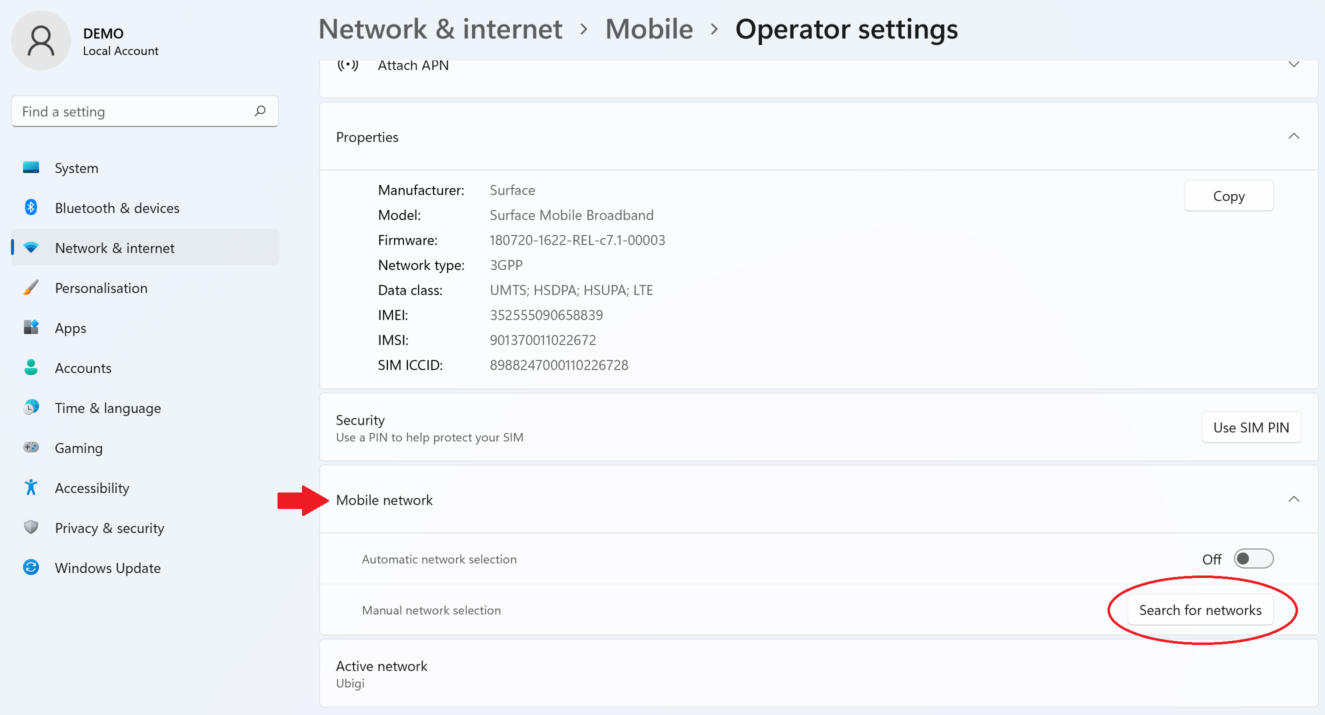
– 몇 초 후 사용 가능한 네트워크 목록이 표시됩니다. Ubigi(또는 현재 위치한 국가의 통신사 이름)를 선택하고 확인을 클릭합니다:
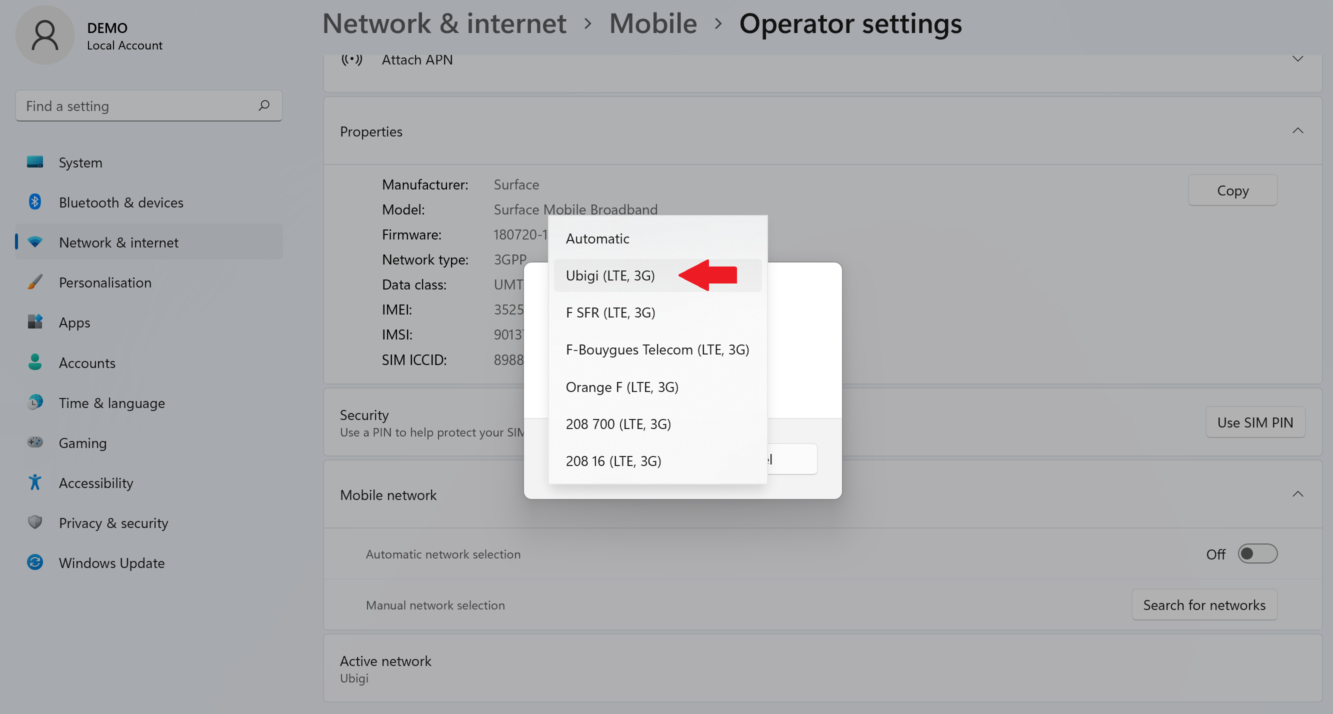

– 그 후 셀룰러 옵션을 몇 초 동안 비활성화했다가 다시 활성화하여 네트워크 연결을 새로 고칩니다:


몇 초 후 네트워크가 표시되고 장치에서 Ubigi 연결을 사용할 수 있습니다.

참고: 장치에서 VPN을 사용하는 경우 Ubigi 서비스 연결에 문제가 있을 경우 이를 비활성화할 것을 권장합니다.

특정한 것을 찾으시나요?

기타 자주 묻는 질문:

(새) iPhone에서 데이터를 복원했지만 eSIM 프로필이 작동하지 않습니다. 어떻게 해야 하나요?

곧 여행을 떠납니다. 내 기기에서 Ubigi eSIM 프로필을 어떻게 관리하나요?

Android 기기에서 Ubigi eSIM 프로필 관련 문제 해결하기

iPhone에서 Ubigi eSIM 프로필 관련 문제 해결하기

iMessage가 내 Ubigi eSIM 프로필에서 작동하지 않습니다. 어떻게 해야 하나요?

아이폰/아이패드에서 유비기 eSIM 프로필이 활성화되었는지 어떻게 알 수 있나요?

iPhone에서 Ubigi eSIM 프로필을 얻고 설치하는 방법은 무엇인가요?

Android 기기에서 Ubigi eSIM 프로필을 받고 설치하는 방법은 무엇인가요?

Ubigi 물리적 SIM 카드가 장착된 Windows 10 또는 Windows 11 디바이스에서 Ubigi 서비스를 활성화하려면 어떻게 해야 하나요?

iPhone 또는 iPad의 Ubigi 애플리케이션에서 데이터 요금제를 구매하려면 어떻게 해야 하나요?

iPhone에 Ubigi eSIM 프로필이 설치되어 있는지 어떻게 확인하나요?

Ubigi eSIM 프로필이 iPhone/iPad에 설치되어 활성화되어 있는데 네트워크가 표시되지 않는데 어떻게 해야 하나요?

iPhone/iPad에 eSIM Ubigi 프로필이 설치되어 활성화되어 있고 네트워크가 표시되지만 인터넷에 액세스할 수 없는 경우 어떻게 해야 하나요?

내 Ubigi eSIM 프로필이 Android 디바이스에 설치되어 있는지 어떻게 알 수 있나요?

Ubigi eSIM 프로필이 Android 디바이스에 설치되어 활성화되었지만 네트워크가 표시되지 않는데 어떻게 해야 하나요?

내 Ubigi eSIM 프로필이 Android 디바이스에 설치되어 활성화되어 있고 네트워크가 표시되지만 인터넷에 액세스할 수 없는 경우 어떻게 해야 하나요?

모바일 데이터가 내 Android 디바이스의 Ubigi eSIM 프로필에 적용되었지만 인터넷에 액세스할 수 없는 경우 어떻게 해야 하나요?

Ubigi eSIM 데이터 요금제로 전화를 걸 수 있나요?

유비기 eSIM의 ICCID(일련 번호)는 어떻게 찾을 수 있나요?

Ubigi eSIM 계정의 비밀번호를 어떻게 재설정하나요?

유비기 eSIM의 잔액은 어떻게 확인할 수 있나요?

Ubigi 계정을 삭제하는 방법은 무엇인가요?

데이터 요금제를 잘못 구매했는데 사용하지 않았는데 어떻게 변경할 수 있나요?

Ubigi 데이터 요금제 구매 영수증은 어떻게 받나요?

새 Android 디바이스가 있습니다. Ubigi eSIM 프로필을 다시 설치하려면 어떻게 해야 하나요?

다시 사용하고 싶을 때 iPhone에서 Ubigi eSIM 프로필을 활성화하려면 어떻게 해야 하나요?

여행 중이거나 사용하지 않을 때 iPhone에서 Ubigi eSIM 프로필을 비활성화하려면 어떻게 해야 하나요?

다시 사용하고 싶을 때 내 Android 기기에서 Ubigi eSIM 프로필을 활성화하려면 어떻게 해야 하나요?

아이폰/아이패드에서 유비기 eSIM 프로필을 삭제하는 방법은 무엇인가요?

Ubigi 연결이 작동하지 않습니다. 기기에서 활성 DNS 또는 VPN을 비활성화해야 하나요?

훌륭해 Trustpilot stars Trustpilot
Trustpilot stars
Trustpilot 35026개 리뷰를 기준으로
5 stars 검증됨
검증된 리뷰
이 사용자는 구매자로 확인되었습니다
So easy to set up and use
So easy to set up and use. It is a real relief to not worry about huge phone expenditures while traveling
customer, 16 Apr 2026
5 stars 검증됨
검증된 리뷰
이 사용자는 구매자로 확인되었습니다
We used Ubigi for 2 weeks in Japan
We used Ubigi for 2 weeks in Japan. Very easy to use and good connection.
customer, 16 Apr 2026
5 stars 검증됨
검증된 리뷰
이 사용자는 구매자로 확인되었습니다
Perfect experience
Perfect experience, with no issues! For two weeks in Japan, was perfect choice with unlimited data!
Panos Kouv, 16 Apr 2026
5 stars 검증됨
검증된 리뷰
이 사용자는 구매자로 확인되었습니다
First time eSim user and chose Ubigi…
First time eSim user and chose Ubigi for a trip to Japan. So far has been affordable and had no connection issues. Speed has been good too.
customer, 16 Apr 2026
5 stars 검증됨
검증된 리뷰
이 사용자는 구매자로 확인되었습니다
No interruption
No interruption, except Serbia was 3G Otherwise perfect
Jones, 16 Apr 2026
5 stars 검증됨
검증된 리뷰
이 사용자는 구매자로 확인되었습니다
Great service
Great service, good food.
customer, 16 Apr 2026
5 stars 검증됨
검증된 리뷰
이 사용자는 구매자로 확인되었습니다
I got good signals most of the time…
I got good signals most of the time along the Kumano Kodo walk.
customer, 16 Apr 2026
5 stars 검증됨
검증된 리뷰
이 사용자는 구매자로 확인되었습니다
I really like Ubigi
I really like Ubigi ! Super !
customer, 16 Apr 2026
5 stars 검증됨
검증된 리뷰
이 사용자는 구매자로 확인되었습니다
Quality product
Very simple set up and reliable connections made for a pain free experience!
Guy, 16 Apr 2026
5 stars 검증됨
검증된 리뷰
이 사용자는 구매자로 확인되었습니다
Ubigi had great service
Ubigi had great service, I went to japan with my friends and we would often go on buses. We played Brawl Stars on the bus and my connection was much better than my friends who had Google Fi or Apple service.
customer, 16 Apr 2026
5 stars 검증됨
검증된 리뷰
이 사용자는 구매자로 확인되었습니다
Easy to use
Easy to use, good prices, good data coverage
Daniel Senicar, 16 Apr 2026
5 stars 검증됨
검증된 리뷰
이 사용자는 구매자로 확인되었습니다
Everything worked always
Jay C., 16 Apr 2026
4 stars 검증됨
검증된 리뷰
이 사용자는 구매자로 확인되었습니다
Decent value
Decent value, but had numerous issues with it dropping and reconnecting when I had strong signal.
Mark, 16 Apr 2026
5 stars 검증됨
검증된 리뷰
이 사용자는 구매자로 확인되었습니다
We used the Ubigi eSIM during our trip to Tokyo
We used the Ubigi eSIM during our 10-day trip to Tokyo, and the experience was excellent from start to finish. The installation process was quick and straightforward, and we were connected within minutes of arrival. Throughout our stay, the coverage was outstanding — we had a stable and fast connection everywhere we went, including busy areas, public transport, and even more remote spots around the city. We never experienced any interruptions, slow speeds, or connectivity issues. Having reliable internet made navigating Tokyo, using maps, and staying connected incredibly easy and stress-free. Overall, Ubigi exceeded our expectations, and we would definitely use it again for future travels. Highly recommended!
Aliki Cavras, 16 Apr 2026
5 stars 검증됨
검증된 리뷰
이 사용자는 구매자로 확인되었습니다
We purchased the service for our Japan…
We purchased the service for our Japan Trip, and it was easy to set up and use. It was more cost efficient than Roaming, would definitely use for future travels.
Sam, 16 Apr 2026

귀하의 메시지가 전송되었습니다.
곧 답변드리겠습니다.

귀하의 뉴스레터 구독을 고려했습니다.
