Skip to content
← 질문으로 돌아가기
iPhone 또는 iPad의 Ubigi 애플리케이션에서 데이터 요금제를 구매하려면 어떻게 해야 하나요?

Ubigi 계정을 생성한 후(계정 생성 단계는 여기에서 확인하세요), 데이터 요금제를 쉽게 구매하여 계정을 충전할 수 있습니다:

Ubigi 애플리케이션에서: AppStore에서 다운로드할 수 있습니다.

– 또는 웹 사이트 Ubigi.me에서: 웹 페이지를 열고 Ubigi.me
로그인 및 비밀번호로 연결되면 TOP-UP 탭으로 이동하여 데이터 요금제를 선택한 후 안내에 따라 구매하세요.

필요한 경우 아래 자세한 지침을 참조하세요:

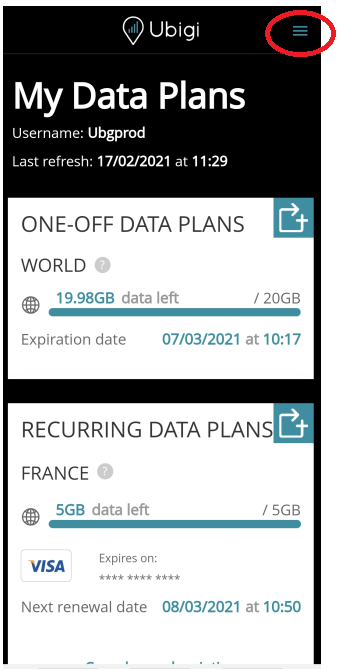
유비기 계정에 접속한 후 페이지 상단의 ““를 눌러 메뉴를 엽니다:

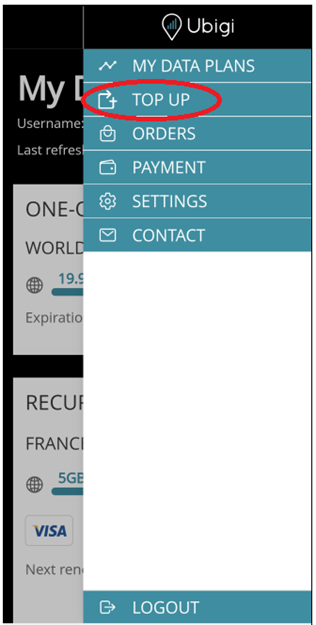
메뉴가 뜨면 “충전” 선택:

구매하고자 하는 데이터 요금제 선택:
(아래 예시는 미국 3GB 데이터 요금제)
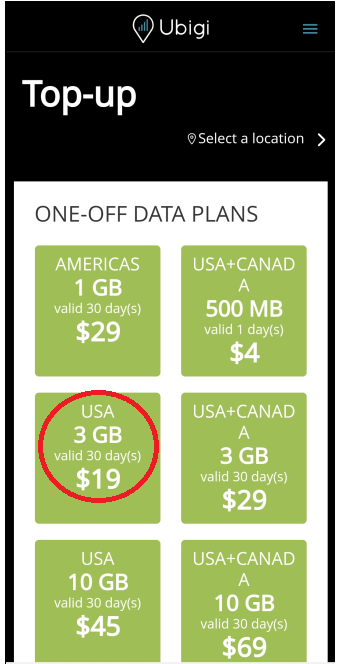
선택한 충전에 대한 설명이 표시됩니다.
구매하고자 하는 데이터 요금제가 맞는지 확인한 후 원하는 결제 방법을 선택하고 화면의 안내에 따라 결제를 완료합니다.

참고 1: 데이터 요금제 구매 시 향후 원활한 구매를 위해 고객님의 신용카드 정보가 계정에 등록됩니다. “결제” 메뉴에서 등록된 정보를 원하는 대로 확인하고 삭제할 수 있습니다.

참고 2: 모든 결제는 Transatel S.A의 은행 명세서에 표시됩니다(Ubigi는 Transatel S.A의 서비스입니다).

결제가 확인되면 새 충전이 “내 데이터 요금제” 탭에 표시되고 자동으로 활성화됩니다. 따라서 바로 사용할 수 있습니다.

특정한 것을 찾으시나요?

기타 자주 묻는 질문:

(새) iPhone에서 데이터를 복원했지만 eSIM 프로필이 작동하지 않습니다. 어떻게 해야 하나요?

곧 여행을 떠납니다. 내 기기에서 Ubigi eSIM 프로필을 어떻게 관리하나요?

Android 기기에서 Ubigi eSIM 프로필 관련 문제 해결하기

iPhone에서 Ubigi eSIM 프로필 관련 문제 해결하기

iMessage가 내 Ubigi eSIM 프로필에서 작동하지 않습니다. 어떻게 해야 하나요?

아이폰/아이패드에서 유비기 eSIM 프로필이 활성화되었는지 어떻게 알 수 있나요?

iPhone에서 Ubigi eSIM 프로필을 얻고 설치하는 방법은 무엇인가요?

Android 기기에서 Ubigi eSIM 프로필을 받고 설치하는 방법은 무엇인가요?

Ubigi 물리적 SIM 카드가 장착된 Windows 10 또는 Windows 11 디바이스에서 Ubigi 서비스를 활성화하려면 어떻게 해야 하나요?

iPhone에 Ubigi eSIM 프로필이 설치되어 있는지 어떻게 확인하나요?

Ubigi eSIM 프로필이 iPhone/iPad에 설치되어 활성화되어 있는데 네트워크가 표시되지 않는데 어떻게 해야 하나요?

iPhone/iPad에 eSIM Ubigi 프로필이 설치되어 활성화되어 있고 네트워크가 표시되지만 인터넷에 액세스할 수 없는 경우 어떻게 해야 하나요?

내 Ubigi eSIM 프로필이 Android 디바이스에 설치되어 있는지 어떻게 알 수 있나요?

Ubigi eSIM 프로필이 Android 디바이스에 설치되어 활성화되었지만 네트워크가 표시되지 않는데 어떻게 해야 하나요?

내 Ubigi eSIM 프로필이 Android 디바이스에 설치되어 활성화되어 있고 네트워크가 표시되지만 인터넷에 액세스할 수 없는 경우 어떻게 해야 하나요?

모바일 데이터가 내 Android 디바이스의 Ubigi eSIM 프로필에 적용되었지만 인터넷에 액세스할 수 없는 경우 어떻게 해야 하나요?

Ubigi eSIM 데이터 요금제로 전화를 걸 수 있나요?

Windows 10 또는 Windows 11 장치에서 Ubigi eSIM 프로필이 활성화되었지만 네트워크가 없는 경우 어떻게 해야 하나요?

유비기 eSIM의 ICCID(일련 번호)는 어떻게 찾을 수 있나요?

Ubigi eSIM 계정의 비밀번호를 어떻게 재설정하나요?

유비기 eSIM의 잔액은 어떻게 확인할 수 있나요?

Ubigi 계정을 삭제하는 방법은 무엇인가요?

데이터 요금제를 잘못 구매했는데 사용하지 않았는데 어떻게 변경할 수 있나요?

Ubigi 데이터 요금제 구매 영수증은 어떻게 받나요?

새 Android 디바이스가 있습니다. Ubigi eSIM 프로필을 다시 설치하려면 어떻게 해야 하나요?

다시 사용하고 싶을 때 iPhone에서 Ubigi eSIM 프로필을 활성화하려면 어떻게 해야 하나요?

여행 중이거나 사용하지 않을 때 iPhone에서 Ubigi eSIM 프로필을 비활성화하려면 어떻게 해야 하나요?

다시 사용하고 싶을 때 내 Android 기기에서 Ubigi eSIM 프로필을 활성화하려면 어떻게 해야 하나요?

아이폰/아이패드에서 유비기 eSIM 프로필을 삭제하는 방법은 무엇인가요?

Ubigi 연결이 작동하지 않습니다. 기기에서 활성 DNS 또는 VPN을 비활성화해야 하나요?

훌륭해 Trustpilot stars Trustpilot
Trustpilot stars
Trustpilot 44003개 리뷰를 기준으로
5 stars 검증됨
검증된 리뷰
이 사용자는 구매자로 확인되었습니다
Good product
Good product
Alexander, 21 Aug 2026
5 stars 검증됨
검증된 리뷰
이 사용자는 구매자로 확인되었습니다
Easy setup with great coverage.
Michael, 21 Aug 2026
5 stars 검증됨
검증된 리뷰
이 사용자는 구매자로 확인되었습니다
Second time using Ubigi in Japan
Second time using Ubigi in Japan - both times no issues at all. Fast connection. Highly recommend!
JCChi, 21 Aug 2026
4 stars 검증됨
검증된 리뷰
이 사용자는 구매자로 확인되었습니다
Great service, but referral policy needs improvement
Overall, I have been very satisfied with Ubigi’s pricing, network quality and reliability. However, I find the referral program disappointing. Because my very first purchase years ago was made through the website, my existing account is permanently excluded from the program, even though I now purchase plans through the app. I find it unfortunate that the original purchase channel matters more than customer loyalty. This was also not clear to me when I made my first purchase. I hope Ubigi will reconsider this policy in the future.
Mark, 21 Aug 2026
5 stars 검증됨
검증된 리뷰
이 사용자는 구매자로 확인되었습니다
The SIM is perfect for travelling
The SIM is perfect for travelling, highly recommended.
customer, 21 Aug 2026
4 stars 검증됨
검증된 리뷰
이 사용자는 구매자로 확인되었습니다
Good reception and easy to use.
Mel, 21 Aug 2026
5 stars 검증됨
검증된 리뷰
이 사용자는 구매자로 확인되었습니다
Working great in switzerland
Andre, 21 Aug 2026
5 stars 검증됨
검증된 리뷰
이 사용자는 구매자로 확인되었습니다
easy installation
easy installation great reception
Kko, 21 Aug 2026
5 stars 검증됨
검증된 리뷰
이 사용자는 구매자로 확인되었습니다
Worked every time
Worked every time
Janice Thomas, 21 Aug 2026
5 stars 검증됨
검증된 리뷰
이 사용자는 구매자로 확인되었습니다
Ubigi esim helped my trip a lot
It helped me during my trip so wonderfully. It took me a long time to read and chose the right kind , and understand the instructions before going on the trip. However it was easy to start using after I arrived Shanghai, then EU countries. I bought China for transit time and unlimited Europe for 15 days for visiting France, Spain, and Germany. I spent my travel time with a very comfortable wi-fi condition.
Fumie, 21 Aug 2026
5 stars 검증됨
검증된 리뷰
이 사용자는 구매자로 확인되었습니다
Reliable & activation only when you join your destination
I used Ubigi for the first time this year in Japan, I faced no issue and that worked properly from my airport arrival to my departure. Network coverage was ok. For a normal usage I recommand 1 Go by day for navigation, translation and restaurant searches. More if you used massively social network.
OC-Team, 21 Aug 2026
5 stars 검증됨
검증된 리뷰
이 사용자는 구매자로 확인되었습니다
It worked very well
It worked very well. Exactly as we wanted it to work.
Time, 21 Aug 2026
5 stars 검증됨
검증된 리뷰
이 사용자는 구매자로 확인되었습니다
Malesia & Singapore
Great experience!
customer, 21 Aug 2026
4 stars 검증됨
검증된 리뷰
이 사용자는 구매자로 확인되었습니다
The app is easy to use and the…
The app is easy to use and the connection is good. The subscription price is reasonable, but I find the extra data a bit pricey.
customer, 21 Aug 2026
4 stars 검증됨
검증된 리뷰
이 사용자는 구매자로 확인되었습니다
Great impression
It was an excellent experience for my first use. I simply had some bad Network sometimes but overall it was fine. I will definetely recommend it to my colleagues.
Seyni Malan, 21 Aug 2026

귀하의 메시지가 전송되었습니다.
곧 답변드리겠습니다.

귀하의 뉴스레터 구독을 고려했습니다.