경고: Ubigi 계정을 삭제하면 더 이상 Ubigi eSIM 데이터 소비량을 확인할 수 없고, Ubigi eSIM 계정을 충전할 수 없으며, Ubigi로부터 알림을 받을 수 없습니다.
Ubigi 계정에서 활성 데이터 요금제가 있는 경우, 모두 삭제됩니다. 계정 삭제 후에는 데이터 요금제 환불, 검색, 교체 또는 다른 Ubigi 계정으로의 이전이 불가능합니다. 계정 삭제 후 이러한 종류의 모든 요청은 시스템적으로 거부됩니다.
Ubigi 계정을 삭제하려면 다음 단계를 따르세요:
– 먼저 Ubigi 앱 또는 Ubigi .me에서 Ubigi 계정에 연결
– 설정 탭에서 “내 계정 삭제” 버튼을 클릭합니다:
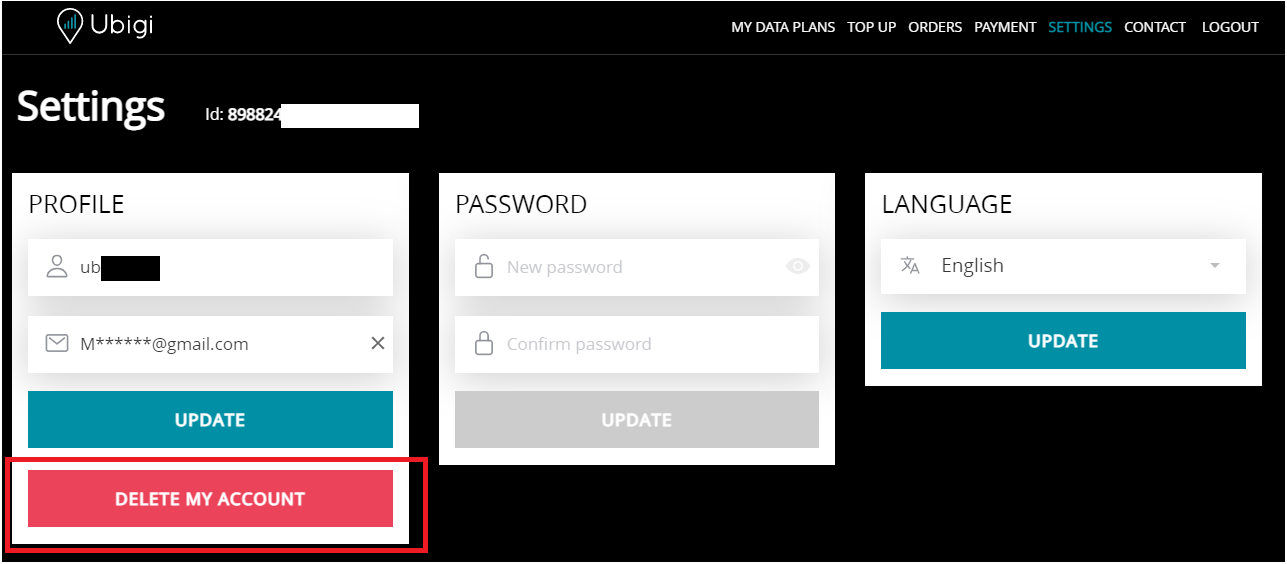
– 마지막으로 “확인”을 클릭하여 Ubigi 계정을 삭제합니다.
완료되면 남은 데이터 요금제와 자격 증명이 자동으로 삭제되고 동시에 Ubigi 앱 또는 Ubigi.me에서 로그아웃됩니다.
이 문의 양식을 통해 고객 서비스에 직접 연락하여 Ubigi 계정 삭제를 요청할 수도 있습니다. 요청은 영업일 기준 24시간 이내에 처리되며 확인 이메일을 받게 됩니다.
It worked perfectly and was easy and quick to install. Highly recommend!
Christina, 12 Feb 2026
검증됨
검증된 리뷰
이 사용자는 구매자로 확인되었습니다
Perfect service in Tokyo
Perfect service in Tokyo, Osaka, Nara and Kyoto
customer, 12 Feb 2026
검증됨
검증된 리뷰
이 사용자는 구매자로 확인되었습니다
Smooth internet experience
Fast speed no disruption
customer, 12 Feb 2026
검증됨
검증된 리뷰
이 사용자는 구매자로 확인되었습니다
everything worked
everything worked. great.
customer, 12 Feb 2026
검증됨
검증된 리뷰
이 사용자는 구매자로 확인되었습니다
It was easy to connect
Debra Finney EFB29AEC, 12 Feb 2026
검증됨
검증된 리뷰
이 사용자는 구매자로 확인되었습니다
Reliability of service and easy to…
Reliability of service and easy to install
Geoff, 12 Feb 2026
검증됨
검증된 리뷰
이 사용자는 구매자로 확인되었습니다
Instant connection.
Instant connection.
customer, 12 Feb 2026
검증됨
검증된 리뷰
이 사용자는 구매자로 확인되었습니다
Great service will use u again
Les Dvorzsak, 12 Feb 2026
검증됨
검증된 리뷰
이 사용자는 구매자로 확인되었습니다
The website Ui was not friendly for me…
The website Ui was not friendly for me to set up eSIM in the phone. Other than that it was very useful in Srilanka!
customer, 12 Feb 2026
검증됨
검증된 리뷰
이 사용자는 구매자로 확인되었습니다
Smooth experience- Easy activation
Smooth experience- Easy activation, excellent coverage, usage control in the app. Unlimited package gives you ease of mind.
Hans, 12 Feb 2026
검증됨
검증된 리뷰
이 사용자는 구매자로 확인되었습니다
Easy to install and purchase plans
Easy to install and purchase plans. Activation is simple and fast.
Coverage is excellent however some places do not have 5G and uses LTE which is slower but overall it’s a very good network and service is excellent
William Ching, 12 Feb 2026
검증됨
검증된 리뷰
이 사용자는 구매자로 확인되었습니다
After Spending 2 weeks on a ski trip to…
After Spending 2 weeks on a ski trip to Japan, I had zero problems wherever we went, Ubigi eSIM kept me connected on the slopes as well as around the towns, simply awesome!!
John Murray, 12 Feb 2026
검증됨
검증된 리뷰
이 사용자는 구매자로 확인되었습니다
Easy to find info set up and use
Easy to find information
Easy to choose best plan for my stay
Easy to set up and use
Dean T, 12 Feb 2026
검증됨
검증된 리뷰
이 사용자는 구매자로 확인되었습니다
it works very well
I had trouble connecting at first, but once it connected, it worked very well.
customer, 12 Feb 2026
검증됨
검증된 리뷰
이 사용자는 구매자로 확인되었습니다
It was easy to use
It was easy to use - was automatically functional in country
customer, 12 Feb 2026
감사합니다
귀하의 메시지가 전송되었습니다. 곧 답변드리겠습니다.
감사합니다
귀하의 뉴스레터 구독을 고려했습니다.
eSIM 호환성 확인 방법
스마트폰 / 태블릿:
*#06# 입력. → EID 번호가 나오면 eSIM 지원 기기입니다.
Windows 10 / 11:
Windows+I 를 누르세요. “네트워크 및 인터넷”으로 이동하세요 → 셀룰러 네트워크가 보이면 PC가 eSIM을 지원합니다..
통신사 잠금 해제 여부 확인 방법
iPhone / iPad:
설정 > 일반 > 정보로 이동 통신사 잠금 항목까지 스크롤. → “SIM 제한 없음”이 표시되면 기기는 잠금 해제 상태입니다.
Android:
설정 > 네트워크 및 인터넷 > 모바일 네트워크 자동 네트워크 선택을 끄세요. → 여러 네트워크가 보이면 잠금 해제된 기기입니다.


