Skip to content
← 질문으로 돌아가기
다시 사용하고 싶을 때 내 Android 기기에서 Ubigi eSIM 프로필을 활성화하려면 어떻게 해야 하나요?

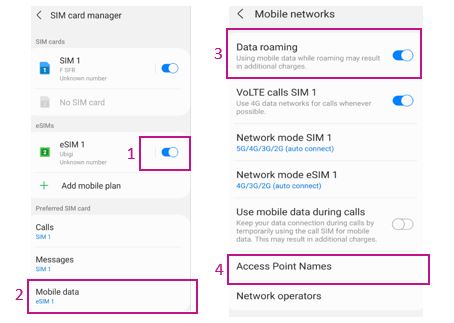
Android 기기에서 (일시적으로라도) Ubigi eSIM 프로필을 다시 활성화하려면 다음과 같이 하세요:

1 – 설정 > 연결 > SIM 카드 관리자로 이동하여 Ubigi eSIM 프로필을 활성화합니다(참고: 아직 이름을 변경하지 않은 경우 “보조”라는 이름이 표시됩니다):

2 – 모바일 데이터의 경우 Ubigi에 해당하는 eSIM 프로필을 선택합니다

3 – 설정> 연결> 모바일 네트워크로 이동하여 “데이터 로밍”을 활성화합니다

4 – 마지막으로 액세스 포인트 이름으로 이동> 화면 오른쪽 하단에있는 Ubigi eSIM을 선택하고> APN을 추가하고 이름 = Ubigi 및 APN = mbb를 입력 한 다음 저장합니다.

이제 Ubigi eSIM 연결을 사용할 수 있습니다!

(참고: 프로필을 활성화/비활성화하면 이러한 설정이 저장됩니다. 프로필을 삭제하면 모든 설정이 지워집니다.

아래 동영상에서도 해당 지침을 확인할 수 있습니다.

여행 중이거나 사용하지 않을 때는 위에서 설명한 대로 간단히 비활성화할 수 있으므로 다시 필요할 때까지Ubigi eSIM 프로필을 절대 삭제하지 않는 것이 좋습니다.

특정한 것을 찾으시나요?

기타 자주 묻는 질문:

(새) iPhone에서 데이터를 복원했지만 eSIM 프로필이 작동하지 않습니다. 어떻게 해야 하나요?

곧 여행을 떠납니다. 내 기기에서 Ubigi eSIM 프로필을 어떻게 관리하나요?

Android 기기에서 Ubigi eSIM 프로필 관련 문제 해결하기

iPhone에서 Ubigi eSIM 프로필 관련 문제 해결하기

iMessage가 내 Ubigi eSIM 프로필에서 작동하지 않습니다. 어떻게 해야 하나요?

아이폰/아이패드에서 유비기 eSIM 프로필이 활성화되었는지 어떻게 알 수 있나요?

iPhone에서 Ubigi eSIM 프로필을 얻고 설치하는 방법은 무엇인가요?

Android 기기에서 Ubigi eSIM 프로필을 받고 설치하는 방법은 무엇인가요?

Ubigi 물리적 SIM 카드가 장착된 Windows 10 또는 Windows 11 디바이스에서 Ubigi 서비스를 활성화하려면 어떻게 해야 하나요?

iPhone 또는 iPad의 Ubigi 애플리케이션에서 데이터 요금제를 구매하려면 어떻게 해야 하나요?

iPhone에 Ubigi eSIM 프로필이 설치되어 있는지 어떻게 확인하나요?

Ubigi eSIM 프로필이 iPhone/iPad에 설치되어 활성화되어 있는데 네트워크가 표시되지 않는데 어떻게 해야 하나요?

iPhone/iPad에 eSIM Ubigi 프로필이 설치되어 활성화되어 있고 네트워크가 표시되지만 인터넷에 액세스할 수 없는 경우 어떻게 해야 하나요?

내 Ubigi eSIM 프로필이 Android 디바이스에 설치되어 있는지 어떻게 알 수 있나요?

Ubigi eSIM 프로필이 Android 디바이스에 설치되어 활성화되었지만 네트워크가 표시되지 않는데 어떻게 해야 하나요?

내 Ubigi eSIM 프로필이 Android 디바이스에 설치되어 활성화되어 있고 네트워크가 표시되지만 인터넷에 액세스할 수 없는 경우 어떻게 해야 하나요?

모바일 데이터가 내 Android 디바이스의 Ubigi eSIM 프로필에 적용되었지만 인터넷에 액세스할 수 없는 경우 어떻게 해야 하나요?

Ubigi eSIM 데이터 요금제로 전화를 걸 수 있나요?

Windows 10 또는 Windows 11 장치에서 Ubigi eSIM 프로필이 활성화되었지만 네트워크가 없는 경우 어떻게 해야 하나요?

유비기 eSIM의 ICCID(일련 번호)는 어떻게 찾을 수 있나요?

Ubigi eSIM 계정의 비밀번호를 어떻게 재설정하나요?

유비기 eSIM의 잔액은 어떻게 확인할 수 있나요?

Ubigi 계정을 삭제하는 방법은 무엇인가요?

데이터 요금제를 잘못 구매했는데 사용하지 않았는데 어떻게 변경할 수 있나요?

Ubigi 데이터 요금제 구매 영수증은 어떻게 받나요?

새 Android 디바이스가 있습니다. Ubigi eSIM 프로필을 다시 설치하려면 어떻게 해야 하나요?

다시 사용하고 싶을 때 iPhone에서 Ubigi eSIM 프로필을 활성화하려면 어떻게 해야 하나요?

여행 중이거나 사용하지 않을 때 iPhone에서 Ubigi eSIM 프로필을 비활성화하려면 어떻게 해야 하나요?

아이폰/아이패드에서 유비기 eSIM 프로필을 삭제하는 방법은 무엇인가요?

Ubigi 연결이 작동하지 않습니다. 기기에서 활성 DNS 또는 VPN을 비활성화해야 하나요?

훌륭해 Trustpilot stars Trustpilot
Trustpilot stars
Trustpilot 45311개 리뷰를 기준으로
5 stars 검증됨
검증된 리뷰
이 사용자는 구매자로 확인되었습니다
Easy setup fast 5G and great value.
Very easy setup of eSim, and fast internet connection. Good value for money.
Mr Lakith Leelasena, 08 Sep 2026
5 stars 검증됨
검증된 리뷰
이 사용자는 구매자로 확인되었습니다
Good connectivity on the internet.
Cristi, 08 Sep 2026
5 stars 검증됨
검증된 리뷰
이 사용자는 구매자로 확인되었습니다
Only esim that worked
This was the only eSIM company that I could actually get to work for me. I tried three others and could never get them to actually work, even after I loaded and registered with them. Pretty much everywhere I have gone, It has served me well and not failed me.
Sally Stunkel, 08 Sep 2026
5 stars 검증됨
검증된 리뷰
이 사용자는 구매자로 확인되었습니다
Easy to purchase and connect to the…
Easy to purchase and connect to the service once I arrived in the country. Probably purchased a larger package that was needed. I can't fault the service.
customer, 08 Sep 2026
5 stars 검증됨
검증된 리뷰
이 사용자는 구매자로 확인되었습니다
User friendly
User friendly
HAMED, 08 Sep 2026
5 stars 검증됨
검증된 리뷰
이 사용자는 구매자로 확인되었습니다
👍👍👍👍👍👍👍👍👍👍👍👍👍👍👍👍👍👍👍👍👍👍
👍👍👍👍👍👍👍👍👍👍👍👍👍👍👍👍👍👍👍👍👍👍
customer, 08 Sep 2026
5 stars 검증됨
검증된 리뷰
이 사용자는 구매자로 확인되었습니다
Good value
Good pricing, clear instructions and easy to download. Also very easy to top up when needed.
Sue, 08 Sep 2026
5 stars 검증됨
검증된 리뷰
이 사용자는 구매자로 확인되었습니다
Fast and Reliable internet connection
Fast and Reliable internet connection, easy activation process and has plenty of data options.
Rave, 08 Sep 2026
5 stars 검증됨
검증된 리뷰
이 사용자는 구매자로 확인되었습니다
Excellent service always connected and…
Excellent service always connected and good signal
Footasylum Customer, 08 Sep 2026
5 stars 검증됨
검증된 리뷰
이 사용자는 구매자로 확인되었습니다
Ultimate Ubigi: Seamless Cross-Border Roaming
After comparing a few eSIM options for a recent trip across the US and UK, I went with Ubigi, and it exceeded expectations. Having used other eSIM providers before, what stood out here was the hassle-free setup and reliable data speeds throughout both countries. Transitions between networks were automatic, navigation worked instantly upon landing, and I never had to deal with dropped connections. I'll definitely be sticking with Ubigi for future international trips.
Gaurav Gautam, 08 Sep 2026
4 stars 검증됨
검증된 리뷰
이 사용자는 구매자로 확인되었습니다
Easy to use and worked perfectly
I used Ubigi during my trip to Egypt. It was easy to install and activate, and the connection was stable throughout my trip. I had no major issues and the service worked exactly as expected. I would definitely use Ubigi again for future international travel.
TAKASHI, 08 Sep 2026
5 stars 검증됨
검증된 리뷰
이 사용자는 구매자로 확인되었습니다
Consistent and reliable!
Very consistent in connectivity on land and no hidden fee hikes. Will definitely use again! Wayyyy to go with me Ubigi! My Verizon carrier would have been double the cost,
Jill Beck, 08 Sep 2026
5 stars 검증됨
검증된 리뷰
이 사용자는 구매자로 확인되었습니다
It’s a great service
It’s a great service. I have a perfect connection everywhere.
customer, 08 Sep 2026
5 stars 검증됨
검증된 리뷰
이 사용자는 구매자로 확인되었습니다
Works great so far in Japan!
Roelof, 08 Sep 2026
5 stars 검증됨
검증된 리뷰
이 사용자는 구매자로 확인되었습니다
easy to proceed
easy to proceed, very practical
anonymous, 07 Sep 2026

귀하의 메시지가 전송되었습니다.
곧 답변드리겠습니다.

귀하의 뉴스레터 구독을 고려했습니다.