다시 사용하고 싶을 때 iPhone에서 Ubigi eSIM 프로필을 활성화하려면 어떻게 해야 하나요?
일시적으로 비활성화한 후 iPhone에서 Ubigi eSIM 프로필을 다시 활성화해야 하는 경우 다음과 같이 하세요:
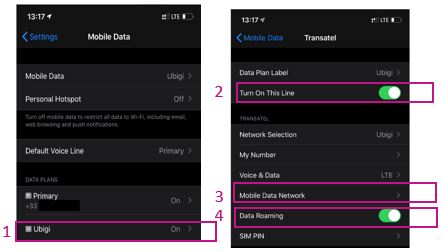
1 – 설정 > 모바일 데이터 > 데이터 요금제에서 Ubigi*(또는 아직 프로필 이름을 변경하지 않은 경우 “보조”)를 선택합니다: 2 – “이 회선 켜기” 옆의 버튼을 눌러 프로필을 활성화합니다. 활성화되면 한 번 돌아가서 프로필로 돌아와 그 아래의 하위 메뉴가 표시되도록 합니다
3 – “모바일 데이터 네트워크” 섹션에서 “셀룰러 데이터”라는 첫 번째 섹션의 “액세스 포인트 이름” 필드에 mbb를 언급합니다(다른 모든 필드는 비워 두세요)
4 – 돌아가서 “데이터 로밍” 옵션을 활성화합니다
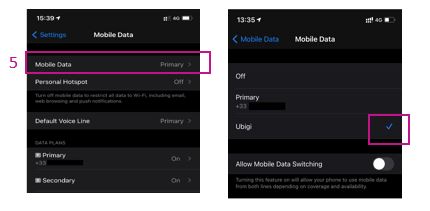
5 – 돌아가서 모바일 데이터 섹션에서 데이터를 Ubigi eSIM 프로필에 적용합니다(또는 아직 프로필 이름을 변경하지 않은 경우 “보조”):
이제 Ubigi eSIM 연결을 사용할 수 있습니다!
(참고: 프로필을 활성화/비활성화하면 이러한 설정이 저장됩니다. 프로필을 삭제하면 모든 설정이 지워집니다.
아래 동영상에서도 해당 지침을 확인할 수 있습니다.
여행 중이거나 사용하지 않을 때는 다시 필요할 때까지 위에서 설명한 대로 간단히 비활성화/재활성화할 수 있으므로절대 삭제하지 않는 것이 좋습니다 .
Easy to use, easy to verify that I am still on Ubigi, and I had excellent service throughout my trip.
Sareh Farmand, 03 Oct 2026
검증됨
검증된 리뷰
이 사용자는 구매자로 확인되었습니다
The SIM worked
The SIM worked. Period.
Rob Blackman, 03 Oct 2026
검증됨
검증된 리뷰
이 사용자는 구매자로 확인되었습니다
Easy installation
Easy installation. Seamless.
Carey Castillo, 03 Oct 2026
검증됨
검증된 리뷰
이 사용자는 구매자로 확인되었습니다
Very good ,I can use every app at China
Very good ,I can use every app at China
customer, 03 Oct 2026
검증됨
검증된 리뷰
이 사용자는 구매자로 확인되었습니다
Timely response!
Timely response!
customer, 02 Oct 2026
검증됨
검증된 리뷰
이 사용자는 구매자로 확인되었습니다
Work as expected and good price…
Work as expected and good price (andorra)
customer, 02 Oct 2026
검증됨
검증된 리뷰
이 사용자는 구매자로 확인되었습니다
Easy install and use right on arrival
Easy install and use right on arrival. Instructions are clear and process is seamless. Quality and reliability of service is perfect. No complaints.
customer, 02 Oct 2026
검증됨
검증된 리뷰
이 사용자는 구매자로 확인되었습니다
Manifique bravo
Manifique bravo
customer, 02 Oct 2026
검증됨
검증된 리뷰
이 사용자는 구매자로 확인되었습니다
Very good and fast Internet
Very good and fast Internet
customer, 02 Oct 2026
검증됨
검증된 리뷰
이 사용자는 구매자로 확인되었습니다
Easy to use
It was easy to use, affordable. My experience was based on Switzerland.
customer, 02 Oct 2026
검증됨
검증된 리뷰
이 사용자는 구매자로 확인되었습니다
Had perfect connectivity while…
Had perfect connectivity while traveling in France.
customer, 02 Oct 2026
검증됨
검증된 리뷰
이 사용자는 구매자로 확인되었습니다
This plan has been a God send as my…
This plan has been a God send as my plan for international is absolutely ridiculous .
I have used UBIGI for 3 soon to be 4 trips.
Connie Sales, 02 Oct 2026
검증됨
검증된 리뷰
이 사용자는 구매자로 확인되었습니다
All is really great!
All is really great!
customer, 02 Oct 2026
검증됨
검증된 리뷰
이 사용자는 구매자로 확인되었습니다
The esim worked as advertised.
The esim I got worked fine for Greece, as advertised. The speed was great, the app showed me the current bandwidth limits etc and reminded me before the quota ran out..
John M, 02 Oct 2026
감사합니다
귀하의 메시지가 전송되었습니다. 곧 답변드리겠습니다.
감사합니다
귀하의 뉴스레터 구독을 고려했습니다.
eSIM 호환성 확인 방법
스마트폰 / 태블릿:
*#06# 입력. → EID 번호가 나오면 eSIM 지원 기기입니다.
Windows 10 / 11:
Windows+I 를 누르세요. “네트워크 및 인터넷”으로 이동하세요 → 셀룰러 네트워크가 보이면 PC가 eSIM을 지원합니다..
통신사 잠금 해제 여부 확인 방법
iPhone / iPad:
설정 > 일반 > 정보로 이동 통신사 잠금 항목까지 스크롤. → “SIM 제한 없음”이 표시되면 기기는 잠금 해제 상태입니다.
Android:
설정 > 네트워크 및 인터넷 > 모바일 네트워크 자동 네트워크 선택을 끄세요. → 여러 네트워크가 보이면 잠금 해제된 기기입니다.




 eSIM 호환성 확인 방법
 통신사 잠금 해제 여부 확인 방법