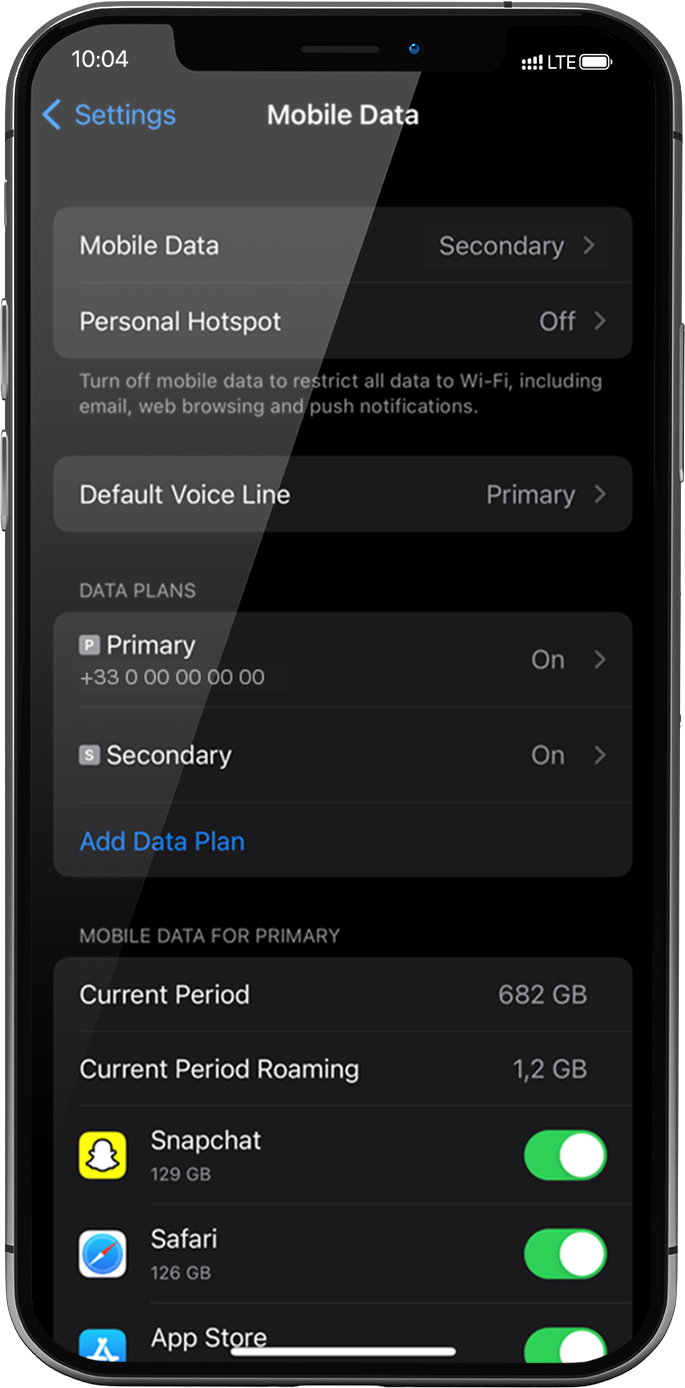
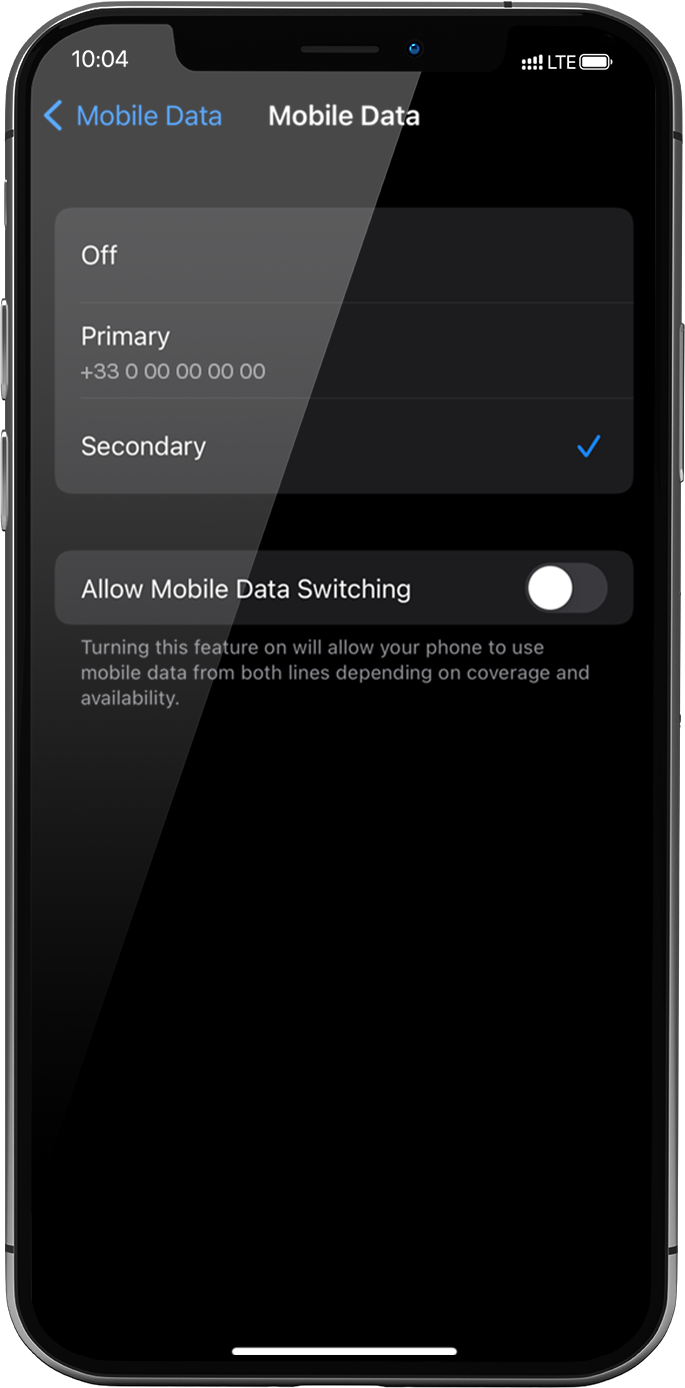
이렇게 하려면 설정 > 모바일 데이터 > 모바일 데이터로 다시 이동하여 보조를 선택합니다. 보조를 선택하면 앞에 체크 표시가 나타납니다.
중요: iPhone에 여러 개의 SIM 카드/eSIM 프로필이 있는 경우, 두 개의 데이터 요금제에서 동시에 셀룰러 데이터를 활성화할 수 없습니다. 한 번에 하나에만 적용할 수 있습니다.
훌륭해
의 30338개 리뷰를 기준으로
검증됨
검증된 리뷰
이 사용자는 구매자로 확인되었습니다
Easy to setup and WiFi usage overseas…
Easy to setup and WiFi usage overseas are working well so far
customer, 14 Jan 2026
검증됨
검증된 리뷰
이 사용자는 구매자로 확인되었습니다
Easy connections everywhere we go.
customer, 14 Jan 2026
검증됨
검증된 리뷰
이 사용자는 구매자로 확인되었습니다
I had a very smooth experience. I highly recommend it!
Everything worked well from the first minute. It was easy to install and use it. I faced no issues at all. I highly recommend it!
Chryssa, 14 Jan 2026
검증됨
검증된 리뷰
이 사용자는 구매자로 확인되었습니다
Easy to buy easy to install and perfect…
Easy to buy easy to install and perfect for my trip !
I will use Ubigi again for my travels !
Anthony, 14 Jan 2026
검증됨
검증된 리뷰
이 사용자는 구매자로 확인되었습니다
This was my first time using an E-sim…
This was my first time using an E-sim and it was an amazing experience.
customer, 14 Jan 2026
검증됨
검증된 리뷰
이 사용자는 구매자로 확인되었습니다
Great coverage in Hokkaido and the Philippines
I used their e-sim in both Hokkaido and in the Philippines and had great coverage both times. Internet speeds were fast, and consistent. It also felt like the data was being consumed very slowly despite my very liberal use of it. I got the 10GB plan and it lasted all throughout my 10 day stay.
customer, 14 Jan 2026
검증됨
검증된 리뷰
이 사용자는 구매자로 확인되었습니다
Reliable & easy to install
LUN, 14 Jan 2026
검증됨
검증된 리뷰
이 사용자는 구매자로 확인되었습니다
While the initial purchase was not…
While the initial purchase was not easy, once installed, I received seamless coverage in Japan
Frank Thielen, 14 Jan 2026
검증됨
검증된 리뷰
이 사용자는 구매자로 확인되었습니다
It was reliable service.
customer, 14 Jan 2026
검증됨
검증된 리뷰
이 사용자는 구매자로 확인되었습니다
Easy to install and activate
customer, 13 Jan 2026
검증됨
검증된 리뷰
이 사용자는 구매자로 확인되었습니다
Great app!!
Great app!!
customer, 13 Jan 2026
검증됨
검증된 리뷰
이 사용자는 구매자로 확인되었습니다
Easy to install and connected very well
Easy to install and connected
Maurice Joseph, 13 Jan 2026
검증됨
검증된 리뷰
이 사용자는 구매자로 확인되었습니다
No signal ..
No signal .. told the company customer care.. they took prompt action and promised full refund.
customer, 13 Jan 2026
검증됨
검증된 리뷰
이 사용자는 구매자로 확인되었습니다
Very good coverage !
client, 13 Jan 2026
검증됨
검증된 리뷰
이 사용자는 구매자로 확인되었습니다
Works perfectly....
Works perfectly....
Claudio, 13 Jan 2026
감사합니다
귀하의 메시지가 전송되었습니다. 곧 답변드리겠습니다.
감사합니다
귀하의 뉴스레터 구독을 고려했습니다.
eSIM 호환성 확인 방법
스마트폰 / 태블릿:
*#06# 입력. → EID 번호가 나오면 eSIM 지원 기기입니다.
Windows 10 / 11:
Windows+I 를 누르세요. “네트워크 및 인터넷”으로 이동하세요 → 셀룰러 네트워크가 보이면 PC가 eSIM을 지원합니다..
통신사 잠금 해제 여부 확인 방법
iPhone / iPad:
설정 > 일반 > 정보로 이동 통신사 잠금 항목까지 스크롤. → “SIM 제한 없음”이 표시되면 기기는 잠금 해제 상태입니다.
Android:
설정 > 네트워크 및 인터넷 > 모바일 네트워크 자동 네트워크 선택을 끄세요. → 여러 네트워크가 보이면 잠금 해제된 기기입니다.