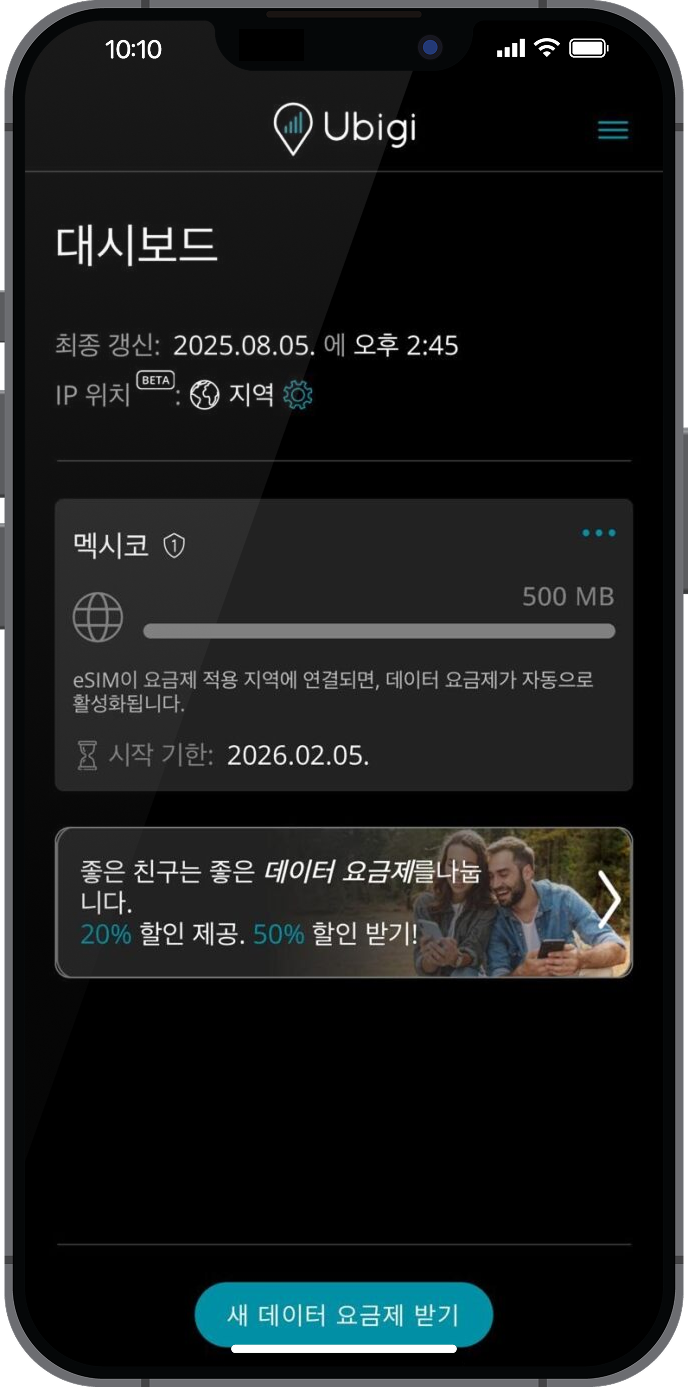
이 단계에서 Ubigi 앱을 열어 Ubigi 셀룰러 연결이 작동하는지 확인하여 Ubigi 연결을 테스트합니다.
이미 Ubigi 계정이 있는 경우: 자동으로 연결됩니다.
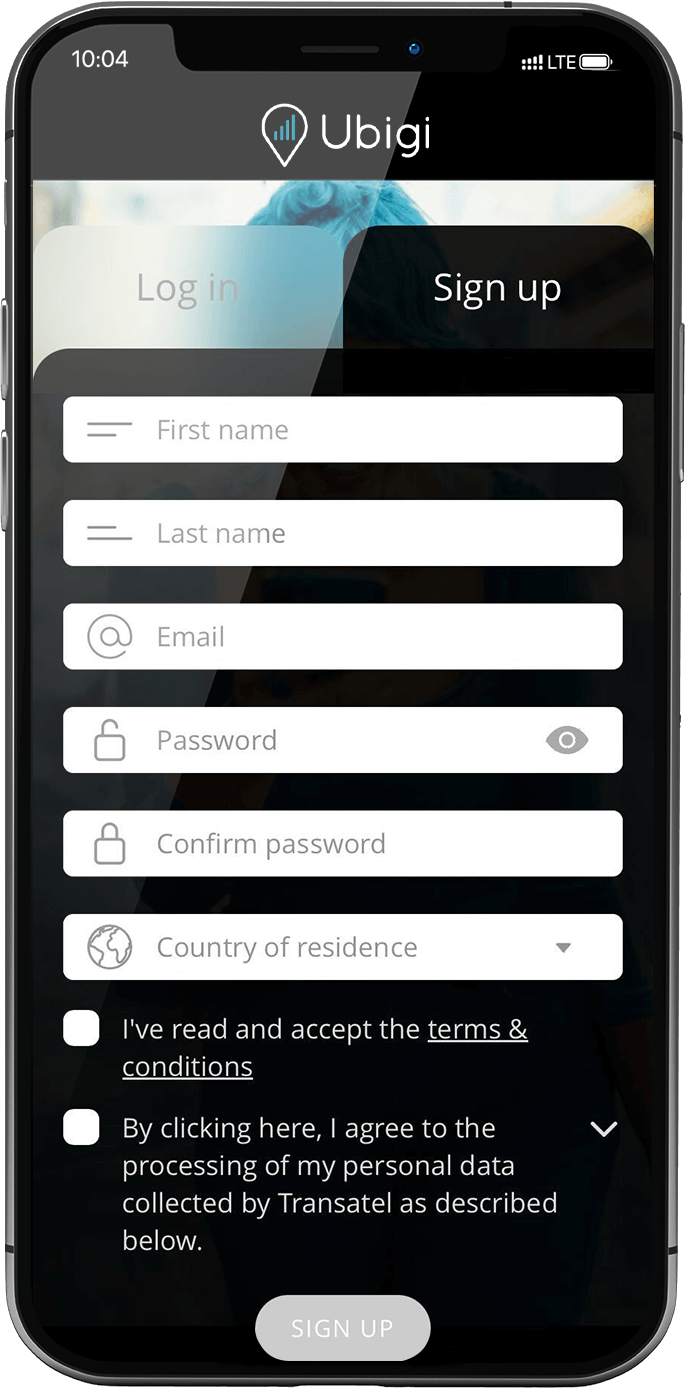
아직 Ubigi 계정이 없는 경우 계정 생성 페이지가 표시됩니다: 입력란을 채우고 “계정 만들기”를 클릭합니다.
계정이 생성되면 계정에 연결됩니다.
이제 Ubigi 연결을 즐길 수 있습니다!
참고: 모든 지침을 따랐지만 여전히 계정에 액세스할 수 없는 경우 고객 지원팀에 문의하여 추가 도움을 받으세요.
훌륭해
의 48619개 리뷰를 기준으로
검증됨
검증된 리뷰
이 사용자는 구매자로 확인되었습니다
Excellent choice for emergency…
Excellent choice for emergency connectivity while you travel. Seamless connection is not available even if you are in cities.
A Rhetso, 15 Oct 2026
검증됨
검증된 리뷰
이 사용자는 구매자로 확인되었습니다
Great service for a good price
I found it very easy to install and start using my Ubigi e-sim card during my first trip to Japan. Connection was overall quite good. The only aspect that needs improvement is how to check how much data I had left on the plan I had purchased.
Esther Gaitán Fuertes, 15 Oct 2026
검증됨
검증된 리뷰
이 사용자는 구매자로 확인되었습니다
Have it set up prior to travel
Had it set up prior to travel. Easy to use. They have instructional videos that had great information.
customer, 15 Oct 2026
검증됨
검증된 리뷰
이 사용자는 구매자로 확인되었습니다
Very easy and fast internet
customer, 15 Oct 2026
검증됨
검증된 리뷰
이 사용자는 구매자로 확인되었습니다
Ubigi made traveling in Japan with confidence a breeze
This service made traveling to Japan and moving around each prefecture and region easy. Even in more rural areas the service was stable and reliable. The only time I ever lost service was in long tunnels while taking the train. For me that kind of reliability and a reasonable price point and easy set up and top-up without need for a wireless connection really is a game change and puts your mind at ease while traveling in a new place where perhaps you may not speak the language at all.
Omar, 15 Oct 2026
검증됨
검증된 리뷰
이 사용자는 구매자로 확인되었습니다
easy and strong signal aera coverage.
customer, 15 Oct 2026
검증됨
검증된 리뷰
이 사용자는 구매자로 확인되었습니다
No glitches from start to end of our…
No glitches from start to end of our trip in Japan. WiFi connection was spotty during the bus ride in the mountains along the Sea of Japan coastline. Otherwise the WiFi connection was good and dependable.
Dean Doi, 15 Oct 2026
검증됨
검증된 리뷰
이 사용자는 구매자로 확인되었습니다
Ubigi always makes my travel easier
Ubigi always makes my travel easier. Never failed me once and is always there to top up if I need to. 😊
customer, 15 Oct 2026
검증됨
검증된 리뷰
이 사용자는 구매자로 확인되었습니다
Works perfect
I have Ubigi nog for twee weeks. Its perfectly and its was easy to connect on mine Phone.
customer, 15 Oct 2026
검증됨
검증된 리뷰
이 사용자는 구매자로 확인되었습니다
I am now in Cabo San Lucas Mexico and…
I am now in Cabo San Lucas Mexico and reception was faultless .
Michal Andrews, 15 Oct 2026
검증됨
검증된 리뷰
이 사용자는 구매자로 확인되었습니다
Easy to set up
Easy to set up, and good connection
Amy, 15 Oct 2026
검증됨
검증된 리뷰
이 사용자는 구매자로 확인되었습니다
Great !!
Great !!
Simple to set up
Never failed us, even in mountain range
My daughter hot spotted too
Overall great and will recommend
Samantha Coggin, 14 Oct 2026
검증됨
검증된 리뷰
이 사용자는 구매자로 확인되었습니다
At first
At first, there were a few challenges with the setup since it was my first time using it. Now I see that it is easy, and I am truly grateful for the experience, as I was able to use video calls—something very important for deaf people. The signal was sometimes weaker in certain places, especially where there was a lot of frequency interference or other networks, but otherwise, my experience was excellent; I used email, various apps, SMS, and navigation.
Petra, 14 Oct 2026
검증됨
검증된 리뷰
이 사용자는 구매자로 확인되었습니다
Good eSIM, Uneven Coverage
Overall, I had a good experience using the eSIM in Italy. However, there were several areas where the signal was either very weak or completely unavailable, particularly in the Dolomites and in some areas on the outskirts of Bologna.
On the positive side, the interface is user-friendly, and the app makes it easy to monitor data usage, which is very helpful.
Overall, a good service, but network coverage could be improved in certain areas.
Ori, 14 Oct 2026
검증됨
검증된 리뷰
이 사용자는 구매자로 확인되었습니다
Easy automatic connection as soon as…
Easy automatic connection as soon as you arrive in the country.
Bill UK, 14 Oct 2026
감사합니다
귀하의 메시지가 전송되었습니다. 곧 답변드리겠습니다.
감사합니다
귀하의 뉴스레터 구독을 고려했습니다.
eSIM 호환성 확인 방법
스마트폰 / 태블릿:
*#06# 입력. → EID 번호가 나오면 eSIM 지원 기기입니다.
Windows 10 / 11:
Windows+I 를 누르세요. “네트워크 및 인터넷”으로 이동하세요 → 셀룰러 네트워크가 보이면 PC가 eSIM을 지원합니다..
통신사 잠금 해제 여부 확인 방법
iPhone / iPad:
설정 > 일반 > 정보로 이동 통신사 잠금 항목까지 스크롤. → “SIM 제한 없음”이 표시되면 기기는 잠금 해제 상태입니다.
Android:
설정 > 네트워크 및 인터넷 > 모바일 네트워크 자동 네트워크 선택을 끄세요. → 여러 네트워크가 보이면 잠금 해제된 기기입니다.